TypeScript Tutorial for Beginners: Add Safe Types to JavaScript
Turn a small JavaScript task board into TypeScript step by step. See exactly how the checker catches a bad value and preserves useful type information.
KnowledgeGate Team
Exam prep & CS education
Updated 22 Aug 20266 min read
A JavaScript program can run while carrying a bad value, then produce the wrong result much later. In one two-task file, an effort value is the string "5" instead of the number 5, so the printed total is "05". TypeScript checks that file before it runs and then erases its type syntax, adding a checker rather than a second runtime. An interface fixes the object shape, a literal union limits status, control-flow narrowing handles a genuine number | string, and one generic helper keeps the Task type through a lookup. If the original syntax is still unfamiliar, build your JavaScript foundation first.
TypeScript adds a checker, not a new runtime
At check time, const maxAttempts: number = 2 gives the compiler a constraint: this variable must contain a number. The emitted JavaScript is simply const maxAttempts = 2, and the runtime value is still the number 2.
An annotation states the type you expect. Inference derives a type from a value or operation. A compiler error reports an unsafe combination before the program executes. Useful TypeScript is mainly about modelling valid data, not annotating every variable.
The Coding & Skills category covers broader programming topics. A checker never runs your program, so it rejects the string "5" where a number is required, rather than waiting for the wrong total to appear.
The JavaScript bug: a string effort value makes the total 05 instead of 5
The baseline file is task-board.js:
const tasks = [
  { id: 101, title: "Add login validation", effortHours: 3, status: "done" },
  { id: 102, title: "Write tests", effortHours: "5", status: "todo" }
];

function remainingHours(task) {
  return task.status === "done" ? 0 : task.effortHours;
}

const total = tasks.reduce(
  (sum, task) => sum + remainingHours(task),
  0
);
console.log(total);
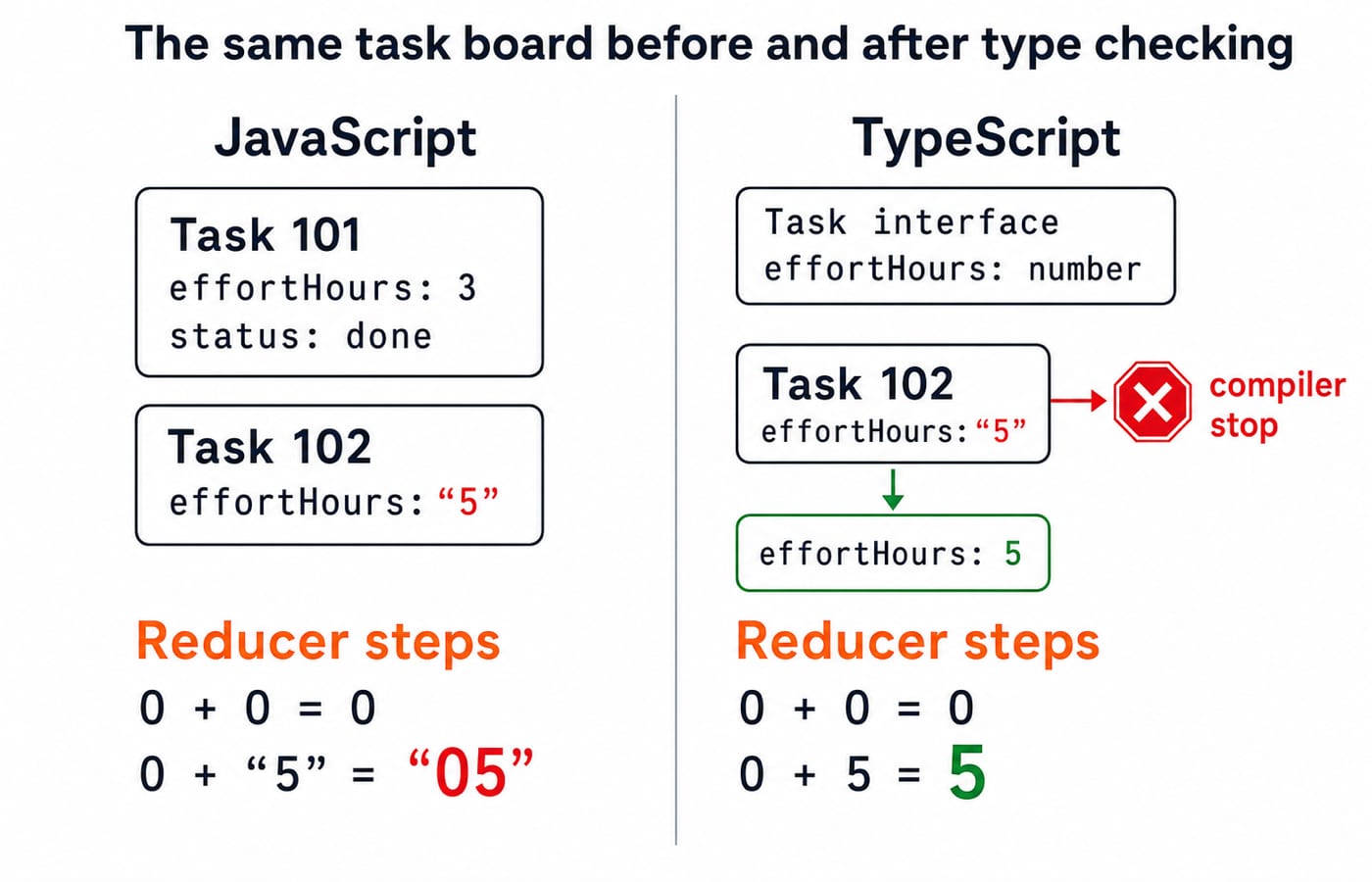
Trace the reducer carefully. Task 101 is done, so it contributes numeric 0. The running sum starts at numeric 0, giving 0 + 0 = 0. Task 102 contributes string "5", so JavaScript evaluates 0 + "5" as string concatenation and produces "05". The intended remaining effort is numeric 5.
Neither the object literal nor remainingHours(task) records the allowed object shape and value types. That is the gap TypeScript closes.
Add an interface and follow each compiler decision
Rename the file task-board.ts and compile it with tsc --strict --target es2015 task-board.ts. Strict mode catches unsafe type combinations, while the ES2015 target supplies standard definitions such as Array.find. First define the reusable shape and annotate the function:
type TaskStatus = "todo" | "doing" | "done";

interface Task {
  id: number;
  title: string;
  effortHours: number;
  status: TaskStatus;
}

function remainingHours(task: Task): number {
  return task.status === "done" ? 0 : task.effortHours;
}
The IDs are numbers, both titles are strings, and effort is meant to be numeric. The status field uses TaskStatus, a literal union that admits only "todo", "doing", or "done". Now declare const tasks: Task[] around the same objects. At object 102, the checker stops: effortHours: "5" is a string, so it cannot fill a number field.
Correct it to effortHours: 5. The reduction now proceeds as intended: the initial 0 plus task 101's 0 gives 0 + 0 = 0; that result plus task 102's 5 gives 0 + 5 = 5. We do not need to annotate total, because TypeScript infers number from the reducer.
The interface gives every consumer a reusable object-shape contract. It does not validate unknown form or network data at runtime. Such input still needs runtime validation before we treat it as a Task.
Use a literal union to rule out invalid states
The status alias is a union of three exact values:
type TaskStatus = "todo" | "doing" | "done";This defines a union of three exact string values. It is not a choice among three broad string types.
Task 101 accepts "done", and task 102 accepts "todo". Now consider this object:
const previewTask: Task = {
  id: 103,
  title: "Deploy preview",
  effortHours: 2,
  status: "blocked"
};
The checker rejects "blocked" because it is absent from TaskStatus. Either add "blocked" deliberately to the model or map the incoming data to an existing state. Do not silence the mismatch with as TaskStatus.
If the interface instead used status: string, it would also accept mistakes such as "don". The literal union gives every function that receives a Task the same clear set of allowed states.
Narrow a union before using type-specific operations
Some values genuinely have two valid forms. A task ID may arrive as a number or an already formatted string:
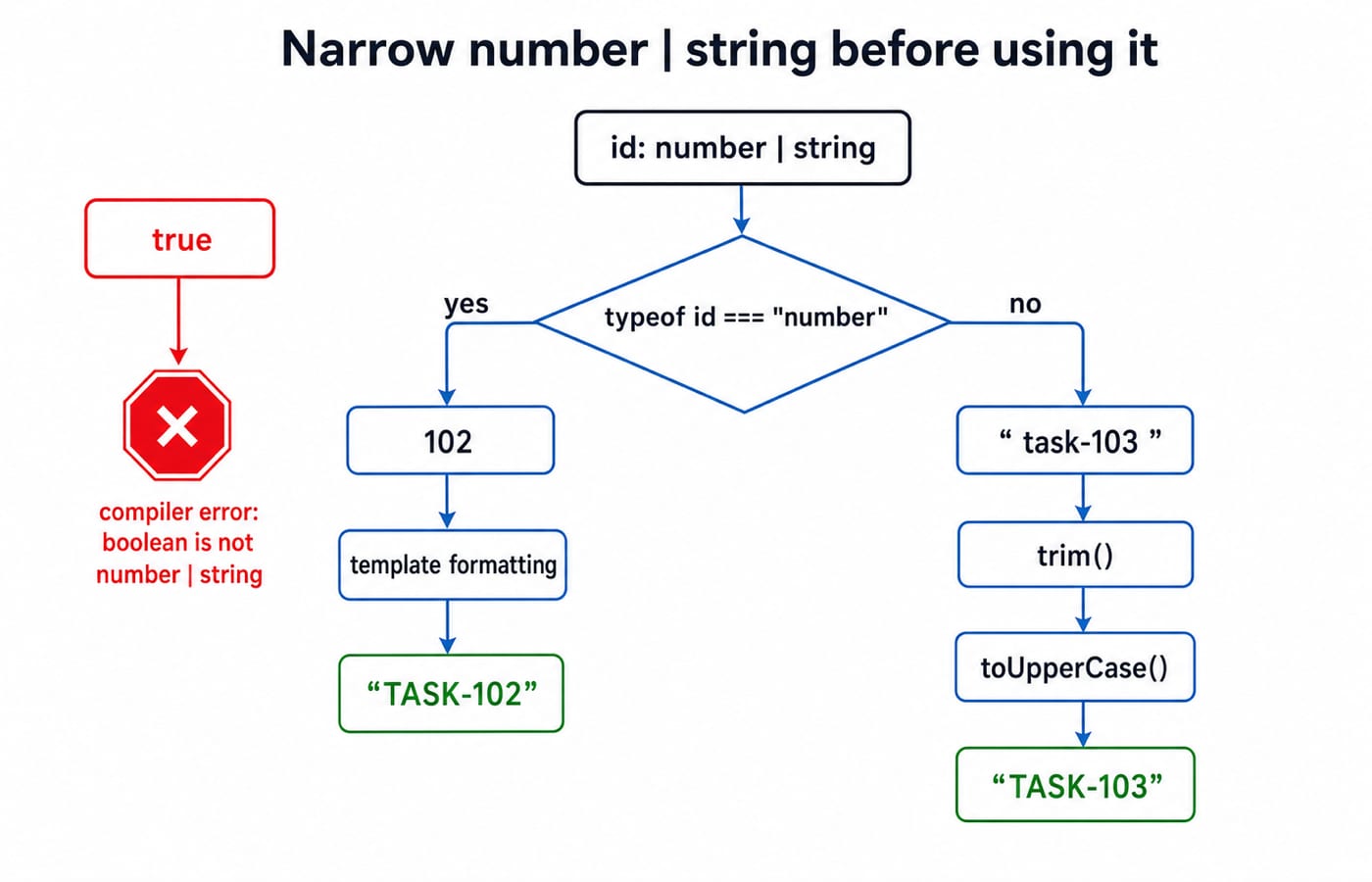
function normaliseTaskId(id: number | string): string {
  if (typeof id === "number") {
    return `TASK-${id}`;
  }
  return id.trim().toUpperCase();
}
Before the typeof check, id.trim() is unsafe because a number has no trim method. In the first branch, the check narrows id to number, so normaliseTaskId(102) returns "TASK-102". In the remaining branch, id is a string, so normaliseTaskId(" task-103 ") trims and capitalises it to return "TASK-103". Calling the function with true is rejected before runtime.
This is control-flow narrowing: the compiler follows a real runtime check and learns a more precise type in each path. A type assertion would merely hide the uncertainty rather than resolve it.
Use one generic helper without losing the Task type
A generic is useful when one operation must preserve the caller's specific type:
function findById<T extends { id: number }>(
  items: T[],
  id: number
): T | undefined {
  return items.find(item => item.id === id);
}
T represents the caller's item shape. The constraint guarantees a numeric id, while the return keeps the complete shape instead of reducing it to { id: number }.
With const match = findById(tasks, 102), TypeScript infers Task | undefined. A search can miss, so it cannot promise Task alone. The safe branch if (match) console.log(match.title); prints Write tests. Searching for ID 999 returns undefined, and accessing match.title without a check must fail.
Use a generic when an operation should preserve a relationship between caller-supplied types. Do not replace every ordinary concrete type with T.
Debug the tempting shortcuts
Watch for four shortcuts that weaken the model:
any: removes useful checks. Model the real type instead.as Task: can suppress a genuine mismatch. Validate or correct the value.status: string: loses the allowed-state model. Keep the literal union.findById(...)!: can turn ID999into a runtime property-access failure. Handleundefined.
Predict three outcomes before reading them. normaliseTaskId(true) is rejected at compile time. Task 103 with status "blocked" is rejected until the union changes. findById(tasks, 999) runs and returns undefined, which must be checked before property access.
For more answer-before-running practice, try Python output-based questions on lists, slicing, and mutability. For related interview reasoning at the language level, work through Java string handling, the string pool, and immutability.
Apply the types to another task
The annotation exposed why
"5"was unsafe.Taskfixed the reusable object shape.TaskStatuslimited valid states.typeofnarrowednumber | stringsafely.findById<T>preservedTaskwhile admittingundefined.
Now add task 104, titled "Review pull request", with effort 4 and status "doing". The remaining total becomes 0 + 5 + 4 = 9. Then call findById(tasks, 104) and print Review pull request only after checking that the result exists.
The Complete JavaScript course strengthens the basics if you need more practice. If you are ready to apply JavaScript in a larger web-development context, inspect the MERN Stack course.
Keep learning

Classes and Objects MCQs: 12 Solved OOP Questions with Explanations
Solve 12 classes and objects MCQs, check each explanation, and use a worked Java trace to separate instance state, constructors, overloading and nested classes.
20 Oct 20267 min readProgramming Languages Survey
Programming Language Syntax MCQs: 12 Solved Questions on Grammar, Tokens and Semantics
Solve 12 MCQs on syntax, tokens, pseudocode, C grammar and runtime behaviour. Each explanation identifies the rule and applies it.
Updated 16 Oct 20268 min readProgramming Languages Survey

Imperative Programming Structure and Flow Control MCQs: 12 Solved Questions
Test whether you can trace changing state, choose the right loop, read a flowchart, and follow event-driven or exceptional control paths through 12 solved MCQs.
12 Oct 20267 min readProgramming Languages Survey

Static vs Dynamic Binding MCQs: 11 Solved Questions on Scope, Aliasing and Dispatch
Solve 11 binding questions from GATE and UGC NET papers by tracing lexical scope, runtime call chains, declared types and shared storage cells. Each answer shows why the tempting shortcuts fail.
Updated 8 Oct 20267 min readProgramming Languages Survey