Display Technologies Explained: CRT, LCD, LED and OLED with Worked Raster Numericals
Follow a pixel from the frame buffer to the screen, compare scanning with flat-panel addressing, and check two complete raster calculations.
KnowledgeGate Team
Exam prep & CS education
Updated 6 Sep 20266 min read
Resolution, refresh rate, response time and display technology answer different questions. Even the label LED can mean an LCD backlight or an emissive display, so memorising brand names will not explain how a picture appears. The display path runs from the frame buffer through CRT scanning and flat-panel addressing, followed by memory, throughput and pixel-pitch calculations for a 1920 x 1080 display. The UGC NET CS Exam Preparation category places these concepts in the broader exam path.
Related reading: display technology MCQs and computer graphics basics.
1. The display path and the quantities that must stay separate
Pipeline: application or renderer -> frame buffer -> display controller -> physical display. The frame buffer stores pixel values, the controller reads and times them, and the display turns electrical drive into light. The same raster can feed a CRT, LCD or OLED despite their different light mechanisms. See input, output and storage hardware for background.
Keep these quantities separate:
Resolution: addressable pixel dimensions, such as
1920 x 1080.Colour depth: stored bits per pixel, such as
24 bpp.Refresh rate: complete update cycles per second, such as
60 Hz.Response time: time taken by a physical pixel to change state.
Pixel pitch: centre-to-centre pixel spacing, normally in millimetres.
None follows from another without extra data. Aspect ratio is not resolution: 1920:1080, divided by 120, is 16:9.
2. CRT displays: electron beam, phosphor, persistence and refresh
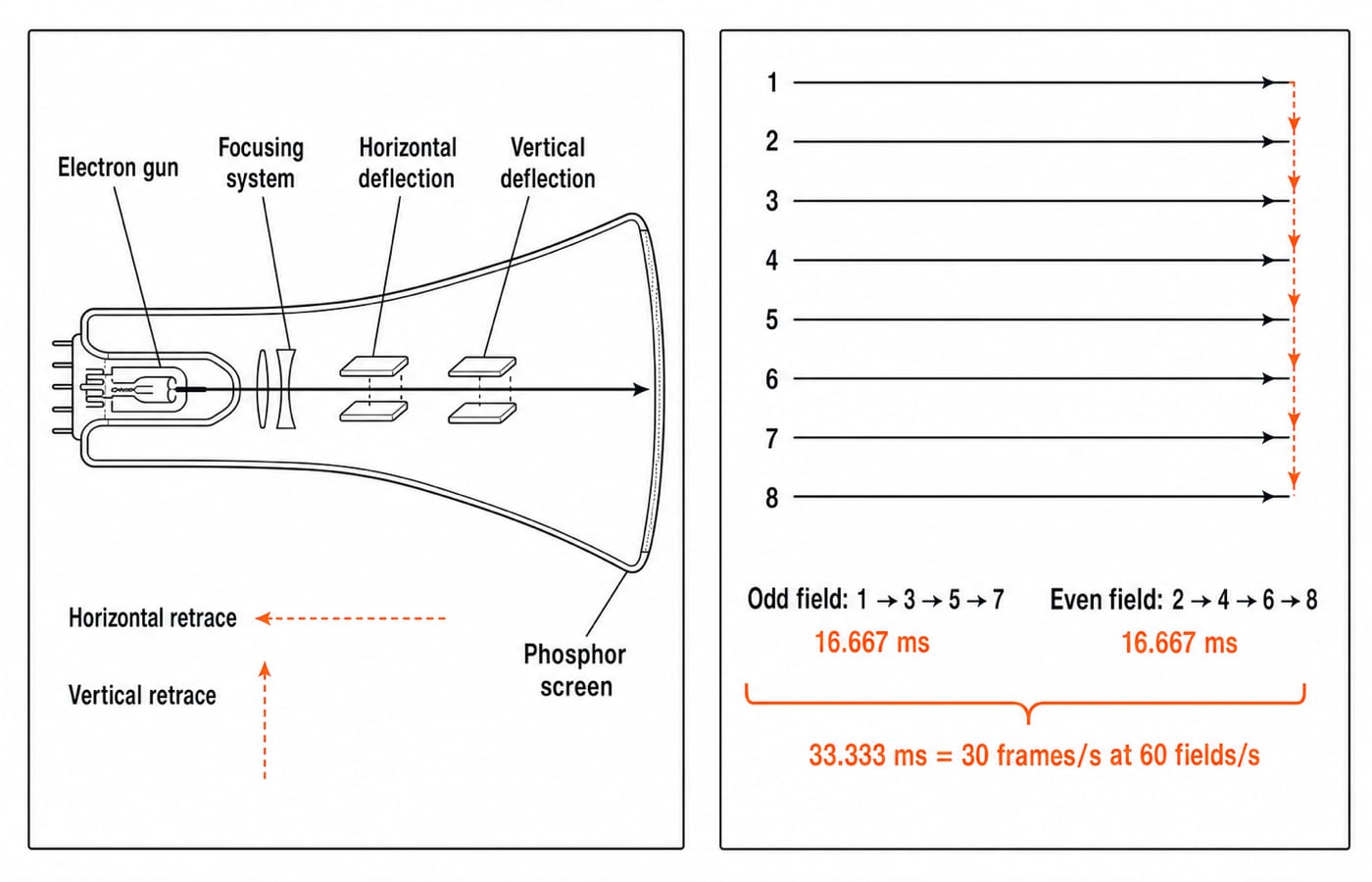
A monochrome CRT's electron gun emits and accelerates electrons. Focusing and deflection shape and steer the beam; phosphor glows where it strikes. A colour CRT directs three colour components at phosphor dots or stripes through a shadow mask, aperture grille or similar structure. Gun arrangements vary.
Phosphor persistence is the glow duration after excitation; refresh redraws it. Short persistence can expose flicker; long persistence can smear fast changes. No universal flicker threshold applies because brightness, field size, motion and viewing conditions matter.
Horizontal retrace returns the beam after a line; vertical retrace after a frame or field. Both are timing overhead, not picture pixels.
3. Raster scan, random scan and interlacing
Raster scan visits a regular grid line by line, suiting filled areas and images. Random scan, or vector or calligraphic display, traces stored line segments smoothly; cost grows with vector count, and fills are awkward. Historical storage tubes retained an image without continuous refresh, but selective erasure and updates were difficult.
For eight lines, progressive order is 1,2,3,4,5,6,7,8. Ideal 2:1 interlace sends odd field 1,3,5,7, then even field 2,4,6,8. At 60 fields/s:
Field time =
1/60 s = 16.667 ms.Two-field frame time =
2/60 s = 33.333 ms.Complete-frame rate =
60/2 = 30 frames/s.
Interlacing raises field-update cadence for a fixed line rate, but fields represent different instants and can cause line twitter or comb-like motion artefacts. A fixed-pixel panel must deinterlace or process the signal equivalently. Real standards add timing details beyond this model.
4. Flat panels: LCD, LED-backlit LCD, OLED and direct-view LED
An LCD is a non-emissive light valve. A backlight supplies light; polarisers, liquid crystals and RGB filters modulate it. An active matrix uses TFTs to hold and drive pixels between refreshes. A passive matrix selects row-column intersections with less independent control.
An LED LCD or consumer LED TV normally means an LCD with an LED backlight. Direct-view LED is emissive because LED elements form the picture. OLED is also emissive, using organic subpixels without a full-panel backlight.
Technology | Light production | Addressing or scan idea | Fixed native grid | Black-level mechanism | Motion or response issue | Typical limitation |
|---|---|---|---|---|---|---|
CRT | Beam excites phosphor | Raster beam | No | Beam off | Persistence, scanning | Bulk, high voltage, convergence |
LCD with LED backlight | Backlight is modulated | TFT matrix | Yes | Blocks backlight, panel-dependent | Pixel transitions | Leakage, viewing angles |
OLED | Organic subpixels emit | Active matrix | Yes | Subpixels switch off for deep black | Fast switching, sample-and-hold motion | Uneven ageing possible |
Direct-view LED | LED elements emit | Module matrix | Yes | LEDs switch off | Drive and processing | Pitch limits close-view detail |
The Zero to Hero Complete CS Course covers these distinctions within Basics of Computer Graphics.
5. Worked raster numerical: frame-buffer memory and active-pixel throughput
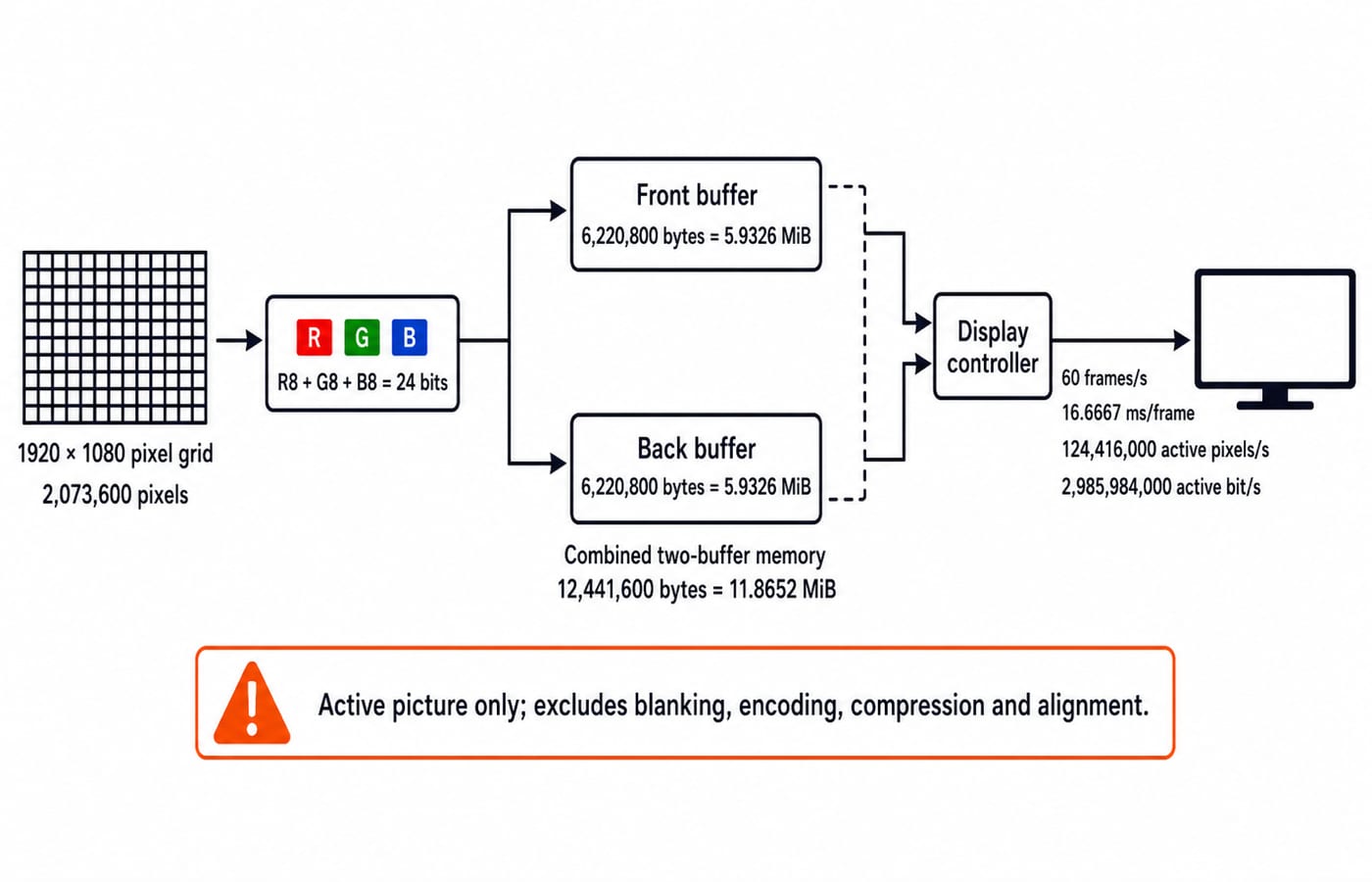
Assume 1920 x 1080, packed RGB 24 bpp = 3 bytes/pixel, two full buffers and 60 complete frames/s. Count active picture only, excluding blanking, encoding, compression, metadata, alignment and possible 32 bpp storage.
Pixels per frame =
1920 x 1080 = 2,073,600.One frame =
2,073,600 x 24 = 49,766,400 bits.In bytes, that is
49,766,400 / 8 = 6,220,800 bytes.Using
1 MiB = 1,048,576 bytes, one frame =6,220,800 / 1,048,576 = 5.9326 MiB.Front plus back buffer =
2 x 6,220,800 = 12,441,600 bytes = 11.8652 MiB.
At 60 frames/s, frame time is 1/60 s = 16.6667 ms. Active-pixel throughput is 2,073,600 x 60 = 124,416,000 pixels/s. Raw payload is 124,416,000 x 24 = 2,985,984,000 bit/s, or 373,248,000 byte/s = 355.9570 MiB/s.
This is neither guaranteed frame-buffer bandwidth nor cable line rate because real systems add formats and overhead. Checksum: memory uses resolution, stored bits per pixel and buffer count; active payload also uses frames per second. Panel type enters neither expression.
6. Worked screen-geometry numerical: pixel density and pixel pitch
Put the same raster on a 24-inch diagonal screen with square pixels.
Diagonal pixels =
sqrt(1920^2 + 1080^2) = 2202.907 pixels.PPI = 2202.907 / 24 = 91.7878 pixels/inch.Pixel pitch =
25.4 / 91.7878 = 0.27673 mm/pixel.
Cross-check using physical sides: width = 24 x 1920 / 2202.907 = 20.9178 inches; height = 24 x 1080 / 2202.907 = 11.7663 inches. Their ratio matches 16:9, apart from rounding.
This result needs diagonal size, resolution and square pixels. A manufacturer's dot pitch need not mean pixel pitch because a dot can denote a subpixel or another structure. PPI alone reveals nothing about response time, colour accuracy or refresh rate.
7. How objective and numerical questions test display technologies
Questions may ask you to order CRT components, distinguish raster from random scan, separate refresh, persistence and response time, trace interlaced lines, classify LCD and OLED, decode LED, or calculate memory, frame time and PPI. Those forms test both vocabulary and method; they do not establish marks, syllabus status or frequency.
Trap | Fix |
|---|---|
Multiply | Multiply by stored bpp |
Divide bytes by | For MiB, divide by |
Count one buffer when front and back are specified | Multiply one-frame memory by two |
Treat | Two fields form one frame in this model |
Call an LED-backlit LCD self-emissive | The liquid crystal modulates a backlight |
Equate refresh rate with response time | One is updates per second; one is pixel transition time |
Assume random scan stores a full raster | It stores and traces line segments |
Use screen diagonal alone to claim PPI | Resolution and pixel assumptions are also required |
Mini-check: at 1024 x 768 and 8 bpp, one frame is 786,432 bytes = 0.75 MiB; two need 1.50 MiB. A separate 256-entry, 24-bit palette adds 256 x 3 = 768 bytes, making 1,573,632 bytes. State whether palette memory is included.
Use the NTA-UGC-NET Paper - 2 course for Computer Graphics and UGC NET Computer Science Syllabus Areas: Paper 2 as the broader map. Confirm inclusion and current instructions with your exam's official source.
8. Short version and the next step
First identify how light is produced, then how picture locations are addressed, then what resolution, colour depth and update rate mean. For the worked model, remember 5.9326 MiB per 24 bpp frame, 11.8652 MiB for two buffers and 16.6667 ms at 60 frames/s. A 24-inch 1920 x 1080 screen has 91.7878 PPI under the stated assumptions.
Now redraw the CRT and flat-panel light paths from memory, solve both numericals without looking, and explain aloud why an LED-backlit LCD and a direct-view LED are different architectures.
Keep learning

Society, Law and Ethics in ICT: Concepts, Worked Example and Exam Traps
Learn a three-lens method for separating social impact, legal requirements and ethical judgment in ICT, then apply it to an exact hypothetical AI-proctoring audit.
Updated 24 Oct 20265 min readUGC NET Computer Science
Function Keys F1-F12 Explained: Uses, Worked Shortcut Map and Exam Traps
Learn what F1 through F12 do in named Windows and Microsoft application contexts, then solve a nine-command classification and avoid common modifier traps.
Updated 20 Oct 20266 min readUGC NET Computer Science

E-Waste Management Explained: Lifecycle, Worked Recovery Example and Exam Traps
Learn how e-waste moves from use to reuse, recycling and controlled residue. A hypothetical 600 kg batch shows how to close the mass balance and avoid denominator traps.
Updated 16 Oct 20266 min readUGC NET Computer Science

Data Protection, IPR and Open Source Explained: Two Worked Cases and Exam Traps
Separate privacy from security, match IP rights to software assets, and solve two numerical cases on data minimisation and mixed-licence releases.
Updated 12 Oct 20266 min readUGC NET Computer Science