Image Compression and Standards Explained: Worked Example and Exam Traps
Separate lossless from lossy compression, encode a small image with RLE, and learn the mechanisms that distinguish JPEG, PNG, and GIF.
KnowledgeGate Team
Exam prep & CS education
Updated 7 Sep 20266 min read52 views
A smaller image file can come from removing repeatable structure without changing a single pixel. It can also come from discarding detail that the decoder can never recover. Those two results may look similar in a file browser, but they mean very different things in a numerical or standards question. Removing repeatable structure preserves the original values, whereas discarding detail produces an approximation.
Related reading: Image processing and Computer graphics basics.
Start with raw size, redundancy, ratio, and saving
First calculate the uncompressed pixel payload in a common unit:
width × height × bits per pixel
For a 1024 × 768 RGB image at 24 bits per pixel:
1024 × 768 × 24 = 18,874,368 bits
Dividing successively gives 2,359,296 bytes = 2,304 KiB = 2.25 MiB, before headers or metadata. Revise bits per pixel and binary values if needed.
State the ratio convention before using it. Here, compression ratio means original size / compressed size. If the 2,304 KiB payload becomes 384 KiB, the ratio is 2304 / 384 = 6:1. The percentage saving is different:
(2304 - 384) / 2304 × 100 = 83.33%
Spatial redundancy appears when neighbouring pixels are equal or predictable. Coding redundancy appears when symbols use less efficient codes than necessary. A 6:1 size ratio measures size reduction only. It does not tell us whether the reconstructed image is exact or visually good.
Lossless and lossy compression answer different questions
Lossless compression reconstructs every original sample value exactly after decompression. Lossy compression reconstructs an approximation because some stage, commonly quantisation, deliberately merges or removes information.
Choose by asking what must survive. Use lossless compression when every value matters, as with line art, text screenshots, masks, or intermediate editing assets. Consider lossy compression when a smaller photographic delivery file matters more than sample-for-sample identity.
Also keep three related terms separate. A compression technique transforms data. A bitstream specifies how the coded data is represented. A file format or standard defines the surrounding syntax and how a decoder should interpret it. An exam stem may blur these terms, but your answer should not. The fact that a format supports a certain technique does not make the technique and the format the same thing. This distinction prevents tempting wrong answers in exams.
Worked example: encode a 4 × 8 image with run-length encoding
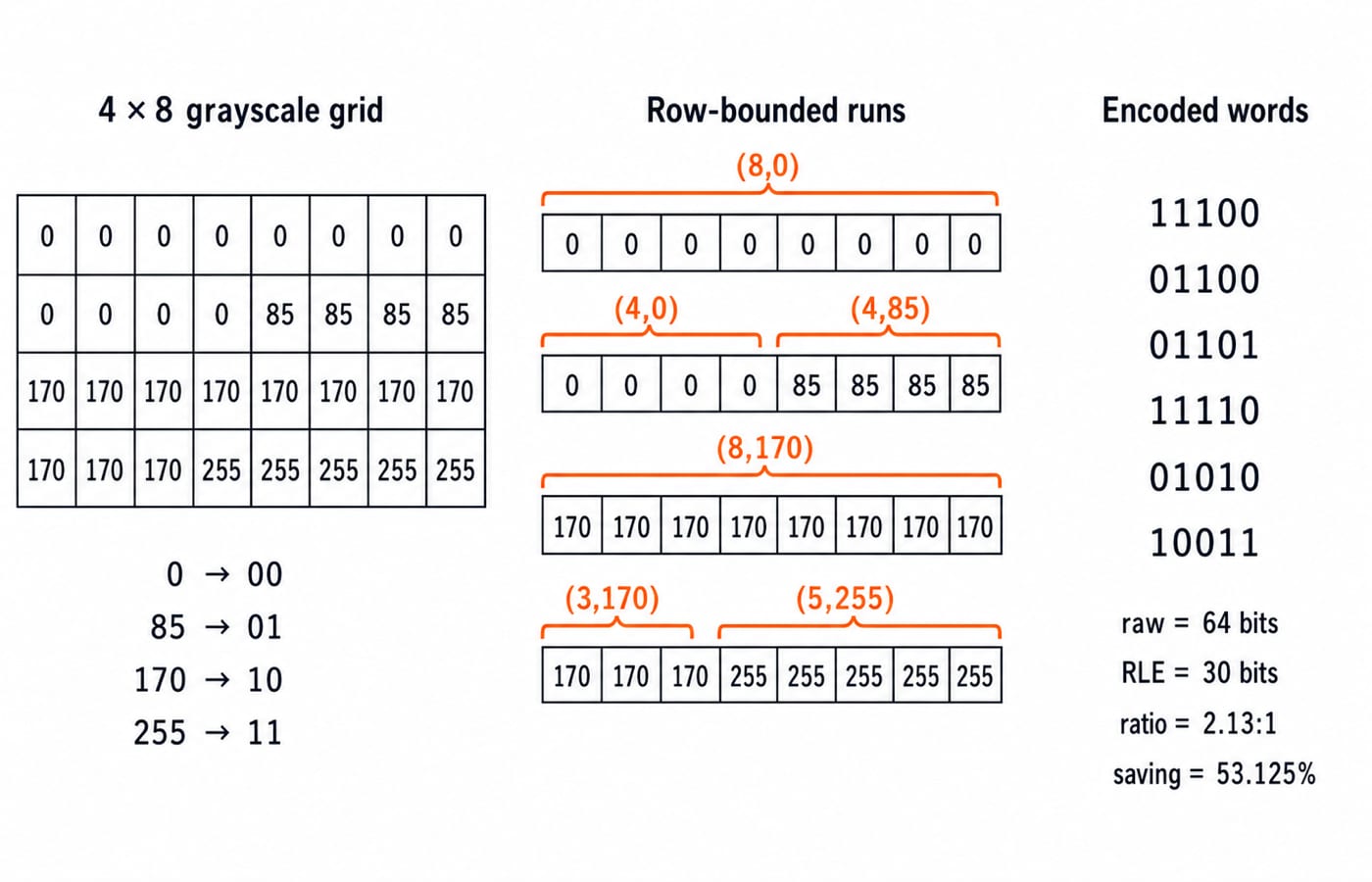
Consider this four-level grayscale image:
0   0   0   0   0   0   0   0
0   0   0   0   85  85  85  85
170 170 170 170 170 170 170 170
170 170 170 255 255 255 255 255
With 0 = 00, 85 = 01, 170 = 10, and 255 = 11, the 32-pixel raw payload is:
32 × 2 = 64 bits
Reset runs at every row boundary. Each run gets a 3-bit count minus 1 field for lengths 1 through 8, followed by the 2-bit sample code:
Row | Run | Count minus 1 | Sample code | Five-bit word |
|---|---|---|---|---|
1 |
|
|
|
|
2 |
|
|
|
|
2 |
|
|
|
|
3 |
|
|
|
|
4 |
|
|
|
|
4 |
|
|
|
|
The payload is 11100 01100 01101 11110 01010 10011. Six five-bit runs need 6 × 5 = 30 bits.
Therefore, the compression ratio is 64 / 30 = 2.13:1. The saving is (64 - 30) / 64 × 100 = 53.125%.
This scheme is lossless. Decoding the count and value in each word reproduces all 32 samples exactly. It is also a payload-only classroom calculation. A real file needs format-level signalling and metadata in addition to these 30 coded bits.
Traps: when the same encoder expands the data
For the 32-pixel stream 0, 85, 170, 255 repeated eight times, every run has length 1. The scheme needs:
32 × (3 + 2) = 160 bits
The raw form still needs 64 bits. The increase is (160 - 64) / 64 × 100 = 150%. This proves that compressibility belongs to the data and the coding method together, not to the filename alone.
Watch for five calculation traps:
Reversing the stated ratio convention.
Reporting a
6:1ratio as600%saving.Forgetting to include the count field.
Reading the 3-bit field as the literal count when it stores
count minus 1.Allowing a run to cross a row when the scheme says to reset at each row.
There is a practical overhead trap too. Dimensions, headers, colour tables, checksums, and other metadata can make a tiny real file larger than its raw classroom payload. Always check what the question includes.
Map the mechanisms to JPEG, PNG, and GIF standards
The extension is a clue, not a complete explanation. Identify the coding stages and the reconstruction guarantee.
Standard | Core coding path | Exact reconstruction? | Best clue in a question |
|---|---|---|---|
JPEG, ISO/IEC 10918-1 | Typical 8 × 8 block transform, quantisation, coefficient ordering, then entropy coding | Usually no, because quantisation is lossy | Transform coefficients and a quantisation step |
Scanline filtering followed by DEFLATE | Yes | Filtered scanlines and DEFLATE | |
GIF89a | Palette-indexed colour with at most 256 colour-table entries, then LZW coding of indices; animation is supported | Indexed samples are reconstructed exactly, but converting a richer source to the palette may lose colours | Palette indices, LZW, or animation |
Do not conclude that one of these formats is always smallest. Content, encoder choices, and required fidelity all matter. Also do not assume that every file carrying a familiar extension is a valid instance of its claimed standard.
For contrast, the IEEE 754 representation standard specifies how floating-point values are represented. Image standards specify coded image data and how the surrounding file is interpreted. Both are standards, but they standardise different objects.
How exams turn compression and standards into questions
Organise question forms by operation:
Compute raw size, compression ratio, or percentage saving.
Trace an RLE or Huffman-style encoding.
Decide whether exact reconstruction is possible.
Match JPEG, PNG, or GIF to a coding mechanism.
Predict which input pattern helps or hurts a compressor.
An 8 × 8 transform block followed by quantisation points to typical JPEG. A scanline filter followed by DEFLATE points to PNG. Palette indices followed by LZW point to GIF.
For this RLE, eight zeros help because one five-bit word replaces sixteen raw bits. The repeating 0, 85, 170, 255 stream hurts because each two-bit sample gains a three-bit count. A small set of practice questions on Compression & Standards is useful after you learn the mechanism, not as the main way to learn it. For any named exam, verify current syllabus or pattern details in its official notification.
The short version and the next practice step
Keep five lines in memory:
Calculate raw bits first.
State the compression-ratio convention.
Lossless means identical decoded samples.
Lossy means a deliberate, irreversible approximation.
Identify a standard from its coding stages, not vague image-quality language.
Change the worked grid's last row to eight 255 values. Predict the new run count before calculating its encoded size. For broad revision, use the CS Fundamentals category and ZERO TO HERO course. If you are specifically preparing for that exam, continue with the NTA UGC NET Paper 2 course.
Keep learning
Function Keys F1-F12 Explained: Uses, Worked Shortcut Map and Exam Traps
Learn what F1 through F12 do in named Windows and Microsoft application contexts, then solve a nine-command classification and avoid common modifier traps.
Updated 20 Oct 20266 min readUGC NET Computer Science

E-Waste Management Explained: Lifecycle, Worked Recovery Example and Exam Traps
Learn how e-waste moves from use to reuse, recycling and controlled residue. A hypothetical 600 kg batch shows how to close the mass balance and avoid denominator traps.
Updated 16 Oct 20266 min readUGC NET Computer Science
Data Protection, IPR and Open Source Explained: Two Worked Cases and Exam Traps
Separate privacy from security, match IP rights to software assets, and solve two numerical cases on data minimisation and mixed-licence releases.
Updated 12 Oct 20266 min readUGC NET Computer Science
Common Software & Tools MCQs: 12 Solved ICT Questions Explained
Attempt 12 previous-year ICT MCQs before reading concise explanations that separate applications, hardware, web tools, abbreviations, malware and operating systems.
8 Oct 20267 min readUGC NET Computer Science