Numbers and Arithmetic in Python: Operators, Precision, and Worked Examples
Understand how Python evaluates numeric expressions, from result types and precedence to negative floor division and floating-point comparison. Runnable examples culminate in one complete practice-session calculation.
KnowledgeGate Team
Exam prep & CS education
Updated 21 Aug 20266 min read
The symbols +, -, *, and / look familiar, but Python adds important rules. An operator can change the result type, / and // mean different things, negative quotients are floored, and not every decimal fraction has an exact binary floating-point representation. Predict each output before you run it, and predict its type too: in Python the value and the type are two separate answers.
Python numbers: int, float, complex, and bool
Python has three distinct numeric types, and bool is a subclass of int, so it behaves as a number too. These assignments give the following exact type checks:
count = 24
completion = 0.625
signal = 3 + 4j
is_complete = True

print(type(count).__name__)        # int
print(type(completion).__name__)   # float
print(type(signal).__name__)       # complex
print(type(is_complete).__name__)  # bool
The j marks the imaginary part of a complex number. Most beginner arithmetic uses int and float, but the other types matter when you read or extend existing programs.
The operator and operands determine the result type. 8 + 3 gives 11 as an int, while 8 + 3.0 gives 11.0 as a float. True division always produces a float, so 8 / 4 is 2.0, even though the division is exact. Python integers can grow beyond fixed 32-bit or 64-bit ranges, although available memory remains a practical limit.
bool is a specialised integer type, so True + True evaluates to 2. That is language behaviour, not a good way to store counts. For a broader route through Python, other languages, and DSA, use the Coding & Skills category.
The seven Python arithmetic operators
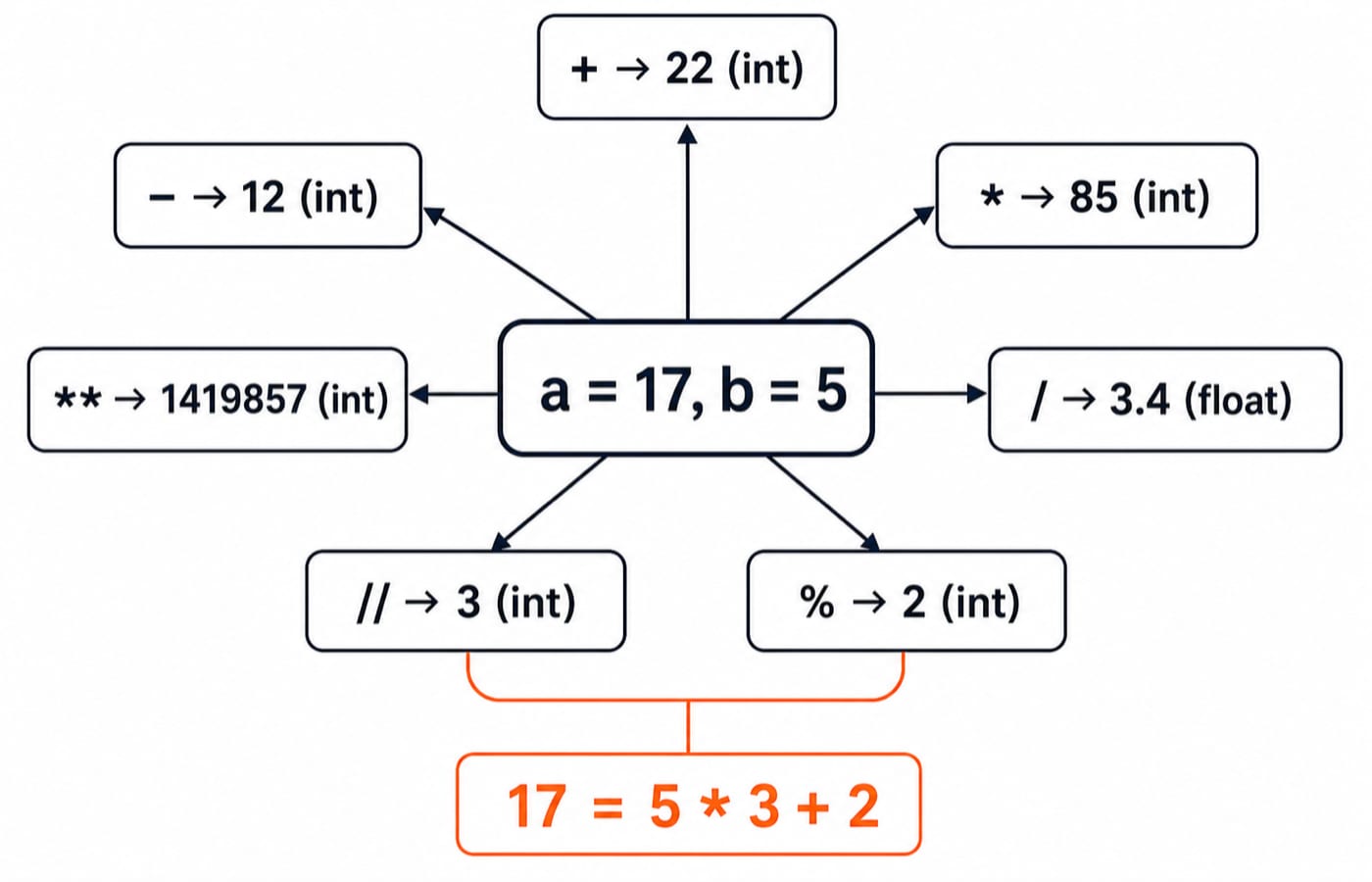
Set a = 17 and b = 5. One pair of values is enough to compare all seven operators clearly.
Expression | Meaning | Result | Result type |
|---|---|---|---|
| Addition |
|
|
| Subtraction |
|
|
| Multiplication |
|
|
| True division |
|
|
| Floor division |
|
|
| Remainder |
|
|
| Exponentiation |
|
|
Addition, subtraction, and multiplication behave as their names suggest. True division gives the quotient as a float. Floor division gives the quotient rounded down, modulo gives the paired remainder, and exponentiation raises the left operand to the power on the right.
Quotient and remainder reconnect through 17 = 5 * 3 + 2. For powers, use **. The ^ symbol is a bitwise operator, not exponentiation: 3 ^ 2 is 1, while 3 ** 2 is 9.
Python also accepts integer literals in different bases. 0b10001, 0o21, and 0x11 all equal decimal 17. Continue with Number systems and base conversions: binary, octal and hexadecimal explained to understand those forms.
True division, floor division, and negative values
17 / 5 is 3.4, while 17 // 5 is 3. More precisely, // floors the quotient. It does not simply delete the decimal part. Those descriptions happen to agree for a positive quotient, but they differ for a negative one.
divmod(-17, 5) # (-4, 3)Therefore, -17 // 5 is -4 and -17 % 5 is 3. The defining identity still holds: 5 * (-4) + 3 = -20 + 3 = -17. Compare that floor result with truncation towards zero: int(-17 / 5) is -3, not -4.
For a positive practical example, set minutes = 137. Then full_blocks, leftover = divmod(minutes, 25) produces full_blocks = 5 and leftover = 12. Use divmod() when you need both values instead of evaluating // and % separately.
Arithmetic precedence and parentheses
Python evaluates exponentiation before multiplication, then addition in 6 + 4 * 3 ** 2:
3 ** 2 = 94 * 9 = 366 + 36 = 42
Parentheses change the grouping. (6 + 4) * 3 ** 2 becomes 10 * 9 = 90.
Two exponent cases deserve special care. -3 ** 2 is -9 because exponentiation happens before unary minus, while (-3) ** 2 is 9. Exponentiation also groups from the right, so 2 ** 3 ** 2 means 2 ** (3 ** 2) and gives 512. By contrast, (2 ** 3) ** 2 gives 64.
Use parentheses to communicate intended grouping even when precedence already makes an expression legal. Reduce the expression one operation at a time instead of relying only on a mnemonic.
Fully worked Python arithmetic example
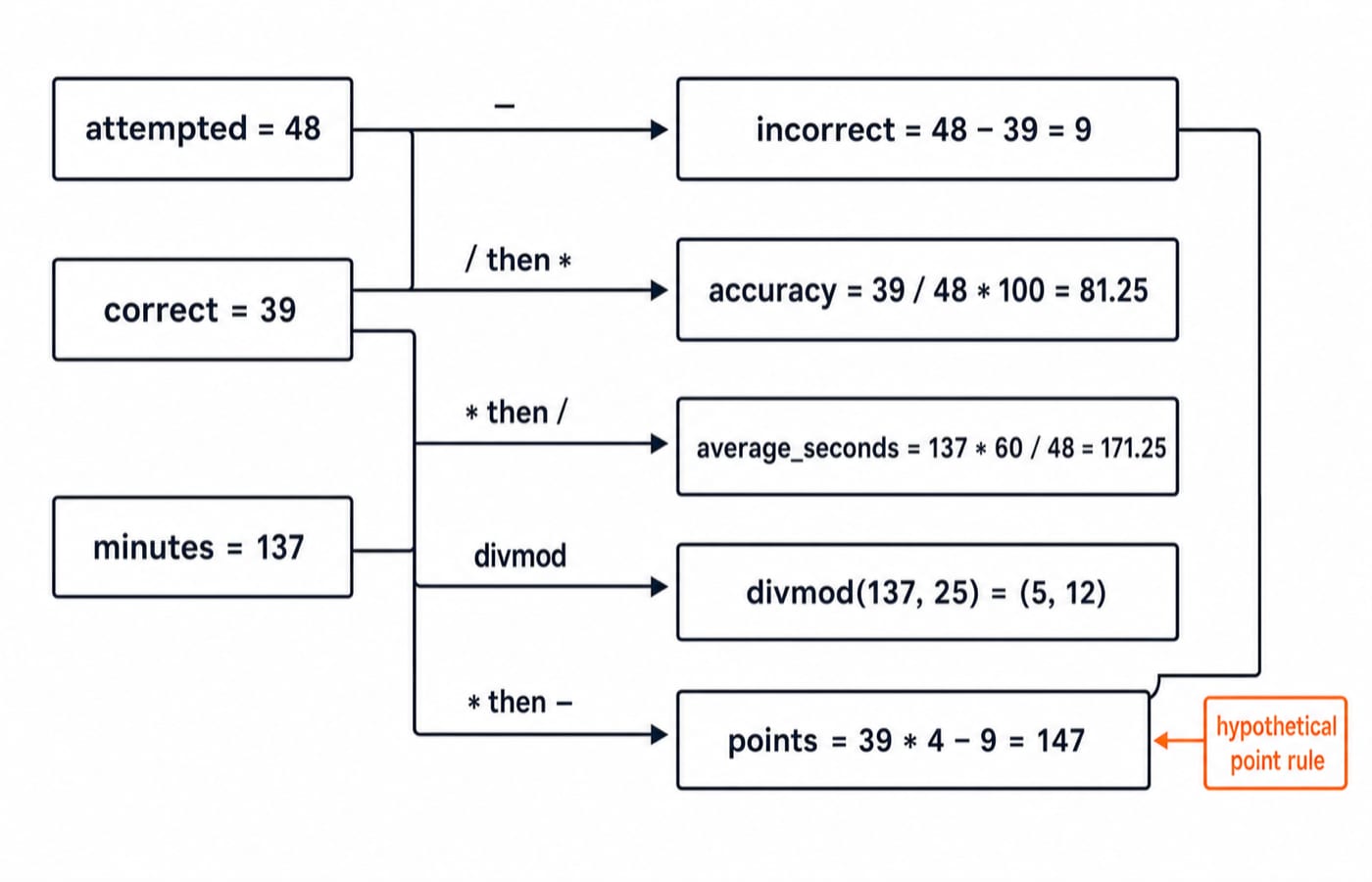
This program turns one practice session's raw counts into a summary:
attempted = 48
correct = 39
minutes = 137

incorrect = attempted - correct
accuracy = round(correct / attempted * 100, 2)
average_seconds = round(minutes * 60 / attempted, 2)
full_blocks, leftover_minutes = divmod(minutes, 25)
points = correct * 4 - incorrect

print(incorrect)
print(accuracy)
print(average_seconds)
print(full_blocks, leftover_minutes)
print(points)
The exact output is:
9
81.25
171.25
5 12
147
Walk through every result. Incorrect attempts are 48 - 39 = 9. Accuracy is 39 / 48 * 100 = 81.25. Total seconds are 137 * 60 = 8220, and 8220 / 48 = 171.25 seconds per attempt. The block calculation is 137 = 25 * 5 + 12. Finally, the scoring rule used in this example, four marks per correct attempt and one mark deducted per wrong one, gives 39 * 4 - 9 = 156 - 9 = 147.
Now change minutes from 137 to 150 and predict the affected outputs. average_seconds becomes 187.5, full_blocks becomes 6, and leftover_minutes becomes 0. The values of incorrect, accuracy, and points stay unchanged.
Floating-point precision and deliberate rounding
Try this expression in Python:
0.1 + 0.2 # 0.30000000000000004Many decimal fractions have no finite binary floating-point representation. Python stores approximations of those operands, so the observed result is not random and is not a Python defect.
Rounding and comparison answer different questions. round(0.1 + 0.2, 1) gives 0.3, a value rounded to the requested precision. math.isclose(0.1 + 0.2, 0.3) gives True, meaning the two floating-point results are sufficiently close under its tolerances.
An important edge case is round(2.675, 2) == 2.67. If input digits must be preserved and a specific decimal policy applied, construct Decimal from a string:
from decimal import Decimal, ROUND_HALF_UP

Decimal("2.675").quantize(Decimal("0.01"), rounding=ROUND_HALF_UP)
The expression produces Decimal('2.68'). Choose the rounding rule deliberately. ROUND_HALF_UP is one policy, not a universally correct choice.
Conversions and arithmetic mistakes to catch early
Program input often begins as text. With raw_attempted = "48" and raw_minutes = "137.5", int(raw_attempted) gives 48, while float(raw_minutes) gives 137.5. Without conversion, raw_attempted + "2" produces the string "482". After conversion, int(raw_attempted) + 2 gives the number 50.
Catch these common failures early:
int("7.5")raisesValueError. Usefloat("7.5")when the fraction matters.5 / 0and5 // 0raiseZeroDivisionError. Validate a divisor before dividing.3 ^ 2is1. Use3 ** 2for exponentiation.
Truncation is not rounding. int(7.9) is 7 and int(-7.9) is -7 because int() truncates towards zero. In contrast, round(7.9) is 8 and round(-7.9) is -8. Do not use int() as if it were a rounding function.
Arithmetic questions: predict before running
Test the decisive rules with three short checks:
7 // 2 + 7 % 2is3 + 1 = 4. Floor division supplies the quotient and modulo supplies the remainder.2 ** 3 ** 2is512. Exponentiation groups from the right.round(0.1 + 0.2, 1) == 0.3isTrue. The sum is rounded before comparison.
The short version and your next step
Keep six rules in view: know the result type, distinguish / from //, connect // and % through a = bq + r, use ** for powers, add parentheses when grouping matters, and compare or round floats deliberately. For what to learn next and in what order, follow the Python Tutorial: The Complete Learning Path.
Beginners can use the Python course for structured concept, MCQ, and coding practice. Once Python syntax and control flow feel comfortable, Coding for Placements is a later cross-language route. Neither course is needed to run or change any of the examples above; a plain Python install is enough.
Keep learning
Decorators in Python: @ Syntax, Wrappers and Worked Examples
Understand when decoration happens, what a wrapper receives, and how return values travel back. Runnable examples cover parameters, stacking and built-ins.
Updated 22 Oct 20266 min readPython
Exceptions in Python: Handle Errors with try, except and finally
Learn how Python exceptions change control flow, how to catch expected failures without hiding bugs, and when to use else, finally, raise, and custom exceptions.
Updated 18 Oct 20265 min readPython

Context Managers in Python: with, __enter__, __exit__ and contextlib
Learn how Python's with statement guarantees cleanup, then build and trace class-based and generator-based context managers with runnable examples.
Updated 14 Oct 20266 min readPython
Python Arguments and Scope: Parameters, LEGB, and Worked Examples
Trace how Python binds arguments, handles mutation and rebinding, and resolves names through LEGB. Runnable examples turn scope rules into predictable output.
Updated 10 Oct 20265 min readPython