Python String Methods: A Practical Tutorial With Worked Examples
Stop memorising isolated methods. Trace Python strings through indexing, cleanup, searching, splitting, validation and formatting, with exact results and the traps coding tests use.
KnowledgeGate Team
Exam prep & CS education
Updated 24 Aug 20265 min read
Memorising a list of Python string methods is easy. The trouble starts in a coding test, when you must remember what each method returns, whether it changes the original, and whether a failed search gives -1 or raises an error. Work through one string at a time and check the exact output at every step.
Strings are immutable, and indexing starts at zero
A Python string is immutable. You cannot change one of its characters in place. Methods that transform text produce a new string, while methods that inspect it may return a number, Boolean or list. The original string remains untouched in every case.
Start with a six-character string:
s = "PYTHON"Positive indexing begins at zero, while negative indexing counts back from the end:
s[0]    # 'P'
s[1]    # 'Y'
s[5]    # 'N'
s[-1]   # 'N'
s[-6]   # 'P'
A slice selects a range. Its stop index is excluded:
s[0:3]   # 'PYT'
s[2:]    # 'THON'
s[::-1]  # 'NOHTYP'
The step -1 makes the last slice move backwards, which is a compact way to reverse a string. If you try s[0] = "J", Python raises TypeError: 'str' object does not support item assignment. To make the apparent change, build another string instead:
"J" + s[1:] # 'JYTHON'![The string PYTHON in indexed boxes with positive and negative indices, plus the slice s[0:3] and reverse s[::-1].](https://cdn.knowledgegate.ai/blog-assets/blog_asset_1784171272857_j9giby.jpg)
Changing case with upper, lower, title, capitalize and swapcase
Case methods return changed copies of a string:
"hello world".upper()       # 'HELLO WORLD'
"HELLO".lower()             # 'hello'
"hello world".title()       # 'Hello World'
"hello world".capitalize()  # 'Hello world'
"Hello".swapcase()          # 'hELLO'
The important distinction is between title() and capitalize(). The first capitalises each word. The second capitalises only the first character and lowercases the remaining characters. Therefore, "python IS fun".capitalize() returns 'Python is fun'.
Cleaning input with strip, lstrip and rstrip
strip() removes characters from both ends of a string. With no argument, it removes whitespace, which makes it useful for cleaning a form field. lstrip() cleans only the left end, and rstrip() cleans only the right.
raw = "  Knowledge Gate  "

raw.strip()   # 'Knowledge Gate'
raw.lstrip()  # 'Knowledge Gate  '
raw.rstrip()  # '  Knowledge Gate'
Here is the common trap: the argument to strip(chars) is a set of characters, not one substring. "codex".strip("cod") returns 'ex'. Python peels c, o and d from the front because each belongs to the supplied set, then stops at e. It also stops immediately at the final x on the right.
Searching and counting with find, index, count and in
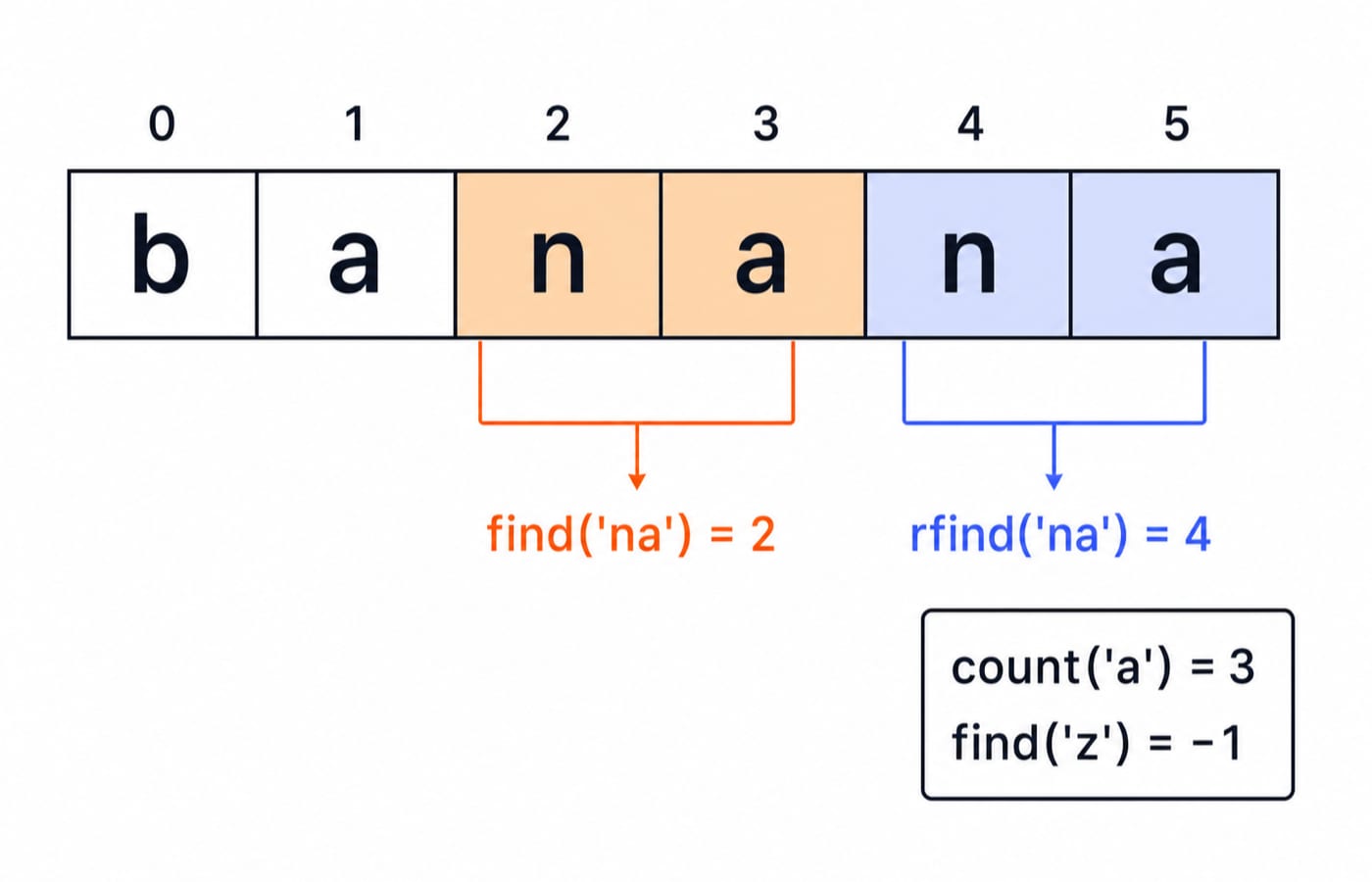
The pair to internalise is find() and index(). find() returns the starting index, or -1 when the text is absent. index() returns the same index when found, but raises ValueError when it is absent. Use find() when a missing match is normal, and index() when it should be treated as an error.
text = "banana"

text.count("a")     # 3
text.find("na")     # 2
text.rfind("na")    # 4
text.find("z")      # -1
text.index("na")    # 2
text.index("z")     # ValueError: substring not found
Membership and boundary checks make many conditions easier to read:
"na" in text           # True
text.startswith("ban") # True
text.endswith("na")    # True
These checks are case-sensitive. For example, "Banana".find("banana") returns -1.
Splitting and joining with split, rsplit, splitlines and join
split() turns one string into a list of pieces. join() combines an iterable of strings using the string before .join() as the separator. rsplit() starts splitting from the right when a maximum number of splits is supplied, while splitlines() separates multiline text at line boundaries.
"id,name,score".split(",")       # ['id', 'name', 'score']

"-".join(['2026', '07', '16'])       # '2026-07-16'

"team:backend:api".rsplit(":", 1) # ['team:backend', 'api']
"first\nsecond".splitlines()          # ['first', 'second']
Calling split() without an argument splits on any run of whitespace and drops empty pieces. Supplying one literal space changes that behaviour:
"a  b".split()    # ['a', 'b']
"a  b".split(" ") # ['a', '', 'b']
The first result has two elements. The second has three, including an empty middle string created by the two consecutive separators.
Replacing text and validating input
replace(old, new) returns a new string with every matching occurrence replaced. A third argument limits how many replacements are made. Reassign the result if you want to keep it, because text itself does not change.
"banana".replace("a", "o")    # 'bonono'
"banana".replace("a", "o", 2) # 'bonona'
The second call changes only the first two occurrences of a.
Validation helpers return Booleans and work well as guards before conversion:
"12345".isdigit()   # True
"Hello".isalpha()   # True
"Hello!".isalpha()  # False
"abc123".isalnum()  # True
"abc 123".isalnum() # False
The exclamation mark is not a letter, and a space is neither a letter nor a digit. That is why the last two negative cases return False.
Formatting output with f-strings and format
F-strings are the clearest modern option for inserting values into output. The older format() method remains common in existing code and is useful for learning alignment specifications.
name = "Aditi"
score = 87

f"{name} scored {score}%"  # 'Aditi scored 87%'
A width of eight reserves eight character positions. Since hi uses two, six spaces are added:
"{:>8}".format("hi") # '      hi'
"{:<8}".format("hi") # 'hi      '
The greater-than sign right-aligns the text, while the less-than sign left-aligns it. A format specification can also control decimal places: f"{3.14159:.2f}" returns '3.14'.
How coding tests probe Python strings
String exercises are common in placement screens and coding warm-ups: reverse a string, count vowels, check a palindrome, or clean and split a CSV-like line. Most reduce to the methods above plus a loop, a condition or a slice. Timed interview questions add slicing, formatting and performance trade-offs; Python String Methods: Predict Slicing and f-string Output practises that next layer.
raw_name = "  Ada Lovelace  "
slug = "-".join(raw_name.strip().lower().split())

slug      # 'ada-lovelace'
raw_name  # '  Ada Lovelace  '
Trace this pipeline left to right. strip() removes outer spaces, lower() returns a lowercase copy, split() creates the list ['ada', 'lovelace'], and join() inserts one hyphen between the elements. The original raw_name still includes its spaces because none of these methods mutates it. Naming each intermediate type also prevents a common error: split() returns a list, so another string method cannot be called on that result until the pieces are joined.
When an exact return type or edge case matters, use the official Python documentation for the str type as the source of truth. It confirms whether a method returns a sentinel such as -1 or raises an exception. For a wider map of related programming study, browse the Coding & Skill Development Courses.
The short version and next step
Strings are immutable. A method returns a new result instead of changing the original, and find() versus index() differs mainly in how each reports "not found".
To practise these ideas on real problems, start with Python Course: Concepts, MCQs & Coding. Once string handling feels automatic, carry the same techniques into DSA Using Python for broader pattern practice.
Keep learning
Exceptions in Python: Handle Errors with try, except and finally
Learn how Python exceptions change control flow, how to catch expected failures without hiding bugs, and when to use else, finally, raise, and custom exceptions.
Updated 18 Oct 20265 min readPython
Context Managers in Python: with, __enter__, __exit__ and contextlib
Learn how Python's with statement guarantees cleanup, then build and trace class-based and generator-based context managers with runnable examples.
Updated 14 Oct 20266 min readPython
Python Arguments and Scope: Parameters, LEGB, and Worked Examples
Trace how Python binds arguments, handles mutation and rebinding, and resolves names through LEGB. Runnable examples turn scope rules into predictable output.
Updated 10 Oct 20265 min readPython
Python Control Flow and Loops: if, for, while and Worked Traces
Learn to trace Python branches and loops without skipping a state change. Worked examples cover GCD, break and continue, loop else, nested loops, and common mistakes.
Updated 6 Oct 20265 min readPython