Python Introduction and Setup Tutorial: Install, Verify, and Run Your First Programs
Set up Python with confidence by checking the command, isolating a project in .venv, and running a saved program whose output you can verify step by step.
KnowledgeGate Team
Exam prep & CS education
Updated 19 Aug 20266 min read
Installing Python is only one part of a working setup. A correct installation can still look broken when your terminal, editor, or virtual environment uses a different interpreter. Getting from an empty machine to working code takes three checkpoints: a command that answers, a project folder carrying its own interpreter, and a saved program whose output you can predict before you run it. Command names also vary by operating system, so Windows users reach for py while macOS and Linux users reach for python3; there is no single universal command to memorise. The Coding & Skill Development Courses map the wider route around this first setup, but a verified interpreter comes before any of it.
Understand the four pieces of a working Python setup
Four pieces have to line up. The Python 3 interpreter executes code. The terminal launches that interpreter and reports its answer back. The editor changes text in a .py file and does nothing else, so installing an editor does not necessarily install an interpreter. The project folder keeps that file and its environment together.
Pick the names once and reuse them, so every command below stays copy-pasteable:
Project folder:
python-setupVirtual environment:
.venvScript:
hello.pyLearner name:
Asha
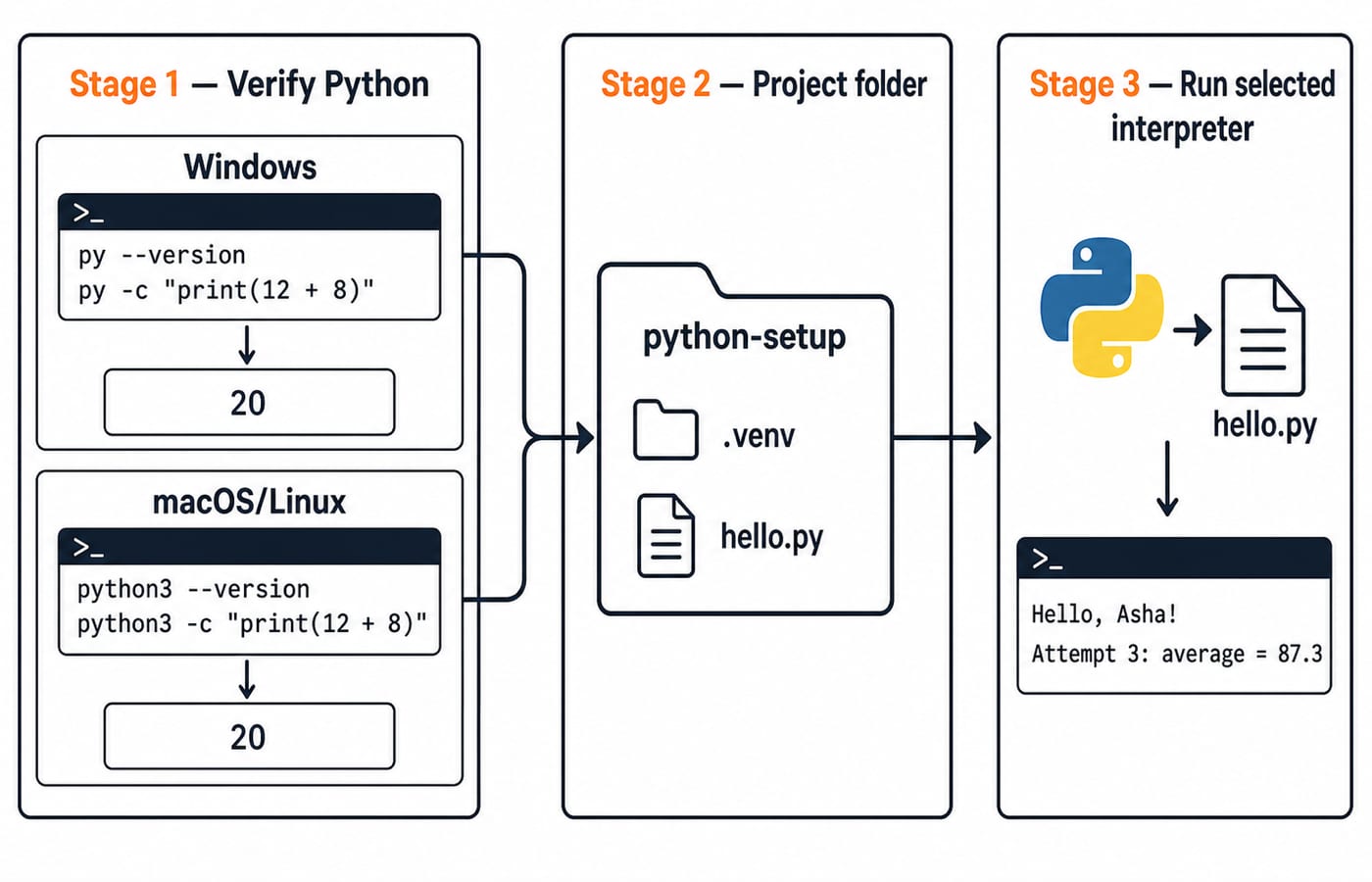
The complete flow is terminal command, selected interpreter, hello.py, then printed output. Keeping those pieces separate makes errors easier to diagnose.
Install Python 3, then prove which command works
On Windows and macOS, download the current Python 3 installer from the official Python downloads page. On Linux, install it through your distribution's package manager rather than building it by hand. The Windows installer may offer an option to add Python to PATH; select it when available, since the exact wording changes between releases. On macOS and Linux, do not assume that the bare python command points to the interpreter you intend to use.
Open a new terminal after installation. On Windows, begin with:
py --version
py -c "print(12 + 8)"
On macOS or Linux, begin with:
python3 --version
python3 -c "print(12 + 8)"
The version number will vary. The calculation must produce this exact output:
20The version line proves command discovery, while 20 proves code execution. If the command is not found, repair the installation or PATH. If it works only in the terminal, select the same interpreter in the editor. If several commands work, use the one connected to the .venv path verified next.
Create the project folder and an isolated environment
Create the folder and enter it:
mkdir python-setup
cd python-setup
On Windows, create the environment with py -m venv .venv. On macOS or Linux, use python3 -m venv .venv.
Activate it with the command for your shell:
Windows PowerShell:
.venv\Scripts\Activate.ps1Windows Command Prompt:
.venv\Scripts\activate.batmacOS or Linux shell:
source .venv/bin/activate
Shell choice and security policy can affect the activation command. After activation, verify the interpreter rather than trusting only the prompt decoration:
python -c "import sys; print(sys.executable)"
python -m pip --version
The path varies, but it should end inside python-setup/.venv/bin/python on macOS or Linux, or python-setup\.venv\Scripts\python.exe on Windows. The first command identifies the interpreter. The second ties future package operations to it. You need no third-party package yet.
Use the REPL for tiny checks and a script for saved work
With .venv active, run python to open the interactive prompt. Predict each answer, then enter these expressions one at a time:
>>> 12 + 8
20
>>> 3 * 7
21
>>> name = "Asha"
>>> len(name)
4
The >>> characters belong to the prompt. Do not copy them into hello.py. Leave the prompt with exit().
The REPL responds immediately to one-line experiments. A script preserves a sequence for repeated runs with python hello.py. Use a script when the order matters.
Build and run one complete Python example
Create hello.py inside python-setup and save this exact program:
name = "Asha"
attempt = 3
scores = [84, 91, 87]
average = sum(scores) / len(scores)

print(f"Hello, {name}!")
print(f"Attempt {attempt}: average = {average:.1f}")
Run it from the project folder:
python hello.pyThe exact output is:
Hello, Asha!
Attempt 3: average = 87.3
Here is the arithmetic. The score sum is 84 + 91 + 87 = 262. The list has three values, so len(scores) = 3. Therefore, 262 / 3 = 87.333.... The .1f format displays that result to one decimal place as 87.3.
This program contains several building blocks. "Asha" is a string, 3 is an integer, and [84, 91, 87] is a list. The = lines assign values, sum(scores) and len(scores) call functions, and each f string inserts values into text.
Now make one controlled edit. Change attempt = 3 to attempt = 4, and change the list to scores = [84, 91, 87, 93]. The new sum is 355, the count is 4, and 355 / 4 = 88.75. Formatting to one decimal place produces this exact second line:
Attempt 4: average = 88.8![Execution trace of hello.py: scores [84, 91, 87] sum to 262 over 3 values, giving average 87.333 formatted to one decimal as 87.3.](https://cdn.knowledgegate.ai/blog-assets/blog_asset_1784150275921_7wo0wg.jpg)
Diagnose setup errors with evidence
Random reinstallation hides the useful clues. Match each symptom to a likely cause and a focused fix:
Symptom | Likely cause | Focused fix |
|---|---|---|
Command not found | Python is not discoverable, or the terminal was not reopened | Open a new terminal, then check the installation and |
Editor runs different results | The editor has not selected | Select the interpreter whose path is inside |
| A package was installed into another environment | Check |
| Prompt characters were copied into the file | Remove |
| Leading spaces are inconsistent | Align the affected block consistently |
| The terminal is in the wrong folder | Return to |
Use one evidence-first sequence. Run pwd on macOS, Linux or Windows PowerShell, or cd with no arguments in Windows Command Prompt, to confirm the folder. List files to locate hello.py. Run python -c "import sys; print(sys.executable)" to identify the interpreter, then rerun python hello.py. These checks prove location, file presence, interpreter choice, and execution.
How Python screening questions test these basics
Introductory checks commonly ask you to identify the active interpreter, predict a short output, distinguish a string from a number, spot syntax or indentation errors, or trace assignments. For example:
x = 5
y = 2
print(x ** y + y)
Exponentiation happens first: 5 ** 2 = 25, then 25 + 2 = 27. By contrast, print("7" + "3") joins two strings and prints 73.
Most such checks are one-line output questions rather than installation questions, so practise predicting output as deliberately as you practise the setup. For a structured language sequence, use the Python Course: Concepts, MCQs & Coding. If your goal is coding-round preparation across languages, continue with Coding for Placements: C, C++, Java, Python.
The short version and your next useful step
Before moving on, confirm all six items:
A Python 3 command returns a version line.
The command running
print(12 + 8)returns20.The
python-setupfolder exists..venvis activated.sys.executablepoints inside.venv.python hello.pyprintsHello, Asha!andAttempt 3: average = 87.3.
Rerun the edited four-score example without copying its answer. Predict the sum, count, average, and formatted line first. For the ordered route through the rest of the language, follow Python Tutorial: The Complete Learning Path, Ordered for Self-Study. For optional foundations, Number Systems and Base Conversions: GATE Worked Examples shows how programs represent values.
Keep learning
Decorators in Python: @ Syntax, Wrappers and Worked Examples
Understand when decoration happens, what a wrapper receives, and how return values travel back. Runnable examples cover parameters, stacking and built-ins.
Updated 22 Oct 20266 min readPython
Exceptions in Python: Handle Errors with try, except and finally
Learn how Python exceptions change control flow, how to catch expected failures without hiding bugs, and when to use else, finally, raise, and custom exceptions.
Updated 18 Oct 20265 min readPython
Context Managers in Python: with, __enter__, __exit__ and contextlib
Learn how Python's with statement guarantees cleanup, then build and trace class-based and generator-based context managers with runnable examples.
Updated 14 Oct 20266 min readPython
Python Arguments and Scope: Parameters, LEGB, and Worked Examples
Trace how Python binds arguments, handles mutation and rebinding, and resolves names through LEGB. Runnable examples turn scope rules into predictable output.
Updated 10 Oct 20265 min readPython