

NPM and package.json in Node.js: Setup, Scripts, Dependencies, and SemVer
Build a small Node.js project from an empty folder, install Lodash, add reusable npm scripts, compare the manifest and lockfile, and practise SemVer ranges.
KnowledgeGate Team
Exam prep & CS education
Updated 12 Nov 20266 min read
npm, package.json, package-lock.json, and node_modules appear together, but each solves a different problem. Start in an empty folder, install a package, create a repeatable script, and read common version ranges. npm is lowercase in commands and official documentation, although learners often search for “NPM”. The Node.js Tutorial: The Complete Learning Path from Zero to Job-Ready orders runtime, core modules, Express and data work. Package setup is the narrower task: take one small project from npm init to a reproducible npm ci.
1. NPM, Node.js, and package.json: what each one does
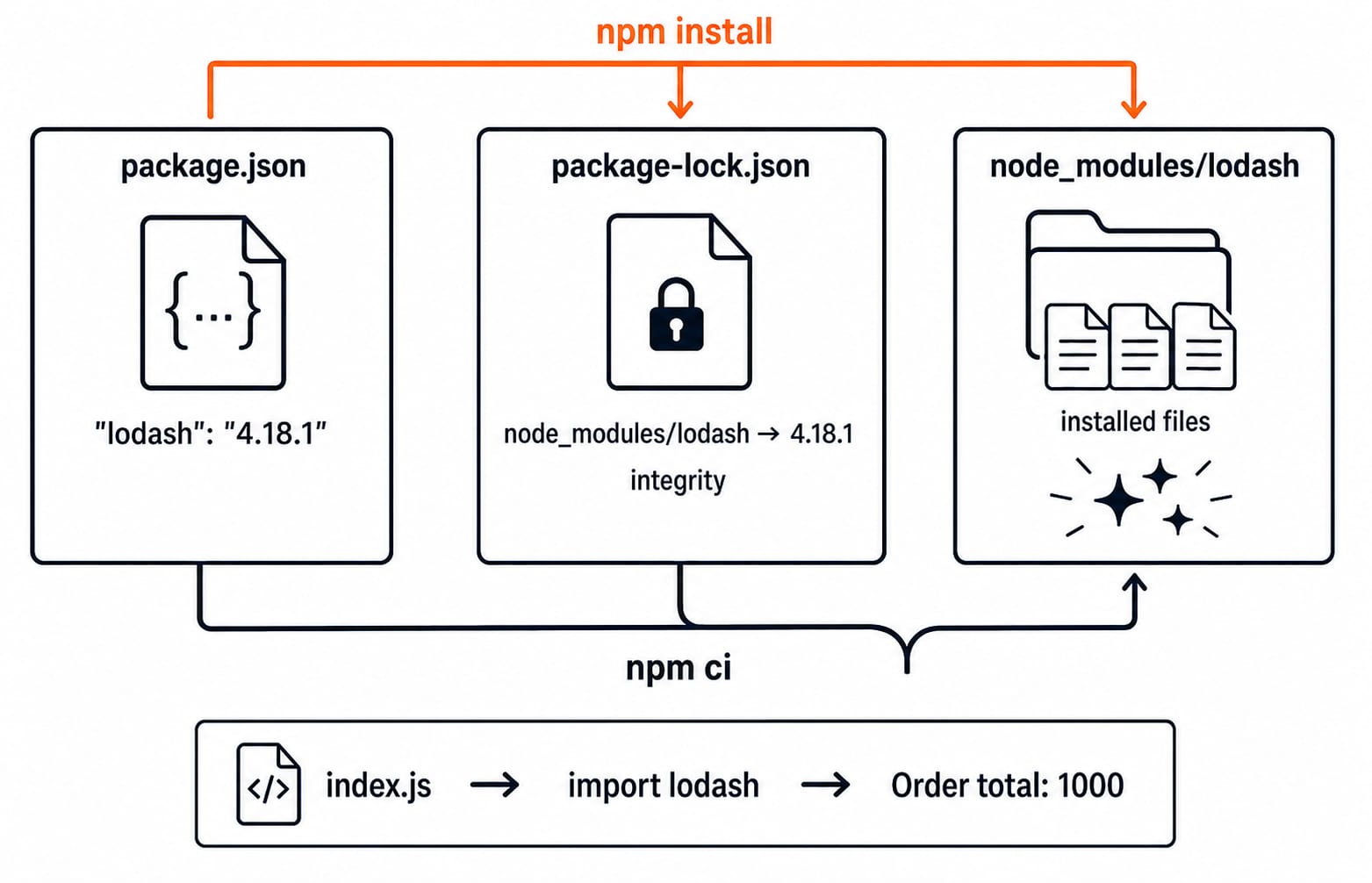
Node.js runs JavaScript outside the browser. npm installs project packages and runs named scripts. package.json is the project manifest, package-lock.json records the resolved dependency tree, and node_modules contains the files installed on your machine.
The official npm package.json documentation defines how npm interprets manifest fields. A limited analogy is this: package.json is a shopping list and rule sheet, the lockfile is the itemised receipt with exact versions, and node_modules is what arrived. The manifest also stores scripts and metadata.
Suppose a Git project includes package.json and package-lock.json, but not node_modules. With a consistent lockfile, npm ci reconstructs a clean installation. This matters in a backend and full-stack context with teammates or automated builds.
2. Create the project with npm init
Run these commands in a terminal:
mkdir kg-npm-demo
cd kg-npm-demo
npm init -y
npm pkg set type=module
npm pkg set scripts.start="node index.js"
npm pkg set scripts.check="node --check index.js"
mkdir creates the folder, and cd enters it. npm init -y creates the manifest with npm's defaults; use interactive npm init to choose values yourself. The npm pkg set commands add the module type and two scripts.
The relevant result is:
{
  "name": "kg-npm-demo",
  "version": "1.0.0",
  "type": "module",
  "scripts": {
    "start": "node index.js",
    "check": "node --check index.js"
  }
}
Read six fields for now. name identifies the project, version records its version, type controls the module format, and scripts names reusable commands. dependencies records runtime packages; devDependencies records development tools. "type": "module" makes this package's .js files use ES module syntax. CommonJS vs ESM in Node.js: Modules Tutorial with Runnable Examples explains module markers, loading semantics, interoperability and migration; this package uses ESM only to keep the Lodash program consistent.
3. Install one dependency and run a real program
Install a deliberately pinned Lodash release:
npm install lodash@4.18.1 --save-exactThe exact pin keeps the exercise reproducible. npm documents that --save-exact records an exact version instead of its default range operator. The command adds "lodash": "4.18.1" under dependencies and updates package-lock.json.
Create index.js exactly as follows:
import lodash from "lodash";

const orders = [
  { id: "A101", amount: 199 },
  { id: "A102", amount: 349 },
  { id: "A103", amount: 452 },
];

const total = lodash.sumBy(orders, "amount");
console.log(`Order total: ${total}`);
Now run npm start. Lodash reads each amount and sums the values:
199 + 349 + 452 = 1000
Order total: 1000
Lodash makes the installed package observable; simple addition does not need a library. To continue with Express and MongoDB, use the NodeJs + ExpressJs + MongoDB course.
4. package.json vs package-lock.json vs node_modules
The same Lodash installation appears differently in three places:
Artefact | What this example contains | Purpose |
|---|---|---|
|
| Declares the direct dependency intent |
|
| Captures the resolved tree |
| Installed package files | Supplies the code loaded at runtime |
Do not reproduce or hand-edit the full lockfile. Use npm install to change dependencies. Use npm ci for a clean, lockfile-driven installation in a clone or CI job. npm requires an existing lockfile; if its declarations disagree with package.json, npm ci exits instead of rewriting it.
Commit package.json and package-lock.json. Normally, add node_modules to .gitignore because npm can reconstruct it.
5. Read dependency versions with SemVer
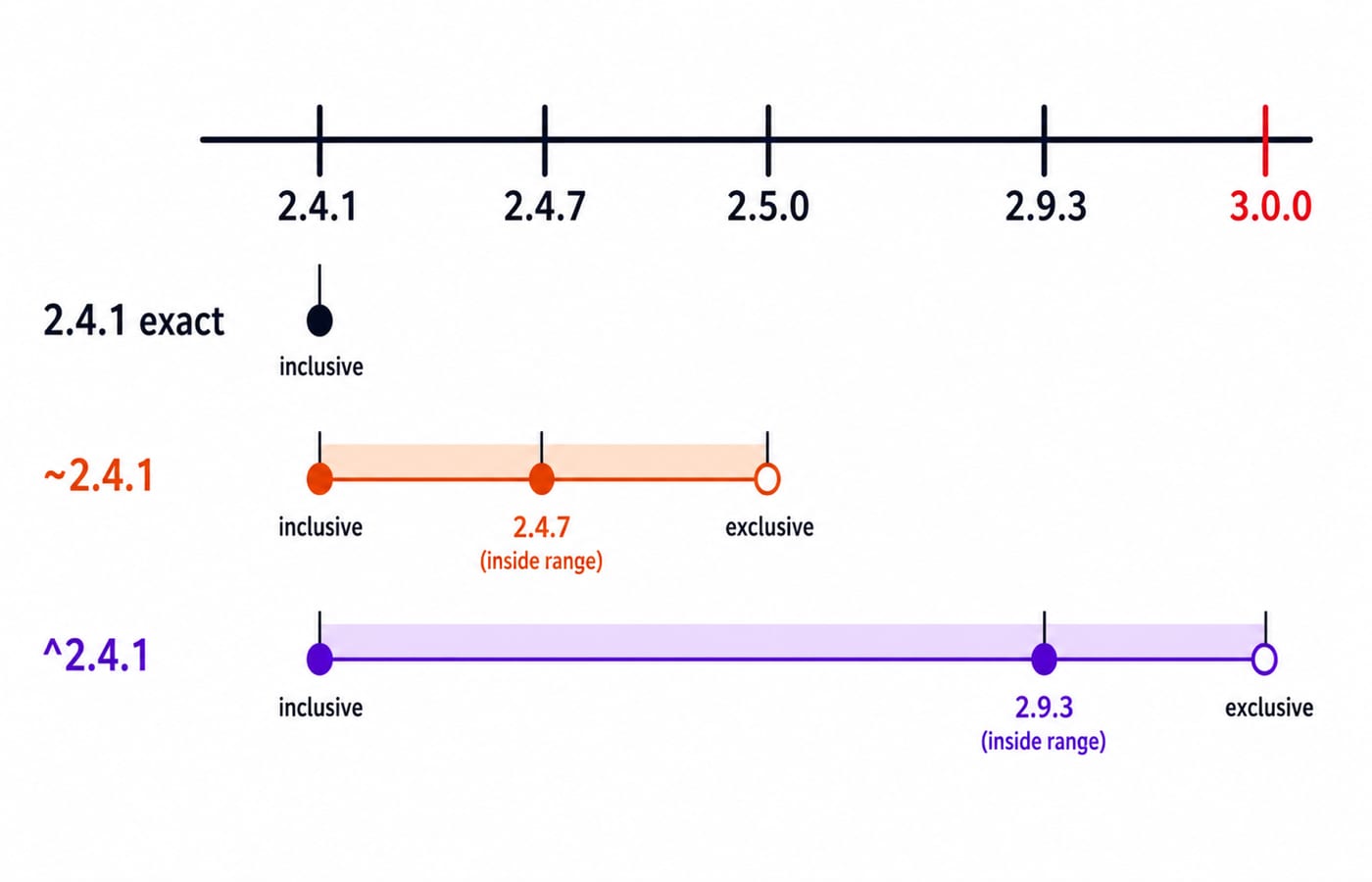
Semantic Versioning uses MAJOR.MINOR.PATCH. In 2.4.1, 2 represents incompatible API changes, 4 represents backward-compatible functionality, and 1 represents backward-compatible fixes. npm documents these meanings, but maintainers do not always apply SemVer perfectly.
Assume only these releases exist: 2.4.1, 2.4.7, 2.5.0, 2.9.3, and 3.0.0.
Declaration | Eligible interval | Selected from the set |
|---|---|---|
| Exact version only |
|
|
|
|
|
|
|
None of the three declarations selects 3.0.0. The --save-exact option records one Lodash version, not an update range. One zero-major warning: ^0.2.3 means >=0.2.3 <0.3.0, while ^0.0.3 means >=0.0.3 <0.0.4. A caret stops before the leftmost non-zero component changes, so zero-major ranges are intentionally narrower.
6. Turn repeated commands into npm scripts
Extend the manifest's scripts to this exact object:
{
  "scripts": {
    "start": "node index.js",
    "check": "node --check index.js",
    "verify": "npm run check && npm start",
    "dev": "nodemon index.js"
  }
}
Run npm run verify. When syntax is valid, node --check produces no success text, then npm start prints Order total: 1000. Run npm run to list available scripts.
Add the development tool with:
npm install --save-dev --save-exact nodemon@3.1.14Lodash 4.18.1 stays under dependencies because the application imports it at runtime. Nodemon 3.1.14 belongs under devDependencies because it assists development. These fields express dependency intent.
Interview or lab check: Why prefer npm run verify over asking every team member to remember two commands? The named script provides one version-controlled project command. It does not make the underlying commands faster.
7. Fix common npm and package.json errors
Symptom | Likely cause | Check | Fix |
|---|---|---|---|
| A trailing comma makes the file invalid JSON | Inspect the line reported and validate strict JSON | Remove the trailing comma and save valid JSON |
| The script key is absent or misspelled | Run | Restore the exact |
| Dependencies are not installed | Check for | Run |
|
| Inspect the module type and import line | Restore |
Never edit node_modules, and do not delete the lockfile merely to silence a mismatch. A global installation does not declare a project dependency. Check package names, review packages, and read relevant advisories. npm does not eliminate package risk.
8. Check understanding, then choose the next step
Replace the order amounts with
125,375, and625. Predict the output.From the supplied release set, predict the selections for
~2.4.1and^2.4.1.Replace the import with
const lodash = require("lodash")while"type": "module"remains active. Observe the failure, then restore the import.
Answers: The first total is 125 + 375 + 625 = 1125, so the output is Order total: 1125. The tilde range selects 2.4.7, while the caret range selects 2.9.3. The third exercise produces a require is not defined failure because the .js file is an ES module.
Which files should be committed after installing Lodash? The beginner answer is the source files, package.json, and package-lock.json, not node_modules.
The manifest declares intent, the lockfile captures resolution, node_modules holds installed code, scripts standardise commands, and SemVer ranges control eligible updates. Use the Coding Skills category to place this package workflow inside a broader web-development route.
Finish the complete kg-npm-demo, make a fresh copy without node_modules, run npm ci and npm run verify there, then continue with Mongoose schemas, models, validation, and population when you are ready to add a MongoDB data model.
Keep learning

Future Internet Explained: Architecture, a Worked IoT Example and Exam Traps
Learn how device, edge, network, cloud and application layers cooperate, then solve a smart-campus example for data reduction and control-loop latency.
Updated 16 Nov 20266 min readWeb Development

Testing React Components: A Runnable Vitest and Testing Library Tutorial
Build and test a small React progress component from its initial render through completion. The examples use accessible queries, awaited actions, and an exact mock assertion.
Updated 15 Nov 20266 min readWeb Development
React Performance Optimization Tutorial: Profiler, memo, useMemo, and useCallback Examples
Build one React lab, measure its render and calculation counts, then remove avoidable work while keeping typing responsive.
Updated 14 Nov 20266 min readWeb Development
Node.js Path and OS Modules: Build Portable Scripts with Runnable Examples
Learn how Path and OS remove hard-coded assumptions from Node.js scripts. Follow deterministic examples, memory maths, and a complete system-report build.
Updated 13 Nov 20265 min readWeb Development