Knowledge of ICT Explained: Digital Divide, Email Fields and MS Word Macros
Connect access, communication and automation through three worked ICT concepts. Practise denominator choice, Bcc visibility and a beginner Word macro trace.
KnowledgeGate Team
Exam prep & CS education
Updated 16 Aug 20266 min read
Knowledge of information and communication technology (ICT) questions can jump from a social-access term to an email privacy rule, then to office automation. Memorising disconnected expansions does not build the usable model needed to separate these neighbouring ideas under pressure. Access, communication and automation are the three layers that hold them together, and each carries a value you can recompute: an access gap of 80% against 45%, a Bcc recipient who cannot see a fellow Bcc recipient, and a macro that works out 12 minus 7 before Word prints anything.
Knowledge of ICT connects access, communication and automation
Information and communication technology is the use of digital devices, software and communication systems to create, process, store and exchange information. It extends beyond the Internet, computers and classroom technology.
Use three layers to organise it:
Access asks who can use devices, connections and digital services, leading to the digital divide.
Communication asks who receives information and who can see recipient details. This leads to the To, carbon copy (Cc) and blind carbon copy (Bcc) fields.
Automation asks how software executes repeatable actions consistently, leading to Word macros and Visual Basic for Applications (VBA).
ICT for Teaching Exams: Fundamentals Explained sets out the wider hardware, network and digital-service map. Access, communication and automation each contribute one heavily tested idea here: the digital divide, the Bcc field and the Word macro.
Digital divide: name the denominator before measuring the gap
The digital divide is a disparity between people or groups in meaningful access to and use of digital technology. It includes device availability, reliable connectivity, affordability, digital skills, accessibility and useful outcomes. A handset alone does not establish meaningful access.
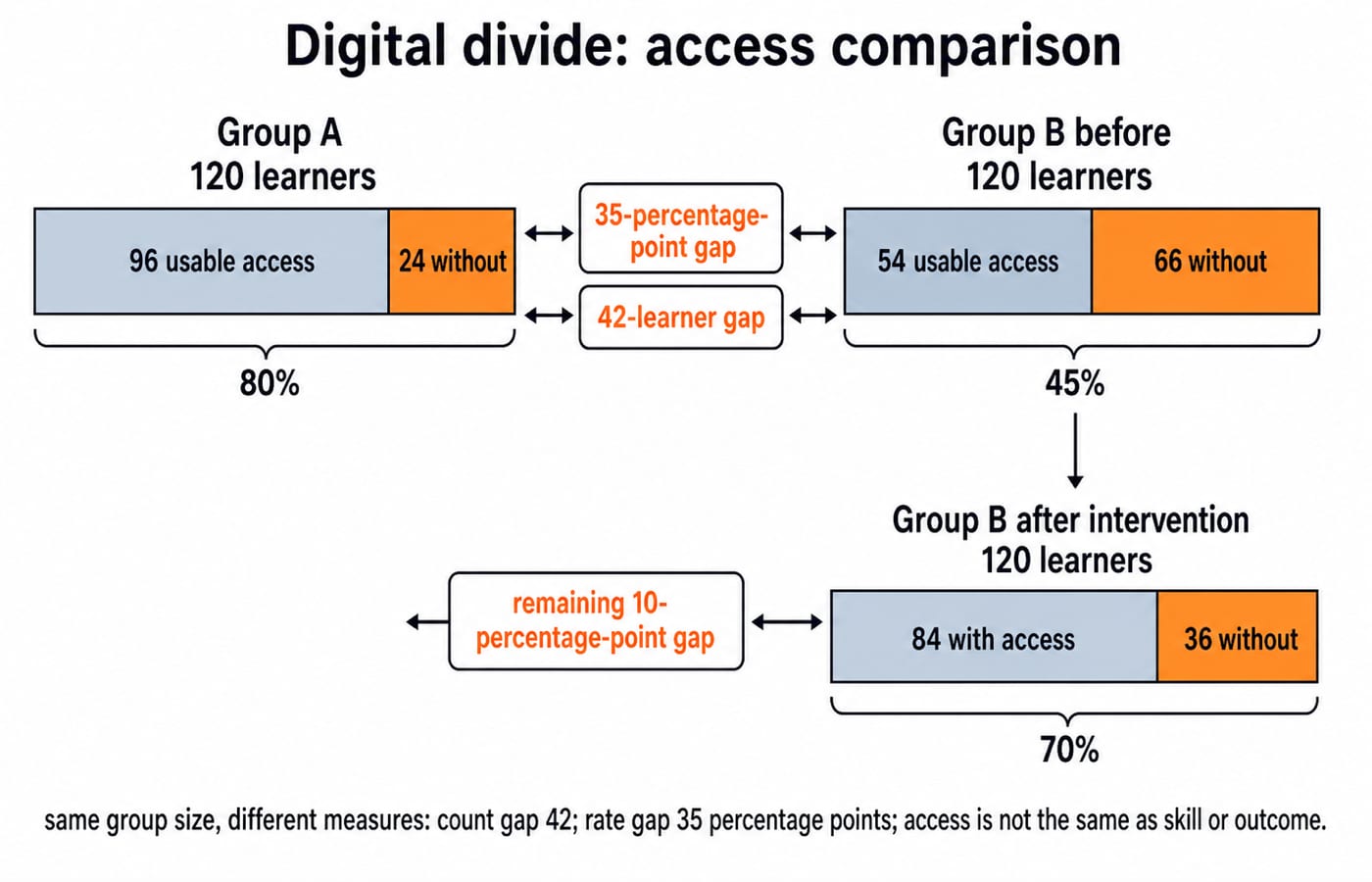
In an illustrative comparison, Group A has 120 learners, with 96 having usable device-and-connection access:
96 / 120 x 100 = 80%
Group B also has 120 learners, but 54 have usable access:
54 / 120 x 100 = 45%
Both rates use 120 learners as the denominator. The rate gap is 80% - 45% = 35 percentage points, while the count gap is 96 - 54 = 42 learners. A relative comparison uses Group A's access count, 96, as its denominator: 42 / 96 x 100 = 43.75% fewer learners with usable access. These measures are not synonyms.
If an intervention raises Group B's count from 54 to 84, its new rate is 84 / 120 x 100 = 70%. The remaining gap is 80% - 70% = 10 percentage points. The count still does not measure skill, quality of use or learning outcome.
Email fields: trace what To, Cc and Bcc recipients can see
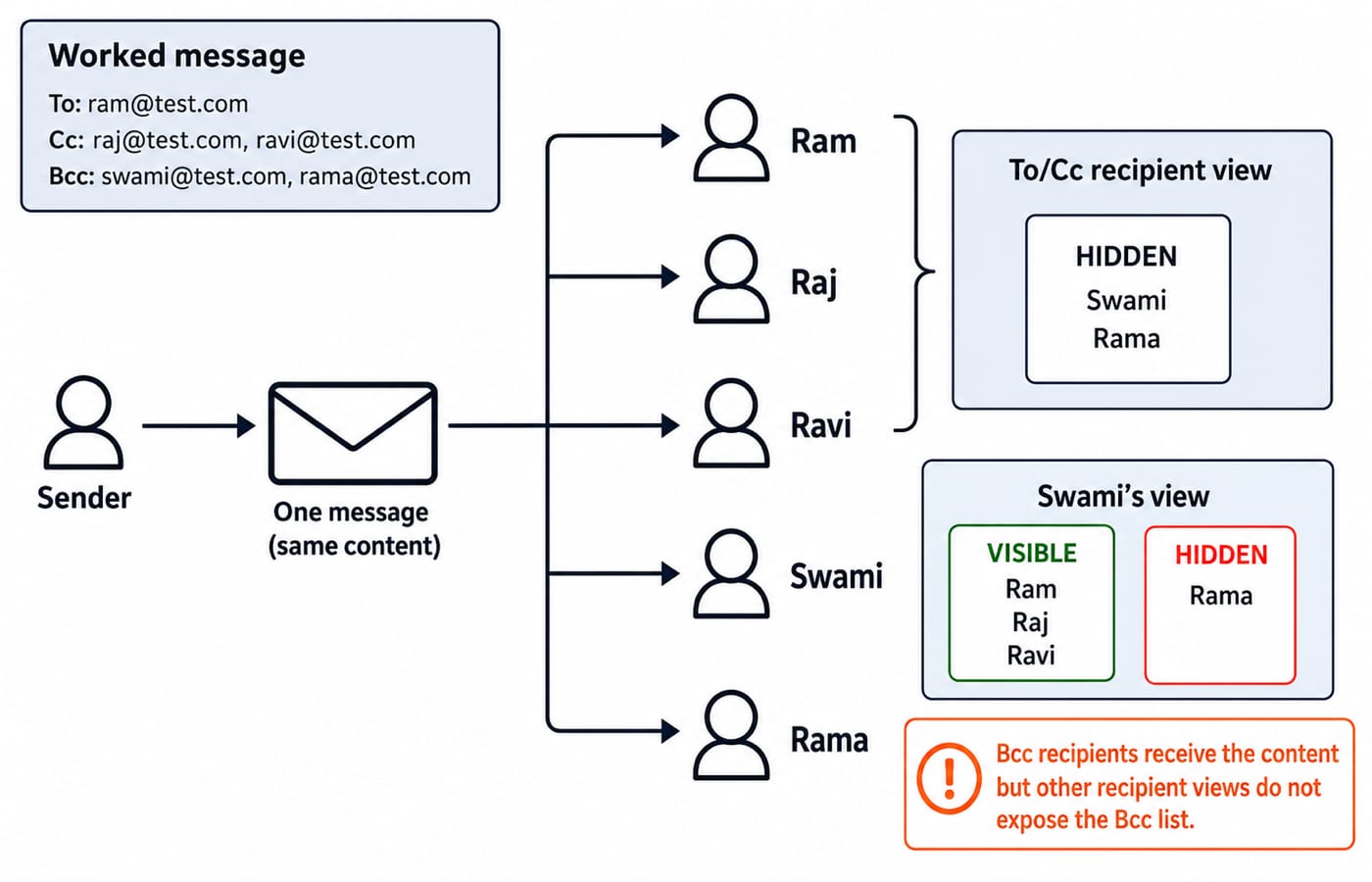
To names the primary recipient. Cc sends a visible copy to additional recipients. Bcc sends a copy without exposing its recipients to To and Cc recipients or to one another. Bcc protects address visibility, not message content.
Trace this illustrative header: To: ram@test.com; Cc: raj@test.com, ravi@test.com; Bcc: swami@test.com, rama@test.com. Swami sees Ram in To and Raj and Ravi in Cc, but not Rama. Swami's visible set of other recipients is {ram@test.com, raj@test.com, ravi@test.com}. Ram, Raj and Ravi cannot see Swami or Rama.
Viewer | To addresses | Cc addresses | Swami's Bcc address | Rama's Bcc address |
|---|---|---|---|---|
Sender's sent copy | Entered | Entered | May show | May show |
To or Cc recipient | Visible | Visible | Hidden | Hidden |
Swami, Bcc recipient | Visible | Visible | Own address | Hidden |
Rama, Bcc recipient | Visible | Visible | Hidden | Own address |
The sender's sent copy may show the addressing entered, although clients can render headers differently. A Bcc recipient may see their own address on the Bcc line, depending on the client, but never a fellow Bcc recipient's. Bcc does not encrypt a message, and Reply All cannot safely reveal hidden recipients.
MS Word macros: VBA turns a sequence into one command
A Word macro is a stored instruction sequence that automates a repeated task. Microsoft Word macros use VBA, not Visual C++, FoxPro or Microsoft Access. A recorded macro captures supported actions, while VBA code can use variables, calculations and control flow.
This beginner macro stores a small checklist calculation:
Sub BuildICTChecklist()
    Dim planned As Integer
    Dim completed As Integer
    Dim remaining As Integer
    planned = 12
    completed = 7
    remaining = planned - completed
    Selection.TypeText Text:="ICT questions remaining: " & remaining
    Selection.TypeParagraph
    Selection.TypeText Text:="Next topic: Email fields"
End Sub
Trace it in order. planned = 12; completed = 7; therefore remaining = 12 - 7 = 5. The first TypeText inserts ICT questions remaining: 5. TypeParagraph starts a new paragraph. The final line inserts Next topic: Email fields. The macro calculates before Word receives any text, so the document gains two lines of output separated by one new paragraph mark.
Keep neighbouring tools separate. A shortcut triggers a command, a template provides reusable document structure, and mail merge creates personalised copies from data. A macro may automate related steps, but these terms are not synonyms. MS Office for CS Teaching Exams gives the wider Word, Excel and PowerPoint context.
Do not enable an unknown macro merely to view a document, because a macro is executable code that runs with your own permissions.
Digital divide, Bcc and macros compared side by side
Concept | Question it answers | Worked value | Nearest confusion | Correct distinction |
|---|---|---|---|---|
Digital divide | Who has meaningful access? |
| Device ownership alone | Access includes connection, skills and useful outcomes |
Bcc | Which recipient addresses remain hidden? | Swami cannot see Rama | Cc | Cc recipients are visible; the Bcc list is hidden from recipient views |
Word macro | What automates a repeatable command sequence? | VBA computes | Template or shortcut | A macro stores executable instructions |
Digital divide is social access, email fields are communication metadata, and macros are application automation. They share an ICT umbrella, but are not interchangeable. Revise Computer Fundamentals for CS Teaching Exams if hardware, software, applications and networks still blur.
Knowledge of ICT traps: why the tempting answer fails
Trap | Why it fails | Correction |
|---|---|---|
Device ownership equals inclusion | Ignores connection, skill and outcome | Test meaningful access |
A 35-point gap equals 35% relative | Base and unit differ | Rate gap is 35 points; |
Cc hides addresses | Cc is visible | Use Bcc |
Bcc encrypts | It only hides addresses | Separate encryption |
Bcc recipients see one another | The list is hidden | Swami cannot see Rama |
Visual C++ runs Word macros | The name only sounds plausible | Use VBA |
A template is automatically a macro | Structure is not automation | Keep them separate |
Mail merge equals Bcc | Personalisation is not address hiding | Keep them separate |
A macro name predicts its result | The stored values at run time decide | Trace the code: |
These distinctions are stable, so they are worth learning once. Menu paths and macro-security defaults do change between Word versions, so check the behaviour of the version you actually use.
ICT question forms: definition, visibility caselet and language match
These three concepts reach you in three recognisable question forms. Naming the form first tells you which rule to write down before you look at the options.
Definition form: A disparity in meaningful digital access is the
digital divide.Visibility caselet: With Ram in To, Raj and Ravi in Cc, and Swami and Rama in Bcc, Swami sees Ram, Raj and Ravi but not Rama.
Application-language association: The Word macro language is
Visual Basic for Applications (VBA), so when the options offer Visual C++, FoxPro or Microsoft Access alongside it, the Visual Basic family is the answer.
Use one solving sequence: identify access, recipient visibility or automation; write the governing rule; calculate or trace only supplied values; reject distractors answering a neighbouring concept.
The short version: revise the rule, then redo the trace
ICT covers access, communication and information processing.
Digital divide is broader than device ownership.
Compare rates only after naming the denominator.
To and Cc are visible.
Bcc hides the Bcc list from recipient views.
Word macros use VBA to automate repeatable actions.
Recompute 96 / 120, 54 / 120, 84 / 120 and 12 - 7, then redraw Swami's visible-address set without looking. If you would rather follow a ready sequence than build one, the MP Cooperative Bank 2026 Course carries the computer-awareness track in order, and MP Co-operative Bank Exam Preparation shows the other sections it sits beside.
Keep learning
MP Cooperative Bank Roles Compared: Clerk, Manager and Technical Work
Compare three broad work families without treating them as a current vacancy list. Use task routing, a role-fit calculation and a notification card to choose a preparation focus.
Updated 14 Aug 20266 min readMP Cooperative Bank
MP Cooperative Banking Structure: PACS, DCCBs and Apex Bank Functions
Learn how demand, finance and repayments move through PACS, DCCBs and MP Apex Bank. A principal-only example makes each tier's function easy to identify.
Updated 12 Aug 20266 min readMP Cooperative Bank
MP Cooperative Bank Mock Analysis: Turn Errors Into a Revision Loop
A mock score cannot show you what to fix next. Use this worked review system to reconcile your section data, identify root causes and retest each repair.
Updated 9 Aug 20268 min readMP Cooperative Bank
MP Cooperative Banking Structure and Functions: Three Tiers, Roles and Exam Traps
Build a clear village-to-state model of MP cooperative banking, then test it with tier, fund-flow, repayment and authority questions.
Updated 7 Aug 20266 min readMP Cooperative Bank