MP Cooperative Bank Computer Awareness: Office Tools, Networks, and Cyber Basics
Connect RAM, storage, office apps, LAN components, and cyber controls through one branch-workstation example, then use a diagnostic to target weak areas.
KnowledgeGate Team
Exam prep & CS education
Updated 23 Jul 20266 min read
You may use a phone and laptop every day yet still confuse RAM with storage, a browser with a search engine, a workbook with a worksheet, or phishing with malware. Those four pairs are where a computer-awareness paper quietly takes marks back. So start from one branch counter: a clerk at an MP Co-operative Bank branch types the day's service-request counts into a spreadsheet, saves it, prints a copy across the branch network, and gets a phishing mail the same afternoon. Hardware, the operating system, office tools, the network, and cyber controls each do one specific job in that half hour, and naming the job is what the paper tests.
Computer awareness as one connected system
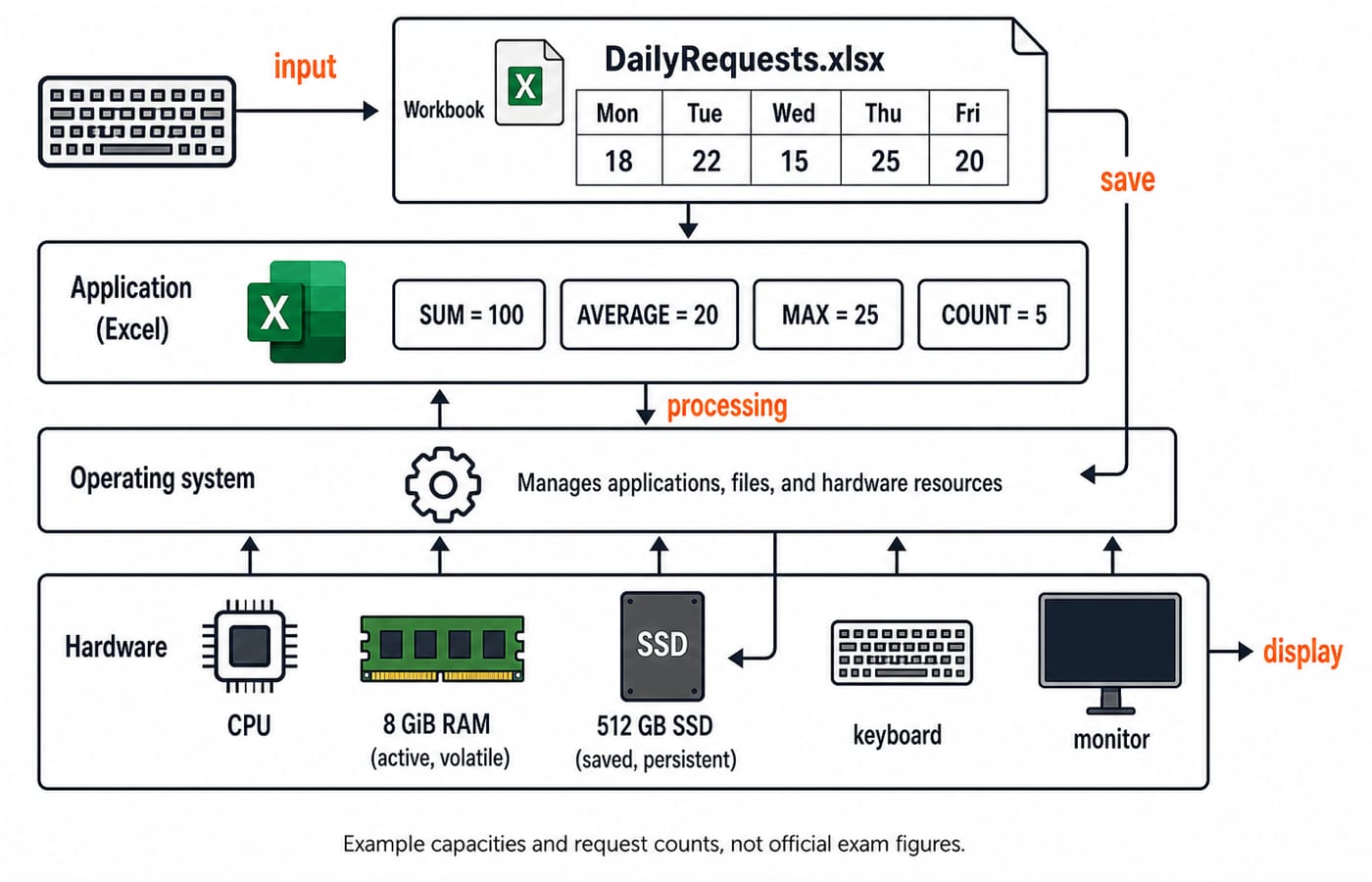
Think in one chain: input -> processing -> working memory -> storage -> output -> network -> protection. A clerk enters service-request counts into DailyRequests.xlsx with a keyboard and mouse. Excel calculates the summary, while Windows or Linux manages the application, file, memory, and devices.
The CPU processes instructions. Here, 8 GiB RAM holds active work, while a 512 GB SSD retains the saved file. The monitor displays the result, and the network interface sends an approved copy. Protection completes the chain by controlling access, filtering traffic, and preserving recoverable copies. CS Fundamentals for Placements works through the same operating-system, memory and networking layers at greater depth.
Hardware, software, files, and the operating system
Hardware is physical equipment. System software includes the operating system and device drivers. Application software performs user tasks, firmware is embedded control software, and a file stores named data. The operating system manages processes, memory, files, devices, users, and permissions.
Binary storage units use powers of 1024. Therefore:
4 MiB = 4 x 1024 KiB = 4096 KiB
This binary conversion differs from decimal labels manufacturers may use. RAM is volatile, so unsaved edits can disappear after power loss. An SSD is persistent, so a correctly saved file remains.
Extensions identify likely formats: notice.docx is a Word document, daily.xlsx an Excel workbook, briefing.pptx a PowerPoint presentation, and guidelines.pdf a portable document. An extension does not prove a file is safe. Computer Fundamentals for CS Teaching Exams drills the same hardware-versus-software boundary from a different angle.
Office tools by task, with one complete spreadsheet example
Use Word for a formatted notice or letter, Excel for data and formulas, and PowerPoint for a slide presentation. A workbook contains worksheets. Rows run horizontally; columns run vertically. Save updates the current file; Save As creates a new name, location, or format.
Build this worksheet:
Cell | Value | Cell | Value |
|---|---|---|---|
A1 | Day | B1 | Requests |
A2 | Mon | B2 | 18 |
A3 | Tue | B3 | 22 |
A4 | Wed | B4 | 15 |
A5 | Thu | B5 | 25 |
A6 | Fri | B6 | 20 |
The leading = starts a formula, and B2:B6 includes both endpoints:
=SUM(B2:B6)gives18 + 22 + 15 + 25 + 20 = 100.=AVERAGE(B2:B6)gives100 / 5 = 20.=MAX(B2:B6)gives25.=COUNT(B2:B6)gives5because five cells contain numbers.
Put 100 in B7. In C2, =B2/$B$7 gives 18/100 = 0.18, displayed as 18%. Copy it to C3; the relative reference becomes B3, while absolute $B$7 stays fixed, giving 22/100 = 22%. MS Office for CS Teaching Exams goes further into the same formula and referencing behaviour.
Networking and Internet terms through a small branch LAN
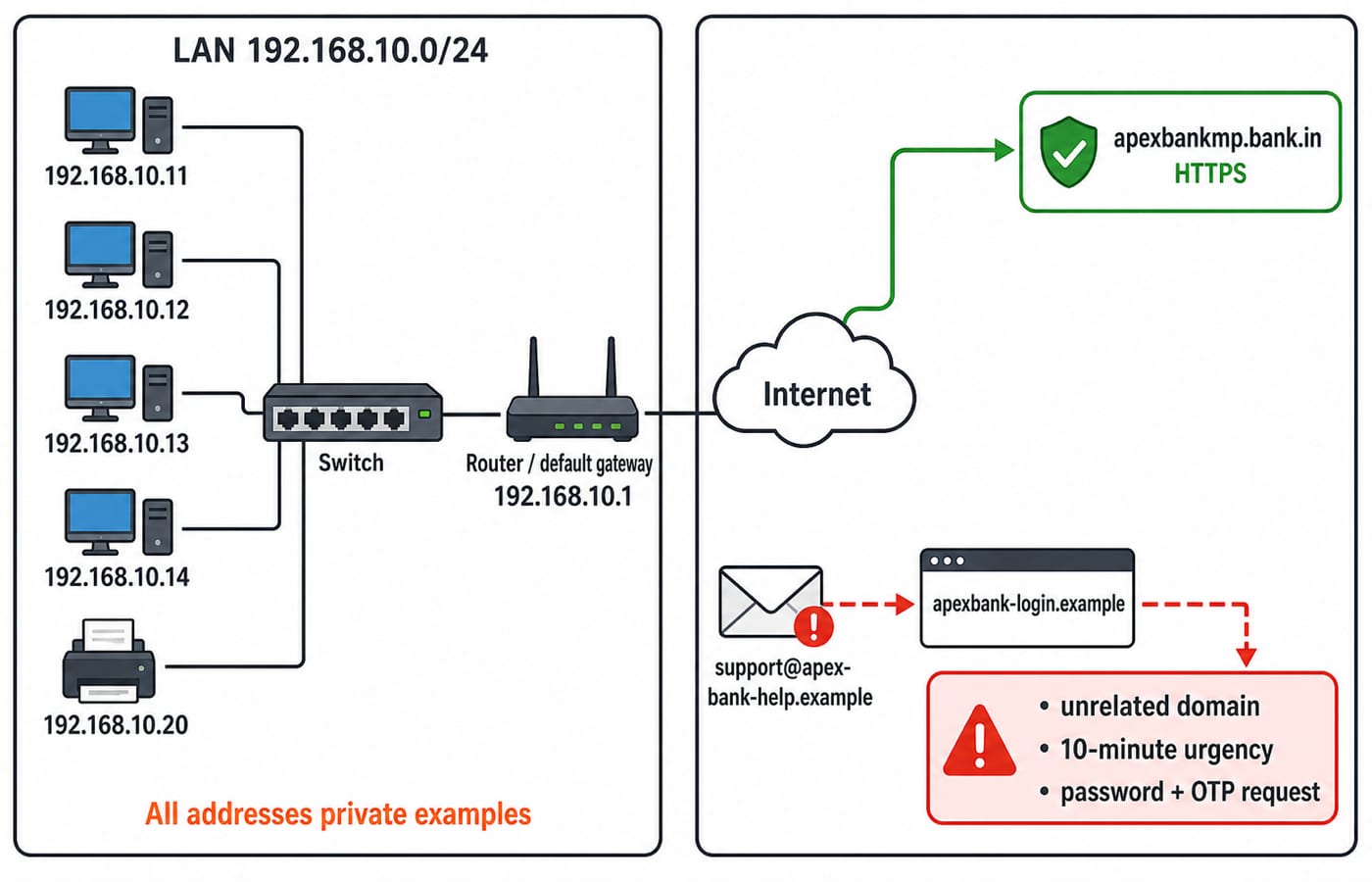
A network connects devices so they can exchange data. A LAN covers a limited local area, while a WAN spans a wider geographical scope. This concerns scope, not speed. A switch connects devices inside the LAN; a router forwards traffic between networks.
The router and default gateway is 192.168.10.1. Four PCs use 192.168.10.11, .12, .13, and .14; the printer uses 192.168.10.20; the prefix is /24. Addresses beginning 192.168 are private: they work inside the LAN and are never routable on the open Internet. PC .12 prints to .20 through the switch, while public-site traffic goes through gateway .1. A network interface connects a device, an IP address identifies an interface, and DNS maps a domain name to an IP address.
The Internet is the global network infrastructure; the Web is one service using it. A browser retrieves webpages, a search engine finds them, and a URL identifies a resource. HTTP transfers web data. HTTPS protects data in transit to the authenticated site, but does not make every site trustworthy.
Cyber hygiene as a decision process
Malware is malicious software; ransomware is one type. Phishing deceptively seeks information or an action. Antivirus scans for malicious code, a firewall filters traffic, multi-factor authentication adds a verification factor, and backups support recovery.
Consider an email from support@apex-bank-help.example that says your account closes in 10 minutes, links to a login page at apexbank-login.example, and asks for a password and OTP. The unrelated sender domain, the manufactured urgency, and the demand for secrets are three separate red flags. Any one of them is reason enough to stop; all three together are not a coincidence.
Do not click or reply. Verify independently through the official bank site, report the message through the approved channel, and change credentials through the legitimate site only if they were exposed. Treat urgency as a cue to slow down and verify, not to bypass procedure. Never share a password, PIN, CVV, or OTP in response to an unsolicited message. Lock the screen before leaving a workstation, apply updates from trusted sources, and keep a tested backup. Antivirus is one control, not a guarantee against every loss.
Computer-awareness question forms and a five-item dry run
Computer-awareness questions rarely ask for a bare definition. They set a term beside three near-neighbours and ask which one does the job described, which is why the pairs matter more than the glossary.
Six forms recur: classifying hardware or software, expanding an abbreviation, predicting a spreadsheet result, distinguishing two close terms, choosing a network component, and selecting the safest cyber response. Try these five:
Volatile working memory among RAM, SSD, DVD, and printer:
RAM.=AVERAGE(12,18,30):(12 + 18 + 30) / 3 = 60 / 3 = 20.Device that routes between networks:
router.Normal PowerPoint file extension:
.pptx.Safe response to an unsolicited OTP request: do not share it, and verify through an official channel.
Answer each one from the concept rather than from memory of the wording. A form you miss twice is a topic to rebuild, not a question to reread.
Common traps and a diagnostic that tells you what to repair
Keep seven pairs distinct: RAM versus long-term storage, workbook versus worksheet, Internet versus Web, browser versus search engine, switch versus router, phishing versus virus, and Save versus Save As.
Now suppose a 20-question self-test gives 14 correct, 4 incorrect, and 2 unattempted:
Attempts =
14 + 4 = 18.Attempt rate =
18 / 20 x 100 = 90%.Accuracy among attempts =
14 / 18 x 100 = 77.777...%, which rounds to77.8%to one decimal place.
Tag the errors as 2 office formulas, 1 networking device, and 1 cyber response. The next repair block is 20 + 10 + 10 = 40 minutes: rebuild formulas for 20 minutes, draw switch versus router for 10, then replay phishing decisions for 10. Re-test with new values instead of memorising answers.
The short version and the next step
Use this six-line recall chain:
Hardware is the equipment.
The operating system manages resources.
Applications perform tasks.
Files retain saved data.
Networks move data.
Cyber controls reduce risk.
Remember Word for documents, Excel for data and formulas, and PowerPoint for presentations. Reproduce the 18, 22, 15, 25, 20 spreadsheet and five-device LAN, then take a 20-question diagnostic and repair errors by category. If you miss a study day, move that block to the next review slot instead of doubling the next session.
For a preparation path with this sequence already built, use the MP Cooperative Bank 2026 Course. For the current recruitment notice and the Computer Knowledge scope it names, the official M.P. Rajya Sahakari Bank site is the authority.
Keep learning
Knowledge of ICT Explained: Digital Divide, Email Fields and MS Word Macros
Connect access, communication and automation through three worked ICT concepts. Practise denominator choice, Bcc visibility and a beginner Word macro trace.
Updated 16 Aug 20266 min readMP Cooperative Bank
MP Cooperative Bank Roles Compared: Clerk, Manager and Technical Work
Compare three broad work families without treating them as a current vacancy list. Use task routing, a role-fit calculation and a notification card to choose a preparation focus.
Updated 14 Aug 20266 min readMP Cooperative Bank
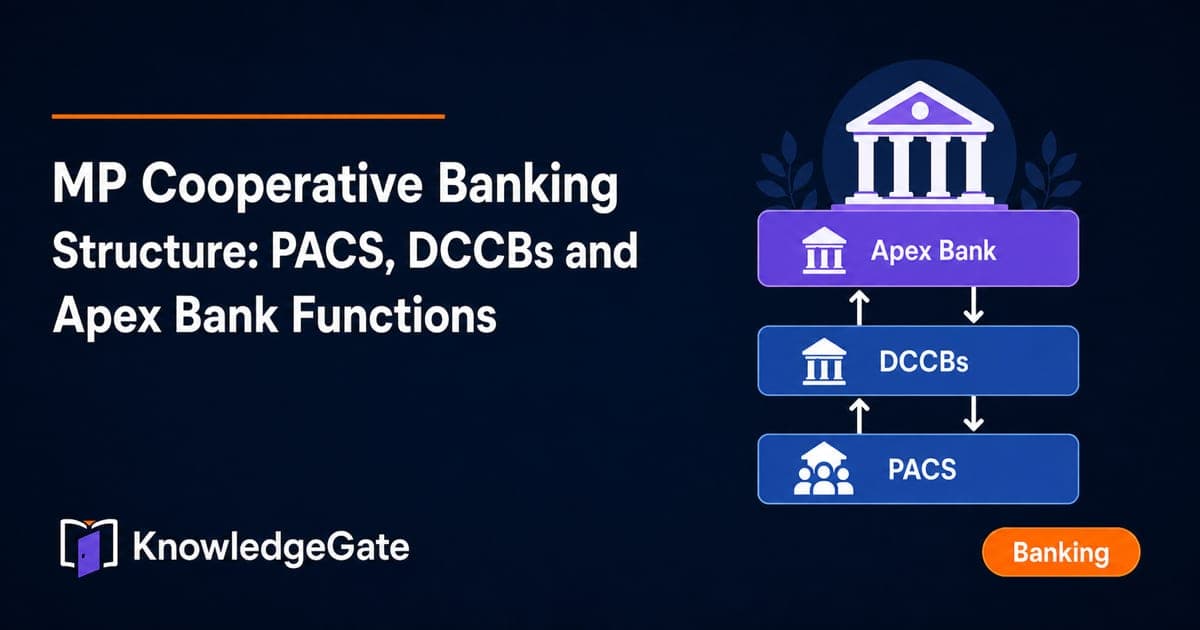
MP Cooperative Banking Structure: PACS, DCCBs and Apex Bank Functions
Learn how demand, finance and repayments move through PACS, DCCBs and MP Apex Bank. A principal-only example makes each tier's function easy to identify.
Updated 12 Aug 20266 min readMP Cooperative Bank
MP Cooperative Bank Mock Analysis: Turn Errors Into a Revision Loop
A mock score cannot show you what to fix next. Use this worked review system to reconcile your section data, identify root causes and retest each repair.
Updated 9 Aug 20268 min readMP Cooperative Bank