Coal India MT Computer Awareness: Office Tools, Internet and Security Guide
Turn a broad syllabus phrase into four practical revision buckets, then test your understanding with worked spreadsheet calculations and six concept checks.
KnowledgeGate Team
Exam prep & CS education
Updated 3 Aug 20265 min read
The phrase Uses of Internet & Computer Awareness names a whole area, not a starting point. It sits inside General Awareness in CIL's indicative Paper-I syllabus, so the boundary is loose and the questions arrive as judgements: which application fits this task, what a copied formula does to its references, whether an address is what it appears to be, and which control actually blunts a given risk.
Start with the official boundary, then use a practical topic map
The official CIL recruitment page for Advertisement No. 03/2026 lists Uses of Internet & Computer Awareness under General Awareness and calls the syllabus indicative, not exhaustive. Re-check the latest applicable notice.
Use four buckets: office applications, spreadsheets and data handling, internet and email, and security and safe use. Take them in that order, because the spreadsheet work reuses the task-to-tool habit and the security judgement reuses the URL reading. The rest of the CBT, across both papers, sits under Coal India MT exam preparation.
Office tools: choose the application from the task
Task | Best-fit tool | Feature |
|---|---|---|
Create a 12-page report with headings and page numbers | Word processor | Styles, headers and footers |
Total 250 transaction rows | Spreadsheet | Formulas, sorting and filters |
Present six project milestones | Presentation software | Slides and speaker notes |
Store and query 5,000 employee records | Database software | Tables, keys and queries |
The task decides the tool. To make only page 2 landscape, place section breaks before and after it, then change its orientation. A page break cannot isolate formatting. For one logo on 12 slides, edit the slide master once. Go deeper with MS Office for CS Teaching Exams.
Spreadsheet formulas: work from raw values to total
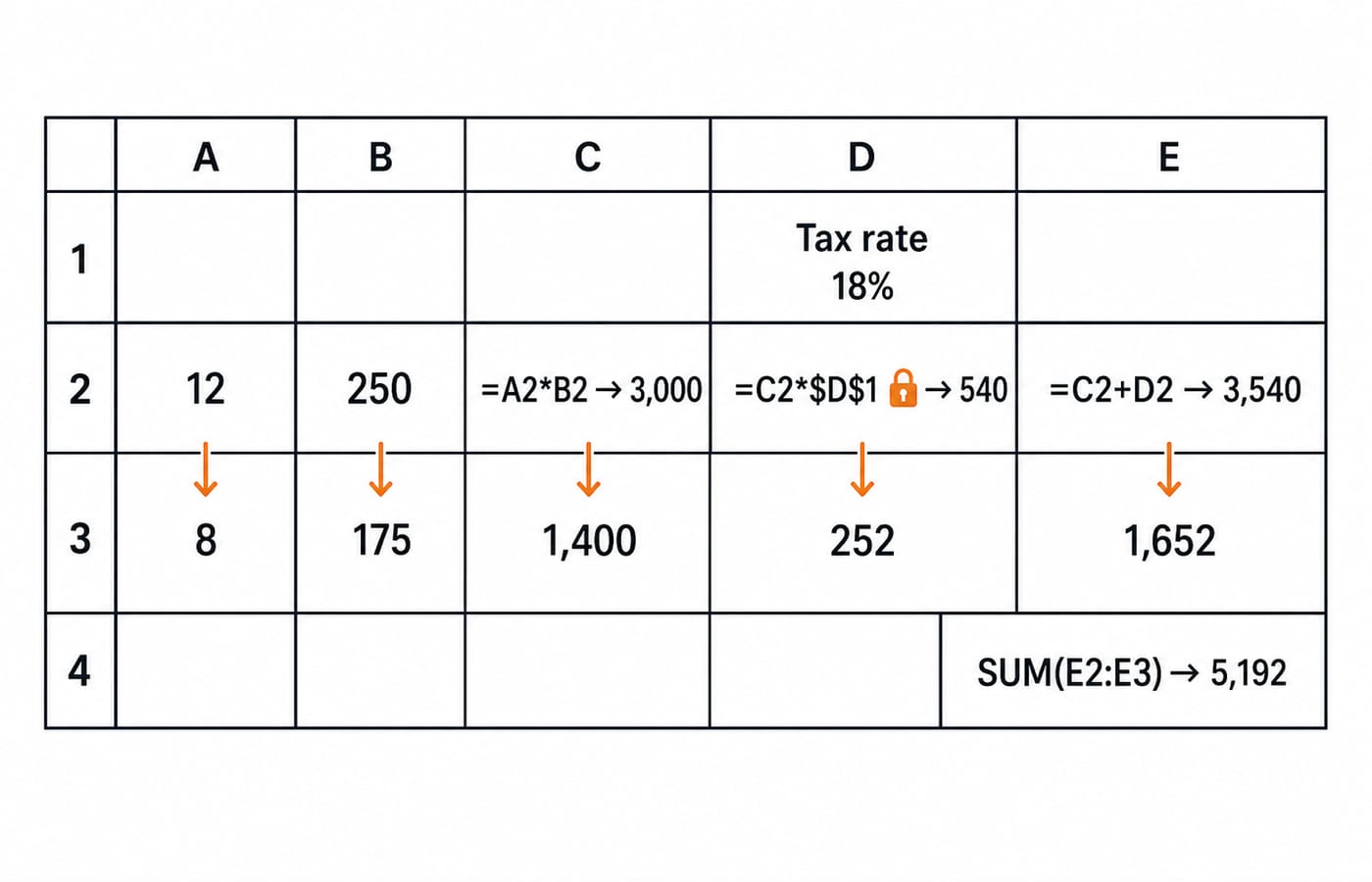
Let D1 = 18%, A2 = 12 and B2 = 250. Then C2 = A2*B2 = 12*250 = 3,000; D2 = C2*$D$1 = 3,000*18% = 540; E2 = C2+D2 = 3,540. $D$1 is absolute, so its row and column stay fixed.
For A3 = 8, B3 = 175: C3 = 8*175 = 1,400; D3 = 1,400*18% = 252; E3 = 1,652. So SUM(E2:E3) = 5,192; AVERAGE(C2:C3) = (3,000+1,400)/2 = 2,200. Precedence gives =120+30*2 = 180, but =(120+30)*2 = 300.
Formula text is =A2*B2, its cell references include A2, and its displayed value is 3,000. Copying relative =C2*D1 down produces =C3*D2, wrongly using 540 as the tax rate.
Internet and email basics: read the address first
In https://portal.example.org:443/results?id=27#score, the scheme is https, host portal.example.org, port 443, path /results, query id=27, and fragment score. DNS resolves the host to an IP address. HTTPS protects transit, but does not prove who runs the site.
SMTP sends outgoing email. IMAP synchronises mailbox state across devices; POP3 primarily retrieves messages. HTTP and HTTPS transfer web resources; DNS resolves names.
Bcc hides a recipient from everyone else on the message and Cc does not, so a reply-all reaches every Cc address and no Bcc one. Default ports are worth a line of memory as well: HTTP on 80, HTTPS on 443, SMTP on 25, POP3 on 110, IMAP on 143, and DNS on 53.
Security basics: match each risk with a useful control
Risk | Clue | Useful control |
|---|---|---|
Phishing | Deceptive message or lookalike destination | Inspect the real domain and report |
Credential theft | Stolen password | Unique password plus MFA |
Malware or ransomware | Malicious code or encrypted files | Patches, anti-malware and tested backups |
Unsafe network access | Unwanted traffic | Firewall rules |
Exposed stored data | Readable files | Encryption with protected keys |
The phishing row is where that address reading pays off. A message displays https://portal.example.org/login but targets http://portal.example.org.evil.example/verify, requests an OTP within ten minutes, and uses HTTP. The registrable destination is evil.example, not example.org. Do not click. Open the known site or app manually, never share the OTP, and report it.
Encryption is reversible with the key and protects confidentiality. Hashing is a one-way digest for integrity or salted password verification. Backup provides recoverability. No padlock, antivirus, or firewall guarantees safety.
Six exam-shaped checks with exact answers
Which tool best totals 250 rows? A word processor, B spreadsheet, C presentation tool, D image editor. B: spreadsheets calculate tables; the others create documents, slides, or images.
For C2 = 3,000 and $D$1 = 18%, what is =C2*$D$1? A 54, B 540, C 3,018, D 5,400. B:
3,000*0.18 = 540; the others misuse operations or scale.What is the host in https://portal.example.org/results?id=27? A https, B portal.example.org, C results, D id=27. B: the others are scheme, path, and query.
Which protocol sends outgoing email? A IMAP, B POP3, C SMTP, D DNS. C: IMAP and POP3 access mailboxes; DNS resolves names.
Which control reduces password-only account takeover? A slide master, B MFA, C mail merge, D page break. B: MFA adds a factor; the others format slides or documents.
Which reference fixes row and column when copied? A D1, B D$1, C $D$1, D D:D. C:
D1is relative,D$1fixes only the row, andD:Dnames a column.
For more practice on the same content, work through SSC CGL Tier 2 Computer Knowledge Questions with Answers, which sets office, internet and security questions for a different paper.
Avoid five traps, then run a seven-day revision loop
Trap | Why it fails | Replacement habit |
|---|---|---|
Memorising software names without tasks | Features blur together | Ask what output is required |
Ignoring | Copied results drift | Simulate one copied row |
Treating HTTPS as proof of legitimacy | Encrypted phishing exists | Inspect the registrable domain |
Assuming a firewall stops every threat | Phishing and stolen credentials can bypass it | Layer MFA, updates and user checks |
Reading explanations without answering | Familiarity feels like recall | Attempt before viewing the answer |
Day 1: 45 minutes on application-to-task mapping. Day 2: 45 minutes on formulas and references. Day 3: 30 minutes on word-processing and presentation features. Day 4: 45 minutes on URLs, DNS and email. Day 5: 45 minutes on threats and controls. Day 6: 60 minutes for 30 mixed questions. Day 7: 60 minutes redoing every wrong or guessed item. Move a missed block to the next open day, never double two full sessions.
Once you can explain all six answers unprompted, the next step is timed mixed practice in the Coal India Management Trainee (CS) Recruitment Test Series.
The short version: identify the task, trace the data, inspect the risk
Choose the tool from the task. Track references while calculating. Parse the URL or protocol. Match risks with layered controls. $D$1 fixes 18%; portal.example.org.evil.example belongs to evil.example.
If you would rather have the general and discipline papers taught in sequence than assemble them bucket by bucket, that is what the Coal India Management Trainee (CS) Recruitment 2026 course does; if computer awareness is your only gap, these four buckets are enough on their own. Revise one bucket without notes, label every mistake concept, formula/reference, protocol, or security judgement, then redo only the label that repeats.
Keep learning
Coal India MT Mock Analysis: Manage Both Papers as One Exam
A combined mock score can hide which paper cost you marks. Use this worked two-paper scorecard to test section order, diagnose errors and plan the next retest.
Updated 12 Aug 20265 min read54 viewsCoal India MT
Coal India MT PYQ Analysis: Balance Paper I and Professional Knowledge
A combined Coal India MT score hides which paper is weak. Score Paper I and professional knowledge separately, classify every miss by cause, and rebalance the week from that.
Updated 10 Aug 20265 min read245 viewsCoal India MT

Coal India MT Cutoffs: Qualifying Marks vs Merit List
Learn why clearing Coal India MT's paper-wise minimum does not guarantee selection. Read the 2026 System rules in order with a worked merit example.
Updated 8 Aug 20265 min read321 viewsCoal India MT
Coal India MT Numerical Ability: Ratios, Percentages and a Worked DI Set
Learn how ratio parts, percentage bases, and table reading work together. Includes checked examples, conversion shortcuts, common traps, and a 30-minute drill.
Updated 5 Aug 20266 min readCoal India MT