Banking Exams Computer Awareness: OS, MS Office, Networks and Security Made Clear
Build a connected revision map for operating systems, MS Office, networks and security. Then practise the ideas through worked Excel, IPv4 and phishing examples.
KnowledgeGate Team
Exam prep & CS education
Updated 21 Aug 20267 min read
Computer awareness can look like a bag of unrelated facts, so revision soon becomes a struggle to memorise abbreviations. A connected map across operating systems, MS Office, networks and security makes those terms easier to reason about than a list of full forms. The four blocks stay in the order a question usually travels: what the machine runs, what you produce on it, how it reaches someone else, and who is allowed to read it.
Banking exams computer awareness starts with one connected map
Each block answers a different question:
Block | Core job | Anchor terms | Typical concept check |
|---|---|---|---|
Operating system | Manages resources | Kernel, process | What schedules work? |
MS Office | Creates and analyses | Workbook, formula | Which tool fits? |
Networks | Moves data | Router, DNS | What handles traffic? |
Security | Protects data, services and identity | Authentication, encryption | Threat or control? |
The blocks meet during ordinary work. Saving an Excel workbook sends an application request through the OS to storage. Sharing it adds network protocols, while protecting it adds access control and encryption. Hardware sits under all four: the CPU executes instructions, RAM holds the active work, storage retains the file after power off, and a network interface card puts the data on the wire. If you are still comparing routes, Banking & Insurance Exam Preparation provides the broader category view.
Operating systems: from booting to files and running programs
The boot path is power on -> firmware and hardware checks -> boot loader -> operating-system kernel -> system services -> login or desktop. A device need not display every stage. The kernel is the core that manages CPU time, memory, devices and system calls.
A program is stored instructions; a process is a running instance. An application may sit on an SSD, which is secondary storage. Launching it creates a process whose active code and data occupy RAM, and the scheduler gives that process CPU time. Save writes a file back to storage. A file holds named data, while a folder organises files and other folders. System software runs or supports the computer; application software helps the user perform a task.
The OS provides multitasking, device drivers, file management, user interface, and security or access control. The specialist IT Officer route goes well past this vocabulary: the IBPS SO IT Officer: Operating Systems PK Guide works through CPU scheduling, process synchronisation, paging and the four deadlock conditions.
MS Office: applications, file types and an Excel formula worked example
Word creates documents, Excel handles workbooks and calculations, and PowerPoint creates slide presentations. Their common modern file extensions are .docx, .xlsx and .pptx. An extension identifies a file format, not the application currently running.
An Excel workbook contains worksheets. A worksheet has rows and columns; their intersection is a cell, and a group of cells is a range. A formula is an expression, while a function such as SUM is a built-in operation.
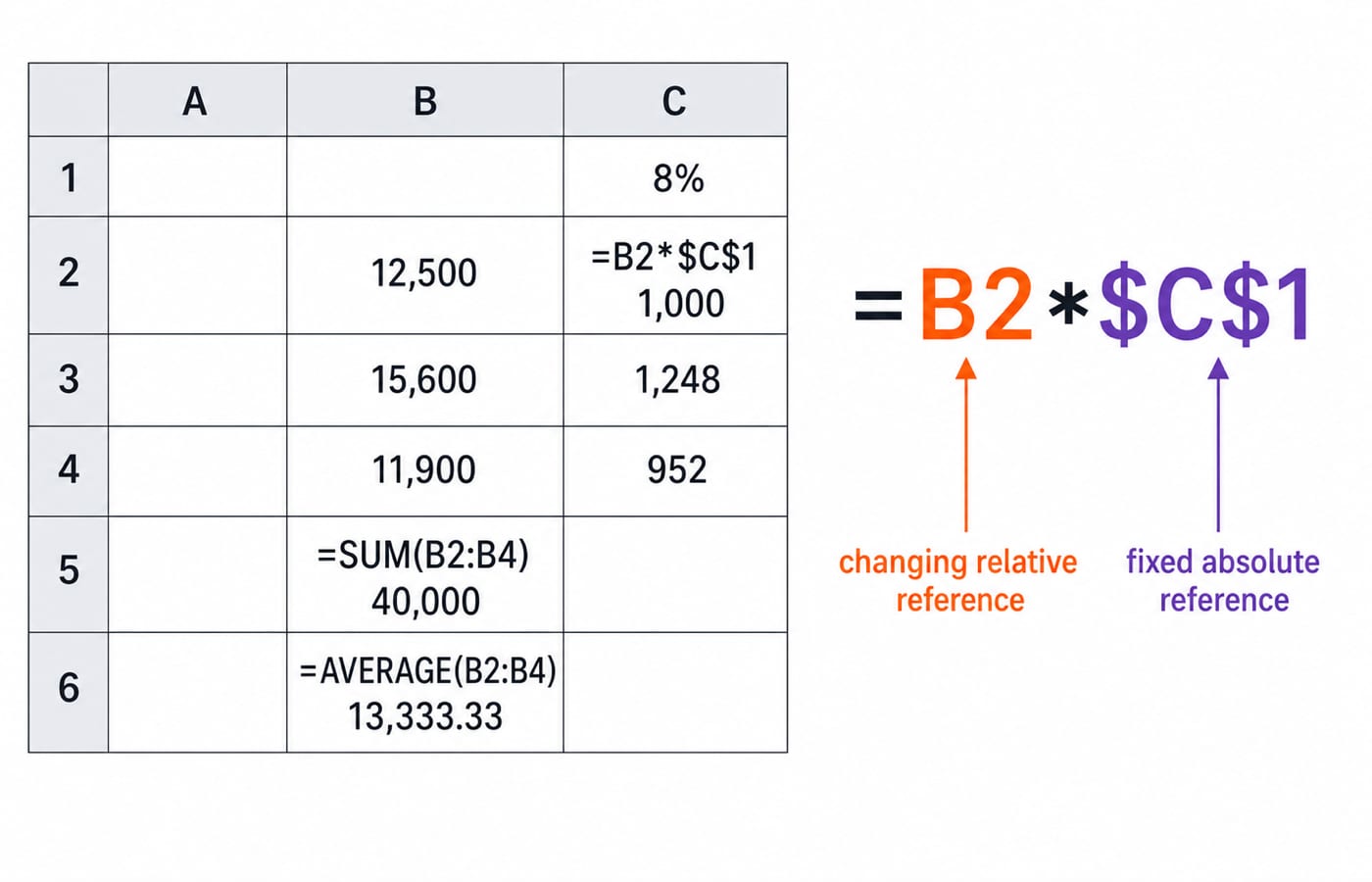
Take a sheet with C1 = 8%, B2 = 12,500, B3 = 15,600 and B4 = 11,900.
B5contains=SUM(B2:B4), so12,500 + 15,600 + 11,900 = 40,000.B6contains=AVERAGE(B2:B4), so40,000 / 3 = 13,333.333..., displayed as13,333.33at two decimal places.C2contains=B2*$C$1, so12,500 x 8% = 1,000. Copied down, it gives15,600 x 8% = 1,248inC3and11,900 x 8% = 952inC4.
B2 is relative, so its row changes when copied. $C$1 is absolute, so it stays fixed. Save updates the current file, while Save As creates a new name, location or format. Sorting changes row order; filtering hides rows that fail a condition.
Computer networks and the Internet: devices, protocols and IP addresses
A LAN connects devices over a limited area. A WAN connects networks across wider areas. Within a LAN, a switch forwards frames; between networks, a router forwards packets. An access point gives devices a wireless connection point. The Internet is the global network infrastructure, while the Web is one service that uses it.
Protocols also have distinct jobs. DNS resolves a domain name to an IP address. HTTP and HTTPS carry web traffic. SMTP sends email, while IMAP synchronises retrieved mail. TCP provides reliable, ordered delivery. UDP has lower overhead but does not provide TCP's delivery guarantees.
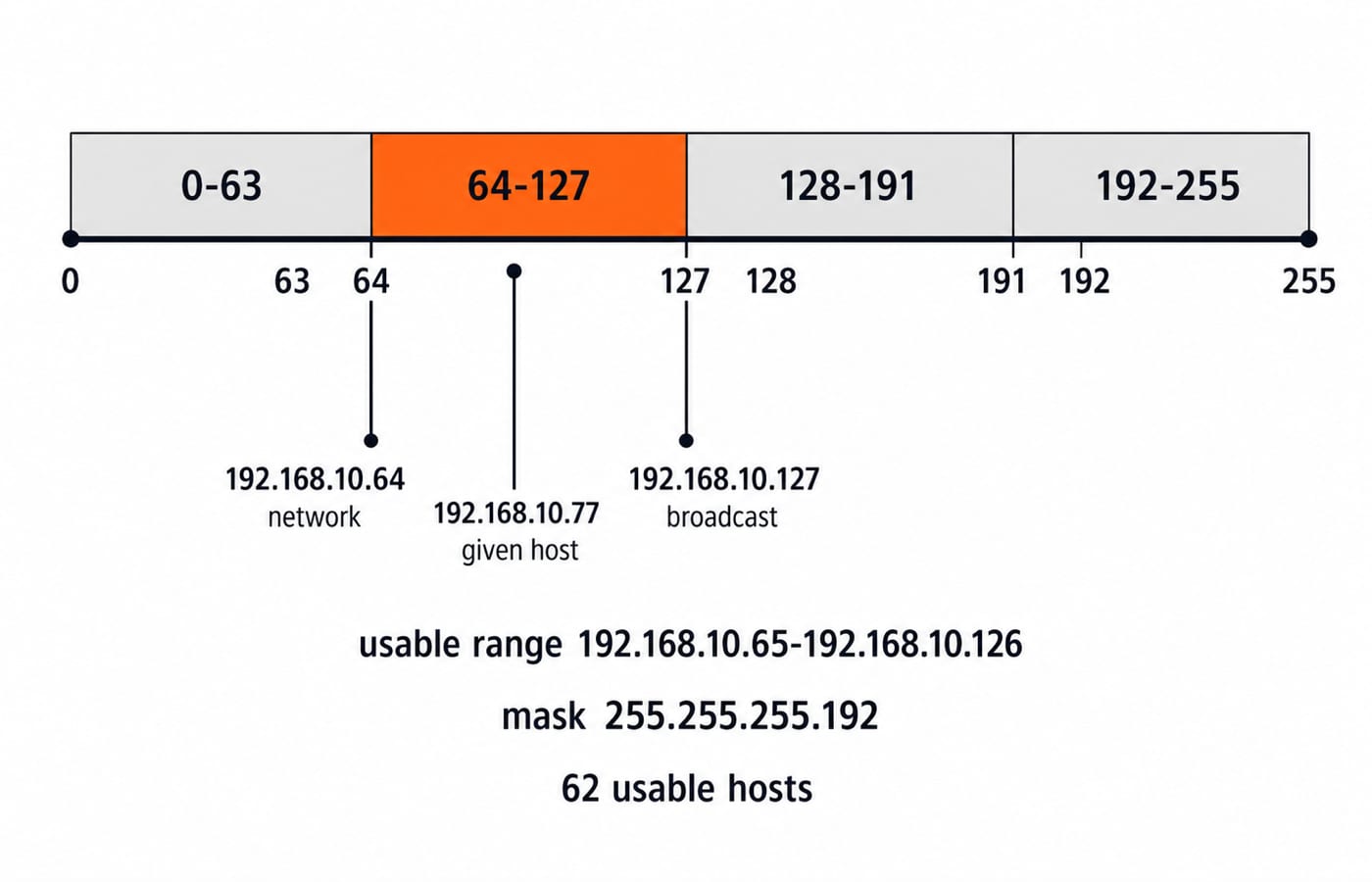
Now take 192.168.10.77/26:
/26gives the mask255.255.255.192.The last-octet block size is
256 - 192 = 64.The ranges are
0-63,64-127,128-191and192-255. Since 77 lies in64-127, the network address is192.168.10.64and the broadcast address is192.168.10.127.Usable hosts run from
192.168.10.65to192.168.10.126.Six host bits remain, so the usable count is
2^(32-26) - 2 = 2^6 - 2 = 62.
The vocabulary this example fixes is what an address question targets: mask, network address, broadcast address, usable range and host count. The IBPS SO IT Officer: Computer Networks PK Guide pushes the same arithmetic further, into the OSI and TCP/IP layers and heavier IP-addressing work.
Computer security: protect confidentiality, integrity and availability
The CIA triad sets three security goals. Confidentiality prevents unauthorised reading of an account statement. Integrity prevents silent alteration of a transaction value. Availability keeps an authorised service usable. Authentication proves identity; authorisation decides permitted actions.
Encryption is reversible with the correct key and protects readable data. A cryptographic hash is a one-way digest used to check integrity or support password verification. Malware differs by behaviour: a virus attaches to a host file, a worm spreads by itself, a Trojan pretends to be legitimate, and ransomware blocks access or encrypts data for extortion. Phishing instead manipulates users.
Suppose a message says your KYC will expire and requests a password and OTP through a link. This is phishing. Urgency, a credential request and an untrusted link are red flags. Do not open the link. Use the bank's known app or type or bookmark its address, never share the OTP, and report the message. If you entered credentials, change them from a trusted device, end active sessions where supported, and contact the bank. HTTPS protects the channel to the displayed domain; it does not make a fraudulent domain honest.
How banking computer-awareness questions test these concepts
Five shapes cover most of what gets asked: a direct definition or full form, a tool-to-function match, a sequence or role identification, a spreadsheet-output calculation, and a scenario you must classify as threat or control.
Six quick checks in those shapes:
Role identification: a stored set of instructions is a program, and the running instance of it is a process.
Spreadsheet output: copied from C2 to C3, =B2*$C$1 becomes =B3*$C$1, because B2 is relative and $C$1 is fixed, so C3 reads 15,600 x 8% = 1,248.
Tool-to-function match: inside one LAN, frames are forwarded by a switch, not a router.
Full form and function: DNS resolves a domain name to an IP address.
Direct definition: authentication establishes identity; authorisation grants permissions.
Scenario classification: malware that spreads without attaching to a host file is a worm, not a virus.
Marks, question counts, duration, negative marking, dates, cutoffs and syllabus wording differ by exam and by cycle, so read them from the current notification for the exam you are writing. For the IBPS recruitments that is ibps.in; other conducting bodies publish their own. Never carry those figures across from one exam to another.
Computer-awareness traps to remove before revision
Confused pair | Question to ask | Correct distinction |
|---|---|---|
RAM vs storage | Active or retained? | RAM handles active work; storage persists. |
Browser vs search engine | App or discovery service? | Browser opens sites; search finds them. |
Internet vs Web | Network or service? | Internet connects networks; Web serves pages. |
Switch vs router | Same LAN or another network? | Switch stays local; router crosses networks. |
Authentication vs authorisation | Identity or permission? | Authentication verifies; authorisation permits. |
Virus vs worm | Host needed? | Virus attaches; worm self-propagates. |
Recompute the calculation traps. AVERAGE is SUM/count, so 40,000/3 displays as 13,333.33 at two decimals. A /26 leaves six host bits, so 2^6 - 2 = 62 usable hosts, not 64.
The short version and the right next step
The OS manages resources, Office applications create and calculate, networks move data, and security protects identity, data and service. Reproduce the Excel and /26 examples without looking, then use the trap table as a one-page revision sheet. If you are preparing for a PO Mains, revise this topic next to reasoning, the way the Reasoning & Computer Aptitude coverage of the IBPS PO Mains Preparation Course and the SBI PO Mains Preparation Course arranges it.
Keep learning

NABARD Grade A Finance Preparation: Resources and an 8-Week Plan
Build a Finance specialist study plan around accounting, calculations and management applications. Use a 12-hour weekly schedule, a worked project appraisal and an error-based review routine.
5 Oct 20265 min readBanking Exams
LIC AAO Preparation for Repeat Attempts: A Six-Week Reset Plan
Familiar chapters need a sharper review method. Use your previous attempt and recent errors to plan six weeks of focused repair, protected mains work and manageable retests.
30 Sep 20265 min readBanking Exams
RBI Grade B Preparation Strategy: A 16-Week Phase-by-Phase Plan
A working aspirant must build early-stage speed without leaving economics, finance, management and writing cold. This plan turns 15 hours a week into foundations, timed practice, mock repair and a post-Phase-I bridge.
Updated 27 Aug 20265 min readBanking Exams
RBI Grade B Syllabus 2026: Phase 1 and Phase 2 Decoded
Separate RBI's official General Cadre syllabus from practical study buckets, then use diagnostics and worked examples to build a balanced weekly plan.
Updated 26 Aug 20265 min read56 viewsBanking Exams