Modules in JavaScript: Import, Export, and Runnable Examples
Build JavaScript modules from scratch with a shopping-cart project that runs in Node.js and the browser. Learn live bindings, re-exports, lazy loading, and practical fixes.
KnowledgeGate Team
Exam prep & CS education
Updated 15 Oct 20265 min read

JavaScript function logic can be correct while its first import fails because the runtime cannot resolve the file or the requested export does not exist. A shopping cart provides one concrete ESM boundary across Node.js and the browser: cart.js and discount.js export values, main.js imports them, and receipt.js loads only after a click. CommonJS uses require() and module.exports, but this runnable path stays entirely in standard ECMAScript modules (ESM).
1. What a JavaScript Module Is and Why It Exists
A JavaScript module is a file with its own top-level scope. It exposes an explicit public interface with export, and another module consumes that interface with import. With classic script files sharing globals, a common name such as total can collide.
Think of the program as a dependency graph: main.js depends on cart.js and discount.js. Import arrows connect those files; code is not copied and pasted between them. This same graph connects JavaScript modules to the wider browser and web context.
ESM uses import and export. CommonJS uses require() and module.exports. They are different module systems, so do not mix them in these worked files.
2. Build the First Runnable Module Program
Create this project:
modules-demo/
  package.json
  cart.js
  discount.js
  main.js
For Node.js, put { "type": "module" } in package.json. Keep the .js extension on every relative import.
// cart.js
export const cart = [
  { name: "Keyboard", price: 1250, quantity: 1 },
  { name: "Mouse", price: 750, quantity: 1 },
  { name: "USB cable", price: 250, quantity: 2 }
];

export function subtotal(items) {
  return items.reduce(
    (sum, item) => sum + item.price * item.quantity,
    0
  );
}// discount.js
export const STUDENT_DISCOUNT = 0.10;
export function applyDiscount(amount, rate) {
const saved = amount * rate;
return { saved, payable: amount - saved };
}Now import the named exports and run the calculation:
// main.js
import { cart, subtotal } from "./cart.js";
import { STUDENT_DISCOUNT, applyDiscount } from "./discount.js";

const gross = subtotal(cart);
const { saved, payable } = applyDiscount(gross, STUDENT_DISCOUNT);

console.log(`Gross: ${gross}`);
console.log(`Discount: ${saved}`);
console.log(`Payable: ${payable}`);
The arithmetic is 1250 + 750 + (250 * 2) = 2500. The saving is 2500 * 0.10 = 250, so the payable amount is 2500 - 250 = 2250. Run node main.js and you get:
Gross: 2500
Discount: 250
Payable: 2250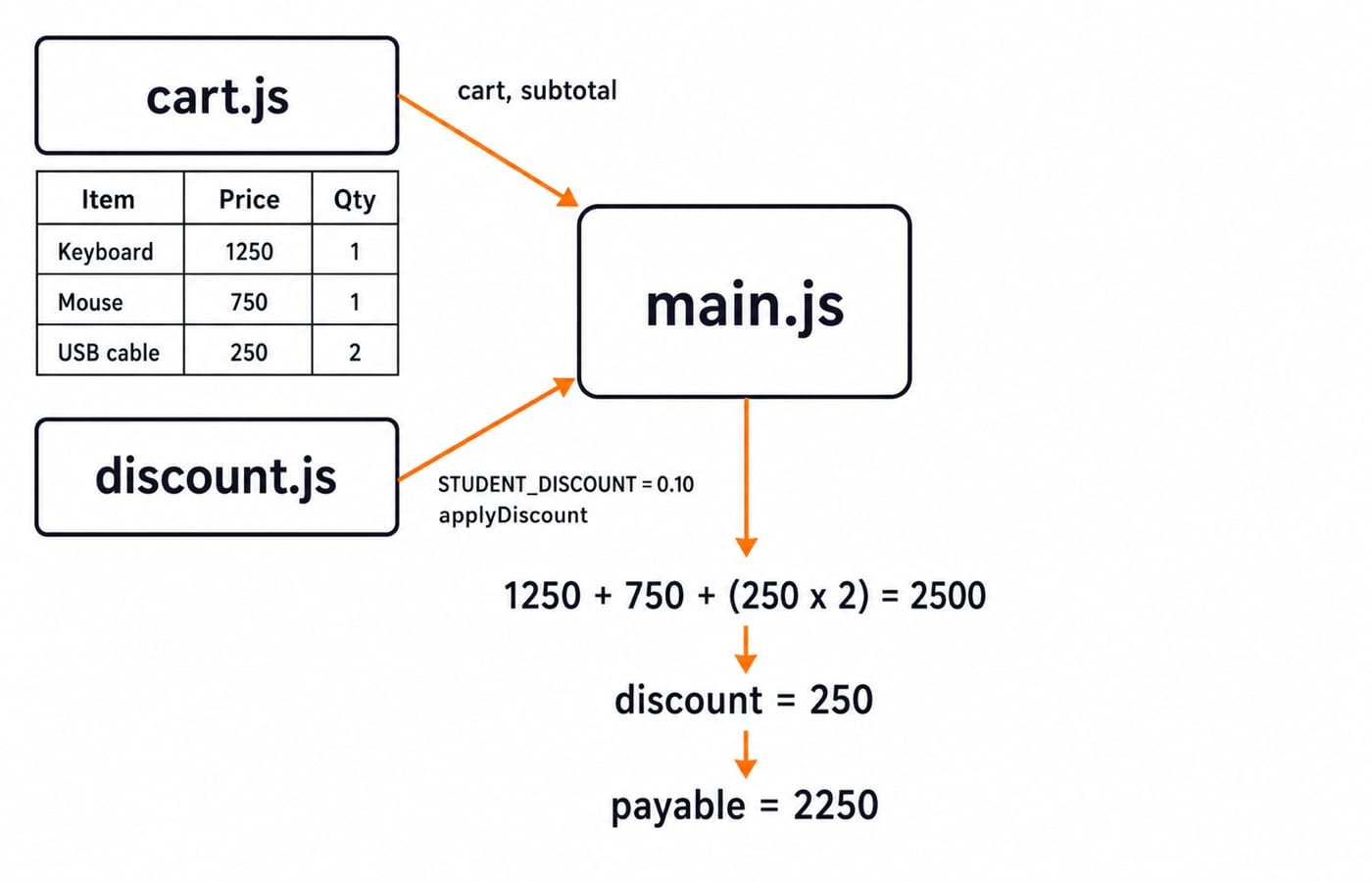
3. Understand Imports as Live, Read-Only Bindings
An imported variable is not a detached copy.
// counter.js
export let count = 0;
export function increment() { count += 1; }

// main.js
import { count, increment } from "./counter.js";
console.log(count);
increment();
console.log(count);
increment();
console.log(count);
The output is 0, 1, and 2 on separate lines. The exporting module may update count, and importers observe the new value. However, main.js cannot assign count = 7. The imported binding is read-only to the importer; that does not mean every exported value is immutable.
4. Choose Named Exports, Default Exports, Aliases, and Re-exports
A module can have one default export and several named exports:
// currency.js
export default function formatAmount(value) {
  return String(value);
}

export const label = "Amount:";
Named imports must match exported names unless you alias them. A re-export can present a smaller public interface:
// report.js
export { default as formatAmount, label as amountLabel } from "./currency.js";

// main.js
import { formatAmount, amountLabel } from "./report.js";
console.log(`${amountLabel} ${formatAmount(2250)}`); // Amount: 2250
Use named exports when several public values matter. Use a default when the file has one obvious main value. Re-export files can simplify imports, but too many nested barrels hide where values originate.
5. Run the Same Idea in a Browser and in Node.js
For a browser, add an index.html file:
<button id="show-receipt">Show receipt</button>
<script type="module" src="./main.js"></script>
Serve the folder through a local HTTP server, then open the page. Check three details: the relative path starts with ./, filename case matches, and .js is present. If the HTML is unfamiliar, use HTML interview questions for freshers as optional prerequisite review.
For Node.js, retain { "type": "module" } and run node main.js. The same three totals appear because main.js has no browser-only API. Bare imports such as import x from "package-name" use Node.js package resolution or build tooling, while local project files use relative paths with explicit extensions. The Node.js, Express.js and MongoDB course continues from file modules into server-side packages, routing and data access. Repeated imports of the same resolved module reuse its instance instead of creating a fresh cart.
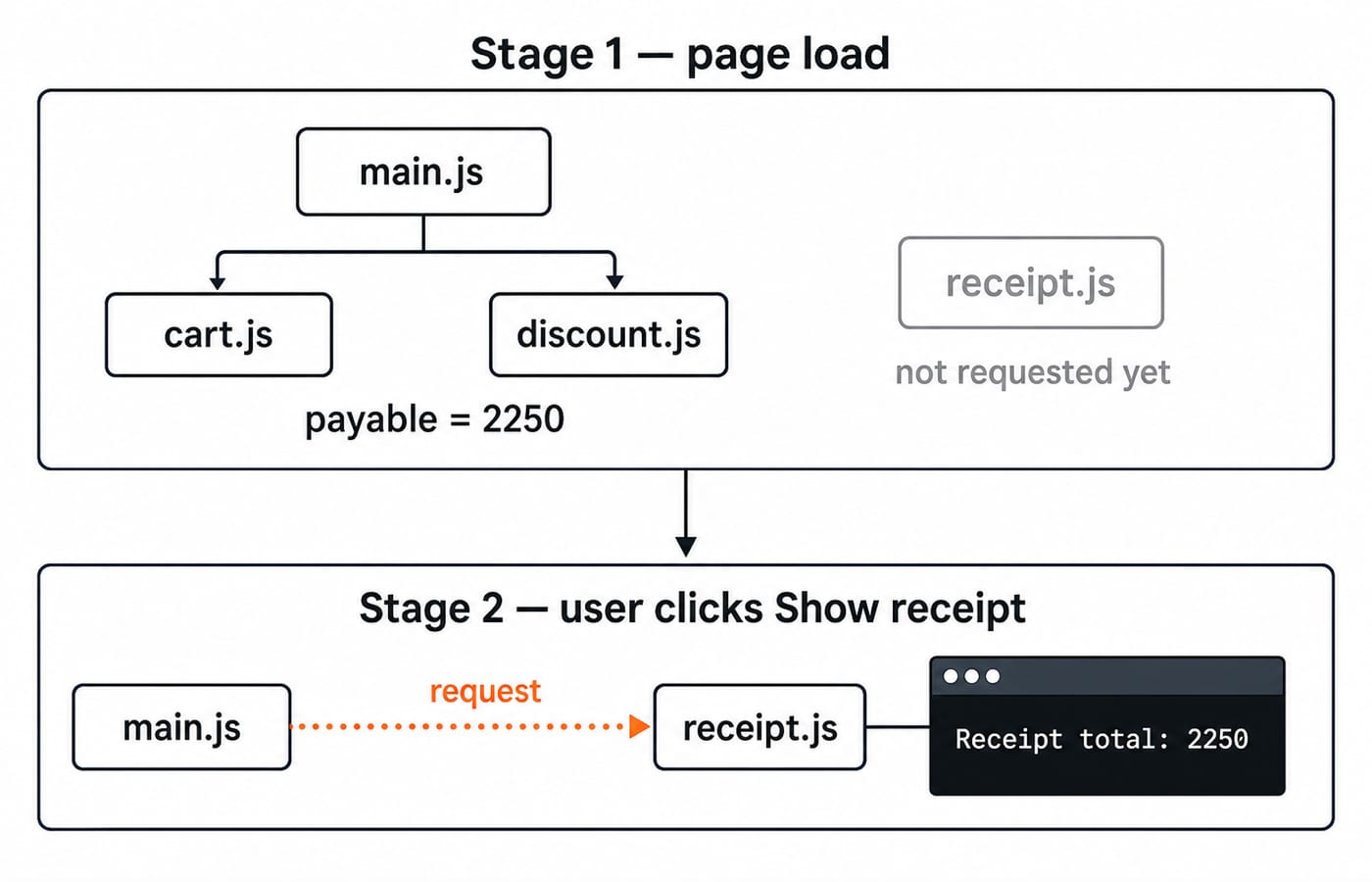
6. Load a Module on Demand with import()
Dynamic import() returns a promise, so it suits an optional feature that should load later.
// receipt.js
export function buildReceipt(payable) {
  return `Receipt total: ${payable}`;
}
In the browser, attach it to a button:
document.querySelector("#show-receipt").addEventListener("click", async () => {
  const { buildReceipt } = await import("./receipt.js");
  console.log(buildReceipt(2250));
});
The initial modules calculate payable = 2250. Only after the click does the browser request receipt.js and print Receipt total: 2250.
7. Diagnose the Four Errors Learners Actually Meet
Failure | Cause | Fix |
|---|---|---|
| The file is not treated as ESM | Add browser |
| Path, extension, or case is wrong | Correct all three |
| The imported name does not match | Use the actual named export or the default syntax |
| Two modules read each other too early | Remove the early read or refactor the cycle |
For example, import total from "cart"; is wrong because it lacks ./ and cart.js has no default export. Repair it as import { subtotal } from "./cart.js";.
A cart.js to discount.js to cart.js cycle does not always fail, but early reads and hidden coupling make it fragile. Move STUDENT_DISCOUNT = 0.10 into config.js, then let both modules import it from there.
8. Check Understanding, Then Take the Next Step
Try these before reading the answers:
Add
{ name: "Notebook", price: 100, quantity: 3 }. Answer:gross = 2800,saved = 280,payable = 2520.Use the original cart but change the rate to
0.15. Answer:saved = 375,payable = 2125.Lazy-load
receipt.js. Answer: no receipt line appears before the click;Receipt total: 2250appears after it.
Coding assessments and interviews can test the same reasoning: predict 0, 1, 2 from a live binding, repair a named-versus-default mismatch, or split one file into a clean dependency graph. Use this coding-round strategy for placements to place those tasks inside a wider practice plan.
The short version
Modules create file scope.
exportdefines the public interface.Static
importdeclares dependencies.import()loads a module later.Paths and export names must match.
Beginners can continue with the Complete JavaScript course. For a wider set of programming courses, use the free Prashant Sir programming-course category.
Keep learning

Functions and Arrow Functions in JavaScript: Syntax, Scope and Runnable Examples
Build function declarations, expressions and arrows in JavaScript, then trace parameters, closures, lexical this and array callbacks through exact outputs.
Updated 19 Oct 20266 min readWeb Development

LocalStorage and Cookies in JavaScript: Store, Read and Delete Data
Run one lesson-progress object and one preference cookie through their complete life cycles, then learn which browser store fits a feature and which security traps to avoid.
Updated 11 Oct 20266 min readWeb Development

JavaScript Event Delegation: Bubbling, target and currentTarget with Runnable Examples
Learn how browser events travel through the DOM, then build one delegated listener that handles nested controls and rows added later.
Updated 6 Oct 20265 min readWeb Development

JavaScript Operators: Types, Precedence and Runnable Examples
Learn how JavaScript arithmetic, assignment, comparison, logical and modern operators behave by tracing one score program from inputs to final output.
Updated 2 Oct 20266 min readWeb Development