KVS and NVS Computer Science Eligibility and Selection: A Post-by-Post Map
KVS and NVS are separate recruiters with separate notices. Test your qualifications, documents and selection stages against the exact notice for the one advertised Computer Science post you are chasing.
KnowledgeGate Team
Exam prep & CS education
Updated 28 Jul 20266 min read65 views
KVS/NVS Computer Science sounds like one exam label, but Kendriya Vidyalaya Sangathan and Navodaya Vidyalaya Samiti are separate recruiters with separate notices. Eligibility belongs to an exact advertised post in a particular notice, so a degree route, teacher-training credential or selection stage accepted in one row cannot be copied into the other. Run the two lanes side by side, from notice to eligibility decision to selection sequence, and let each notice settle its own lane.
1. Split KVS and NVS before checking any eligibility rule
Kendriya Vidyalaya Sangathan runs the Kendriya Vidyalayas and posts its recruitment at kvsangathan.nic.in. Navodaya Vidyalaya Samiti runs the residential Jawahar Navodaya Vidyalayas and posts its own at navodaya.gov.in. Two employers, two notice streams, two eligibility decisions. Begin with two blank identity cards:
KVS | advertisement or notice number | exact post title | Computer Science subject or discipline wording | cycle as printedNVS | advertisement or notice number | exact post title | Computer Science subject or discipline wording | cycle as printed
Keep every field blank until the notice itself supplies it. Never assume the two organisations use the same PGT, TGT or other role label for Computer Science. Without one organisation and one exact post, your status is NOT YET CHECKABLE, which is neither eligible nor ineligible. The KVS and NVS Computer Science exam overview is useful background while you wait for a notice to open.
2. Build two post-specific eligibility matrices
Create this table twice, headed KVS and NVS.
Official field | Exact notice wording | Page or clause | Candidate document | Exact document wording | Status | Missing evidence |
|---|---|---|---|---|---|---|
Essential degree | Copy the notice phrase verbatim | Note the page and clause number | MCA marksheet | Copy the certificate phrase verbatim | MATCH, HOLD or DOES NOT MATCH | Name the exact paper still missing |
Required rows are exact post/subject; essential degree; accepted discipline/subject combination; minimum marks/class if stated; teacher-training credential; CTET/another eligibility test if stated; language proficiency if stated; experience if stated; age at the notified cutoff; category/relaxation proof; and recognition/equivalence authority.
MATCH: notice and document wording align. HOLD: notice, order, cutoff or proof is missing. DOES NOT MATCH: official wording excludes the route or an essential condition is absent. NOT APPLICABLE: that notice makes the field irrelevant. A higher degree, similar syllabus or acceptance elsewhere cannot turn HOLD into MATCH.
3. Worked eligibility audit: Meera's documents in two separate lanes
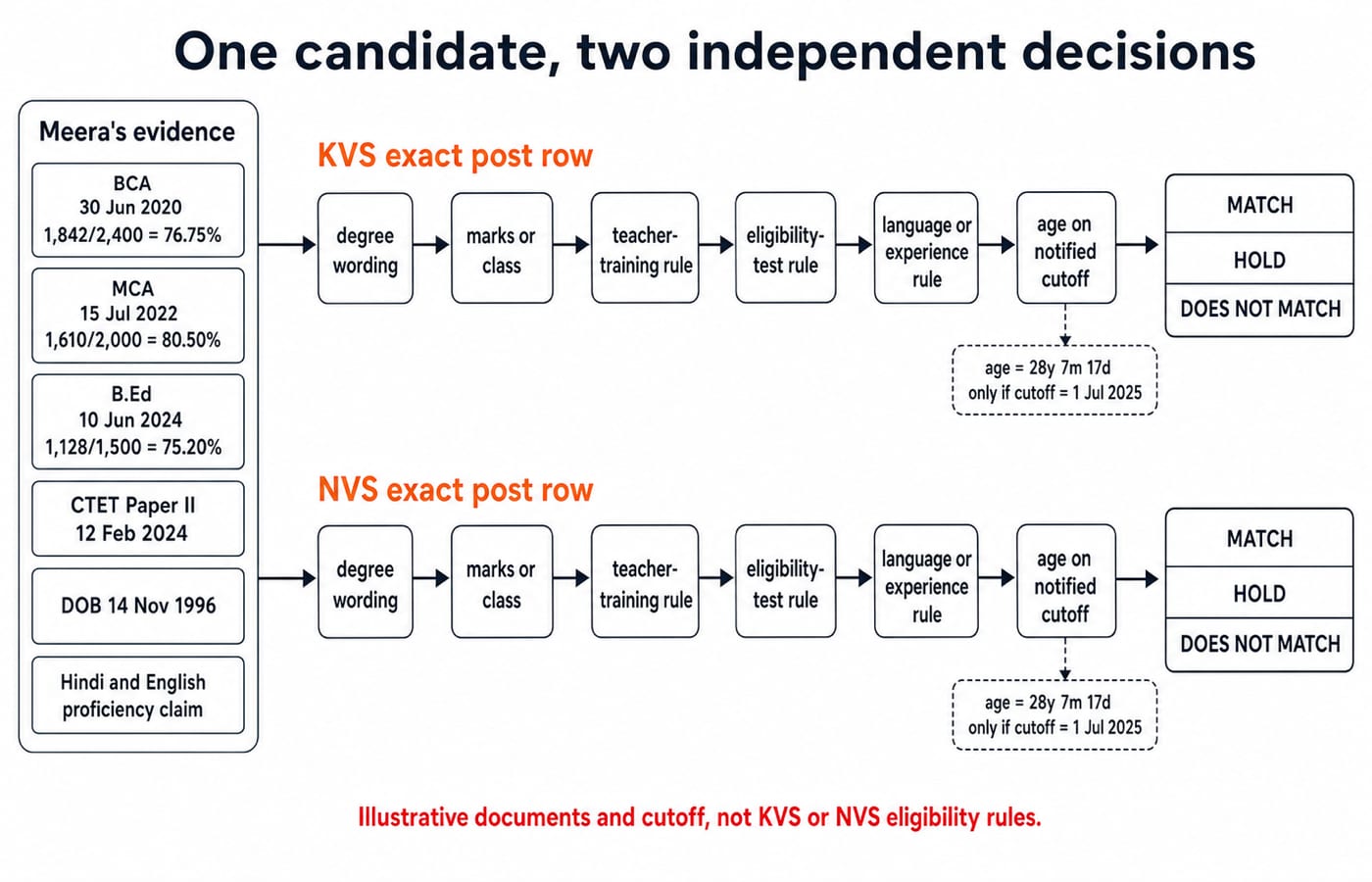
Meera lays out what she actually holds:
BCA, awarded 30 June 2020:
1,842 / 2,400 x 100 = 76.75%.MCA, awarded 15 July 2022:
1,610 / 2,000 x 100 = 80.50%.B.Ed, awarded 10 June 2024:
1,128 / 1,500 x 100 = 75.20%.CTET Paper II, result dated 12 February 2024; date of birth, 14 November 1996.
Hindi and English teaching proficiency, currently only her own claim with no official evidence loaded.
Before both notices are loaded, the printed titles, dates, arithmetic and certificate label are EVIDENCE RECORDED. Their acceptability in the KVS row remains HOLD, and their acceptability in the NVS row separately remains HOLD. Age and language proficiency also remain HOLD.
If a notice set 1 July 2025 as its age cutoff, Meera would be 28 years, 7 months and 17 days on that date. Swap in the real notified cutoff, recompute, and only then read the age row. Holding an MCA, a B.Ed and a CTET result still settles nothing unless the exact post row asks for them.
4. Map each selection process from the same notice stack
Make one blank selection worksheet for KVS and another for NVS:
Stage or paper exactly named | Who takes it | Screening, qualifying or merit-bearing | Questions or marks | Duration | Negative marking | Weight in final merit | What follows | Official page |
|---|---|---|---|---|---|---|---|---|
Copy the stage name verbatim | All applicants or a shortlist | As the notice classifies it | Only if printed | Only if printed | Only if printed | Only if printed | The next named step | Note the page it came from |
Fill a cell only when the KVS notice, or the NVS notice, names that stage in its own words; otherwise leave it blank. A paper section (language, reasoning, teaching aptitude, Computer Science) or a stage (shortlisting, interview, professional-competency test, skill test, document verification, medical step, final merit) exists only where that notice names it. NVS staffs residential schools, so read its notice for steps a day-school recruitment need not carry, and read the KVS notice on its own terms rather than by analogy. The teaching Computer Science exams comparison shows how other teaching recruiters shape selection; fill your own worksheet only from your own notice.
5. Turn eligibility into a document-readiness check
Use folders named 01_notice_and_addenda, 02_identity_and_category, 03_degree_and_marksheets, 04_teacher_training, 05_eligibility_test, 06_experience_or_language_if_required and 07_equivalence_or_recognition. Name notice files KVS_<notice-number>_<issue-date>.pdf and NVS_<notice-number>_<issue-date>.pdf, copying values only from real documents.
Read the two worksheets as tallies. Say the KVS sheet closes with 10 required rows: 6 MATCH, 3 HOLD and 1 NOT APPLICABLE. The NVS sheet closes with 11: 7 MATCH, 4 HOLD and none NOT APPLICABLE. Both decisions are still WAIT, because one unresolved hold outranks any number of matched rows, and each sheet carries several. Resolve every hold before starting a form on assumption.
6. Avoid the four KVS/NVS eligibility traps
Why it happens | What goes wrong | What to do instead |
|---|---|---|
The slash in | A KVS clause enters an NVS decision | Keep two matrices |
A course or blog uses familiar post labels | Preparation copy is treated as a notice | Use it only for target selection or study planning; similarity never proves eligibility |
A previous-cycle or amended notice is read alone | A changed clause is missed | Order the base notice and official addenda by issue date |
A rumoured, expected or news-reported notice is treated as a source | You plan against rules that were never officially issued | Work only from a published notice or its official addendum |
7. Choose preparation only after the correct lane is identified
What you need | Where to study it on KnowledgeGate | What it still does not settle |
|---|---|---|
See the government teaching-exam routes in one place | Government Teaching Jobs, the category hub carrying the KVS and NVS material; no dedicated KVS or NVS course exists yet | Eligibility for any particular post |
Build TGT-level Computer Science subject depth | DSSSB TGT Computer Science Section B, for structured Computer Science study | A KVS or NVS paper pattern |
Build PGT-level Computer Science subject depth | HPSC PGT Computer Science, for subject preparation | Transfer of HPSC eligibility, stages or scoring to KVS or NVS |
Pick by level, not by brand: TGT-level content for a TGT advertisement, PGT-level for a PGT one. Subject work is the part of preparation you can start today, while the eligibility rows are still waiting on a notice.
8. KVS and NVS Computer Science eligibility: the short version
Choose KVS or NVS and identify the exact official post and notice. Compare document wording row by row, resolve equivalence, cutoff and evidence gaps, then map selection from the same notice stack. Separately for each organisation: MATCH means begin post-specific preparation; HOLD means resolve the named gap; DOES NOT MATCH means do not apply on assumption. Return to the latest respective recruitment notice for the final decision. Until one is open, the useful work is subject study at the right level plus a document folder that already matches its own printed wording.
Keep learning

NVS PGT Computer Science: A Topic-by-Topic Practice Map
Turn a topic list into checks you can actually solve. Map your NVS PGT Computer Science preparation through binary conversion, Python tracing, SQL results and IP addressing.
30 Sep 20265 min readKVS & NVS

NVS PGT Computer Science 60-Day Study Plan: Revision and Mock Strategy
Turn the final 60 days into four clear phases, with a worked 201-hour timetable, error-led revision blocks, timed mocks, recovery buffers, and a calm taper.
Updated 12 Aug 20265 min readKVS & NVS
PGT Eligibility: Is B.Ed Mandatory for KVS, NVS and State Recruiters?
A recruiter-first guide to the PGT teacher-training question, using dated KVS, NVS and DSSSB clauses, candidate profiles and a reusable eligibility audit.
Updated 10 Aug 20265 min read125 viewsKVS & NVS
KVS vs NVS vs EMRS: Choose the Right School System for Your Teaching Career
Compare KVS, NVS and EMRS through current post rules, lifestyle limits and a weighted personal-fit matrix. See why changing priorities can change the answer.
Updated 7 Aug 20267 min read87 viewsKVS & NVS