HTML Basics: Complete Guide to Tags, Structure and a Worked Web Page
Learn what HTML elements mean, how a valid document fits together, and how to build and audit a complete profile page with fixed, traceable markup.
KnowledgeGate Team
Exam prep & CS education
Updated 29 Jul 20266 min read
You may be able to copy a tag but still wonder why some content belongs in head, why other content belongs in body, or why a page can look right while its structure is poor. HTML is a markup language, not a programming language: it describes content and structure, CSS controls presentation, and JavaScript adds programmable behaviour. Once that split is clear, one valid profile page settles the rest, with fixed tags, attributes, links, image dimensions and a document tree you can trace from the html root down to the last list item.
HTML basics: markup, elements, tags and attributes
HTML means HyperText Markup Language. In <p>Learn HTML step by step.</p>, <p> is the opening tag, the sentence is content and </p> is the closing tag. Together they form a paragraph element. In <a href="https://example.com">Reference</a>, href is an attribute, and its quoted value tells the browser where that link goes.
The roles stay separate even when they affect the same content. HTML can provide <h1>Asha Verma</h1>, CSS can make that heading orange, and JavaScript can change it after a button click. HTML has no general variables, loops or conditional execution, so it is not a programming language.
Elements can nest: <p>Learn <strong>semantic HTML</strong> first.</p>. Here, strong is a child of p, and tags close in reverse order. Void elements such as img and meta do not wrap content, so they do not take normal closing tags.
HTML document structure: from doctype to body
A minimum page starts with <!doctype html>, which selects modern HTML, followed by <html lang="en">. Inside it, head holds metadata: <meta charset="UTF-8"> selects character encoding, the viewport meta tag supports device-width layout, and <title>Asha Verma | CS Student</title> names the browser tab. Visible content belongs in body.
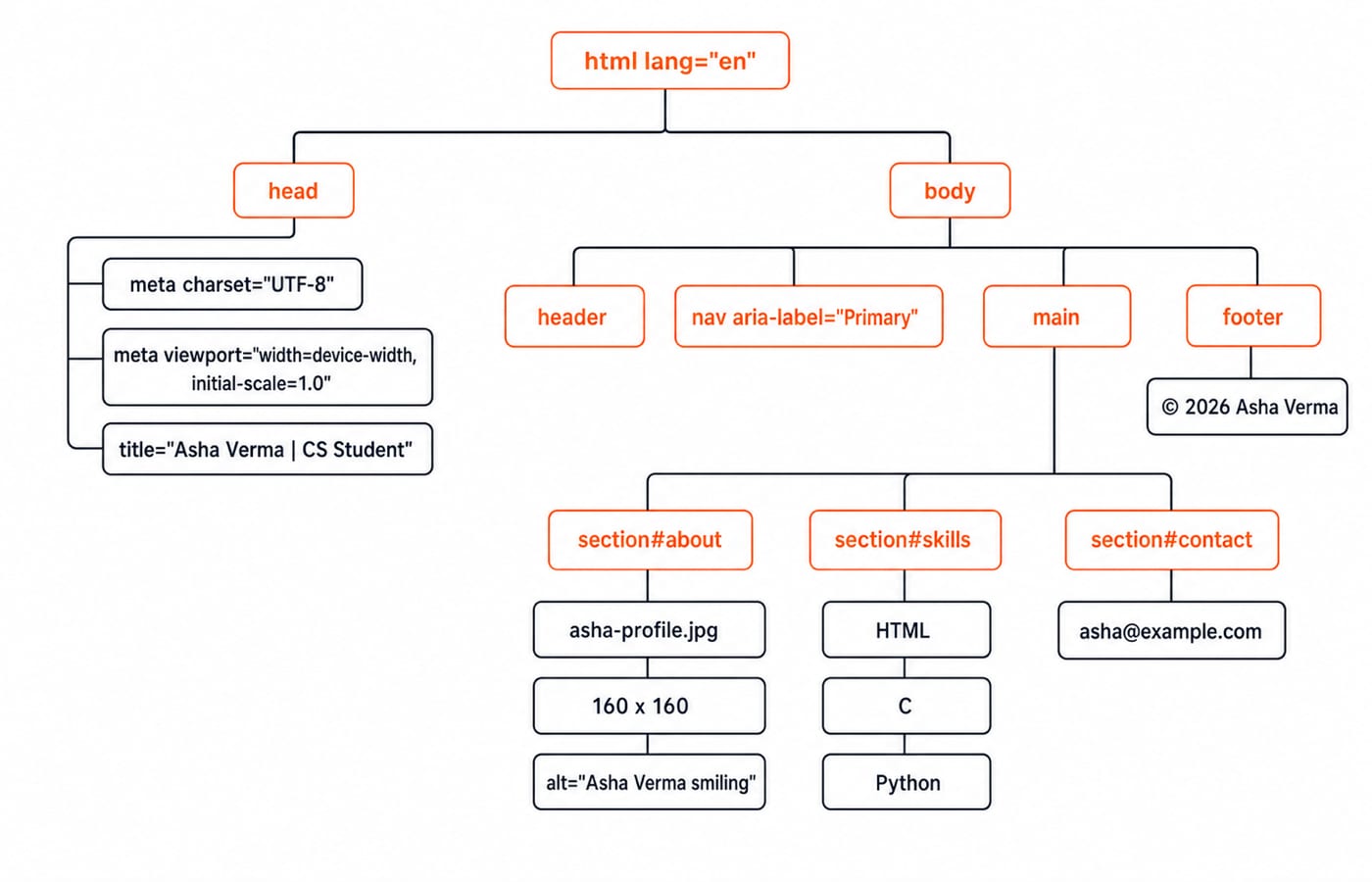
The browser parses nested elements into a document tree. In the worked page, html has head and body; body has header, nav, main and footer; and main has sibling sections named about, skills and contact.
Construct | Exact example | Job |
|---|---|---|
Element |
| Gives the page its main heading |
Attribute |
| Gives one element an identifier |
Text node |
| Supplies text inside an element |
Comment |
| Leaves a note outside visible content |
Character reference |
| Represents the copyright symbol |
A browser and a compiler both read flat text and group it into meaningful units, though a browser recovers from broken input where a compiler rejects it. Lexical Analysis in Compiler Design: Tokens and Lexemes covers that grouping step formally.
HTML worked example: build Asha's profile page
Build the page in four passes: add metadata, add page landmarks, add the three linked sections, then add the image, list and email details.
<!doctype html>
<html lang="en">
<head>
<meta charset="UTF-8">
<meta name="viewport" content="width=device-width, initial-scale=1.0">
<title>Asha Verma | CS Student</title>
</head>
<body>
<header>
<h1>Asha Verma</h1>
<p>Second-year CS student learning web development.</p>
</header>
<nav aria-label="Primary">
<a href="#about">About</a>
<a href="#skills">Skills</a>
<a href="#contact">Contact</a>
</nav>
<main>
<section id="about">
<h2>About</h2>
<p>I build accessible study tools.</p>
<img src="asha-profile.jpg" alt="Asha Verma smiling" width="160" height="160">
</section>
<section id="skills">
<h2>Skills</h2>
<ul>
<li>HTML</li>
<li>C</li>
<li>Python</li>
</ul>
</section>
<section id="contact">
<h2>Contact</h2>
<p>Email: <a href="mailto:asha@example.com">asha@example.com</a></p>
</section>
</main>
<footer>
<p>© 2026 Asha Verma</p>
</footer>
</body>
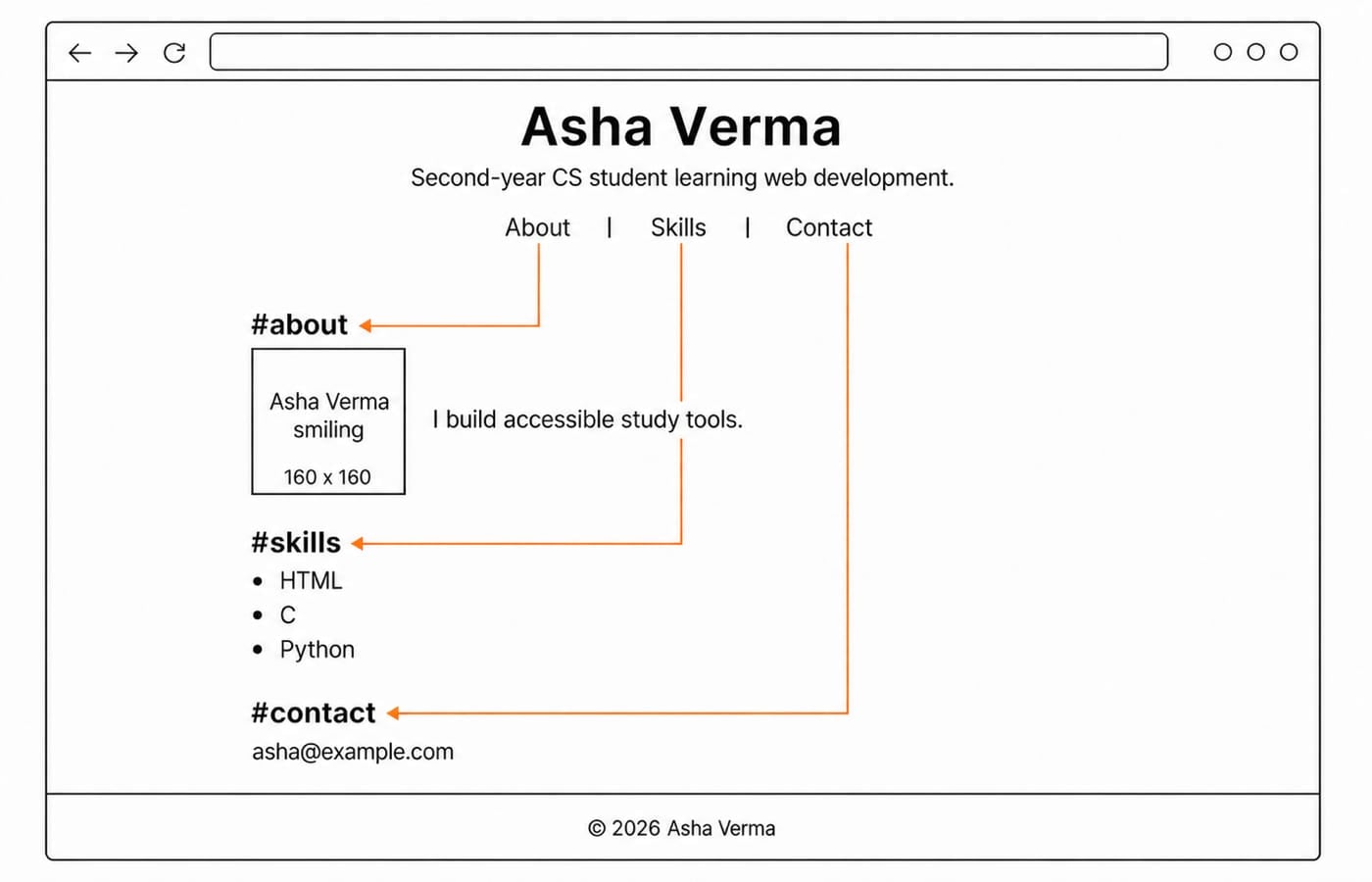
</html>The inventory is 1 title in head, 1 h1, 3 h2 elements, 3 navigation links, 3 matching section IDs, 3 list items, 1 image sized 160 x 160, 1 email link and 1 footer. Clicking Skills follows href="#skills" to id="skills". The list remains a list even if CSS changes its appearance, while mailto:asha@example.com asks the system to hand the address to a configured mail application. The Complete HTML course continues this foundation in sequence.
Semantic HTML and accessibility: make structure carry meaning
header, nav, main, section and footer communicate roles to browsers and assistive technology. Five anonymous div containers could be styled similarly, but visual appearance alone would not create that meaning.
The example identifies its language with lang="en", names the navigation landmark with aria-label="Primary", uses one h1, gives all three sections an h2, and describes meaningful profile content with alt="Asha Verma smiling". A purely decorative image should instead have empty alt text. A link such as href="#skills" navigates; <button type="button">Show skills</button> represents an action and needs JavaScript to change the page. A clickable div is not a sound shortcut.
HTML elements by job: text, media, data and input
Job | Elements | Correct use |
|---|---|---|
Text structure |
| Headings organise ideas; paragraphs hold prose |
Navigation |
|
|
Images |
|
|
Lists |
| Groups related items |
Data |
| Represents tabular data, never page layout |
Input |
| Collects and submits user input |
A small practice table can have caption Weekly practice, headers Topic and Hours, rows HTML | 3 and CSS | 2, and footer Total | 5. Use th for both column headers and the total label. The calculation is 3 + 2 = 5, and the caption names the dataset.
<label for="email">Email</label>
<input id="email" name="email" type="email" value="asha@example.com" required>
<button type="submit">Subscribe</button>
The label's for matches the input ID email; the submitted field name is email; the starting value is asha@example.com; and required asks for a non-empty value. No action endpoint or server is defined, so this markup alone does not store anything.
HTML errors and debugging: fix structure, not just appearance
Trap | Consequence | Fix |
|---|---|---|
| Crossed nesting breaks the intended tree | Use |
Two |
| Keep one unique |
| Meaningful image lacks text alternative | Add |
| Anchor has no destination | Add |
| Heading hierarchy misrepresents structure | Use the next logical level and style it with CSS |
Although <a href=#about> may be tokenised in simple cases, quoted href="#about" is consistent. <img></img> wrongly treats a void element as a container, while <title>Asha Verma</title> belongs in head, not body. Browser recovery can render invalid markup, but rendering does not prove validity.
Debug in a fixed order: validate the skeleton; inspect nesting and closing order; ensure every fragment has one unique matching ID; check headings and landmarks; verify useful alt text; then inspect the browser DOM. Preserve the content while correcting its structure.
HTML in GATE, interviews and fundamentals checks: what is actually asked
The official GATE 2026 Computer Science syllabus names programming in C, and names HTTP among the application layer protocols, but it does not name HTML anywhere. HTML therefore belongs to your interview and fundamentals preparation rather than your GATE revision, and the syllabus for your own cycle is worth a fresh read. HTTP can carry an HTML representation, while compiler study builds a separate formal view of tokens and parsing.
Parsing in Compiler Design: Top-Down and Bottom-Up Explained sets out that stricter view, where a grammar either accepts its input or rejects it outright. Interview and fundamentals checks stay closer to the page itself: distinguish HTML, CSS and JavaScript, predict a document tree, repair nesting, select semantic landmarks, match fragments to IDs, write accessible image markup, or connect a label and input.
Three exact checks: href="#contact" targets id="contact"; the page has 3 list items; and width="200" height="120" has ratio 200:120 = 5:3. That new rectangle can distort an image whose intrinsic ratio is 1:1.
HTML basics: the short version and next step
Recall the chain: doctype selects modern HTML; html wraps the document; head holds metadata; body holds visible content; semantic landmarks organise it; attributes such as href, id and alt add meaning; and correct nesting creates a coherent tree.
Now make two controlled changes. Add <li>JavaScript</li> and the skills list grows from 3 to 4 items. Add <a href="#projects">Projects</a> only after adding <section id="projects"><h2>Projects</h2></section>; navigation links and sections both grow from 3 to 4, and each fragment still resolves once.
The Complete HTML course walks the same ground in a taught sequence. Add the Complete CSS course when you are ready to control presentation, or compare options through Free Courses & Guidance by Prashant Sir. The right next step is to rebuild Asha's page without copying, then inspect the resulting DOM.
Keep learning
TypeScript vs C# Typing: Structural Compatibility, Nominal Identity, Generics and Runtime Checks
Follow one User/Admin example through TypeScript and C# to predict assignments, generic conversions, branded IDs, and JSON behaviour at runtime.
Updated 3 Oct 20266 min readProgramming Languages Survey
TypeScript Learning Roadmap: 20 Weeks from Everyday Types to a Full-Stack App
Follow a dependency-led TypeScript plan through BudgetLens, IssueBoard and TaskBoard, with exact weekly gates, strict checks and tested API boundaries.
Updated 28 Sep 20265 min readProgramming Languages Survey
Static vs Dynamic Typing: Errors, Feedback Loops and Refactoring Flexibility
Follow one OrderLine model from an integer price to an INR Money value. See what Java catches during checking, what Python reveals during execution, and what both still need tests to prove.
Updated 25 Sep 20265 min readProgramming Languages Survey
Kotlin vs C#: Compare Null Safety, Async Models, Ecosystems and Platform Fit
Compare Kotlin and C# by building the same packing model in both. See how their managed runtimes, null checks, async behaviour and ecosystems differ.
Updated 24 Sep 20266 min readProgramming Languages Survey