HTML Forms Explained: Input Types, Validation Attributes, and the MCQs That Test Them
Build one registration form, trace its submitted data, and learn the input and validation details that HTML MCQs and frontend interviews repeatedly test.
KnowledgeGate Team
Exam prep & CS education
Updated 30 Jul 20268 min read
HTML forms look easy, which is exactly why their small details cost marks. MCQs ask which attribute is submitted, what changes between GET and POST, and whether an unchecked checkbox sends false. Build one real form and trace its data, and those details stop being guesses.
Three things happen in order when a form is submitted. The browser checks length, format, and range. It collects only the controls that carry a name. The server then re-checks every value that arrives, because nothing the browser did can be trusted.
Anatomy of a form: action, method, and name
Start with this form:
<form action="/register" method="POST">
  <input type="text"     name="username" required minlength="3" maxlength="20">
  <input type="email"    name="email"    required>
  <input type="password" name="pwd"      required minlength="8" pattern="(?=.*\d).{8,}">
  <input type="number"   name="age"      min="18" max="99" step="1">
  <input type="url"      name="website">
  <input type="date"     name="dob">
  <input type="checkbox" name="terms"    required>
  <button type="submit">Register</button>
</form>
The action tells the browser where to send the form data. Here the target is /register. The method tells it how to send that data. GET appends it to the URL as a query string, while POST places it in the request body. POST keeps the values out of the address bar, but HTTPS is still required to protect them in transit.
The name attribute supplies the key in each submitted name=value pair. It is not optional if the server needs the field. An input with id="username" but no name can be found by CSS and JavaScript, yet its value is not included in the form submission.
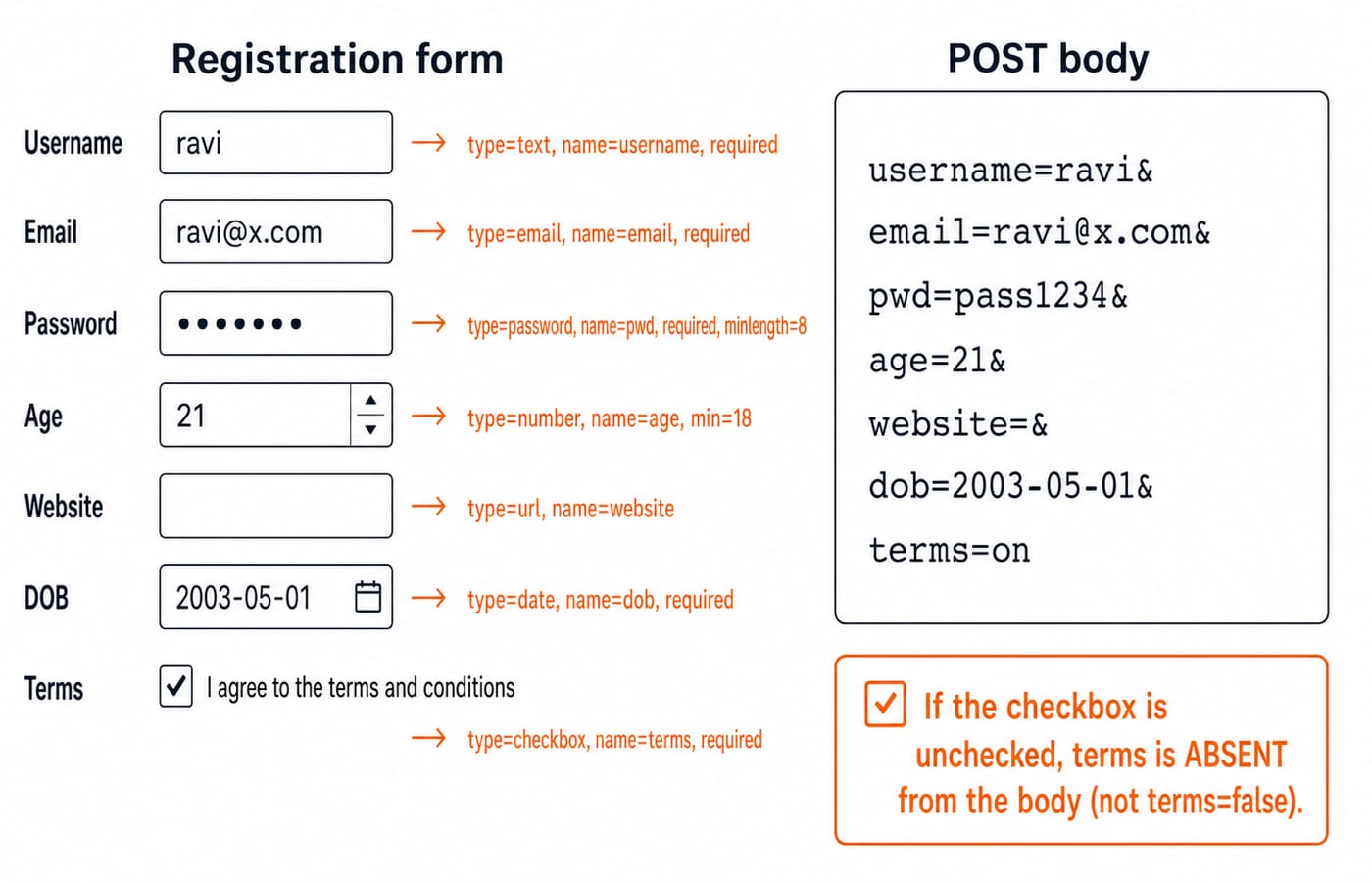
For a valid fill, the conceptual POST body is:
username=ravi&email=ravi@x.com&pwd=pass1234&age=21&website=&dob=2003-05-01&terms=onThe empty website field still has a name, so it appears with an empty value. The checked checkbox has no explicit value, so its default submitted value is on.
Input types you must know cold
An input's type changes its browser interface, built-in checks, or submission behaviour.
textaccepts a single line of general text.emailasks for an email-shaped value and often presents an email-friendly mobile keyboard.passwordvisually masks the characters. Masking is not encryption and does not protect the value from page scripts.numberaccepts numeric input and works withmin,max, andstep.urlapplies a basic URL-format check to a non-empty value.dateusually presents a date picker, though the interface varies by browser and device.checkboxrepresents an independent on or off choice. If it is unchecked, its name is absent from the submission.radiorepresents one choice in a group. Radio buttons with the samenamebelong to one group, and only the selected button'svalueis sent.filelets the user select a file. A file upload form normally needsenctype="multipart/form-data".hiddenhas no visible control but still submits its named value. Treat that value as untrusted because a user can alter it.submitcreates a control that submits the form. A<button type="submit">provides the same core action with more flexible contents.
Types such as email, url, and date improve the input experience, but browser interfaces are not identical. The important exam distinction is what the type asks the browser to check, not what a particular date picker looks like.
Validation attributes with worked outcomes
HTML constraint-validation attributes can block an ordinary browser submission when a value is invalid:
requiredrejects an empty control and, on a checkbox, requires it to be checked.minlengthandmaxlengthset text-length boundaries.min,max, andstepconstrain numbers and dates where the type supports them.patternsupplies a regular expression that the complete value must match.type="email"andtype="url"add basic format checks without a separatepattern.
Apply those rules to our form.
If username = "ab", its length is 2. The declared minimum is 3, so 2 < 3 and the browser blocks submission. A common browser message is, "Please lengthen this text to 3 characters or more."
If age = 15, the value is below min="18". Since 15 < 18, the control is invalid and submission is blocked.
If pwd = "password", the length requirement passes because there are eight characters. The pattern still fails because (?=.*\d) requires at least one digit. Changing the value to pass1234 supplies digits and keeps the total length at eight, so both constraints pass.
These checks are combined. Passing minlength does not excuse a failed pattern, and an optional empty field usually does not fail its type-format check. Add required when an empty value must also be rejected.
HTML form traps and what to do instead
Client-side validation is not security
A user can edit the page in developer tools, call the endpoint directly, or send a custom request. The server must validate every submitted field again, enforce authorisation, and reject unexpected values. Browser validation improves feedback; it does not establish trust.
An unchecked checkbox sends no key
If terms is checked in our form, the browser sends terms=on. If it is unchecked, the browser does not send terms=false; it sends no terms pair at all. Server code should interpret a missing key as unchecked when that is the intended model.
name and id do different jobs
name controls submission. id identifies an element for <label for="...">, CSS, and JavaScript. A good form often needs both, but replacing name with id makes the field disappear from submitted data.
GET is the default method
If method is omitted, the form uses GET. That puts values in the URL, where they can appear in browser history, logs, and copied links. Use an appropriate POST endpoint for credentials and state-changing operations, and use HTTPS either way.
disabled and readonly are not equivalent
A disabled control cannot be edited and is not submitted. A readonly control cannot be edited through the normal interface but is submitted. If the server relies on either value, it must still verify it rather than trusting the browser.
For more quick checks of these distinctions, work through HTML interview questions for freshers. The KnowledgeGate question bank carries more than 200 HTML practice questions across syntax, forms, tables, links, and images, including these same attribute-behaviour traps.
HTML forms MCQs: four solved questions
Attempt each one before you read the answer under it. Every question here comes from the KnowledgeGate question bank.
Q1. GATE 2005 (Information Technology). An HTML form is to be designed to enable purchase of office stationery. Required items are to be selected (checked). Credit card details are to be entered and then the submit button is to be pressed. Which one of the following options would be appropriate for sending the data to the server? Assume that security is handled in a way that is transparent to the form design.
A. Only GET
B. Only POST
C. Either of GET or POST
D. Neither GET nor POST
Answer: B. Only POST. GET puts every field in the query string, so the card number would land in the address bar, the browser history, and the server access log. POST places the same fields in the request body, which keeps them out of all three. The stem's transparency note takes HTTPS out of the decision, so the choice rests purely on where the method puts the data.
Q2. NVS 2022. Identify the error in this markup.
<HTML>
<BODY>
<FORM ID = "FORM1" METHOD = POST>
<BR> SELECT YOUR FAVOURITE CHANNEL :
NETFLIX <INPUT TYPE = CHECKSELECT>
AMAZON PRIME <INPUT TYPE = CHECKSELECT>
</FORM>
</BODY>
</HTML>
Statements: (A) CHECKBOX should be used instead of CHECKSELECT. (B) METHOD = GET should be used instead of POST.
A. Only (A) is correct
B. Both (A) and (B) are correct
C. Only (B) is correct
D. The code is correct and has no errors
Answer: A. Only (A) is correct. The type attribute accepts a fixed set of values and CHECKSELECT is not one of them, so both controls degrade to a plain text box instead of a checkbox. METHOD = POST is entirely legal, so statement B corrects something that was never wrong. Worth noticing as well: neither input carries a name, so even with the type fixed, nothing from this form would reach the server.
Q3. DSSSB 2021. How many forms can we have on a webpage at the maximum?
A. 1
B. 5
C. 10
D. No limit
Answer: D. No limit. The specification sets no cap on the number of <form> elements in one document. What it does forbid is nesting one form inside another, and each submit button submits only the form it belongs to, so a page carrying a search form and a login form sends two independent requests.
Q4. HTML has language elements that permit actions other than describing the structure of a web document. Which one of the following is NOT supported by pure HTML, with no server-side or client-side scripting?
A. Embed web objects from different sites into the same page
B. Refresh the page automatically after a specified interval
C. Automatically redirect to another page upon download
D. Display the client time as part of the page
Answer: D. Display the client time as part of the page. An <iframe> embeds objects from other sites, and <meta http-equiv="refresh"> covers both the timed refresh and the redirect. The clock is different. The client's current time exists only on the client at render time, and markup can declare a constraint or a timer but cannot read a value out of the running machine.
What interviews ask beyond the multiple choice
Expect the short factual ones first. Which attribute enforces a minimum text length? What happens when method is missing? Which key reaches the server if a checkbox is unchecked? Does id determine the submitted key? Which input types provide built-in format validation?
The follow-up moves from HTML into application design. When the same form moves into React, the value either lives in component state, which makes it a controlled input where React holds the value and re-renders on each keystroke, or it stays in the DOM and is read once on submit, which makes it uncontrolled. Neither choice moves the boundary: the browser still only gives feedback, and the server still owns validation. The framework-level version of these questions turns up in React interview questions for freshers.
The short version and your next step
A form sends successful name=value controls by GET in the URL or by POST in the body. Input types and validation attributes can block an ordinary invalid submission, but they never replace server-side validation.
Build the form hands-on in the Complete HTML course, then style its states with the Complete CSS course. If you are heading for full-stack work, the MERN Stack course carries the same markup forward into React and an Express route that validates what the form sends.
Keep learning

JavaScript Event Delegation: Bubbling, target and currentTarget with Runnable Examples
Learn how browser events travel through the DOM, then build one delegated listener that handles nested controls and rows added later.
Updated 6 Oct 20265 min readWeb Development

JavaScript Operators: Types, Precedence and Runnable Examples
Learn how JavaScript arithmetic, assignment, comparison, logical and modern operators behave by tracing one score program from inputs to final output.
Updated 2 Oct 20266 min readWeb Development

JavaScript Data Types and Coercion: Beginner Tutorial with Runnable Examples
Learn how JavaScript stores values, copies primitives and objects, converts input, compares values and produces surprising output. Trace each rule in the console.
Updated 27 Sep 20265 min readWeb Development

JavaScript Conditionals and Loops: Beginner Tutorial with Runnable Examples
Learn how JavaScript chooses a branch and repeats work. Build from small syntax examples to a complete score classifier with a traced average.
Updated 25 Sep 20265 min readWeb Development