JWT Authentication in Node.js and Express: Access Tokens, Refresh Tokens, and the Security Pitfalls That Leak Accounts
Trace a complete Express login, protected request, expiry, and refresh cycle. Then fix the token mistakes that make an apparently working system unsafe.
KnowledgeGate Team
Exam prep & CS education
Updated 1 Aug 20266 min read

Almost anyone can generate a JWT. Far fewer developers can explain why a user was logged out, why an access token still worked after logout, or how another person read its payload. Those failures happen because signing, expiry, storage, refresh, and revocation solve different parts of authentication.
A safe Express setup has a concrete shape: a 15-minute access token held in memory, a 7-day refresh credential in an HttpOnly cookie, and a server-side refresh record that logout can revoke. Every one of those failures traces back to one of these three parts being wrong.
Related reading: Express routing and Node.js error handling.
What a JWT actually is
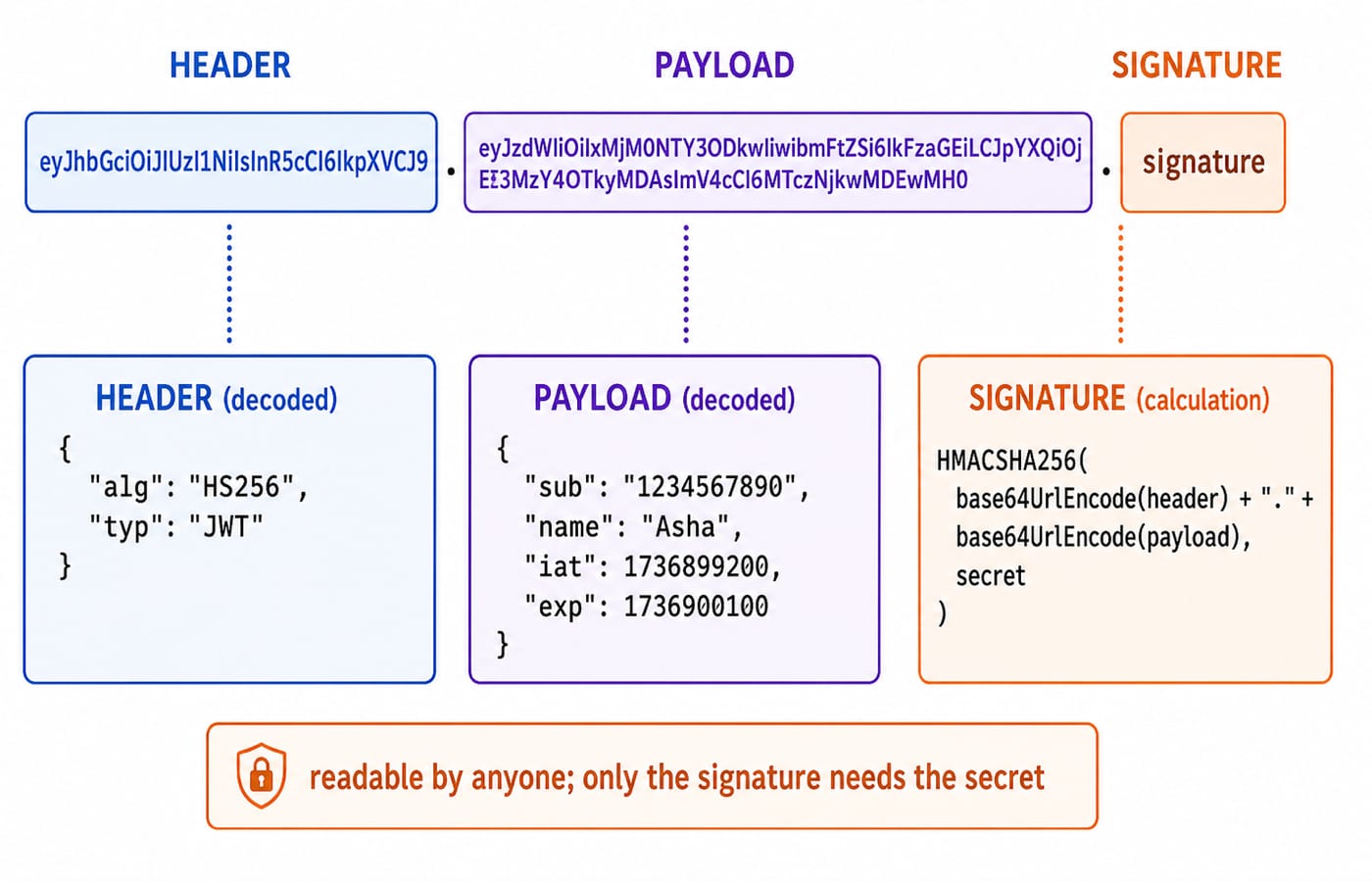
A JSON Web Token is three base64url strings joined by dots:
header.payload.signatureFor a concrete token, the header and payload decode to:
{
  "alg": "HS256",
  "typ": "JWT"
}{
"sub": "6778ad6b83e8290936e879cc",
"role": "student",
"iat": 1736899200,
"exp": 1736900100
}The header describes the token type and signing algorithm. The payload contains claims. Here sub identifies the user, role carries an authorisation input, iat records when the token was issued, and exp records when it expires.
With HS256, the server calculates a signature from the encoded header, encoded payload, and a secret:
HMACSHA256(
  base64url(header) + "." + base64url(payload),
  SECRET
)
Header and payload are encoded, not encrypted. Anyone holding the token can decode and read sub, role, iat, and exp. The signature does something different: it lets the server detect changes. An attacker can edit the payload text, but without SECRET cannot calculate the matching HS256 signature that verification expects.
Access tokens vs refresh tokens
The two tokens have separate jobs.
An access token is presented to protected API routes. It is deliberately short-lived because a normal stateless verification checks its signature and claims without consulting a session record. If that token is stolen, its brief expiry limits the useful window.
In our payload:
exp - iat = 1736900100 - 1736899200
          = 900 seconds
900 / 60 = 15 minutes
A refresh token is the longer-lived credential used only for renewal-related requests such as /refresh and /logout. In this example it lasts 7 days. The browser keeps it in an HttpOnly, Secure, and suitable SameSite cookie, while the server keeps a hashed token or session record that can be revoked. The raw credential should not be stored in the database when a one-way hash is enough for comparison.
Why use both? The access token makes ordinary requests quick and expires after 15 minutes. The refresh record gives the server a revocation point for a credential that can issue new access tokens. A refresh token should also be rotated after use, with the previous stored record invalidated, to reduce replay risk.
Express authentication flow: login, protected request, expiry, and refresh
The sequence starts at login:
The browser sends
POST /loginwith an email and password over HTTPS.Express finds the user and verifies the password against its stored password hash.
The server signs a 15-minute access token and creates a 7-day refresh credential.
The response returns the access token for in-memory use and sets the refresh token in an
HttpOnlycookie.
For a protected request, the client sends:
Authorization: Bearer <access-token>Express middleware extracts and verifies the token before the route handler runs:
function authenticate(req, res, next) {
  const header = req.headers.authorization;

  if (!header?.startsWith('Bearer ')) {
    return res.status(401).json({ error: 'No token' });
  }

  try {
    const token = header.split(' ')[1];
    req.user = jwt.verify(token, process.env.ACCESS_SECRET, {
      algorithms: ['HS256'],
    });
    next();
  } catch (err) {
    return res.status(401).json({ error: 'Invalid or expired token' });
  }
}
jwt.verify() checks the signature and expiry and returns the verified claims. The route can then use req.user.sub to identify the account. It must still apply authorisation rules rather than trusting that any authenticated user may perform every action.
After 15 minutes, the next protected call returns 401 because the access token has expired. The client sends POST /refresh; the browser includes the refresh cookie. The server validates the credential, checks that its stored hash exists and is not revoked or expired, rotates it, and returns a fresh 15-minute access token. The client retries the original protected request without showing a login screen.
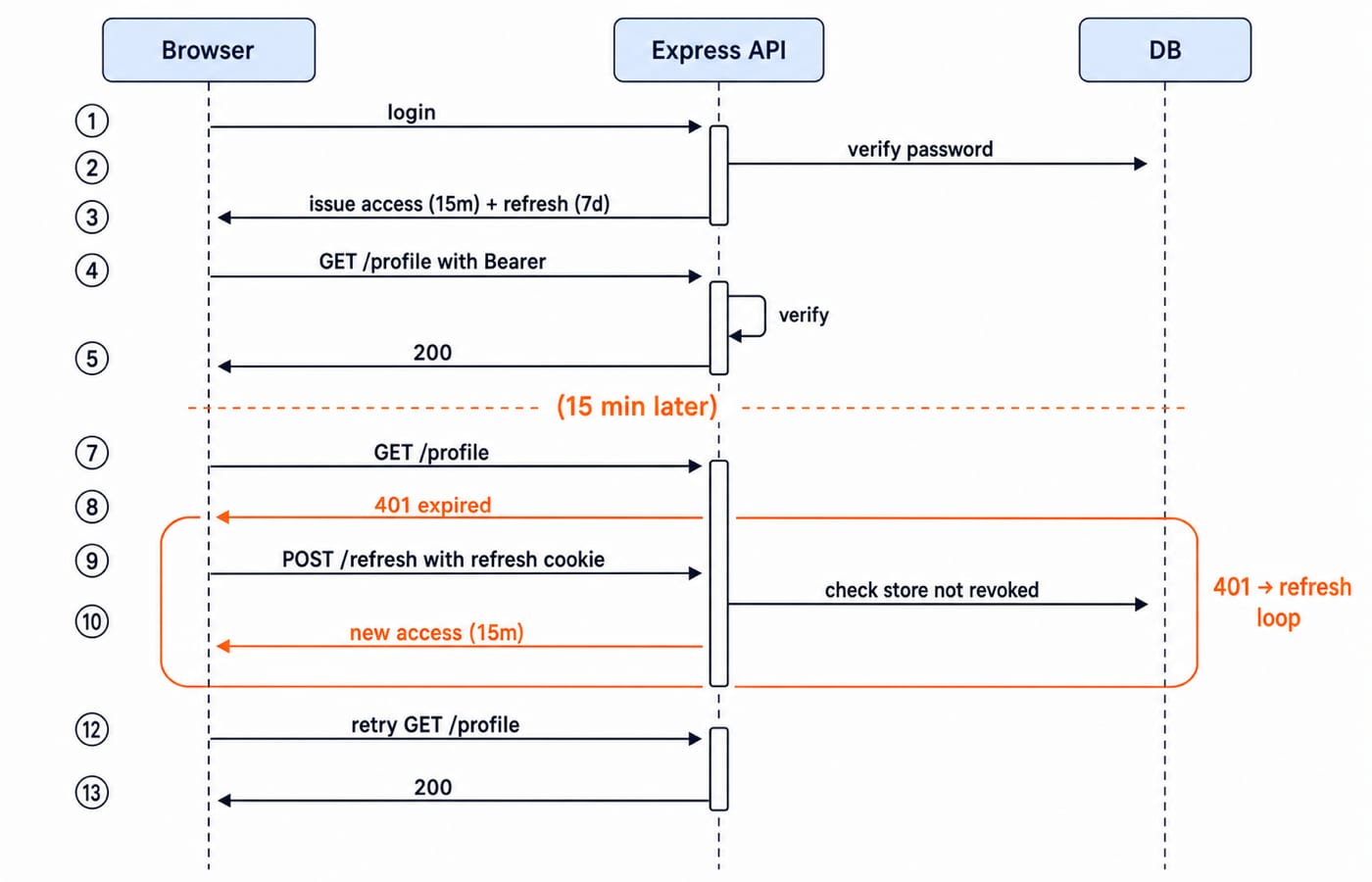
This token flow sits naturally in the middleware chain explained in Express.js REST API routing, middleware, and error handling. Authentication establishes identity; route-level authorisation decides whether that identity may access a resource.
Security pitfalls that leak accounts
Putting secrets or private data in the payload
The payload is readable. Never place a password, card data, private profile details, API key, or signing secret in it. Keep claims minimal, such as a user identifier and the small amount of authorisation context the API genuinely needs.
Calling decode instead of verify
jwt.decode() only parses a token. It does not prove that the signature is valid. If middleware accepts its result as identity, an attacker can create a payload with any sub or role. Use jwt.verify() for authentication and handle its failure.
Trusting the token's algorithm choice
Verification must use the algorithm your server expects. Pinning { algorithms: ['HS256'] } prevents the application from treating an attacker-selected alg as policy. Keep HS256 secrets strong and separate from refresh-token material.
Persisting an access token in localStorage
JavaScript running on the origin can read localStorage, so an XSS flaw can copy a stored token. Keeping the access token in memory reduces persistent exposure. An HttpOnly cookie prevents JavaScript from reading the refresh token, though the application must still use SameSite settings and appropriate CSRF protection for cookie-authenticated endpoints.
Issuing a long-lived access token with no revocation plan
A stolen 30-day access token can remain useful for 30 days unless the API performs an additional blocklist lookup. Prefer short access expiry and make the stored refresh session the normal revocation point. On logout, revoke the refresh record and clear its cookie. The current access token can still work until its 15-minute expiry, which is why that window is kept short.
Token handling is also a frequent part of Node.js interview questions for freshers, especially the difference between decoding, verifying, expiring, and revoking.
How JWT authentication appears in interviews
Expect to explain session-based versus token-based authentication, why JWT access checks can be stateless, what is safe in a payload, and why logout cannot erase an already issued token from another device. A strong answer separates authentication from authorisation and describes refresh-token revocation clearly.
Another standard question is where to store each token. Give the threat model, not a slogan: keep the access token short and in memory, protect the refresh credential in a secure HttpOnly cookie, defend cookie endpoints against CSRF, and prevent XSS across the application.
KnowledgeGate's MERN Stack practice set runs to well over 600 questions, including around 30 on Node.js basics and around 30 more on Express server and routing. Middleware order and error handling decide whether a protected handler ever runs, so those questions exercise the same chain that an authenticate() function sits in.
The short version and your next step
A JWT is a signed but readable set of claims. Use a short access token for protected requests, a revocable and rotated refresh credential for renewal, verify() rather than decode(), and minimal payload data.
Build the complete route, hashing, middleware, refresh, and logout chain in the Node.js, Express.js and MongoDB course. The MERN Stack course shows how the browser side connects to that API, and the Complete MERN Stack (Full Stack Development) module carries the cookies, sessions, and authentication lessons that sit either side of this token flow.
Keep learning

JavaScript Event Delegation: Bubbling, target and currentTarget with Runnable Examples
Learn how browser events travel through the DOM, then build one delegated listener that handles nested controls and rows added later.
Updated 6 Oct 20265 min readWeb Development

JavaScript Operators: Types, Precedence and Runnable Examples
Learn how JavaScript arithmetic, assignment, comparison, logical and modern operators behave by tracing one score program from inputs to final output.
Updated 2 Oct 20266 min readWeb Development

JavaScript Data Types and Coercion: Beginner Tutorial with Runnable Examples
Learn how JavaScript stores values, copies primitives and objects, converts input, compares values and produces surprising output. Trace each rule in the console.
Updated 27 Sep 20265 min readWeb Development

JavaScript Conditionals and Loops: Beginner Tutorial with Runnable Examples
Learn how JavaScript chooses a branch and repeats work. Build from small syntax examples to a complete score classifier with a traced average.
Updated 25 Sep 20265 min readWeb Development