CSS Specificity and the Cascade: How Style Conflicts Resolve, with the Interview Traps That Catch People
Score CSS selectors as four-part tuples, follow one conflict to its final colour, and learn why source order, inheritance, and !important surprise people.
KnowledgeGate Team
Exam prep & CS education
Updated 27 Jul 20266 min read
The familiar CSS complaint, "I set the colour and nothing changed," is usually a cascade problem. The browser is not guessing; it is comparing competing declarations in a fixed order. Once you can score selectors and apply that order, a which-colour-wins question becomes mechanical.
The CSS cascade: how the browser picks a winner
When several declarations target the same property on the same element, three decisions matter in the ordinary author-style questions used in interviews:
Origin and importance: an author
!importantdeclaration beats an ordinary author declaration. Author styles normally override user-agent defaults.Specificity: among declarations at the same importance level, the selector with the stronger score wins.
Source order: if the competing declarations have equal specificity, the one that appears later wins.
That last rule is often misused. Source order is a tie-breaker. Moving a weak selector to the bottom of a stylesheet does not let it defeat a stronger selector.
The cascade compares declarations for one property at a time. One rule may supply color, another may win for margin, and a third may supply font-size. There is no single winning rule for the whole element.
CSS specificity scoring with four-part tuples
For hand calculations, represent specificity as (a, b, c, d):
acounts inline styles.bcounts ID selectors.ccounts classes, attributes, and pseudo-classes.dcounts element selectors and pseudo-elements.
Compare the tuple from left to right. As soon as one slot differs, the higher value wins. Do not add the columns into one decimal number.
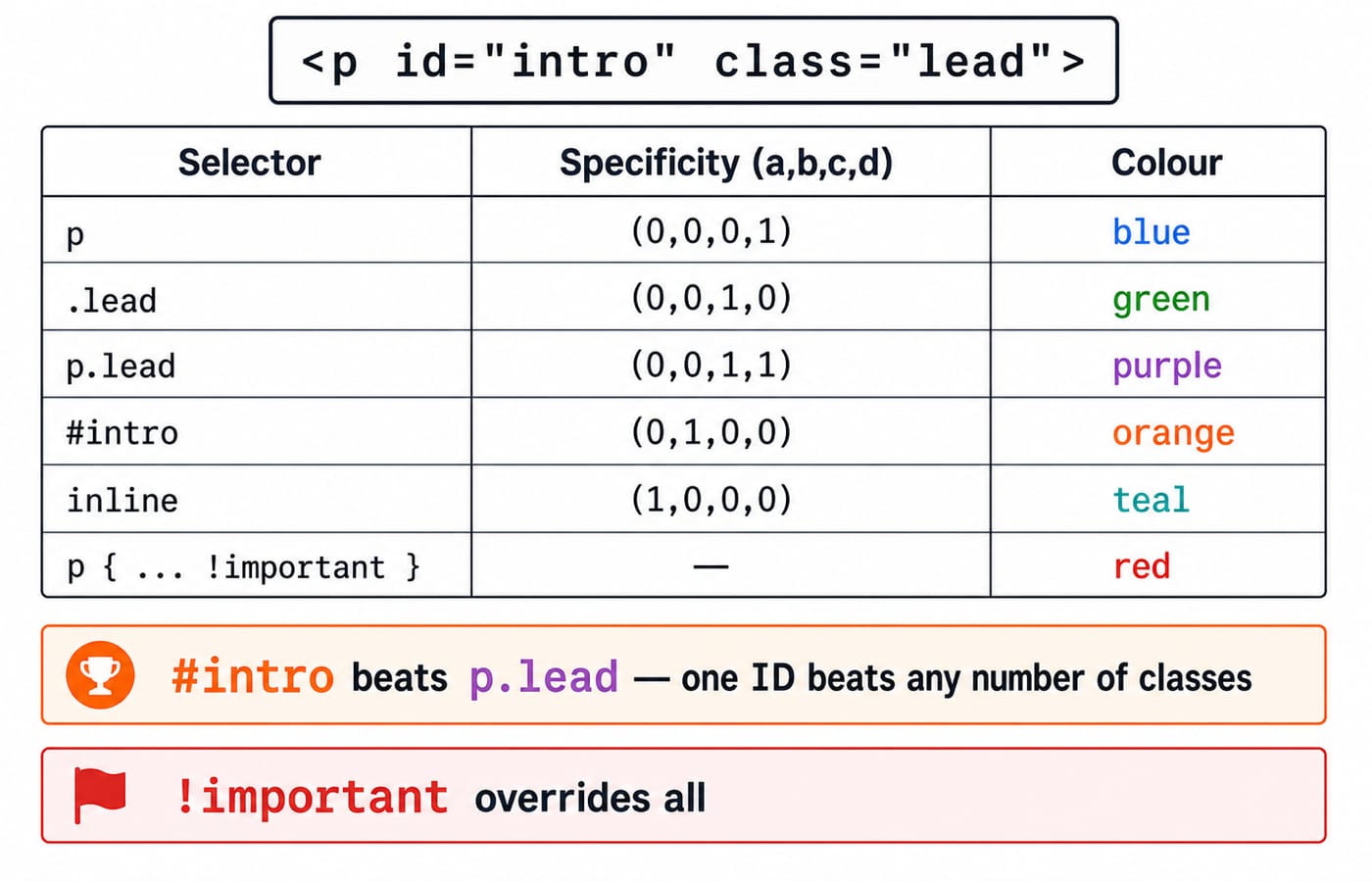
Use this element for every score:
<p id="intro" class="lead">Hello</p>The relevant selectors score as follows:
Selector or declaration | Specificity | Reason |
|---|---|---|
|
| one element |
|
| one class |
|
| one class and one element |
|
| one ID |
|
| one ID and one class |
inline |
| one inline declaration |
The universal selector * and combinators such as >, +, and ~ add nothing. The :not() pseudo-class itself also adds nothing, but the selector inside its argument contributes its own specificity.
A worked CSS conflict: which colour wins?
Start with three rules targeting the same paragraph:
p      { color: blue; }    /* (0,0,0,1) */
.lead  { color: green; }   /* (0,0,1,0) */
#intro { color: orange; }  /* (0,1,0,0) */
All three declarations have normal importance. Compare specificity. The ID selector #intro has (0,1,0,0), which beats the class selector's (0,0,1,0) and the element selector's (0,0,0,1). The rendered colour is orange.
Now add a more detailed-looking rule:
p.lead { color: purple; } /* (0,0,1,1) */Orange still wins. Compare left to right: both scores have a = 0, but #intro has b = 1 while p.lead has b = 0. The comparison ends there. The later class and element slots cannot compensate for losing the ID slot.
Next, add an inline declaration:
<p id="intro" class="lead" style="color: teal">Hello</p>The inline score is (1,0,0,0), so the colour becomes teal. Its first slot beats every normal selector shown above.
Finally, add an important declaration:
p { color: red !important; }Importance is resolved before the normal specificity contest. The colour therefore becomes red, even though p has the weakest selector score in the set. The full sequence of winners is orange, still orange after p.lead, then teal, then red.
One case looks like a conflict and is not. Strip the paragraph back to plain markup, <p>Hello</p> inside a <div class="card">, and colour the parent instead:
.card { color: brown; }  /* the <p> inherits this */
*     { color: grey; }   /* (0,0,0,0), and it matches the <p> itself */
The paragraph renders grey. An inherited value is not a declaration on the paragraph at all, so it never enters the specificity contest; inheritance only supplies a colour when nothing matches the element directly. The universal selector carries (0,0,0,0), the weakest score that exists, and it still wins, because it does match. Delete that one line and the paragraph goes back to brown.
You can build and inspect the exact element in the Complete HTML course, then use browser developer tools to see which CSS declarations were crossed out.
!important, inline styles, and maintainable overrides
!important does not erase all later rules. It creates a higher-priority contest. If two author declarations are both !important, compare their selector specificity; if that ties too, use source order.
Inline styles occupy the first slot in the simplified tuple, but a normal inline declaration still loses to an applicable !important declaration. This distinction explains why merely adding an inline value does not always repair a component.
Both tools can make maintenance difficult. A rushed !important often forces the next developer to add another one. A hard-coded inline style separates a value from the stylesheet that should govern the component. Prefer a readable selector that accurately describes the component state. The Complete CSS course is the right place to practise that cascade in complete components.
CSS specificity interview traps
These are the short statements worth checking carefully:
One ID vs 256 classes: one ID wins. Specificity columns are compared left to right; class counts never spill into the ID column.
Inheritance has zero specificity: an inherited
colorfrom a parent loses to any declaration that directly targets the child, including* { color: ...; }.Source order decides only ties: a later
(0,0,1,0)selector cannot beat an earlier(0,1,0,0)selector.Two important rules still compete: first compare their origins as required, then specificity, then source order when the other conditions tie.
Equal specificity means later wins: if
.leadappears twice with different colours at the same importance level, the later declaration supplies the colour.
Do not count how "long" a selector looks. Write both tuples, compare a, then b, then c, then d. That procedure is faster and safer than visual intuition.
How exams and interviews test the cascade
A common question presents two selectors and asks for their scores. Another supplies a small stylesheet and asks which colour renders. Interviewers also ask why an inherited declaration lost, why a rule placed later still failed, or what changes when both rules use !important.
Score this pair yourself before reading on, assuming one link matches both rules:
ul li.item a:hover { color: navy; }
#nav a             { color: teal; }
The first selector scores (0,0,2,3): two class-level tokens (.item and :hover) and three elements (ul, li, a). The second scores (0,1,0,1): one ID and one element. The far longer selector loses at the first slot that differs, b, so the hovered link renders teal. Length is not the measure; the ID column is.
KnowledgeGate's question bank holds well over 200 HTML and CSS practice questions covering selectors, styling, and layout. The HTML interview questions set adds more frontend interview practice, and the Coding & Skills collection gathers the rest of the frontend and programming guides.
Specificity resolves conflicts within CSS. It does not decide how a box is sized, positioned, or stacked in front of another. For that separate layer, see the CSS box model, positioning and z-index guide.
The short version and your next step
Resolve ordinary style conflicts by importance, then compare specificity left to right, then use source order only for a tie. Inline beats normal selectors, an ID beats any pile of classes, and a directly targeted declaration beats an inherited value.
Recreate the worked paragraph and add one declaration at a time. Before refreshing the browser, write the competing tuples and predict the colour. When your prediction and the computed style agree repeatedly, specificity stops being a memorised table and becomes a reliable debugging method.
Keep learning

JavaScript Event Delegation: Bubbling, target and currentTarget with Runnable Examples
Learn how browser events travel through the DOM, then build one delegated listener that handles nested controls and rows added later.
Updated 6 Oct 20265 min readWeb Development

JavaScript Operators: Types, Precedence and Runnable Examples
Learn how JavaScript arithmetic, assignment, comparison, logical and modern operators behave by tracing one score program from inputs to final output.
Updated 2 Oct 20266 min readWeb Development

JavaScript Data Types and Coercion: Beginner Tutorial with Runnable Examples
Learn how JavaScript stores values, copies primitives and objects, converts input, compares values and produces surprising output. Trace each rule in the console.
Updated 27 Sep 20265 min readWeb Development

JavaScript Conditionals and Loops: Beginner Tutorial with Runnable Examples
Learn how JavaScript chooses a branch and repeats work. Build from small syntax examples to a complete score classifier with a traced average.
Updated 25 Sep 20265 min readWeb Development