

File Formats and Multimedia Explained: Extensions, Codecs and Worked Size Calculations
Build a precise file-to-format mental model, then calculate the size of a 90-second lesson package from image, audio and video specifications.
KnowledgeGate Team
Exam prep & CS education
Updated 4 Nov 20266 min read
A file extension looks simple until a question asks whether renaming changes a format, whether MP4 is a codec, or how image dimensions, audio sampling and video bitrate become bytes. Programs interpret stored bytes through format conventions, not the appearance of a file name. A 90-second lesson package ties these distinctions to exact image, audio, video and upload calculations.
Files and formats: build the vocabulary before memorising extensions
A file is a named byte sequence interpreted by a format. Filesystem metadata includes name, size, timestamps and permissions.
In /media/unit-03/lesson.final.mp4, /media/unit-03/ is the directory path, lesson.final is this example's base name, and .mp4 is the final suffix used as the extension. Naming rules differ, but extensions do not create content.
Keep five ideas separate:
A format specifies information arrangement.
An encoding maps information into bytes, such as characters into UTF-8.
Compression represents the same or approximated information with fewer bits.
A container packages streams and metadata.
A codec encodes or decodes an audio or video stream.
Programs apply these conventions to interpret bytes as text, pixels, samples or frames.
Software may inspect an extension, media type, signature or byte structure. Signatures vary. Renaming photo.jpg to photo.png changes the name, not JPEG bytes into PNG. Software may reject or identify it.
File-format families: match the representation to the job
Family | Examples | What is represented | Exam-safe distinction |
|---|---|---|---|
Plain or structured text | TXT, CSV, JSON, HTML | Text, fields or markup | One family does not mean interchangeable |
Editable or fixed-layout documents | DOCX, ODT, PDF | Structure or laid-out pages | Editable structure differs from fixed layout |
Raster images | JPEG, PNG, GIF | Pixel grid | Enlargement can expose pixels |
Vector images | SVG | Shapes and paths | Redraws at a new scale |
Audio | WAV, MP3, AAC, FLAC | Samples or encoded audio | Compression choices differ |
Video containers | MP4, WebM, MKV | Streams and metadata | Container is not codec |
Archives | ZIP, 7z | Packaged files and folders | Packaging may compress |
Examples within one family are not interchangeable merely because they serve similar purposes.
A 1280 x 720 raster can pixelate when enlarged. A vector stores redrawable paths, although embedded raster content or effects add resolution dependence. JPEG and PNG are raster; SVG is vector.
For frame-buffer sizing and rasterisation, use Basics of Computer Graphics: Complete Guide with Worked Examples; a multimedia package instead combines raw pixel payload with audio and encoded video. For sampling, quantisation, filtering and edge detection, use Image Processing in Computer Graphics: Concepts, Worked Examples, and How Exams Test It; file-size questions compare stored image bytes with multimedia streams.
DOCX supports editing; PDF commonly preserves layout. CSV keeps rows and fields, not spreadsheet formulas, charts or rich formatting.
Multimedia internals: pixels, samples, frames, containers and codecs
Images use pixel dimensions and colour depth; audio uses sample rate, bit depth, channels and duration; video uses frames, resolution and frame rate. Bitrate is encoded bits per second, not samples per second.
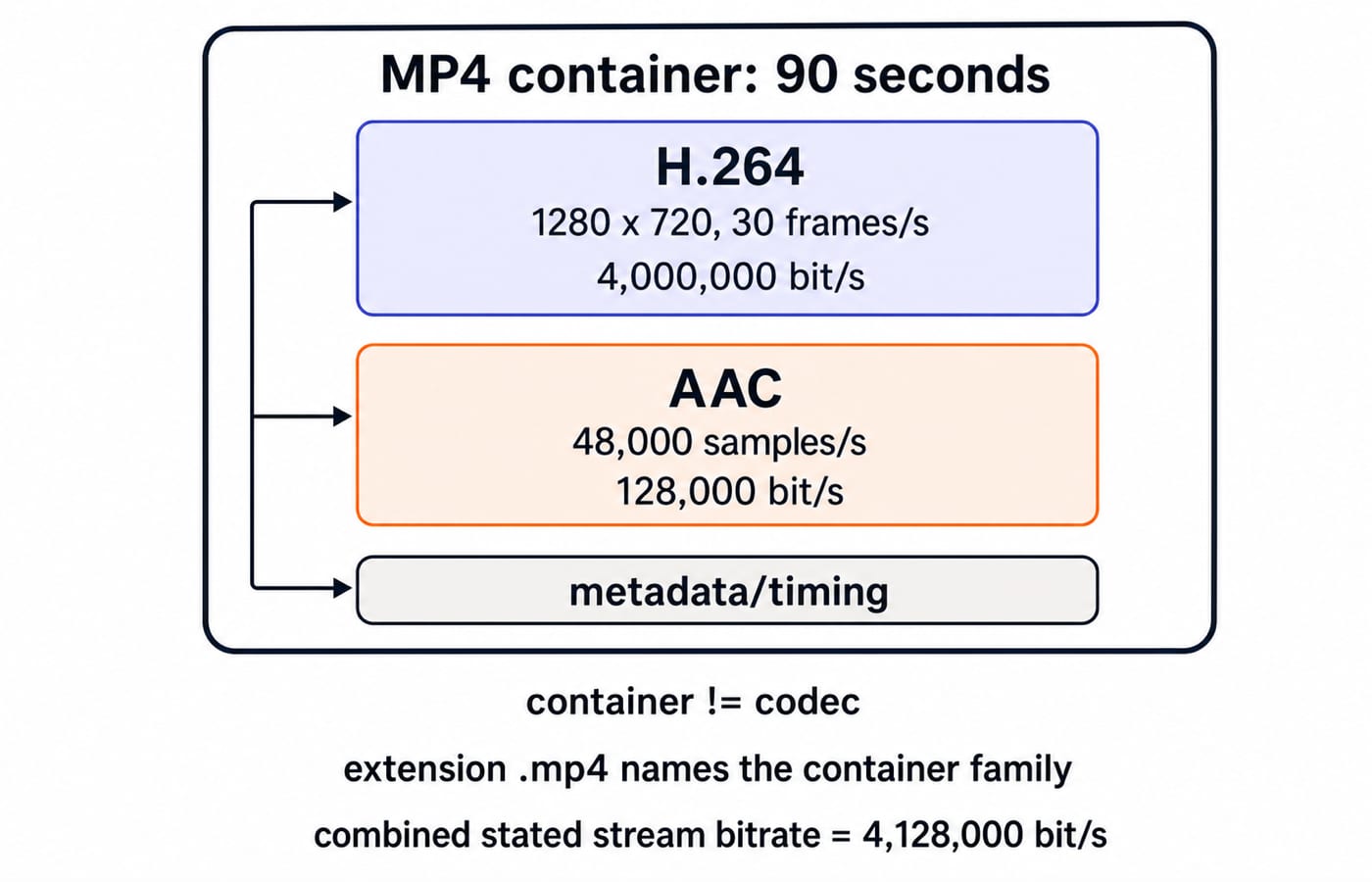
In the 90-second package, lesson.mp4 is an MP4 container holding a 1280 x 720, 30 frames/s H.264 video stream at 4,000,000 bit/s, a 48,000 samples/s AAC audio stream at 128,000 bit/s, and timing or descriptive metadata. MP4 is the container; H.264 and AAC are codecs. .mp4 does not guarantee its codecs.
Transcoding decodes and re-encodes, often changing codec, bitrate or dimensions. Remuxing moves compatible streams between containers without re-encoding. Renaming changes neither stream nor container. Container changes alone do not improve quality or reduce size.
Worked example: calculate one 90-second multimedia lesson package
The folder has three assets:
Uncompressed
1280 x 720RGB thumbnail pixels at24 bits/pixel.Separate
90-secondmono PCM narration at48,000 samples/sand16 bits/sample.Final
90-second lesson.mp4with4,000,000 bit/svideo and128,000 bit/saudio.
Use 8 bits = 1 byte, decimal 1 MB = 1,000,000 bytes, and binary 1 MiB = 1,048,576 bytes. Ignore headers, container overhead, filesystem allocation and network-protocol overhead. Image size here means raw pixel payload, not a guaranteed PNG or JPEG size.
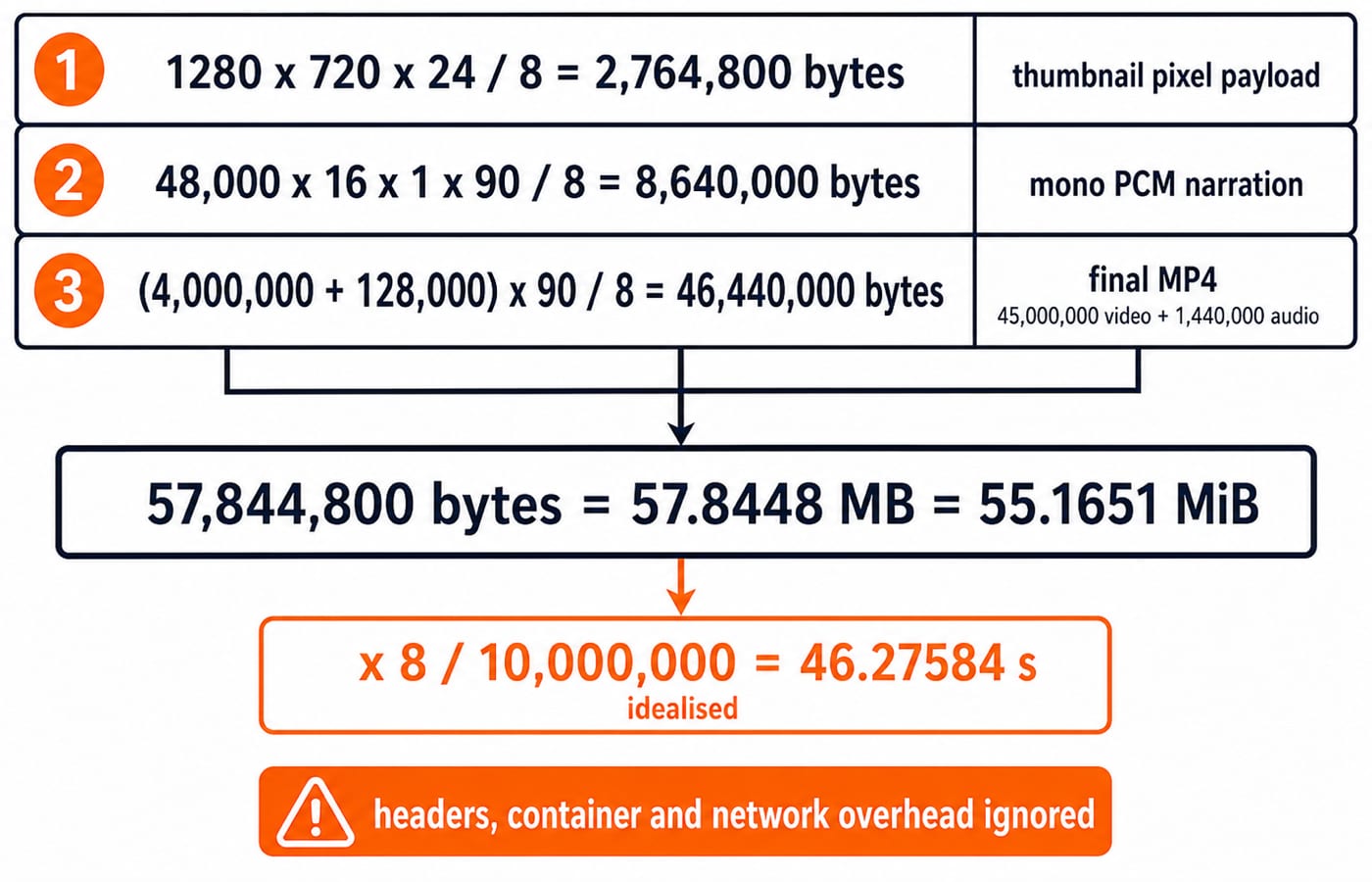
Thumbnail: 1280 x 720 x 24 = 22,118,400 bits. Divide by 8 for 2,764,800 bytes, or 2.7648 MB and approximately 2.6367 MiB. Use width, height and bits per pixel, not frame rate or duration.
Narration: 48,000 samples/s x 16 bits/sample x 1 channel x 90 s = 69,120,000 bits. Divide by 8 for 8,640,000 bytes, or 8.64 MB and approximately 8.2397 MiB. 1 channel distinguishes mono from stereo.
Final MP4: 4,000,000 + 128,000 = 4,128,000 bit/s. Then 4,128,000 x 90 = 371,520,000 bits; divide by 8 for 46,440,000 bytes, or 46.44 MB and approximately 44.2886 MiB, before container overhead. Split-check: 45,000,000 video bytes plus 1,440,000 AAC bytes is 46,440,000 bytes.
Folder total: 2,764,800 + 8,640,000 + 46,440,000 = 57,844,800 bytes = 57.8448 MB, approximately 55.1651 MiB. At an ideal 10,000,000 bit/s, 57,844,800 x 8 / 10,000,000 = 46.27584 s, approximately 46.28 seconds. Real upload takes longer with overhead and rate variation.
Compression and quality: lossless, lossy and the meaning of a ratio
Lossless compression permits exact reconstruction. ZIP, PNG and FLAC are lossless archive, raster and audio examples. Lossy compression discards selected information. JPEG and AAC commonly use it; H.264 commonly uses lossy settings. Extensions fix neither quality nor ratio.
Raw mono PCM is 8,640,000 bytes; 128,000 bit/s AAC for the same 90 seconds is 1,440,000 bytes. Thus 8,640,000 / 1,440,000 = 6, a 6:1 size ratio, not perceptual equivalence or a universal AAC ratio.
Compressed size also depends on complexity, codec, bitrate or quality, frame rate, duration and encoder behaviour. Lossless conversion cannot restore discarded information; repeated lossy transcoding can cause further loss.
Choosing and checking a format: purpose, compatibility and preservation
Identify what must survive, whether editing is needed, and receiver support. Choose lossless or lossy deliberately, then inspect the result.
Choose PNG or SVG for a pixel or vector diagram. JPEG suits photographs when lossy trade-off is acceptable. PDF suits layout distribution if its editable source is retained. Video needs a supported container and codecs.
Keep the source, export intentionally, verify extension and actual format, retain needed metadata, and back up independently. final-v3.mp4 shows intent better than final-final2.mp4, but naming is not version control.
How objective questions test files, formats and multimedia
Objective questions test families, container versus codec, lossless versus lossy, rename versus remux versus transcode, and media-size calculations. The Govt Teaching Jobs category is a broader route. Verify inclusion and pattern against your examination's latest official syllabus or notification.
Six quick checks:
In
/media/unit-03/lesson.final.mp4,.mp4is the extension because it is the final suffix.Renaming
photo.jpgtophoto.pngdoes not convert bytes because only the name changes.MP4 is the container; H.264 and AAC are codecs because they handle its streams.
Combined bitrate is
4,128,000 bit/s, from4,000,000 + 128,000.The 90-second final MP4 is
46,440,000 bytesbefore overhead: bitrate times duration divided by eight.57.8448 MBand approximately55.1651 MiBare the same bytes under decimal and binary definitions.
Common traps:
divide by
8twice -> convert bits to bytes onceuse
1024but label MB -> distinguish MB from MiBomit channels from PCM audio -> multiply by channel count
multiply a still image by frame rate -> frame rate belongs to video
call MP4 a codec -> separate container and streams
equate extension with bytes -> inspect or convert the format
expect rename or remux to add quality -> neither recreates discarded information
Files and multimedia: short version and next practice step
Recall bytes -> format -> application interpretation, then container -> tracks -> codecs. Use width x height x bits per pixel / 8, sample rate x bit depth x channels x seconds / 8, and bitrate x seconds / 8.
Recalculate the total without looking, then explain why the ideal 46.28-second upload is a lower-bound model. Headers, container metadata, protocol overhead and rate variation increase real transfer time.
The UP Police Computer Operator Course includes computer fundamentals and IT awareness. The RSSB Basic Computer Instructor Course suits learners following that teaching-recruitment path.
Keep learning

Files, Formats & Multimedia MCQs: 12 Solved Questions with Explanations
Classify image, audio, video and document formats, then use concise explanations and recall cues to separate valid extensions from plausible distractors.
Updated 2 Nov 20266 min readUGC NET Computer Science

Node.js File System Tutorial: Read, Write and Manage Files with Runnable Examples
Build one path-safe Node.js lab that reads attempt records, calculates accuracy, creates an output directory, writes a JSON summary, and appends an audit log.
Updated 9 Nov 20266 min readWeb Development

Java File I/O and NIO Tutorial: Streams, Path, Files, Channels and Buffers
Learn which Java file API to choose, then run one program that writes and reads text, archives a file, traces an 8-byte buffer, and checks exact output.
Updated 18 Sep 20266 min readJava

Header Files and Linking in C: Build a Multi-File Program Step by Step
Build and debug a three-file C program while learning where declarations, definitions, external symbols, and storage belong.
Updated 18 Aug 20266 min read119 viewsC