

Common Software and Tools Explained: Types, Worked Example and Exam Traps
Learn to classify system, application, utility, and development software by function. Then follow one result-processing workflow from spreadsheet formula to PDF, ZIP, and backup.
KnowledgeGate Team
Exam prep & CS education
Updated 2 Nov 20266 min read

Operating system, browser, compiler, cloud storage, and office suite may all sound familiar. The difficulty begins when options swap a tool with its task, file format, feature, or online service. Classify each item by function, trace the result-processing workflow, calculate each result, and distinguish tools from their tasks, formats, and services. Common Software & Tools MCQs: 12 Solved ICT Questions Explained tests these distinctions question by question. System, application, utility and development software are classified by function before one workflow connects them.
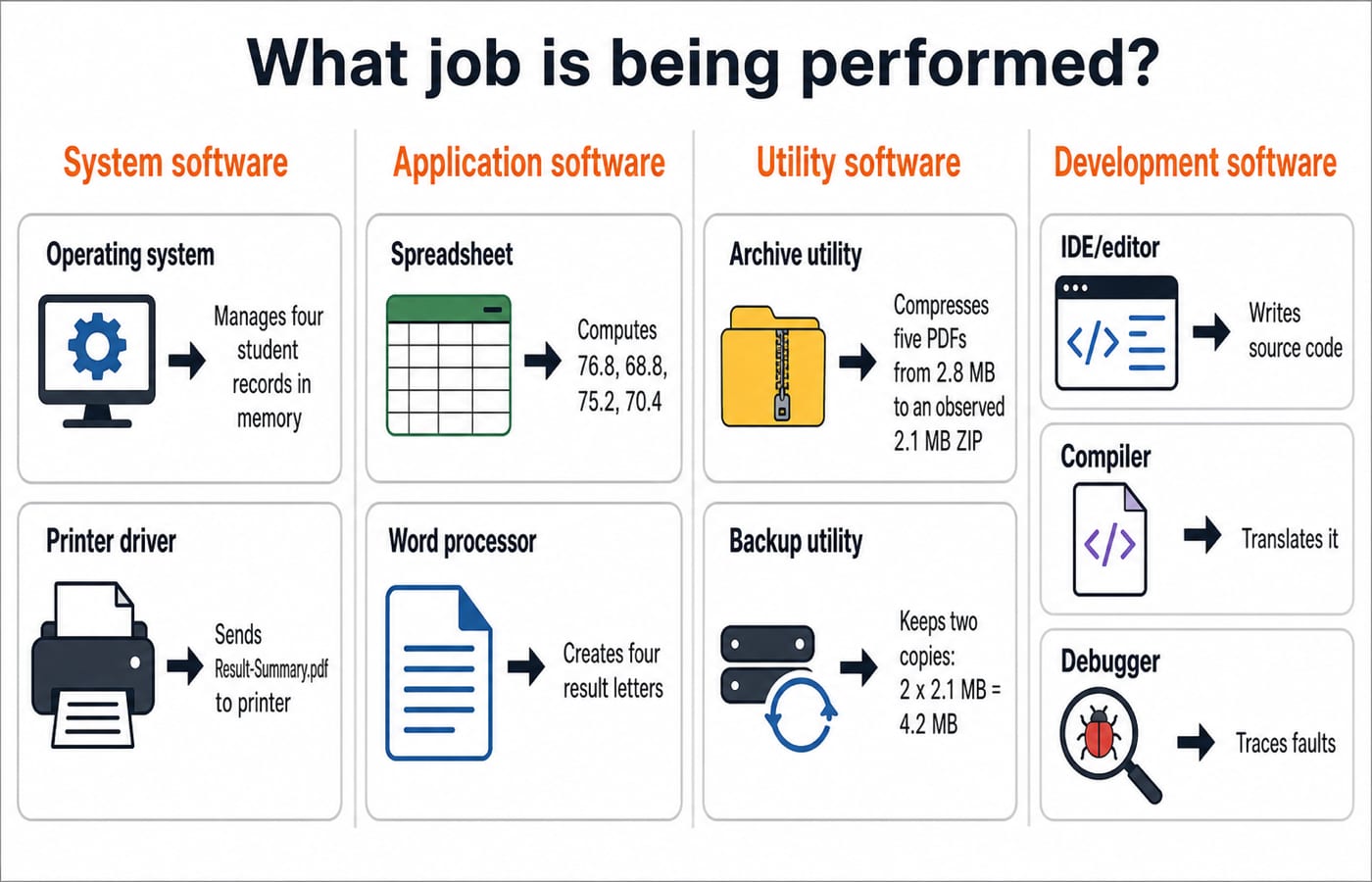
Classify software by the job it performs
Software is the programs and related data that direct a computer. A tool is a program, service, or application feature for a task.
Class | Main job | Examples |
|---|---|---|
System software | Manages the platform and devices | Operating system, device driver |
Application software | Performs a user task | Word processor, spreadsheet, presentation package, browser, email client, DBMS |
Utility software | Maintains, protects, compresses, or backs up data | Antivirus, archive, disk-check, backup utility |
Development software | Helps create and diagnose programs | Editor, IDE, compiler, interpreter, linker, debugger, version-control client |
Separate hardware, software, file formats, and online services. Since products bundle functions, classify the named function. An OS may include backup software, but “creates a recoverable copy” still describes a utility. A browser can display a PDF, but PDF remains a document format.
Know what common user-facing tools do
A word processor formats text. A spreadsheet stores tabular values and calculates with formulae. Presentation software arranges slides. A DBMS stores and queries controlled, related records. A browser displays web resources, an email client manages messages, a media player handles audio or video, and a PDF reader displays fixed-layout documents. MS Office Applications for Knowledge of ICT: Worked Word, Excel and PowerPoint Tasks follows document, worksheet and slide construction. In the wider classification, those programs are application-software examples beside system, utility and development tools.
Extensions identify forms, not software categories: DOCX or ODT for text documents, XLSX or ODS for spreadsheets, PPTX or ODP for presentations, CSV for tabular exchange, PDF for fixed layout, and ZIP for an archive. Several programs may open one form. Office Mixed Concepts Explained: Access, Clipboard, File Formats and Exam Traps traces save, export, copy, link and embed operations. Formats such as PDF and ZIP are data forms, not software categories.
For a web page, browser is the application, HTTPS the protocol, URL the address, and search engine the discovery service.
Separate system software, utilities, and development tools
An OS schedules processes, manages memory, controls files and devices, and serves applications. A driver translates OS requests for a device. Firmware is device-stored low-level software for initialisation or control.
Antivirus scans for malware, archive utilities compress, backup utilities create recoverable copies, and disk tools inspect storage. Sync mirrors current changes, while backup preserves a copy or version. Deletions can propagate through sync.
Write total.c in an editor or IDE. A compiler produces object code total.o; a linker combines it with libraries into executable total; a loader places it in memory. A debugger pauses execution to inspect values. An IDE coordinates tools but is not a compiler. An interpreter translates or executes incrementally at run time rather than producing the same object-code and linker chain. For programming-role classification, translators are development tools; some exam taxonomies include them under system software. Read the question's taxonomy before choosing between those labels.
Worked example: process four student results
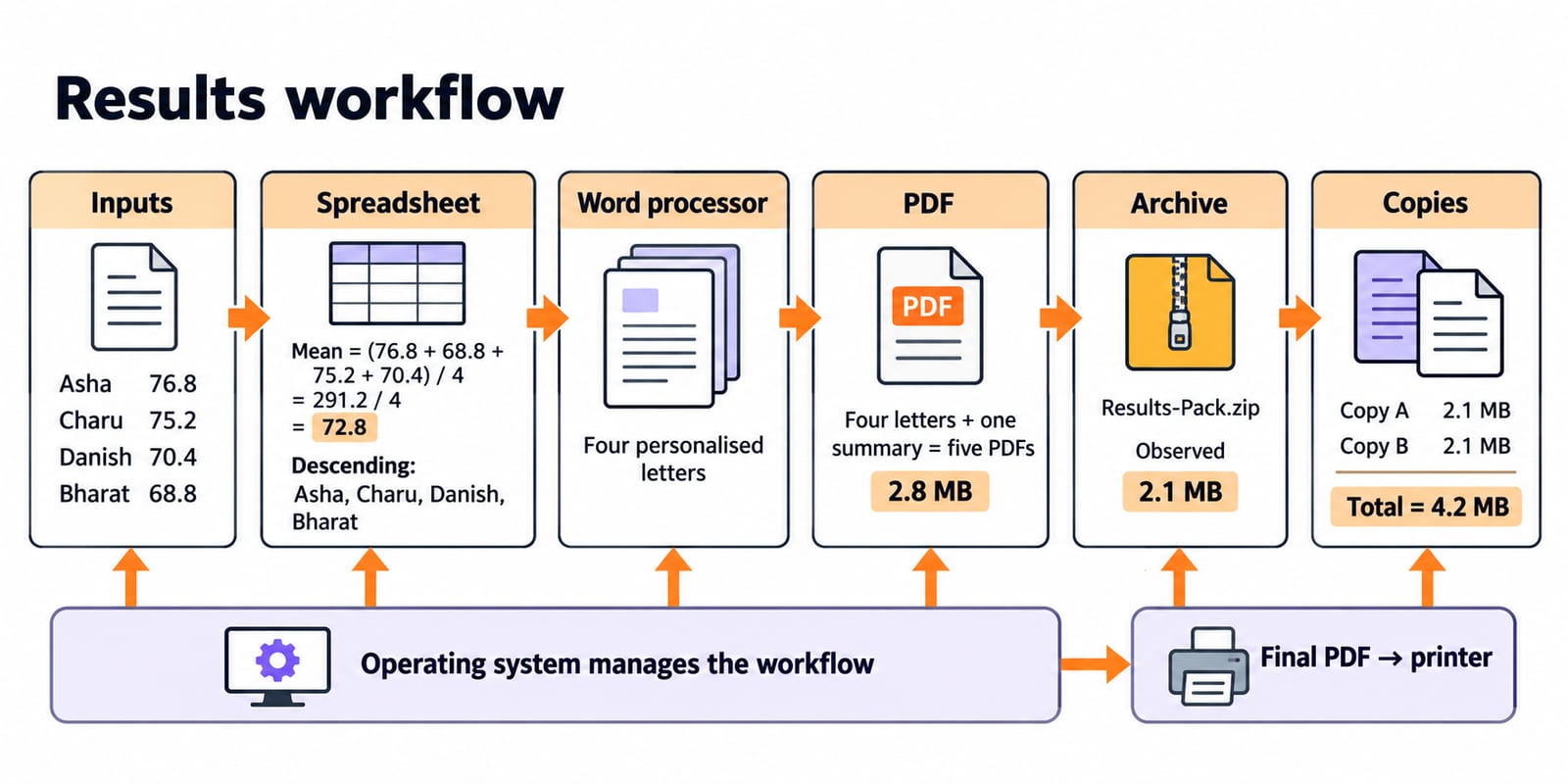
Put theory marks in spreadsheet column B, practical marks in C, and the weighted result in D. For Asha in row 2, enter =0.6*B2+0.4*C2, then fill the formula down.
Calculate each row explicitly:
Asha:
0.6(72) + 0.4(84) = 43.2 + 33.6 = 76.8Bharat:
0.6(64) + 0.4(76) = 38.4 + 30.4 = 68.8Charu:
0.6(80) + 0.4(68) = 48 + 27.2 = 75.2Danish:
0.6(56) + 0.4(92) = 33.6 + 36.8 = 70.4
The class mean is (76.8 + 68.8 + 75.2 + 70.4) / 4 = 291.2 / 4 = 72.8. Descending order is Asha 76.8, Charu 75.2, Danish 70.4, then Bharat 68.8.
Save the table as Results.xlsx. Mail merge creates four personalised letters; exporting those plus one summary gives five PDFs totalling 2.8 MB. An archive utility produces Results-Pack.zip, observed at 2.1 MB. Compression varies by content, so this is not a universal ratio. Two independent backup copies occupy 2 x 2.1 MB = 4.2 MB.
Spreadsheet calculates and sorts; word processor merges; PDF exporter makes the sharing format. Archive utility packages, antivirus scans, backup utility copies. The OS manages resources; the driver serves the printer.
Decode abbreviations by role, not by rote
Attach a function to every expansion:
Term and expansion | Category and use |
|---|---|
GUI, graphical user interface | Interface, icons and windows |
CLI, command-line interface | Interface, textual commands |
OS, operating system | Platform, resource management |
DBMS, database management system | Data system, related-record queries |
CSV, comma-separated values | Data format, row exchange |
PDF, portable document format | Document format, fixed-layout sharing |
IDE, integrated development environment | Development, editing, building, debugging |
API, application programming interface | Integration, software communication |
URL, uniform resource locator | Web address, resource location |
HTTP, hypertext transfer protocol | Web protocol, resource transfer |
HTTPS, HTTP protected through TLS | Secure protocol, protected transfer |
SaaS, software as a service | Delivery model, remote application |
Test yourself: icons and windows, GUI; textual commands, CLI; editor, build, debugger, IDE; related data and queries, DBMS; browser-delivered application, SaaS. Expansion does not prove category, so add function.
Common software and tools traps
Browser versus search engine: the browser renders pages; the search engine indexes and discovers them.
Operating system versus application: the OS manages resources; an application performs the user task. The spreadsheet, not the OS, calculates
72.8.Spreadsheet versus DBMS: a spreadsheet centres on cells and formulae. A DBMS handles controlled related data, queries, and concurrent access. Four local records suit this example; a multi-user system needs a DBMS.
Sync versus backup: sync mirrors changes; backup provides a recoverable copy or version.
IDE versus compiler: the IDE bundles facilities; the compiler performs translation to object code.
File format versus application:
PDFnames the document form, not the program that created or opened it.
RAM and SSD are hardware. GUI is an interface style, not an OS. Follow the function.
How questions test software and tools
Questions test classification, task-tool matching, expansions, file forms, development order, and mismatches. Confirm coverage and format in your examination's official syllabus or notification.
Mixed check: Linux -> OS, antivirus -> utility, GCC -> compiler, browser -> web client, PDF -> document format, GUI -> interface style. A lab printer needs its driver, not the word processor or PDF.
Use four steps: underline the action; classify the item as hardware, software, service, or file form; within software choose platform, user task, maintenance, or development; eliminate mismatches. “Creates a recoverable copy of Results-Pack.zip” means maintenance, so choose backup utility.
Practise after you can state both the category and the job of every option. A remembered full form without its role is not enough.
The short version and next step
Identify the job first: system software manages the platform, applications perform tasks, utilities maintain or protect, and development tools build or diagnose programs. The mean is 72.8; five PDFs total 2.8 MB; the observed ZIP is 2.1 MB; and two backups total 4.2 MB.
Redraw Results.xlsx to Results-Pack.zip, label each category, and explain why the printer driver and PDF differ from an application. For a broader route, use the Govt Teaching Jobs category. Relevant aspirants can explore the RSSB Basic Computer Instructor course.
Keep learning
Common Software & Tools MCQs: 12 Solved ICT Questions Explained
Attempt 12 previous-year ICT MCQs before reading concise explanations that separate applications, hardware, web tools, abbreviations, malware and operating systems.
Updated 29 Oct 20268 min read53 viewsUGC NET Computer Science
MS Office and digital classroom tools for CS teaching exams
Word, Excel and PowerPoint core features, shared shortcuts and formula basics, plus digital classroom tools, taught the way DSSSB and KVS ICT sections test them for computer science teaching posts.
Updated 30 Oct 20265 min readTeaching Recruitment (Computer Science)

ICT in Education MCQs: 12 Solved Questions on Digital Learning Tools
Solve 12 ICT in Education MCQs, then use clear explanations and a five-layer model to separate files, tools, platforms and public initiatives.
Updated 30 Oct 20268 min readUGC NET Computer Science

Artificial Intelligence for ICT Exams: Concepts, Tools and Worked Examples
Build a clear AI concept ladder, learn the main learning types, calculate classifier metrics step by step, and apply a practical tool-checking routine.
Updated 23 Sep 20266 min readML & Data Science