Java offers File, byte streams, character readers and writers, Path, Files, channels and buffers. A small file program can work without revealing which layer solved each problem. FileIoNioDemo.java creates a UTF-8 score file, appends a fourth row, calculates the total and average, copies and moves the file, lists results, and writes an 8-byte binary record.
Build the correct mental model before choosing an API
java.io.File is the legacy pathname-and-metadata object. InputStream and OutputStream move bytes. Reader and Writer decode and encode characters; buffering reduces small operations on the underlying resource.
Path represents a modern path. Files supplies creation, reading, writing, copying, moving, listing and metadata operations. FileChannel works with byte-oriented ByteBuffer objects and explicit file positions. Regular-file NIO does not automatically mean non-blocking I/O.
Need | Suitable API |
|---|---|
Small UTF-8 text file |
|
Line-by-line text | Buffered reader or writer, or |
Path manipulation and directories |
|
Binary or position-aware access |
|
The Coding and DSA Courses for Placements page gives a broader programming path when you want to connect these APIs with larger coding problems.
Read and write text without hiding the important decisions
The program starts with Path dir = Path.of("io-demo"), calls Files.createDirectories(dir), and creates Path scores = dir.resolve("scores.txt"). This is a relative path under the program's current working directory, not necessarily beside the source file. While debugging, you can print scores.toAbsolutePath() to see the resolved location.
The code also shows the legacy-to-modern bridge. scores.toFile() feeds FileOutputStream; OutputStreamWriter explicitly encodes characters as UTF-8; and BufferedWriter writes the first three rows. Files.newBufferedReader(scores, UTF_8) then reads the first line. Each try-with-resources block closes its resource even when an IOException escapes.
Open modes matter. The initial FileOutputStream truncates an existing scores.txt. The later Files.writeString uses CREATE and APPEND. Therefore, rerunning the whole program still produces four rows instead of accumulating another Kabir,88 each time.
Worked example: process four scores, archive the text, and store one binary record
Save this complete source as FileIoNioDemo.java. It writes text through java.io, reads and manages paths through java.nio.file, and uses a channel for the fixed-width binary record.
import java.io.BufferedReader;
import java.io.BufferedWriter;
import java.io.FileOutputStream;
import java.io.IOException;
import java.io.OutputStreamWriter;
import java.nio.ByteBuffer;
import java.nio.channels.FileChannel;
import java.nio.charset.StandardCharsets;
import java.nio.file.Files;
import java.nio.file.Path;
import java.nio.file.StandardCopyOption;
import java.nio.file.StandardOpenOption;
import java.util.List;
import java.util.Locale;
import java.util.stream.Stream;

public class FileIoNioDemo {
    public static void main(String[] args) throws IOException {
        Path dir = Path.of("io-demo");
        Files.createDirectories(dir);
        Path scores = dir.resolve("scores.txt");

        try (BufferedWriter writer = new BufferedWriter(
                new OutputStreamWriter(
                        new FileOutputStream(scores.toFile()),
                        StandardCharsets.UTF_8))) {
            writer.write("Asha,78\n");
            writer.write("Ravi,91\n");
            writer.write("Meera,84\n");
        }

        try (BufferedReader reader = Files.newBufferedReader(
                scores, StandardCharsets.UTF_8)) {
            System.out.println("First: " + reader.readLine());
        }

        Files.writeString(
                scores,
                "Kabir,88\n",
                StandardCharsets.UTF_8,
                StandardOpenOption.CREATE,
                StandardOpenOption.APPEND);

        List<String> rows = Files.readAllLines(scores, StandardCharsets.UTF_8);
        int total = rows.stream()
                .mapToInt(row -> Integer.parseInt(row.split(",")[1]))
                .sum();
        System.out.println("Rows: " + rows.size());
        System.out.println("Total: " + total);
        System.out.printf(
                Locale.ROOT,
                "Average: %.2f%n",
                total / (double) rows.size());

        Path backup = dir.resolve("scores-backup.txt");
        Path archive = dir.resolve("scores-archive.txt");
        Files.copy(scores, backup, StandardCopyOption.REPLACE_EXISTING);
        Files.move(backup, archive, StandardCopyOption.REPLACE_EXISTING);
        System.out.println("Bytes: " + Files.size(scores));

        try (Stream<Path> entries = Files.list(dir)) {
            List<String> names = entries
                    .map(path -> path.getFileName().toString())
                    .filter(name -> name.startsWith("scores")
                            && name.endsWith(".txt"))
                    .sorted()
                    .toList();
            System.out.println("Text files: " + names);
        }

        Path binary = dir.resolve("student.bin");
        try (FileChannel channel = FileChannel.open(
                binary,
                StandardOpenOption.CREATE,
                StandardOpenOption.TRUNCATE_EXISTING,
                StandardOpenOption.READ,
                StandardOpenOption.WRITE)) {
            ByteBuffer output = ByteBuffer.allocate(8);
            output.putInt(101);
            output.putInt(88);
            output.flip();
            while (output.hasRemaining()) {
                channel.write(output);
            }

            channel.position(0);
            ByteBuffer input = ByteBuffer.allocate(8);
            while (input.hasRemaining() && channel.read(input) != -1) {
                // Keep reading until the buffer is full or EOF is reached.
            }
            input.flip();
            System.out.println(
                    "Record: id=" + input.getInt()
                            + ", score=" + input.getInt());
        }
    }
}
Compile and run it from the directory containing the source:
javac FileIoNioDemo.java
java FileIoNioDemo
The exact output is:
First: Asha,78
Rows: 4
Total: 341
Average: 85.25
Bytes: 34
Text files: [scores-archive.txt, scores.txt]
Record: id=101, score=88
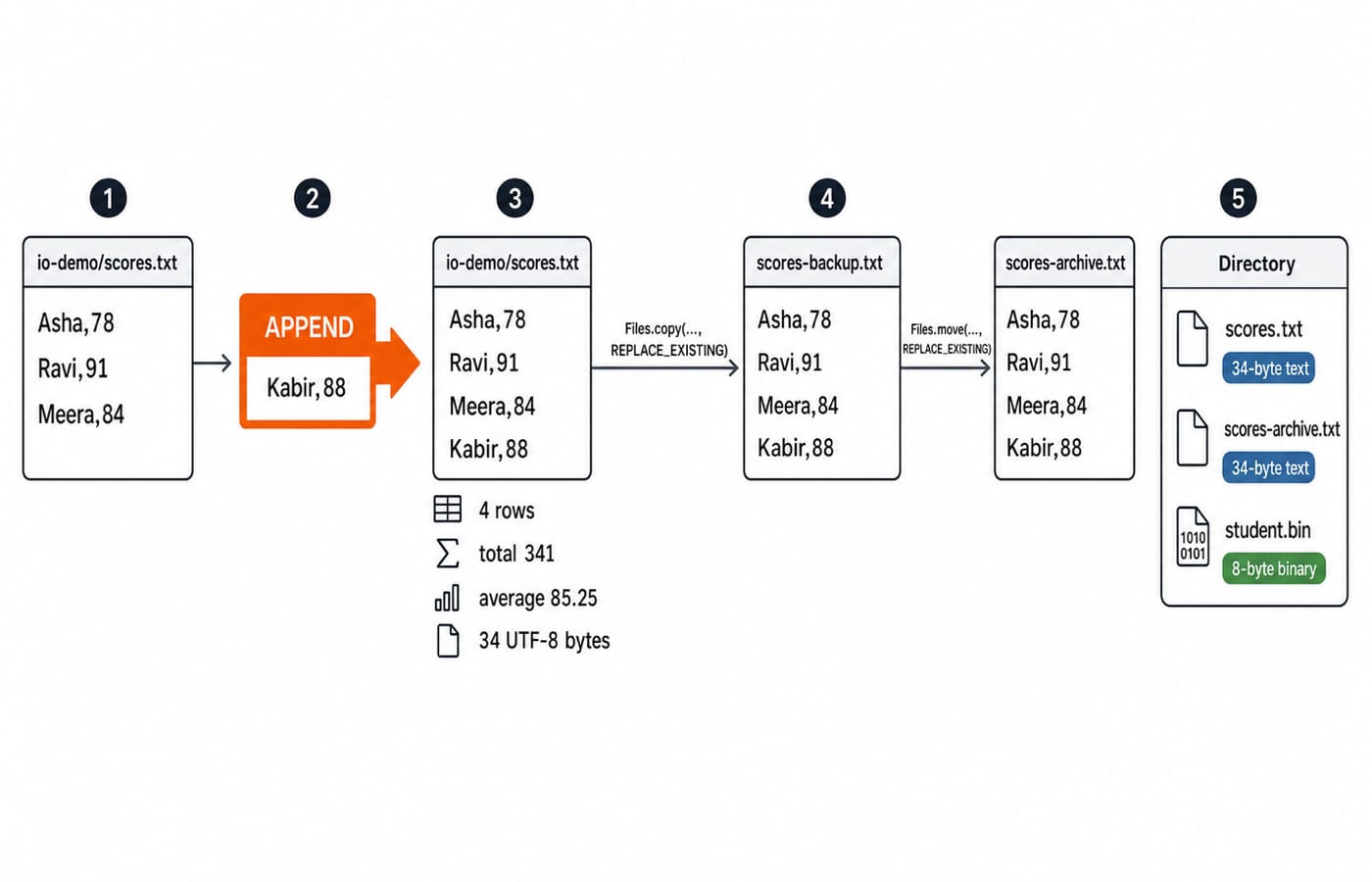
The score calculation is 78 + 91 + 84 + 88 = 341, followed by 341 / 4 = 85.25. The byte count is also exact. The rows occupy 8, 8, 9 and 9 bytes respectively because all names, digits, commas and newline characters are single-byte UTF-8 characters here. That gives 8 + 8 + 9 + 9 = 34 bytes.
The file effects happen in order. The program creates or truncates scores.txt, appends Kabir, copies all 34 bytes to scores-backup.txt, and moves that copy to scores-archive.txt. It then creates or truncates the 8-byte student.bin. REPLACE_EXISTING makes deliberate reruns deterministic, but copy and move are not universally atomic.
Trace channel position and ByteBuffer state instead of memorising flip()
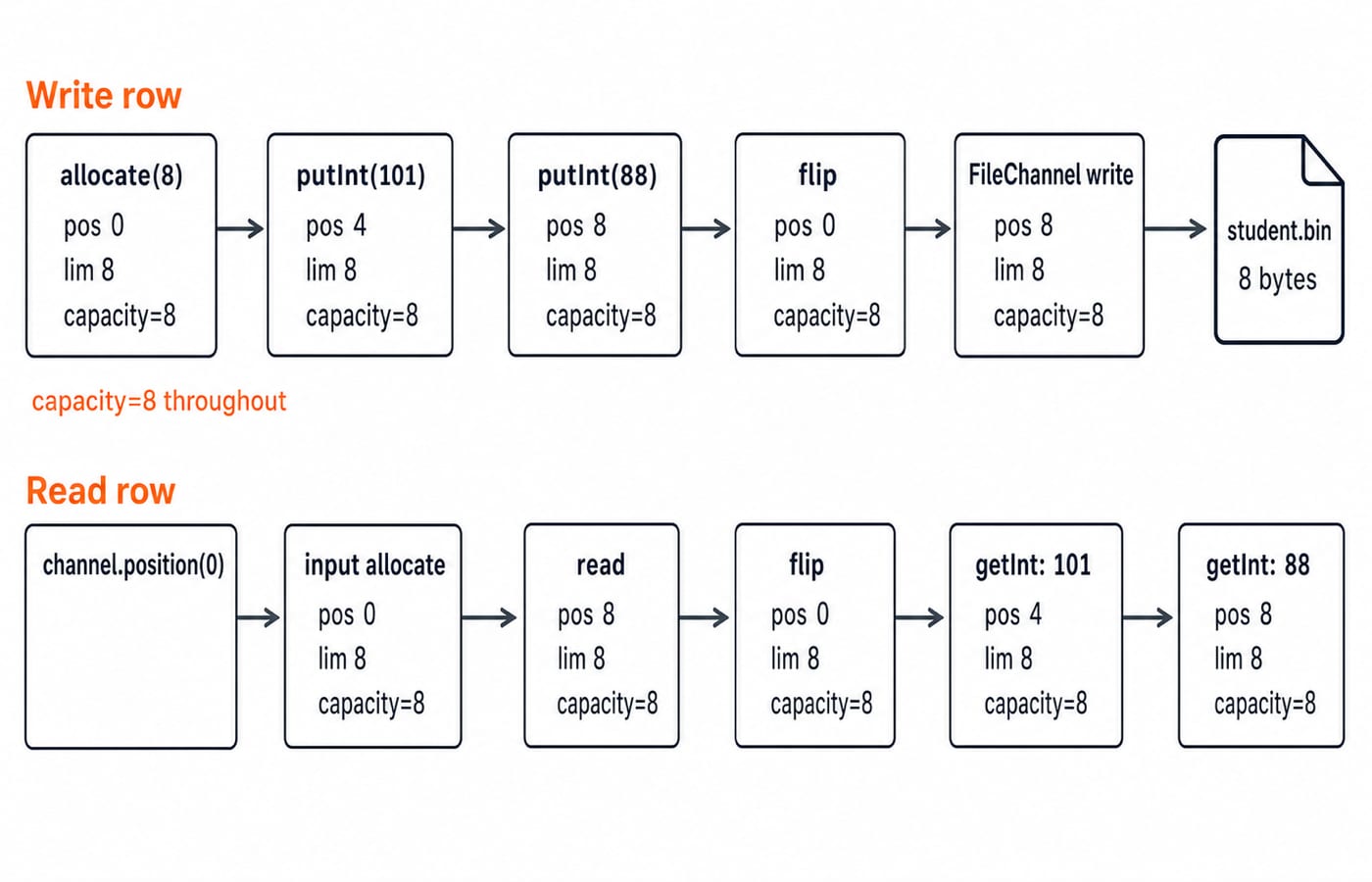
ByteBuffer.allocate(8) starts with position=0, limit=8, and capacity=8. putInt(101) writes four bytes and moves the position to 4. putInt(88) moves it to 8. flip() then sets position=0 and limit=8, preparing the bytes just placed in the buffer to be read by the channel. The write loop finishes at position=8.
For the return path, channel.position(0) seeks to the first file byte. The input buffer fills from position 0 to 8. Its flip() changes the state to position=0, limit=8. The first getInt() returns 101 and advances to 4; the second returns 88 and advances to 8.
The loops remain correct when a channel transfers fewer bytes than requested in one operation. For operating-system context below these Java APIs, read File Systems and Disk Scheduling. It is background, not Java NIO documentation or proof of a speed claim.
Diagnose the file bugs beginners actually meet
Symptom | Cause and fix |
|---|---|
File stays locked or is incompletely flushed | A stream may not have been closed. Use try-with-resources. |
Text is garbled or differs between machines | The default charset may have been used. Pass |
Copy fails when the target exists |
|
Existing content disappears | A truncating open mode erased it. Use |
A filled buffer writes nothing | Its position is at the end. Call |
Path.of("scores.txt") is relative to the current working directory. Files.move renames or relocates a path, but it is not atomic unless an atomic option is requested and the file system supports it. A NullPointerException after a failed read is not a substitute for handling IOException.
Finally, readAllLines fits four rows, not an unbounded log. Stream large text through a buffered reader or a closed Files.lines stream. Retain loops around channel reads and writes because one call need not consume the entire buffer.
Practise file I/O and NIO assessment shapes with exact answers
Useful assessment forms ask you to choose byte or character I/O, predict whether a call appends, truncates or fails, identify which resources close, trace path results, calculate buffer positions around flip(), or explain why readAllLines is unsuitable for a very large file.
KnowledgeGate has 300+ questions available in its Java practice bank across two Java-labelled sections. This is broad Java practice, not a File I/O or NIO-specific count and not evidence of exam frequency.
Try the four exercises, then compare your work with the answers.
Change only
Kabir,88toKabir,92. Predict the rows, total, average and byte size.Trace an output buffer of capacity
12afterputInt(7),putInt(12),putInt(-5)andflip().Why does rerunning the unchanged program not create a fifth row?
Choose an API for a 20 GB line-oriented log and another for seeking to a binary record.
There are
4rows, total345, average86.25, and size34 bytes.Before flip:
position=12, limit=12, capacity=12. After flip:position=0, limit=12, capacity=12.The initial
FileOutputStreamtruncates the file before the program performs its one append.Use buffered line streaming or a closed
Files.linesstream for the log. UseFileChannelplusByteBufferfor position-aware binary access.
After persisting records, study Hashing and Collision Resolution for keyed lookup and collision handling.
The short version and the next Java step
Use streams or channels for bytes, readers and writers with an explicit charset for text, and Path plus Files for paths and everyday file operations. Choose FileChannel with ByteBuffer for position-aware binary work, and put every closeable resource in try-with-resources.
Run the program unchanged, replace Kabir,88 with Kabir,92, and confirm 345, 86.25 and 34 bytes. For the complete language sequence, use the Java Course: Concepts, MCQs and Coding Questions. When you are ready for interview data structures, continue with the DSA using Java course.