JSON in JavaScript: Parse, Stringify and Debug with Runnable Examples
Learn the boundary between JSON text and JavaScript values. Follow a complete parse, update and stringify round trip, then practise response handling and data-shape validation.
KnowledgeGate Team
Exam prep & CS education
Updated 31 Aug 20266 min read

An API response may resemble a JavaScript object, but it crosses the network as text. Confusing the two causes syntax errors and double-encoded data. The boundary follows the parse -> read -> change -> stringify pipeline. In a modern browser console, the same boundary applies to HTTP responses, data-shape checks, and predictable output.
JSON and JavaScript objects are related, but they are not the same thing
JSON is a text format for representing data. A JavaScript object is a value that your program can read and change.
const jsonText = '{"student":"Asha","scores":[78,91],"active":true,"mentor":null}';
const jsObject = {
  student: "Asha",
  scores: [78, 91],
  active: true,
  mentor: null
};

console.log(typeof jsonText); // string
console.log(typeof jsObject); // object
console.log(JSON.parse(jsonText).scores[1]); // 91
This JSON text contains all six JSON value forms: the string "Asha", numbers 78 and 91, Boolean true, null, the array [78,91], and the outer object. Property names and strings need double quotes. Comments and trailing commas are invalid. undefined, functions, symbols, and BigInt are not JSON values.
JSON does not itself have JavaScript methods. JSON.parse and JSON.stringify are JavaScript methods that cross the boundary. For a broader programming and practical skill path, explore Coding & Skills.
Parse JSON text and read known nested values
Call JSON.parse once when you have valid JSON text.
const courseJson = `{
  "course": "JavaScript",
  "student": "Asha",
  "lessons": [
    {"id": 21, "title": "Objects", "minutes": 18, "done": true},
    {"id": 22, "title": "JSON", "minutes": 27, "done": false}
  ]
}`;

const course = JSON.parse(courseJson);
const totalMinutes = course.lessons.reduce(
  (sum, lesson) => sum + lesson.minutes,
  0
);
const completed = course.lessons.filter((lesson) => lesson.done).length;

console.log(course.lessons[1].title); // JSON
console.log(`${course.student}: ${completed}/2 complete, ${totalMinutes} minutes`);
// Asha: 1/2 complete, 45 minutes
After parsing, course is an object and course.lessons is an array of length 2. Dot notation reads properties. Index [1] selects the second array element, whose id is the number 22. The sum is 18 + 27 = 45, and exactly one lesson has done: true. The numbers can be added after the text becomes JavaScript data. If a value is already an object, read it directly instead of parsing it again.
Stringify JavaScript data into compact or readable JSON text
JSON.stringify converts representable JavaScript data into JSON text.
const progress = {
  student: "Asha",
  course: "JavaScript",
  completed: 2,
  total: 2,
  tags: ["objects", "json"]
};

const compact = JSON.stringify(progress);
console.log(compact);
// {"student":"Asha","course":"JavaScript","completed":2,"total":2,"tags":["objects","json"]}

const readable = JSON.stringify(progress, null, 2);
console.log(readable);
The readable output uses two-space indentation:
{
  "student": "Asha",
  "course": "JavaScript",
  "completed": 2,
  "total": 2,
  "tags": [
    "objects",
    "json"
  ]
}
The three arguments are the value, an optional replacer, and optional indentation. Whitespace changes readability, not the represented data. For example, JSON.stringify({ user: "Asha", token: "t-91", theme: "dark" }, ["user", "theme"]) produces {"user":"Asha","theme":"dark"}. This key list selects properties for this conversion. It is not a complete security system. Sensitive fields should not enter data flows that do not need them.
Work the full parse, change and stringify round trip
One value crosses both boundaries in the same trace.
const source = `{
  "student": "Asha",
  "course": "JavaScript",
  "lessons": [
    {"id": 21, "title": "Objects", "minutes": 18, "done": true},
    {"id": 22, "title": "JSON", "minutes": 27, "done": false}
  ]
}`;

const record = JSON.parse(source);
record.lessons[1].done = true;

const completed = record.lessons.filter((lesson) => lesson.done).length;
const snapshot = {
  student: record.student,
  course: record.course,
  completed,
  total: record.lessons.length
};
const saved = JSON.stringify(snapshot);

console.log(saved);
// {"student":"Asha","course":"JavaScript","completed":2,"total":2}
console.log(typeof saved); // string
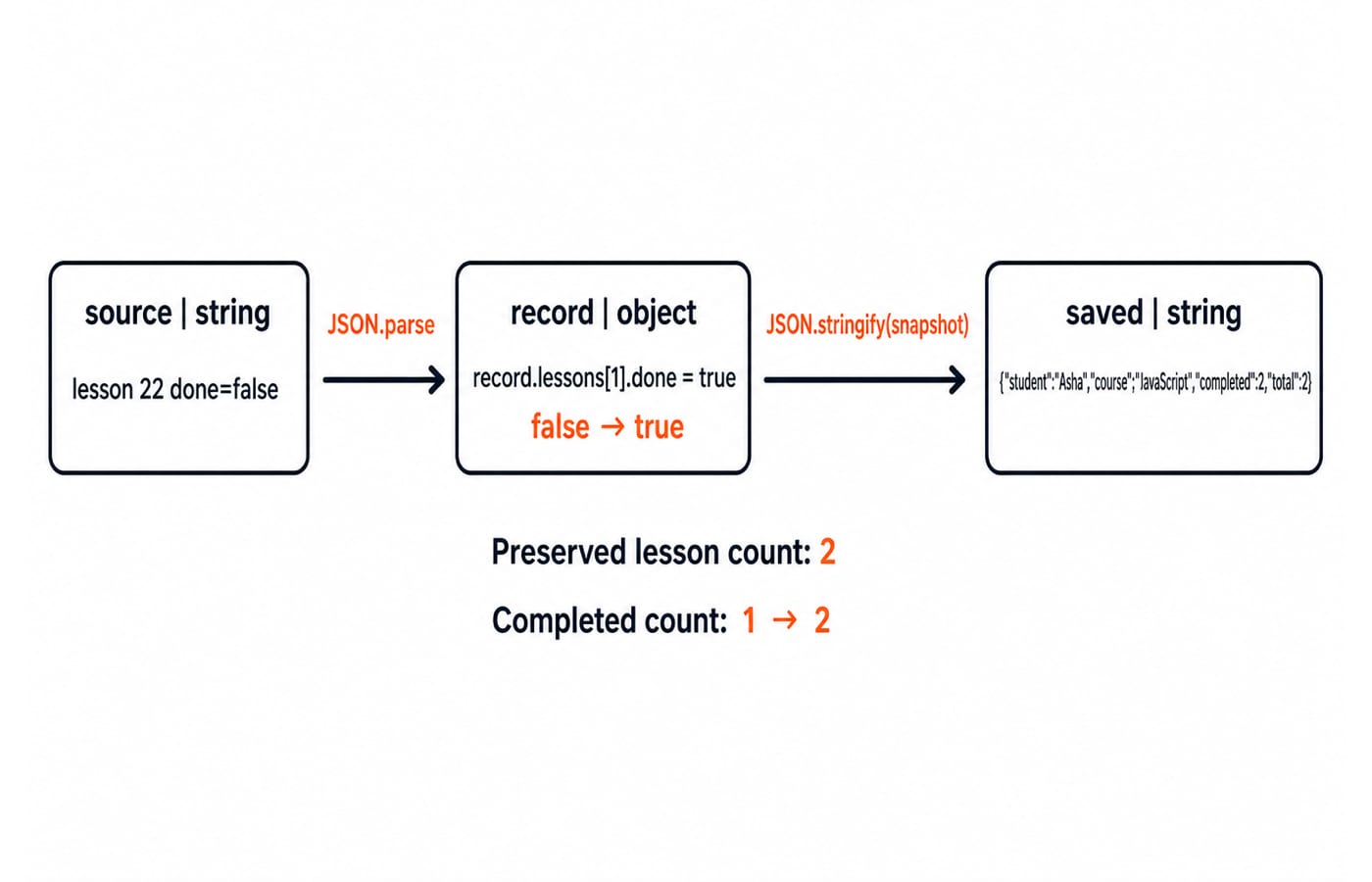
Parsing creates the record object. Lesson 22 changes from done: false to done: true, so the filter now counts 2. The lessons array still has length 2. JSON.stringify then produces the string shown above.
Strings, numbers, Booleans, arrays, objects, and null can survive this data round trip. JavaScript behaviour, including methods and prototypes, is not recreated by JSON. This is a data-interchange technique, not a universal cloning strategy.
Read JSON from an HTTP response and check the status
The Response constructor supplies a local 200 response, so no external endpoint is required:
async function readProgress() {
  const response = new Response(
    '{"course":"JavaScript","completed":12,"total":20}',
    {
      status: 200,
      headers: { "Content-Type": "application/json" }
    }
  );

  if (!response.ok) {
    throw new Error(`HTTP ${response.status}`);
  }

  const progress = await response.json();
  console.log(`${progress.course}: ${progress.total - progress.completed} lessons left`);
}

readProgress();
// JavaScript: 8 lessons left
response.json() reads and parses the body asynchronously, so progress is already an object. In a real request, replace the constructed Response with await fetch(url). Keep the response.ok check. Catch parsing failures if the server may return an empty or non-JSON body. JSON.parse(await response.json()) is wrong because it tries to parse an object.
For the wider HTTP context, read Application Layer Protocols: DNS and HTTP. To apply JSON across front end and back end, use the MERN Stack course.
Fix JSON errors, then validate the parsed shape
A JSON error can concern syntax or the parsed data's shape.
Mistake | What happens | Repair |
|---|---|---|
| Single quotes make it invalid JSON. | Write |
| The trailing comma is invalid. | Remove the final comma. |
| An object is passed where text is expected. | Use the object directly. |
| The circular reference throws a | Design a non-circular data snapshot. |
| It produces | Know that the |
Use a stable message instead of depending on engine-specific error wording:
const broken = '{"name":"Asha","score":91,}';

try {
  JSON.parse(broken);
} catch {
  console.log("Invalid JSON");
}
// Invalid JSON
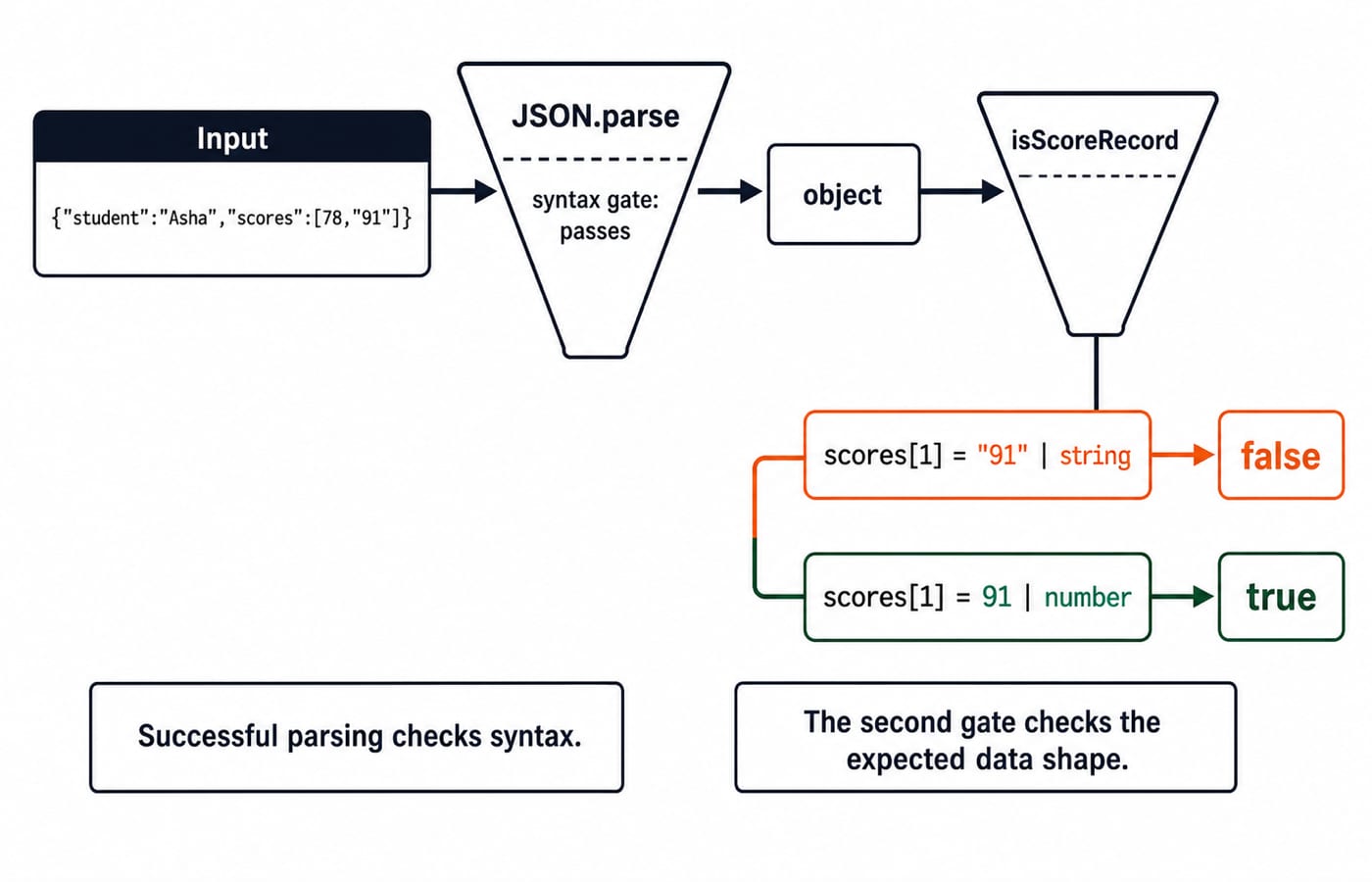
Parsing checks syntax, not whether the fields have the types your program expects. JSON.parse and isScoreRecord handle those concerns separately:
function isScoreRecord(value) {
  return typeof value === "object" &&
    value !== null &&
    typeof value.student === "string" &&
    Array.isArray(value.scores) &&
    value.scores.every(Number.isFinite);
}

const wrong = JSON.parse('{"student":"Asha","scores":[78,"91"]}');
const corrected = JSON.parse('{"student":"Asha","scores":[78,91]}');

console.log(isScoreRecord(wrong)); // false
console.log(isScoreRecord(corrected)); // true
The first parse succeeds, but scores[1] is the string "91", so the check is false. With the number 91, it is true.
Practise JSON output and debugging exercises
Predict each result before running it:
typeof JSON.parse('"42"')produces"string", because the JSON value is the string"42".JSON.parse('{"n":7}').n + 5produces12, becausenis parsed as the number7, and7 + 5 = 12.JSON.stringify({ x: undefined, y: null, z: 3 })produces{"y":null,"z":3}. Propertyxis omitted, whilenullis kept.
Attempt these before checking. Exercise A: parse {"attempts":[18,27,15]} and compute the count and total. Answer: count 3, total 18 + 27 + 15 = 60. Exercise B: remove the trailing comma from {"topic":"JSON", "done":false,}, parse it, set done to true, and stringify it. Answer: {"topic":"JSON","done":true}.
For separate string and output traps, see String Handling in Java. Its rules are not JavaScript JSON rules.
JSON in JavaScript: the short version and next step
Remember: JSON is text; JSON.parse turns valid text into JavaScript data; JSON.stringify turns representable data into JSON text; parsing does not validate shape; network code must handle HTTP and parsing failures.
Central trace: lesson 22 changes from false to true, completed changes from 1 to 2, and the saved value is a string containing {"student":"Asha","course":"JavaScript","completed":2,"total":2}. For an optional structured route through the wider language sequence, continue with the Complete JavaScript course.
Keep learning
Functions and Arrow Functions in JavaScript: Syntax, Scope and Runnable Examples
Build function declarations, expressions and arrows in JavaScript, then trace parameters, closures, lexical this and array callbacks through exact outputs.
Updated 19 Oct 20266 min readWeb Development
Modules in JavaScript: Import, Export, and Runnable Examples
Build JavaScript modules from scratch with a shopping-cart project that runs in Node.js and the browser. Learn live bindings, re-exports, lazy loading, and practical fixes.
Updated 15 Oct 20265 min readWeb Development

LocalStorage and Cookies in JavaScript: Store, Read and Delete Data
Run one lesson-progress object and one preference cookie through their complete life cycles, then learn which browser store fits a feature and which security traps to avoid.
Updated 11 Oct 20266 min readWeb Development

JavaScript Event Delegation: Bubbling, target and currentTarget with Runnable Examples
Learn how browser events travel through the DOM, then build one delegated listener that handles nested controls and rows added later.
Updated 6 Oct 20265 min readWeb Development