JavaScript Variables: let, const and var Scope with Runnable Examples
Learn how let, const and var differ by tracing real JavaScript programs through block scope, hoisting, object mutation and loop closures.
KnowledgeGate Team
Exam prep & CS education
Updated 29 Aug 20266 min read

let, const, and var can all put a value behind a name, yet similar-looking declarations behave differently before their line runs, outside a block, or inside a loop callback. That difference causes many beginner bugs. The key distinctions are declaration and reassignment, block versus function scope, hoisting and the temporal dead zone, const objects, and loop bindings. Predict the behaviour instead of memorising “always use const” without knowing why.
Start from zero: declaration, initialisation and reassignment
A variable is a named binding whose current value can be read through an identifier. Declaration creates the binding. Initialisation gives it its first value. A later assignment changes that value.
let attempts = 1;
attempts = 2;
const maxAttempts = 3;
var legacyMode = false;
JavaScript is dynamically typed, so a binding does not acquire a permanent declared type:
let answer = 42;
console.log(typeof answer);
answer = "forty-two";
console.log(typeof answer);
The exact output is:
number
string
The binding remains answer; its value, and therefore the result of typeof, changes.
Declaration | Scope | Reassignment | Same-scope redeclaration | Read before declaration line | Initial value required |
|---|---|---|---|---|---|
| Block | Yes | No | No, | No |
| Block | No | No | No, | Yes |
| Function or script | Yes | Yes | Yes, gets | No |
Choose const when the binding will not be reassigned, let when it will, and reserve var mainly for reading or maintaining older code.
Fully worked block-scope trace: two rooms and one shared var
Run this complete program:
let room = "lab-1";
var total = 4;

{
  let room = "lab-2";
  const seats = 30;
  var total = 5;
  console.log(room, seats, total);
}

console.log(room, total);

try {
  console.log(seats);
} catch (error) {
  console.log(error.name);
}
Its exact output is:
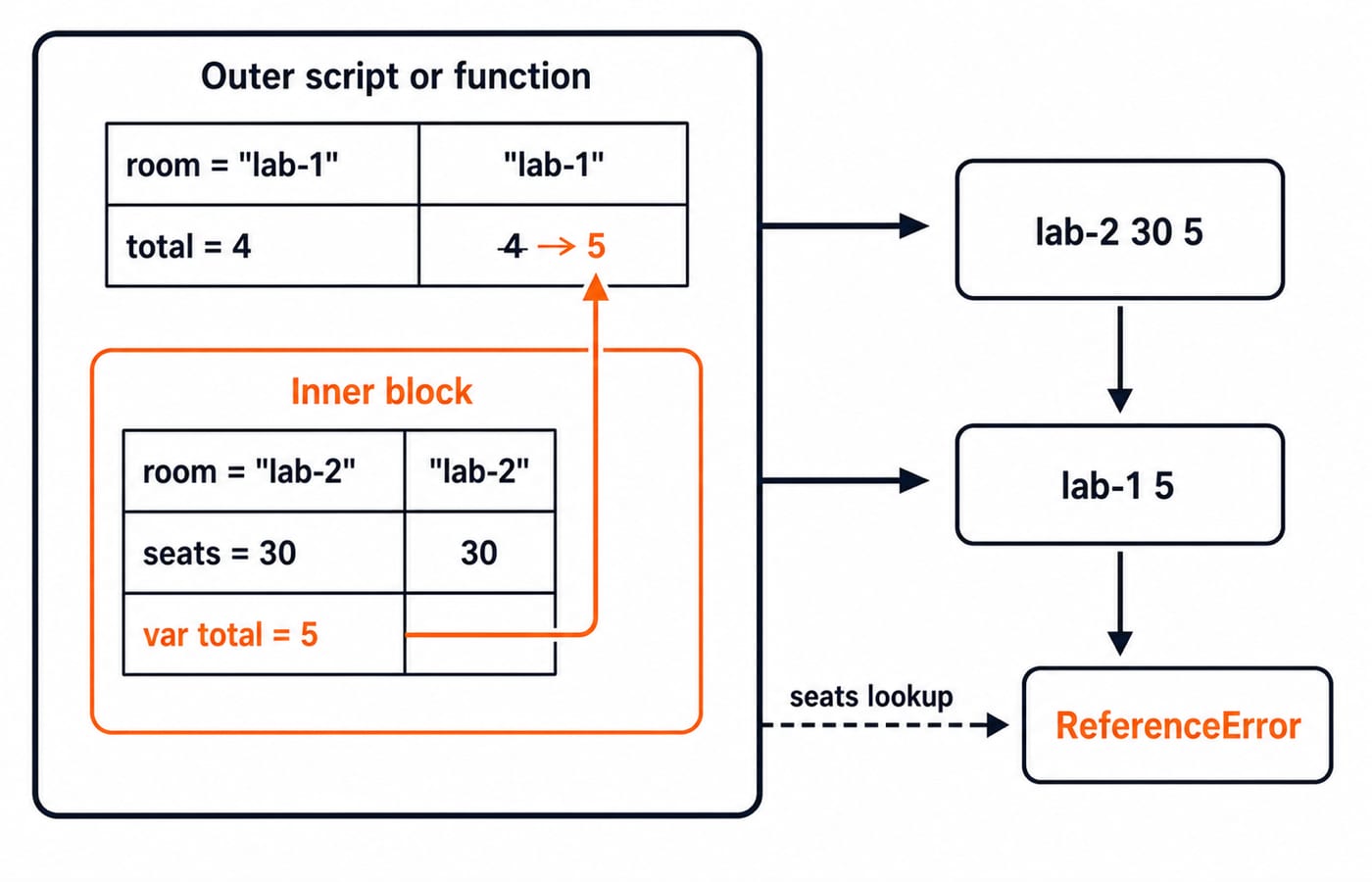
lab-2 30 5
lab-1 5
ReferenceError
For the first console.log, lexical lookup starts in the inner block. It finds the inner room, which shadows rather than overwrites the outer room, so lab-2 appears. It also finds the block-only seats. The var total = 5 declaration does not create a block binding. It updates the same function or script-scoped total that began as 4.
After the closing brace, lookup finds the outer room, giving lab-1. It still finds the shared total, now holding 5. It cannot find seats, so reading that name throws ReferenceError, which the catch prints. For the wider setting in which browser scripts run, see Web Technologies for Teaching Exams: HTML and HTTP. HTML provides the page context, but its structure is not a substitute for JavaScript’s scope rules.
Hoisting and the temporal dead zone as a timeline
Consider the next runnable trace:
console.log(beforeVar);
var beforeVar = 12;

try {
  console.log(beforeLet);
} catch (error) {
  console.log(error.name);
}

let beforeLet = 24;
console.log(beforeVar, beforeLet);
The exact output is:
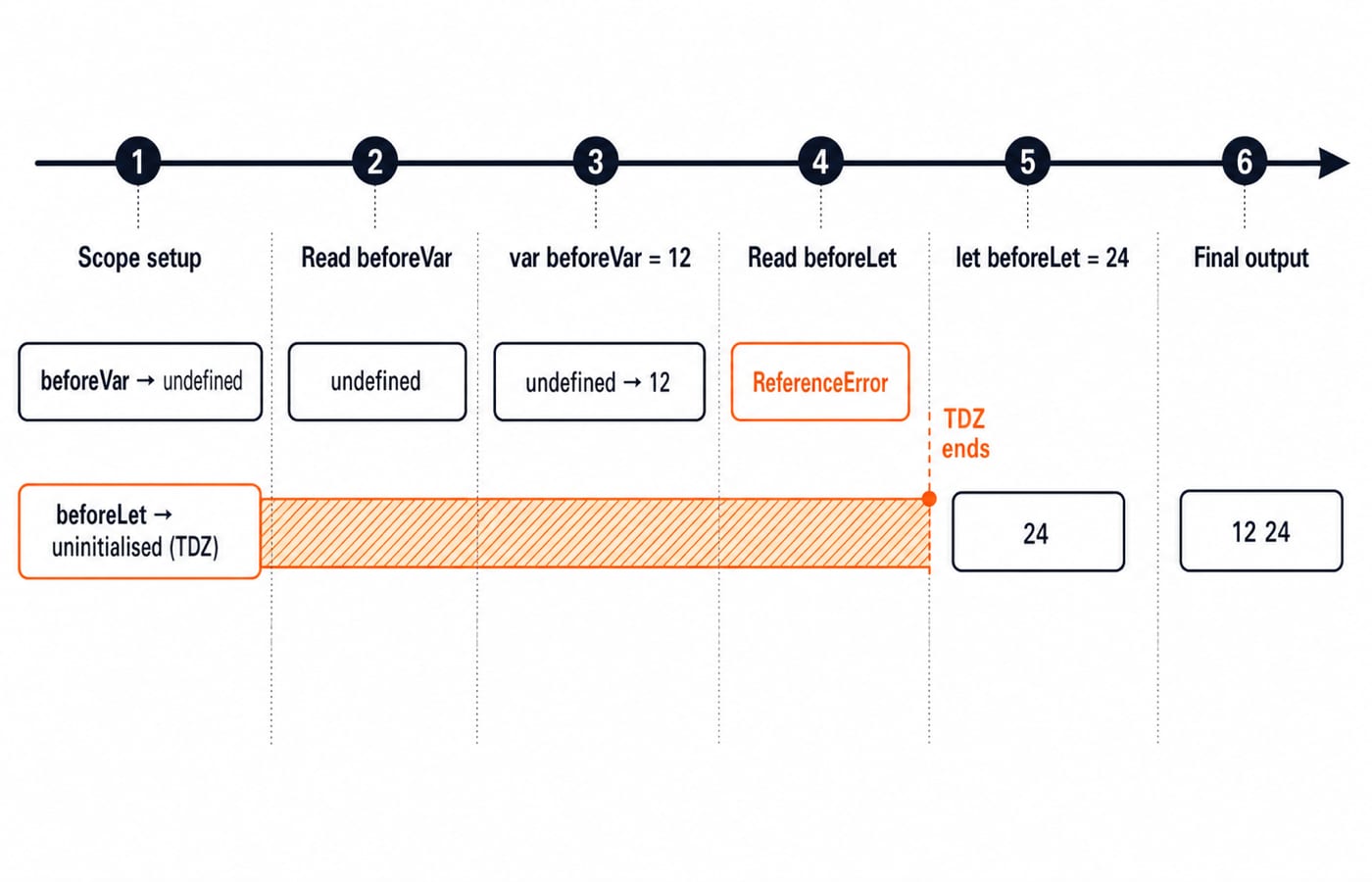
undefined
ReferenceError
12 24
JavaScript does not literally move declaration statements to the top. During scope setup, the var binding exists and starts as undefined. The assignment of 12 occurs only when execution reaches var beforeVar = 12, so the earlier read prints undefined.
The lexical let binding also belongs to the scope, but it remains uninitialised from scope entry until execution reaches let beforeLet = 24. Reading it during this temporal dead zone throws ReferenceError. There is also a precise typeof trap: typeof completelyMissing returns "undefined", but typeof beforeLet inside that same temporal dead zone still throws ReferenceError. Declare variables before use even where var would technically produce undefined.
What const protects, and what it does not
Strict mode makes the failure in this example explicit:
"use strict";

const learner = { name: "Asha", score: 72 };
learner.score = 81;
learner.tags = ["js"];
console.log(learner.name, learner.score, learner.tags[0]);

try {
  learner = { name: "Ravi", score: 90 };
} catch (error) {
  console.log(error.name);
}
The exact output is:
Asha 81 js
TypeError
const prevents assigning a different value to the learner binding. It does not freeze the object reached through that binding. Changing score from 72 to 81 and adding the tags property both succeed. Replacing the whole object fails with TypeError. Because rebinding is forbidden, a const declaration requires an initial value.
Object.freeze() is a separate, shallow object-level tool. It can prevent changes to an object’s own properties, but it is not a synonym for const, and nested objects are not recursively frozen by default. Decide separately whether the binding may change and whether the referenced object may be mutated.
Why let fixes the classic loop-closure surprise
The callbacks run after both loops finish, so each closure reads the binding it retained:
const withVar = [];
for (var i = 0; i < 3; i++) {
  withVar.push(() => i);
}

const withLet = [];
for (let j = 0; j < 3; j++) {
  withLet.push(() => j);
}

console.log(withVar.map(fn => fn()).join(","));
console.log(withLet.map(fn => fn()).join(","));
The exact outputs are:
3,3,3
0,1,2
With var, all three functions close over one i binding. The loop runs for i = 0, 1, and 2, then its final increment sets i = 3. When the stored functions run later, each reads that same 3.
With let, the for loop creates a fresh per-iteration j binding. The three stored functions retain 0, 1, and 2 respectively. Use let for a loop counter when later callbacks must remember each iteration. This is a reasoned scope choice, not magic syntax. A closure that deliberately shares one changing binding can still be correct.
Common variable mistakes: cause, consequence and fix
Use before declaration. This happens when code relies on a vague idea of hoisting. An early var read yields unexpected undefined, while an early let or const read throws in the temporal dead zone. Declare close to first use and initialise immediately.
Scope or reassignment confusion. A var inside {} leaks into the surrounding function or script scope. An inner let room can hide an outer room. Assigning a new object to the earlier const learner throws TypeError. Prefer the narrowest useful block scope, use distinct names when shadowing obscures intent, and choose let only for intentional rebinding.
Redeclaration or accidental globals. These are separate invalid programs that fail with parse-time SyntaxError:
let score = 72;
let score = 81;const limit = 3;
const limit = 4;In strict mode, points = 90 without a declaration throws ReferenceError. Fix it by writing const points = 90 or let points = 90.
How assessments and interviews test let, const, and var
Output-prediction questions combine shadowing, object mutation, and loop scope. Use these three exercises to test the rules. For broader preparation, use the Coding Round Strategy for Placements.
let x = 5; { let x = 8; x += 2; } console.log(x);prints5. The inner binding becomes10, then leaves scope; the outer binding remains5.const cart = { total: 120 }; cart.total += 30; console.log(cart.total);prints150. The object is mutated, not the binding reassigned.After
for (var k = 0; k < 2; k++) {},console.log(k);prints2. Replacingvarwithletmakeskunavailable after the loop, so that read throwsReferenceError.
For every answer, ask: which binding is found, when was it initialised, and is the code mutating a value or reassigning a binding?
JavaScript variables: the short version and next step
Keep five rules: use const when a binding will not be reassigned; use let for deliberate rebinding; expect both to respect block scope; remember that var is function or script scoped and starts as undefined; and declare before use so the temporal dead zone never becomes a debugging strategy.
As a final exercise, change var i in the loop trace to let i and predict 0,1,2 before running it. Then change const learner to let learner and explain why whole-object reassignment succeeds, while property mutation was already allowed.
For a structured language sequence, continue with the Complete JavaScript Course. If you need the page structure around browser scripts, use the Complete HTML Course. You can also browse the verified Free Courses and Guidance by Prashant Sir category for a wider path.
Keep learning

Regular Expressions in JavaScript: Match, Extract, Replace, and Validate
Learn JavaScript regex by tracing what each token consumes. Build a validator and a named-group log parser, then practise extraction, replacement, flags, and common traps.
Updated 23 Oct 20265 min readWeb Development
Functions and Arrow Functions in JavaScript: Syntax, Scope and Runnable Examples
Build function declarations, expressions and arrows in JavaScript, then trace parameters, closures, lexical this and array callbacks through exact outputs.
Updated 19 Oct 20266 min readWeb Development

Modules in JavaScript: Import, Export, and Runnable Examples
Build JavaScript modules from scratch with a shopping-cart project that runs in Node.js and the browser. Learn live bindings, re-exports, lazy loading, and practical fixes.
Updated 15 Oct 20265 min readWeb Development

LocalStorage and Cookies in JavaScript: Store, Read and Delete Data
Run one lesson-progress object and one preference cookie through their complete life cycles, then learn which browser store fits a feature and which security traps to avoid.
Updated 11 Oct 20266 min readWeb Development