Python Dictionaries Tutorial: Syntax, Methods and Worked Examples
Learn how Python dictionaries store, retrieve and transform key-value data through runnable examples, common traps and one complete marks-processing task.
KnowledgeGate Team
Exam prep & CS education
Updated 11 Aug 20266 min read

A list can store scores, but it does not naturally answer questions such as “What is Dev's score?” or “How many pens remain?” A Python dictionary connects each meaningful key to a value, making that lookup direct, and that lookup takes about the same time whether the dictionary holds four pairs or forty thousand. Counters, lookup tables, JSON records and program settings all rest on that one structure. Lists and strings usually come first in a complete Python learning path; dictionaries are the step where data starts carrying names instead of positions.
What is a dictionary in Python?
Consider this object:
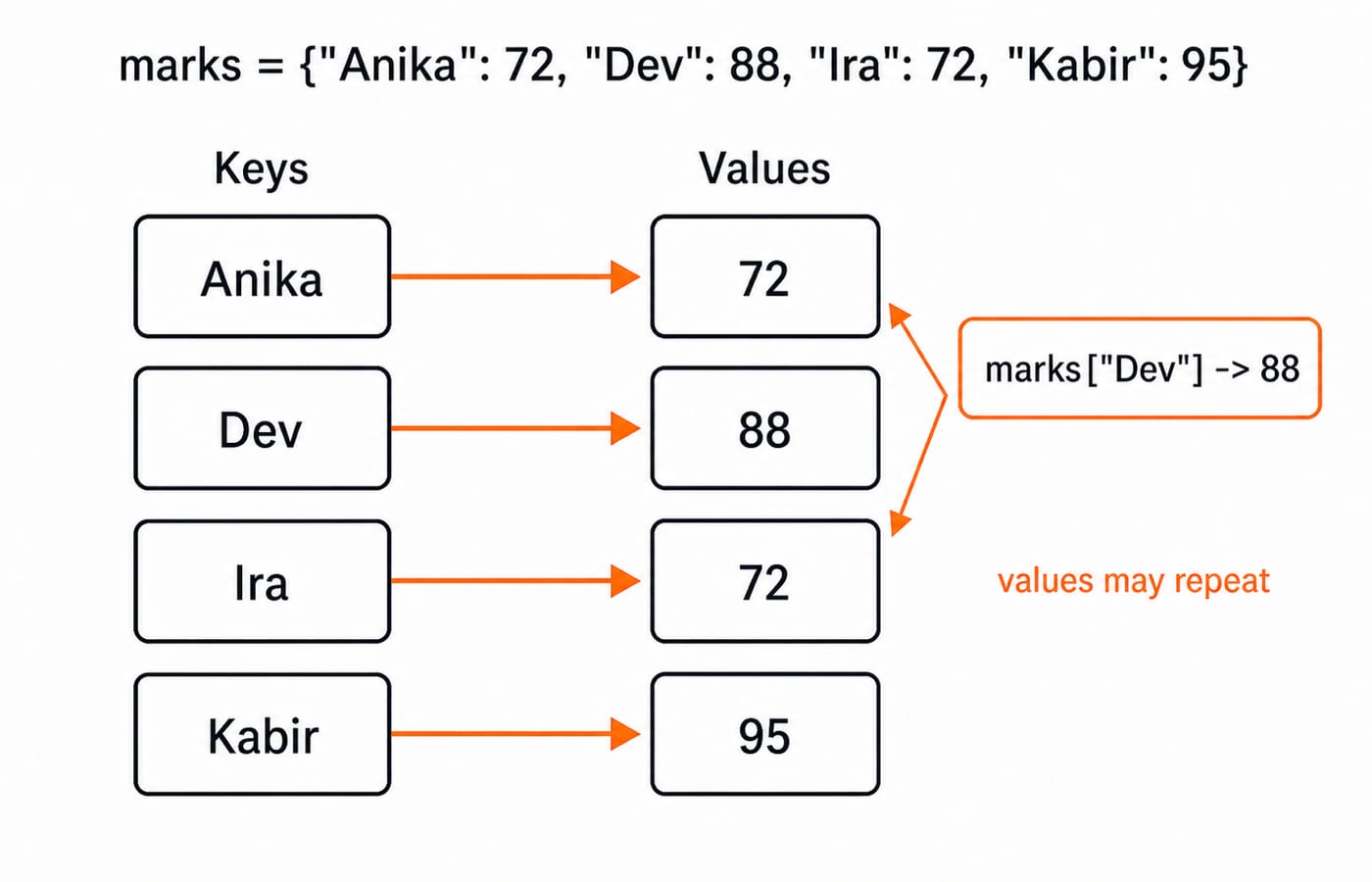
marks = {"Anika": 72, "Dev": 88, "Ira": 72, "Kabir": 95}It has four string keys, four integer values and four key-value pairs. marks["Dev"] evaluates to 88. The value 72 appears twice, which is valid because dictionary values may repeat. Keys must be unique.
Keys must be hashable, meaning a key cannot change after the pair is stored. Strings, numbers and tuples of hashable items qualify; a list does not. The official Python Dictionaries documentation states the same restriction in terms of immutable types. Dictionaries also preserve insertion order, so the pairs above are visited in the order Anika, Dev, Ira and Kabir.
Use a list such as [72, 88, 72, 95] when position identifies each item. Use the dictionary when names such as "Anika" and "Dev" are the identities.
Creating dictionaries and reading values safely
Here are three common construction forms and their results:
stock = {"pen": 12, "notebook": 5, "eraser": 9}

profile = {}
profile["name"] = "Meera"
print(profile)  # {'name': 'Meera'}

colours = dict([("red", 3), ("blue", 7)])
print(colours) # {'red': 3, 'blue': 7}print(stock["pen"]) # 12
print(stock.get("marker")) # None
print(stock.get("marker", 0)) # 0
print("eraser" in stock) # TrueThe in expression checks keys, not values. Use square brackets when a missing key indicates a programming error. Use get() when absence is expected and a fallback such as 0 has a clear meaning.
Adding, updating and removing pairs
Assignment adds a new key or updates an existing one. pop() removes a pair and returns its value.
stock = {"pen": 12, "notebook": 5, "eraser": 9}

stock["marker"] = 6
print(stock)  # {'pen': 12, 'notebook': 5, 'eraser': 9, 'marker': 6}

stock["pen"] = 15
print(stock)  # {'pen': 15, 'notebook': 5, 'eraser': 9, 'marker': 6}

removed = stock.pop("eraser")
print(stock)    # {'pen': 15, 'notebook': 5, 'marker': 6}
print(removed)  # 9
Each row below starts from its own fresh dictionary, so the results do not chain:
Method | Example | Exact result |
|---|---|---|
|
|
|
|
| Returns |
|
| Returns |
|
|
|
|
|
|
A copy lets you change this simple mapping without changing the original:
copy = stock.copy()
copy["pen"] = 20
print(copy["pen"])   # 20
print(stock["pen"])  # 15
Looping through dictionaries and building new ones
You can loop over keys, values or complete pairs:
marks = {"Anika": 72, "Dev": 88, "Ira": 72, "Kabir": 95}

for name in marks:
    print(name)

for score in marks.values():
    print(score)

for name, score in marks.items():
    print(name, score)
The paired loop prints Anika 72, Dev 88, Ira 72 and Kabir 95, each on its own line, in insertion order. A dictionary comprehension can filter or transform those pairs:
qualified = {name: score for name, score in marks.items() if score >= 80}
print(qualified)  # {'Dev': 88, 'Kabir': 95}

boosted = {name: score + 5 for name, score in marks.items()}
print(boosted)  # {'Anika': 77, 'Dev': 93, 'Ira': 77, 'Kabir': 100}
The second comprehension creates a new dictionary and does not change marks. Order is a separate question: to rebuild the mapping highest score first, write dict(sorted(marks.items(), key=lambda pair: pair[1], reverse=True)), which gives {'Kabir': 95, 'Dev': 88, 'Anika': 72, 'Ira': 72}. Anika stays ahead of Ira because Python's sort is stable and keeps the original order for equal values.
Fully worked example: process a class score record
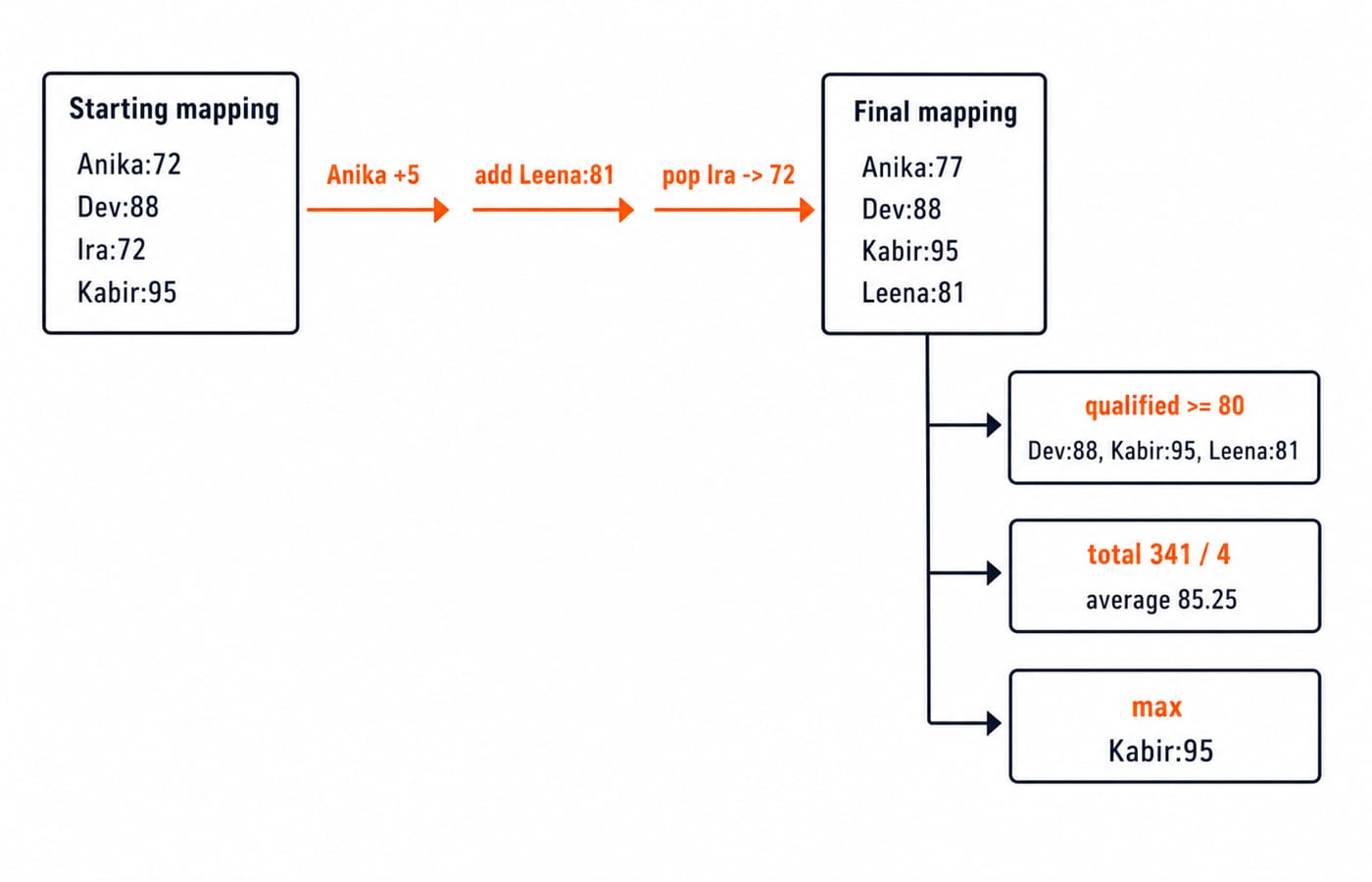
This complete program updates one score, adds a student, removes a withdrawn record, filters qualified students, and calculates the average and topper.
marks = {"Anika": 72, "Dev": 88, "Ira": 72, "Kabir": 95}

marks["Anika"] += 5
marks["Leena"] = 81
withdrawn_score = marks.pop("Ira")

qualified = {name: score for name, score in marks.items() if score >= 80}
average = sum(marks.values()) / len(marks)
topper = max(marks, key=marks.get)

print("Withdrawn score:", withdrawn_score)
print("Final marks:", marks)
print("Qualified:", qualified)
print("Average:", average)
print("Topper:", topper)
The exact output is:
Withdrawn score: 72
Final marks: {'Anika': 77, 'Dev': 88, 'Kabir': 95, 'Leena': 81}
Qualified: {'Dev': 88, 'Kabir': 95, 'Leena': 81}
Average: 85.25
Topper: Kabir
Anika's score becomes 72 + 5 = 77. After Ira is removed, the final total is 77 + 88 + 95 + 81 = 341. There are 4 records, so the average is 341 / 4 = 85.25. Kabir's 95 is the largest value.
Try two changes. First, change the qualification threshold to 85; the result keeps Dev and Kabir. Second, add "Maya": 95, find top_score = max(marks.values()), then use [name for name, score in marks.items() if score == top_score]. The result is ['Kabir', 'Maya'].
Common dictionary errors and why they happen
stock["stapler"]raisesKeyErrorif the key is absent, because square-bracket access is a strict lookup with no fallback of its own. Usestock.get("stapler", 0)only when zero is a genuine answer rather than a convenient one.{["CS", 9]: "room"}raisesTypeError: unhashable type: 'list', because a list can be edited after insertion and its hash would then be stale. Use the hashable tuple{("CS", 9): "room"}.{"id": 101, "id": 205}becomes{'id': 205}. The later duplicate silently overwrites the earlier value.
Deleting entries while iterating over the same dictionary changes its size and raises a runtime error:
for key in stock:
    del stock[key]  # RuntimeError
Iterate over a separate list of keys instead:
for key in list(stock):
    del stock[key]
If you simply want an empty dictionary, stock.clear() states the intention more directly. Also remember that sorted(marks) returns a list of sorted keys, not a sorted dictionary. The binary trees and binary search trees guide is a useful next comparison because dictionary lookup and ordered tree traversal solve different problems.
How coding tests check dictionaries
Coding tests and interviews reuse the same three dictionary tasks: trace a mutation, pick a valid key, or count frequencies. Frequency counting in particular is the standard first move on word, character and duplicate-detection problems in Coding & DSA rounds.
d = {"a": 2, "b": 3}; d["a"] += d.get("c", 4); print(d)prints{'a': 6, 'b': 3}.Of
("CS", 9)and["CS", 9], the tuple is the valid dictionary key.This loop converts the words into
{'gate': 2, 'python': 3, 'code': 1}:
words = ["gate", "python", "gate", "code", "python", "python"]
counts = {}

for word in words:
    counts[word] = counts.get(word, 0) + 1
Trace each line with the current dictionary beside it. That habit catches missed updates and incorrect default values.
The short version
Dictionaries map unique, hashable keys to values. Use get() when absence is expected. Assignment adds or updates a pair. Use items() when you need each key with its value. Comprehensions filter or transform a mapping without touching the original. When you must delete while looping, iterate over list(d) rather than the dictionary itself.
For structured language practice, continue with the Python Programming course. Then use the DSA Using Python course to apply mappings alongside other data structures.
Keep learning
Decorators in Python: @ Syntax, Wrappers and Worked Examples
Understand when decoration happens, what a wrapper receives, and how return values travel back. Runnable examples cover parameters, stacking and built-ins.
Updated 22 Oct 20266 min readPython
Exceptions in Python: Handle Errors with try, except and finally
Learn how Python exceptions change control flow, how to catch expected failures without hiding bugs, and when to use else, finally, raise, and custom exceptions.
Updated 18 Oct 20265 min readPython

Context Managers in Python: with, __enter__, __exit__ and contextlib
Learn how Python's with statement guarantees cleanup, then build and trace class-based and generator-based context managers with runnable examples.
Updated 14 Oct 20266 min readPython
Python Arguments and Scope: Parameters, LEGB, and Worked Examples
Trace how Python binds arguments, handles mutation and rebinding, and resolves names through LEGB. Runnable examples turn scope rules into predictable output.
Updated 10 Oct 20265 min readPython