Python Tuples Tutorial: Packing, Unpacking, Methods and Examples
Learn how Python tuples work through runnable examples, a fixed-record route program, precise error fixes and four predict-before-running exercises.
KnowledgeGate Team
Exam prep & CS education
Updated 15 Aug 20266 min read
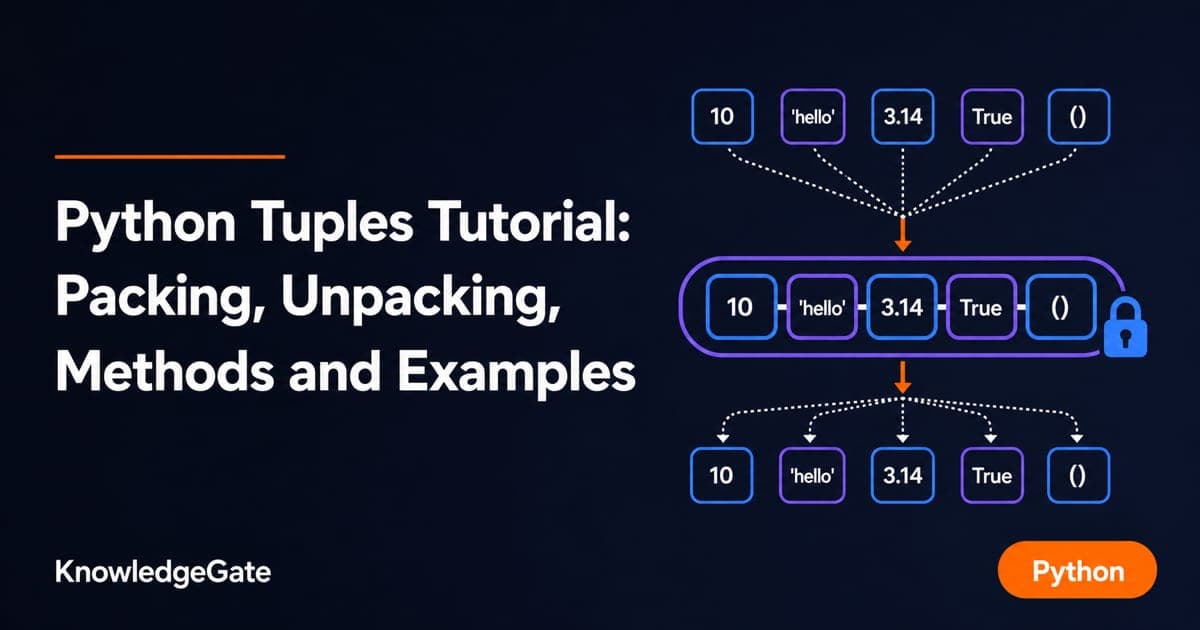
Parentheses do not always create a tuple. One trailing comma can change a value's type, and tuple items cannot be replaced like list items. ("Python") is a plain string, ("Python",) is a one-item tuple, and scores[1] = 85 raises TypeError instead of updating anything. Those three behaviours sit behind almost every tuple error a beginner meets. If you are building a broader programming path, the Coding & DSA Courses for Placements page brings related subjects together.
What a Python tuple is and how to create one
A tuple is an ordered, immutable sequence. As described in the Python Software Foundation's tuple and sequence documentation, order is retained, duplicates are allowed, and an existing tuple slot cannot be assigned a different value. Parentheses make boundaries readable, but the comma creates tuple items.
empty = ()
single = ("Python",)
course = ("Python", 24, True)
coordinates = 12, 7

print(type(empty).__name__)
print(type(("Python")).__name__)
print(type(single).__name__)
print(course)
print(coordinates)
The output is:
tuple
str
tuple
('Python', 24, True)
(12, 7)
("Python") is only a grouped string expression. The comma in ("Python",) makes a one-item tuple. In coordinates = 12, 7, Python packs two values without parentheses. You can also convert another iterable: tuple([4, 6, 8]) gives (4, 6, 8).
Indexing, slicing and nested tuples
Use one record to see the difference between indexing and slicing:
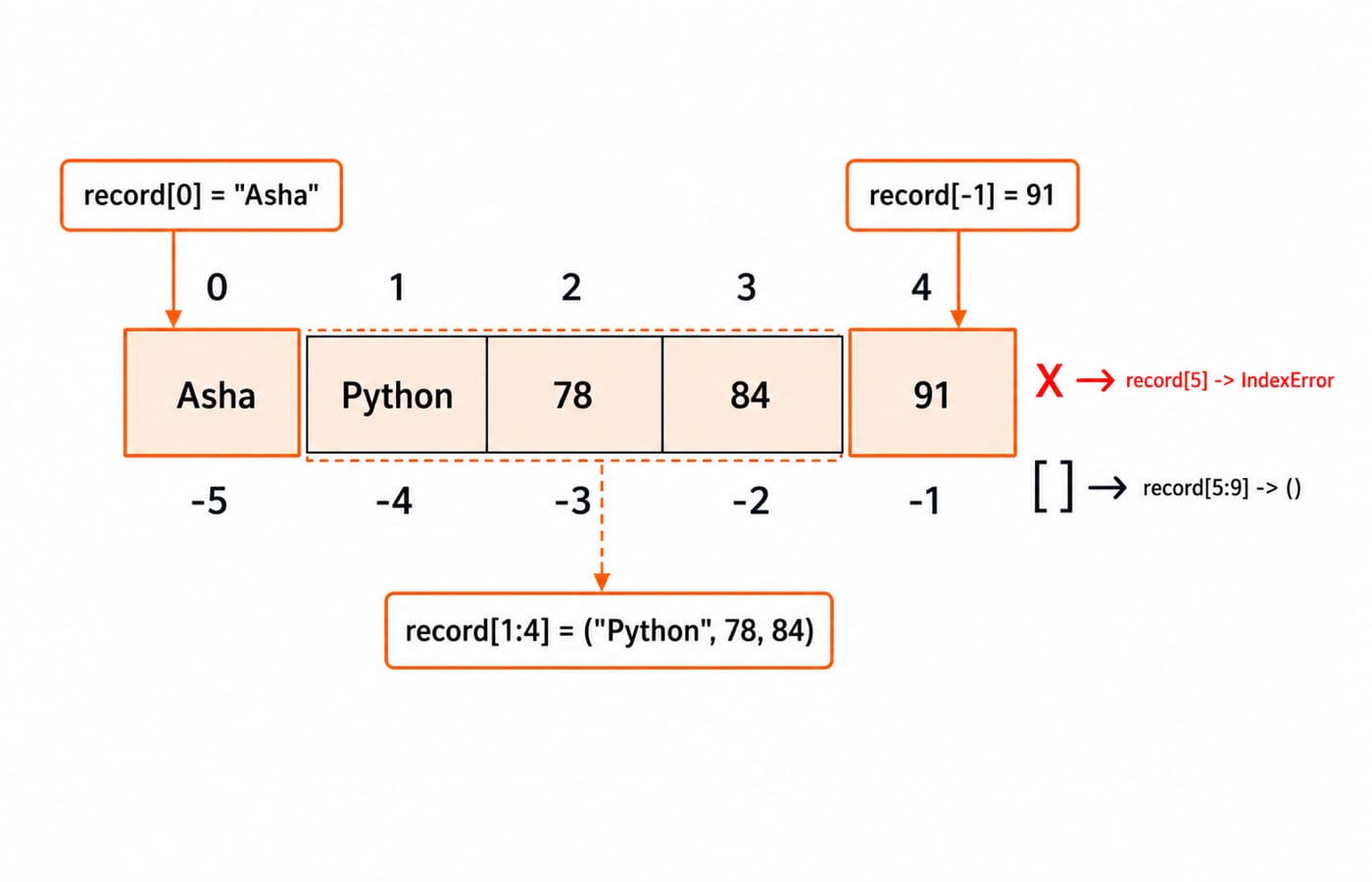
record = ("Asha", "Python", 78, 84, 91)

print(len(record))
print(record[0])
print(record[-1])
print(record[1:4])
print(record[::2])
print(record[5:9])
The results are 5, Asha, 91, ('Python', 78, 84), ('Asha', 78, 91) and (). The value of record[0] is the string 'Asha'; print() shows it without quotation marks. Indexing returns one item, while slicing returns a new tuple. record[5] raises IndexError because position 5 does not exist, but the out-of-range slice record[5:9] safely returns an empty tuple.
For subjects = (("OS", 18), ("DBMS", 21), ("CN", 17)), subjects[1] selects the second inner tuple, ('DBMS', 21). A second index goes inside it: subjects[1][0] is 'DBMS', and subjects[1][1] is 21.
Immutability: what changes and what does not
Start with scores = (78, 84, 91). The assignment scores[1] = 85 raises TypeError because tuples do not support item assignment. Build a new tuple instead:
scores = (78, 84, 91)
updated_scores = scores[:1] + (85,) + scores[2:]

print(updated_scores)
print(scores)
print(scores + (88,))
print(("revise",) * 3)
The four results are (78, 85, 91), (78, 84, 91), (78, 84, 91, 88) and ('revise', 'revise', 'revise'). Addition and repetition also create new tuples. Notice the required comma in both one-item tuples.
A tuple can contain a mutable object. With profile = ("Asha", [78, 84]), calling profile[1].append(91) changes the contained list. Printing profile then gives ('Asha', [78, 84, 91]). The tuple still points to the same two objects; the list changed internally.
Tuple packing, unpacking and starred targets
Packing collects values into a tuple. Unpacking assigns those positions to names.
point = (12, 7)
x, y = point
print(x, y)

name, language, score = ("Asha", "Python", 91)
print(name, language, score)

first, *middle, last = (10, 20, 30, 40, 50)
print(first, middle, last)

left, right = 3, 8
left, right = right, left
print(left, right)
The lines print 12 7, Asha Python 91, 10 [20, 30, 40] 50 and 8 3. A starred target receives a list, not a tuple. During swapping, the right side is packed before the left side is unpacked.
a, b = (10, 20, 30) raises ValueError because the counts of values and targets differ. Use a, *rest = (10, 20, 30) instead: a becomes 10, and rest becomes [20, 30].
![Unpacking diagram for the tuple (10, 20, 30, 40, 50), with first = 10, starred middle = [20, 30, 40] as a list, and last = 50.](https://cdn.knowledgegate.ai/blog-assets/blog_asset_1784144628408_04ef55.jpg)
Tuple operations and the two tuple methods
Keep one tuple for every calculation:
scores = (84, 91, 84, 76, 84)

print(len(scores))
print(min(scores))
print(max(scores))
print(sum(scores))
print(sum(scores) / len(scores))
print(scores.count(84))
print(scores.index(91))
print(91 in scores)
print(sorted(scores))
print(tuple(sorted(scores)))
The results are 5, 76, 91, 419, 83.8, 3, 1, True, [76, 84, 84, 84, 91] and (76, 84, 84, 84, 91). The count() method reports occurrences. The index() method returns the first matching position and raises ValueError if the value is absent. sorted() returns a list, so wrap it in tuple() when you need a tuple. For the algorithmic side of ordering, read Sorting Algorithms Compared: complexity, stability, and the n log n lower bound.
Worked example: process fixed route records
Here the outer list can gain or lose routes. Each inner tuple remains a fixed record with three positions: (start, end, distance_km).
routes = [
    ("Indore", "Bhopal", 194),
    ("Pune", "Mumbai", 149),
    ("Jaipur", "Ajmer", 135),
]

for start, end, distance in routes:
    print(f"{start} -> {end}: {distance} km")

total_distance = sum(distance for _, _, distance in routes)
longest = max(routes, key=lambda route: route[2])

print(f"Total: {total_distance} km")
print(f"Longest: {longest[0]} -> {longest[1]} ({longest[2]} km)")
The exact output is:
Indore -> Bhopal: 194 km
Pune -> Mumbai: 149 km
Jaipur -> Ajmer: 135 km
Total: 478 km
Longest: Indore -> Bhopal (194 km)
The for loop unpacks each three-item route directly into start, end and distance. In the generator, the two _ names signal that only the distance is needed. The arithmetic is 194 + 149 + 135 = 478. The key function lambda route: route[2] tells max() to compare the distance at index 2, not the city names.
Tuples are one of Python's core built-in containers, alongside lists, sets and dictionaries. The rest of the Python tutorials live in the Programming Languages section.
Common tuple errors and precise fixes
These mistakes look similar, but their causes differ:
Expression | Result or exception | Reason | Precise fix |
|---|---|---|---|
|
| No comma creates a tuple | Use |
|
| Tuples reject item assignment | Build a new tuple, or use a list for in-place edits |
|
| Values and targets do not match | Use three targets or |
|
| An integer is not iterable | Use |
|
| The contained list is unhashable | Use |
There is also a method trap: scores.index(100) raises ValueError when 100 is absent. Test 100 in scores first when absence is normal. Use a tuple for a fixed-position record or a value that should not be reassigned item by item. Use a list for a collection designed to change.
Exercises, the short version and the next step
Predict each answer before running any code:
For
book = ("Python Basics", 320, True), findbook[0],book[-1]andlen(book).With
coordinates = (6, 9), unpackx, y, then form(y, x).For
values = (5, 8, 5, 2, 5), findvalues.count(5),values.index(2)andvalues[1:4].Repair
topic = ("tuples")so its type istuple. Then rebuildscores = (70, 80, 90)with the second item changed to85.
Answers: 1. 'Python Basics', True, 3. 2. (9, 6). 3. 3, 3, (8, 5, 2). 4. topic = ("tuples",) and scores[:1] + (85,) + scores[2:], which gives (70, 85, 90).
The short version: commas create tuple items, indexing reads one item, slicing creates a new tuple, unpacking assigns positions to names, and immutability blocks item assignment without freezing a list stored inside a tuple.
Use the Python Course: Concepts, MCQs & Coding for structured language practice. DSA Using Python is a later route once tuple, list and control-flow fundamentals feel comfortable. Neither is required to practise the examples above.
Keep learning
Decorators in Python: @ Syntax, Wrappers and Worked Examples
Understand when decoration happens, what a wrapper receives, and how return values travel back. Runnable examples cover parameters, stacking and built-ins.
Updated 22 Oct 20266 min readPython
Exceptions in Python: Handle Errors with try, except and finally
Learn how Python exceptions change control flow, how to catch expected failures without hiding bugs, and when to use else, finally, raise, and custom exceptions.
Updated 18 Oct 20265 min readPython

Context Managers in Python: with, __enter__, __exit__ and contextlib
Learn how Python's with statement guarantees cleanup, then build and trace class-based and generator-based context managers with runnable examples.
Updated 14 Oct 20266 min readPython
Python Arguments and Scope: Parameters, LEGB, and Worked Examples
Trace how Python binds arguments, handles mutation and rebinding, and resolves names through LEGB. Runnable examples turn scope rules into predictable output.
Updated 10 Oct 20265 min readPython