Python Lists Tutorial: Create, Update, Slice and Use Lists with Examples
Learn Python lists through one clear path, from creation and indexing to mutation, comprehensions, copying, and exam-style output questions.
KnowledgeGate Team
Exam prep & CS education
Updated 13 Aug 20266 min read
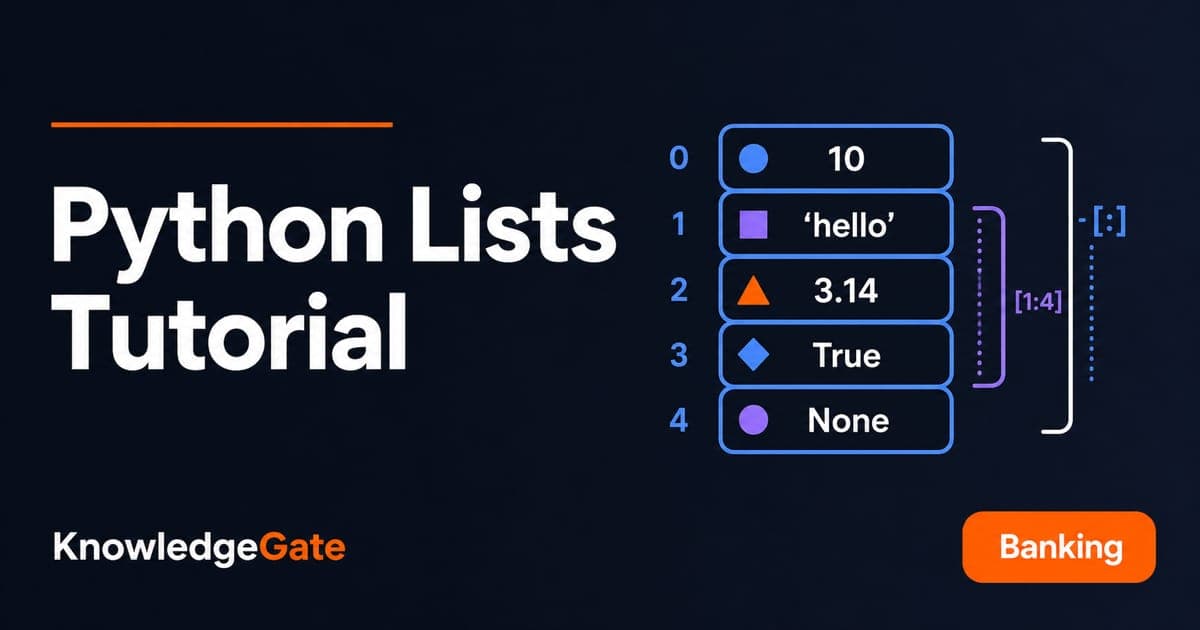
You can write [1, 2, 3], but can you predict a slice, separate an index from a value, or explain why assigning the result of append() produces None? A slice excludes its stop index. Mutating methods such as append() and sort() change the list in place and hand back None. Plain assignment binds a second name to the same list rather than copying it. Those three rules account for most beginner list bugs. Each snippet runs as-is in a REPL, with no imports.
1. What Is a List in Python?
A list is an ordered, mutable sequence. Each item has a position, and the list can change after creation. A tuple is ordered but cannot be changed in place.
marks = [72, 85, 91, 68, 85]This list keeps order, allows duplicate 85, and has len(marks) == 5. Lists can mix types:
profile = ["Asha", 20, 8.4, True]Mixed values are valid, although one consistent type is easier to process. The official Python documentation is the authority on list methods and sequence semantics. For the wider programming ladder around Python, see Coding & DSA courses for placements.
2. Create a List, Read Values, and Understand Indexes
Three creation forms:
empty = []
marks = [72, 85, 91, 68, 85]
first_five = list(range(1, 6))  # [1, 2, 3, 4, 5]
Python uses zero-based indexes. Therefore, marks[0] == 72, marks[2] == 91, and marks[-1] == 85. Negative indexes count from the end.
A slice reads a range without changing the list. Its stop index is excluded:
marks[1:4]gives[85, 91, 68].marks[:3]gives[72, 85, 91].marks[::2]gives[72, 91, 85].marks[::-1]gives[85, 68, 91, 85, 72].
Nested lists use one index per level. For records = [["Asha", 78], ["Ravi", 84]], records[1][0] is "Ravi", while records[0][1] is 78.
![Index ruler for marks = [72, 85, 91, 68, 85] showing positive and negative positions with the slice marks[1:4] highlighted.](https://cdn.knowledgegate.ai/blog-assets/blog_asset_1784143232331_9t9a11.jpg)
3. Update, Add, and Remove Items Without Losing Track of State
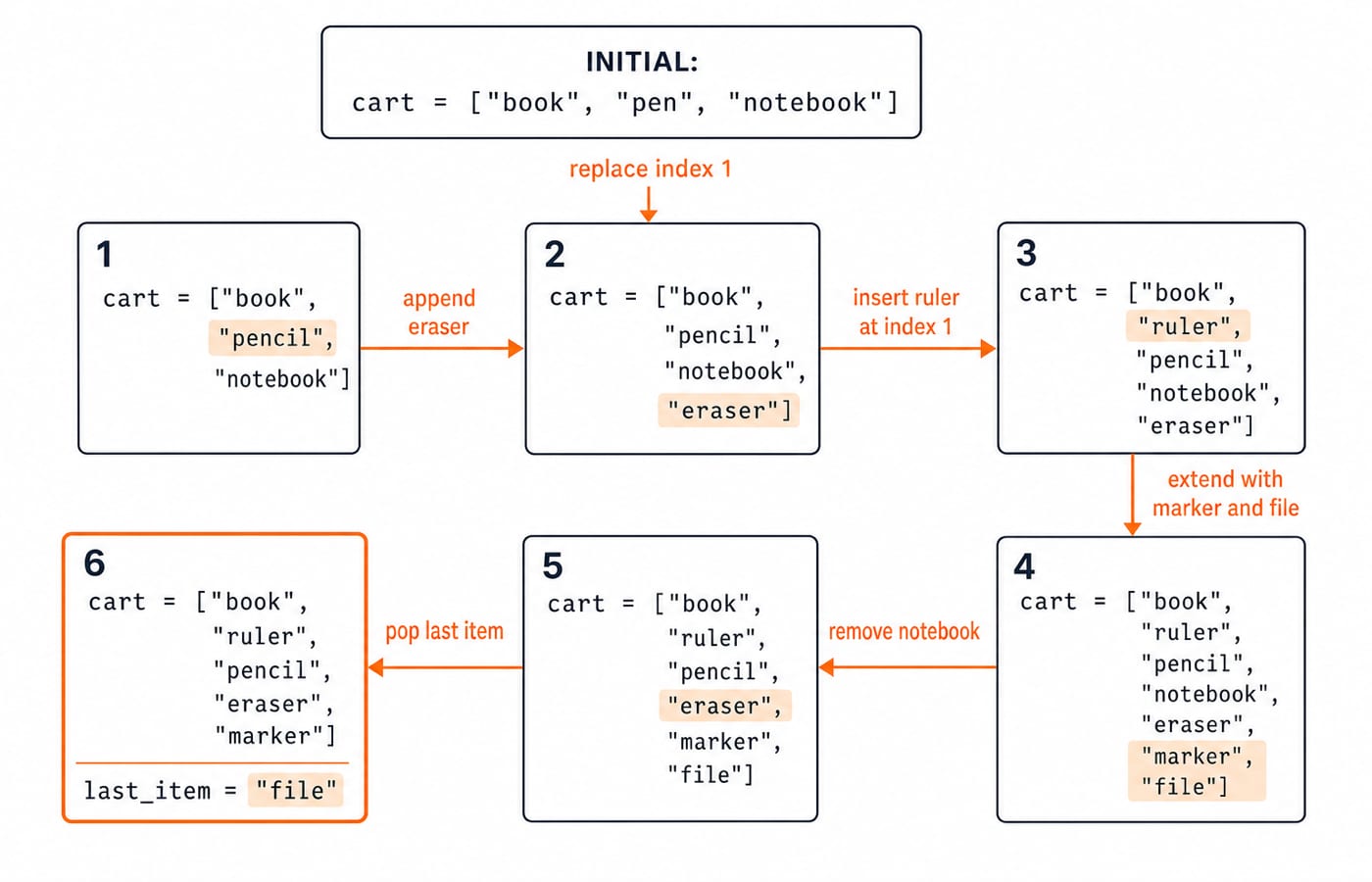
Follow one list through each mutation:
cart = ["book", "pen", "notebook"]

cart[1] = "pencil"  # ["book", "pencil", "notebook"]

cart.append("eraser")  # ["book", "pencil", "notebook", "eraser"]

cart.insert(1, "ruler")  # ["book", "ruler", "pencil", "notebook", "eraser"]

cart.extend(["marker", "file"])  # ["book", "ruler", "pencil", "notebook", "eraser", "marker", "file"]

cart.remove("notebook")  # ["book", "ruler", "pencil", "eraser", "marker", "file"]

last_item = cart.pop()  # last_item == "file"; cart == ["book", "ruler", "pencil", "eraser", "marker"]
remove(value) deletes the first matching value. pop(index) removes and returns an item, while pop() uses the last position. del cart[0] deletes by position without returning it. An absent value passed to remove() raises ValueError; an invalid index raises IndexError.
4. Loop Through Lists and Build New Ones with Comprehensions
An explicit loop shows the running total:
marks = [72, 85, 91, 68, 85]
total = 0

for mark in marks:
    total += mark  # Running totals: 72, 157, 248, 316, 401

average = total / len(marks)  # 401 / 5 = 80.2
The concise equivalent is sum(marks) / len(marks). A comprehension builds a new list:
strong_scores = [mark for mark in marks if mark >= 80]  # [85, 91, 85]

boosted = [min(mark + 5, 100) for mark in marks]  # [77, 90, 96, 73, 90]
Read a comprehension in this order: output expression, loop clause, then optional filter. For numbered output, enumerate() supplies both position and value:
subjects = ["Python", "DBMS", "OS"]
for number, subject in enumerate(subjects, start=1):
    print(number, subject)
It prints 1 Python, 2 DBMS, and 3 OS on separate lines.
5. Sort, Reverse, Copy, and Combine Lists
sort() changes a list in place and returns None. sorted() creates a separate result.
nums = [7, 2, 10, 2]
sort_result = nums.sort()  # nums == [2, 2, 7, 10]; sort_result is None

descending = sorted(nums, reverse=True)  # descending == [10, 7, 2, 2]; nums is still [2, 2, 7, 10]
Continue with the sorting algorithms comparison for underlying methods and costs.
Concatenation and repetition also create new lists. [1, 2] + [3, 4] gives [1, 2, 3, 4], while ["go"] * 3 gives ["go", "go", "go"].
Assignment does not copy a list:
original = [10, 20, 30]
alias = original
clone = original.copy()
alias.append(40)
Now both original and alias are [10, 20, 30, 40], but clone remains [10, 20, 30]. copy() is shallow, so nested mutable items still need special care.
6. Common Python List Errors and How to Fix Them
Do not replace a list with a mutating method's result:
items = ["pen", "book"]
items = items.append("file")  # items is now None
Call items.append("file") on its own line instead. Then items == ["pen", "book", "file"].
Distinguish positions from values. With items = ["pen", "book"], items[3] raises IndexError. items.remove(0) raises ValueError because Python searches for the value 0. Use items.pop(0) to remove and return "pen".
Avoid removing items while iterating over the same list:
nums = [1, 2, 2, 3]
for n in nums:
    if n == 2:
        nums.remove(n)
After the first 2 is removed, later values shift left, but the iterator advances, so the next 2 can be skipped. Build a new list instead: nums = [n for n in nums if n != 2], which gives [1, 3].
7. How Exams and Interviews Test Lists
Consider this output-tracing question:
a = [2, 4, 6]
b = a[:]
a.append(8)
b[1] = 5
print(a, b)
The full slice first creates a separate outer list, so b starts as [2, 4, 6]. Appending changes only a, making it [2, 4, 6, 8]. Replacing index 1 changes b to [2, 5, 6]. The final output is [2, 4, 6, 8] [2, 5, 6].
Now trace a comprehension:
values = [3, 6, 9, 12]
result = [x // 3 for x in values if x > 5]
The filter keeps 6, 9, and 12. Integer division then gives 6 // 3 = 2, 9 // 3 = 3, and 12 // 3 = 4, so result == [2, 3, 4].
Written exams tend to ask you to trace a snippet, choose a suitable method, or predict the result of a mutation. Interviewers push one step further and ask why: why b = a and b = a[:] diverge once a.append(8) runs, or why a loop that removes items while iterating skips one. For a longer set in the same style, work through Python output-based questions on lists, slicing and mutability. KnowledgeGate's question bank carries more than 50 practice questions on Python lists, and the DSA Using Python course builds structured problem solving on those same patterns.
8. Python Lists in Short, Plus Two Exercises
Keep these six points:
Literals such as
[1, 2]create lists.Indexes and slices read items.
Assignment and mutating methods change a list.
Comprehensions create transformed lists.
sort()mutates, whilesorted()creates a result.Copies and aliases behave differently.
For exercise 1, start with temperatures = [31, 28, 35, 30, 33]. Build values above 32. The expected hot_days is [35, 33]. The sum is 31 + 28 + 35 + 30 + 33 = 157, so the mean is 157 / 5 = 31.4.
For exercise 2, start with queue = ["Asha", "Ravi", "Meera"]. Append "Kabir", pop index 0 into served, and reverse what remains. The expected values are served == "Asha" and queue == ["Kabir", "Meera", "Ravi"].
Run each example, change one input, and predict the result before pressing Enter. That habit is what turns list syntax into list intuition. For a guided route from these basics to interview-level practice, take the Python Programming course.
Keep learning
Decorators in Python: @ Syntax, Wrappers and Worked Examples
Understand when decoration happens, what a wrapper receives, and how return values travel back. Runnable examples cover parameters, stacking and built-ins.
Updated 22 Oct 20266 min readPython
Exceptions in Python: Handle Errors with try, except and finally
Learn how Python exceptions change control flow, how to catch expected failures without hiding bugs, and when to use else, finally, raise, and custom exceptions.
Updated 18 Oct 20265 min readPython

Context Managers in Python: with, __enter__, __exit__ and contextlib
Learn how Python's with statement guarantees cleanup, then build and trace class-based and generator-based context managers with runnable examples.
Updated 14 Oct 20266 min readPython
Python Arguments and Scope: Parameters, LEGB, and Worked Examples
Trace how Python binds arguments, handles mutation and rebinding, and resolves names through LEGB. Runnable examples turn scope rules into predictable output.
Updated 10 Oct 20265 min readPython