

Regular Expressions in Python: A Runnable Tutorial from First Match to Log Parser
Learn Python regex by running small examples, reading exact match spans and building a structured parser for three log records.
KnowledgeGate Team
Exam prep & CS education
Updated 10 Nov 20265 min read

Ordinary string methods are clear when you need one literal check, but they become repetitive when input can contain variable digits, separators or repeated records. Python's re module solves this pattern-matching problem, provided you understand what each symbol and API choice does. Regular expressions can match filenames, extract and validate data, substitute text and parse a three-line log; Coding & Skills provides the broader learning path.
Regular expressions in Python start with a pattern, text and match object
A regular expression describes character sequences. Its three parts are the pattern, input text and a match object or None.
import re

pattern = re.compile(r"invoice-(\d{4})-(\d{2})\.pdf")
match = pattern.fullmatch("invoice-2026-07.pdf")

print(match.group(0))
print(match.groups())
print(match.span())
Outputs are invoice-2026-07.pdf, ('2026', '07') and (0, 19). Left to right, the pattern has literal invoice-, four captured year digits, a hyphen, two captured month digits, an escaped dot and pdf.
Both r"\d+" and "\\d+" send a backslash and d to the regex engine; the raw form reads better. The dot needs \. because unescaped . matches any non-newline character by default.
For invoice-July.pdf, fullmatch returns None; calling .group() raises AttributeError. Check if match is not None: before reading groups. Regular Expressions and the Pumping Lemma is the formal-language companion, not Python API documentation.
Python regex methods answer different matching questions
Method | Question | Return shape |
|---|---|---|
| Where is the first match anywhere? | Match object or |
| Does a match start at position | Match object or |
| Does the whole input match? | Match object or |
| What are all matched strings or captured values? | List |
| What are all matches with groups and spans? | Iterator of match objects |
Use:
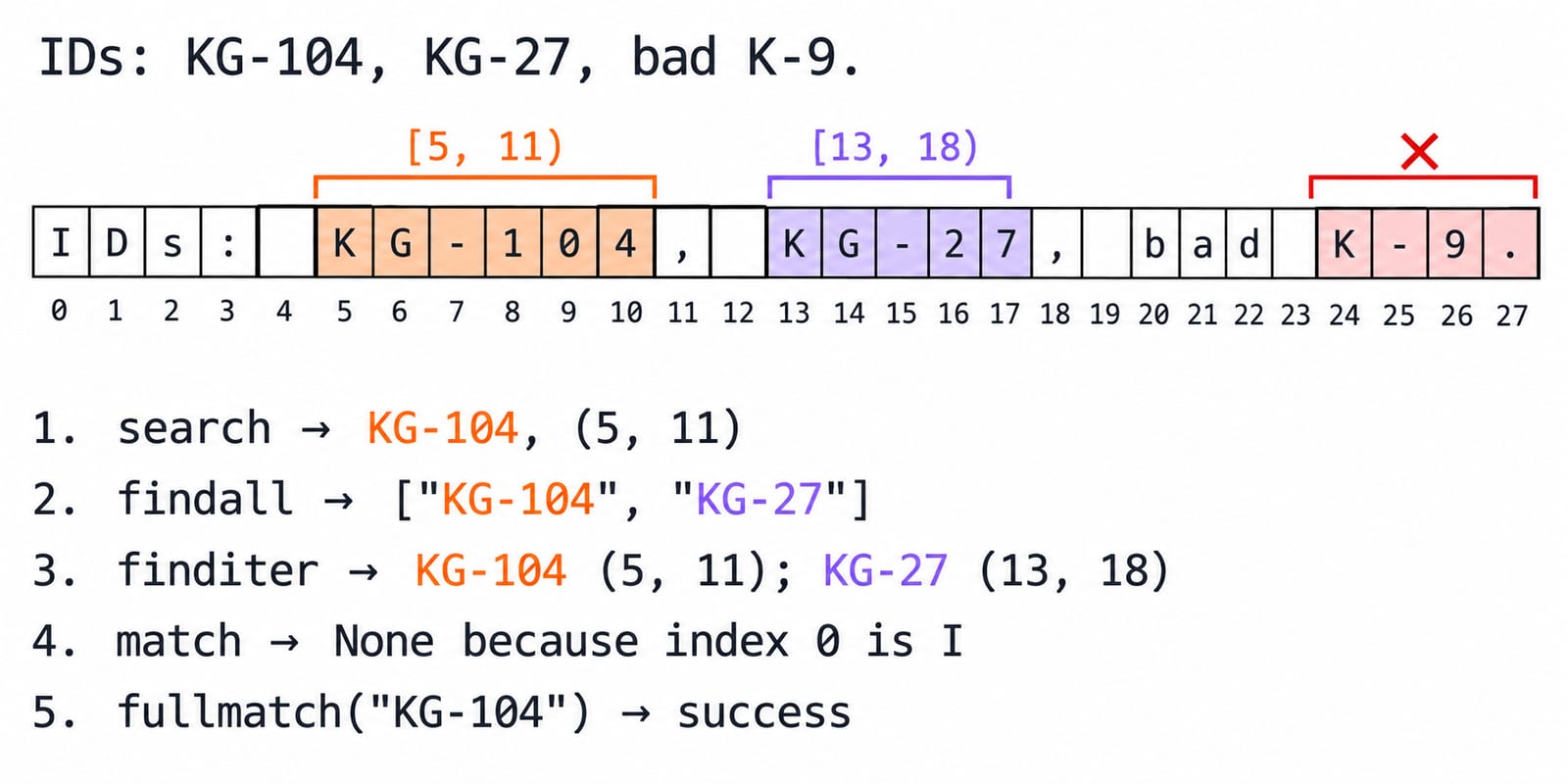
text = "IDs: KG-104, KG-27, bad K-9"
id_re = r"\bKG-\d+\b"
search finds KG-104 at (5, 11). findall returns ['KG-104', 'KG-27']; finditer yields spans (5, 11) and (13, 18). match returns None, while fullmatch(id_re, "KG-104") succeeds. K-9 lacks the required KG- prefix.
fullmatch validates whole input; search finds one occurrence; findall returns values; finditer preserves positions and groups.
Character classes, quantifiers and anchors make Python regex precise
Symbol | Meaning |
|---|---|
| Digit, uppercase ASCII letter, non-digit |
| One or more, zero or more, optional or lazy depending on position |
| Three through five repetitions |
| Word boundary |
| Start and end of the string; each line with re.MULTILINE |
[.-] matches one listed character; a hyphen between class items can define a range.
re.findall(r"v\d+\.\d+", "build v3.12 and v312") returns ['v3.12']: literal v, digits 3, a literal dot, then digits 12. v312 lacks the dot.
With re.fullmatch(r"[A-Z]{2}-\d{3,5}", value), CS-2048 succeeds. Lowercase makes cs-2048 fail; CS-20 has two digits and CS-204812 has six. fullmatch makes ^...$ redundant.
Capturing groups and alternation turn matches into structured fields
Parentheses capture fields, | expresses alternatives, and (?P<name>...) gives a group a readable name.
orders = "Orders: ORD-2026-0042, RET-2025-0187."
order_re = re.compile(
    r"\b(?P<kind>ORD|RET)-(?P<year>\d{4})-(?P<serial>\d{4})\b"
)

for match in order_re.finditer(orders):
    print(match.groupdict(), match.span())
Results are {'kind': 'ORD', 'year': '2026', 'serial': '0042'} (8, 21) and {'kind': 'RET', 'year': '2025', 'serial': '0187'} (23, 36). Strings preserve leading zeroes; later conversion makes int('0042') equal 42 and int('0187') equal 187. Use group(0) for the record and match['year'] for one field.
A capture changes findall: re.findall(r"(KG)-\d+", "KG-104 KG-27") returns ['KG', 'KG']; re.findall(r"(?:KG)-\d+", ...) returns ['KG-104', 'KG-27'].
re.sub and re.split transform text with matched structure
raw = "Dates: 17/07/2026, 03/01/2025"
date_re = r"\b(?P<day>\d{2})/(?P<month>\d{2})/(?P<year>\d{4})\b"
clean = re.sub(date_re, r"\g<year>-\g<month>-\g<day>", raw)
print(clean)
Output is Dates: 2026-07-17, 2025-01-03. The first year 2026, month 07 and day 17 become 2026-07-17. Reshaping text does not prove that a captured calendar date is valid.
re.split(r"\s*[,;|]\s*", "python, regex; parsing | validation") returns ['python', 'regex', 'parsing', 'validation']. \s* consumes optional surrounding whitespace; the class accepts comma, semicolon or pipe. Python String Methods and Formatting explains literal str.split and str.replace; regex is the better fit when the delimiter or replacement follows a pattern.
Greedy matching and common Python regex errors need deliberate repairs
For html = "<b>one</b><b>two</b>", greedy .* returns ['<b>one</b><b>two</b>']; lazy .*? returns ['<b>one</b>', '<b>two</b>']. One expands as far as possible, the other as little as possible. This is not a general HTML parser.
re.findall(r"(?<=ID:)\d+", "ID:104 REF:27 ID:305") returns ['104', '305']. The lookbehind requires ID: immediately before the digits but excludes it from the result.
Mistake | What goes wrong | Repair |
|---|---|---|
Forgetting raw strings | Backslashes become hard to reason about | Use a raw string |
Using | A valid later value is missed | Use |
Capturing inside | Only captured values return | Use |
Using | The match expands too far | Bound it or use lazy repetition |
Calling |
| Check explicitly for |
Compiling | Invalid syntax raises | Catch |
Fully worked Python regex log parser and transfer exercises
import re
from collections import Counter

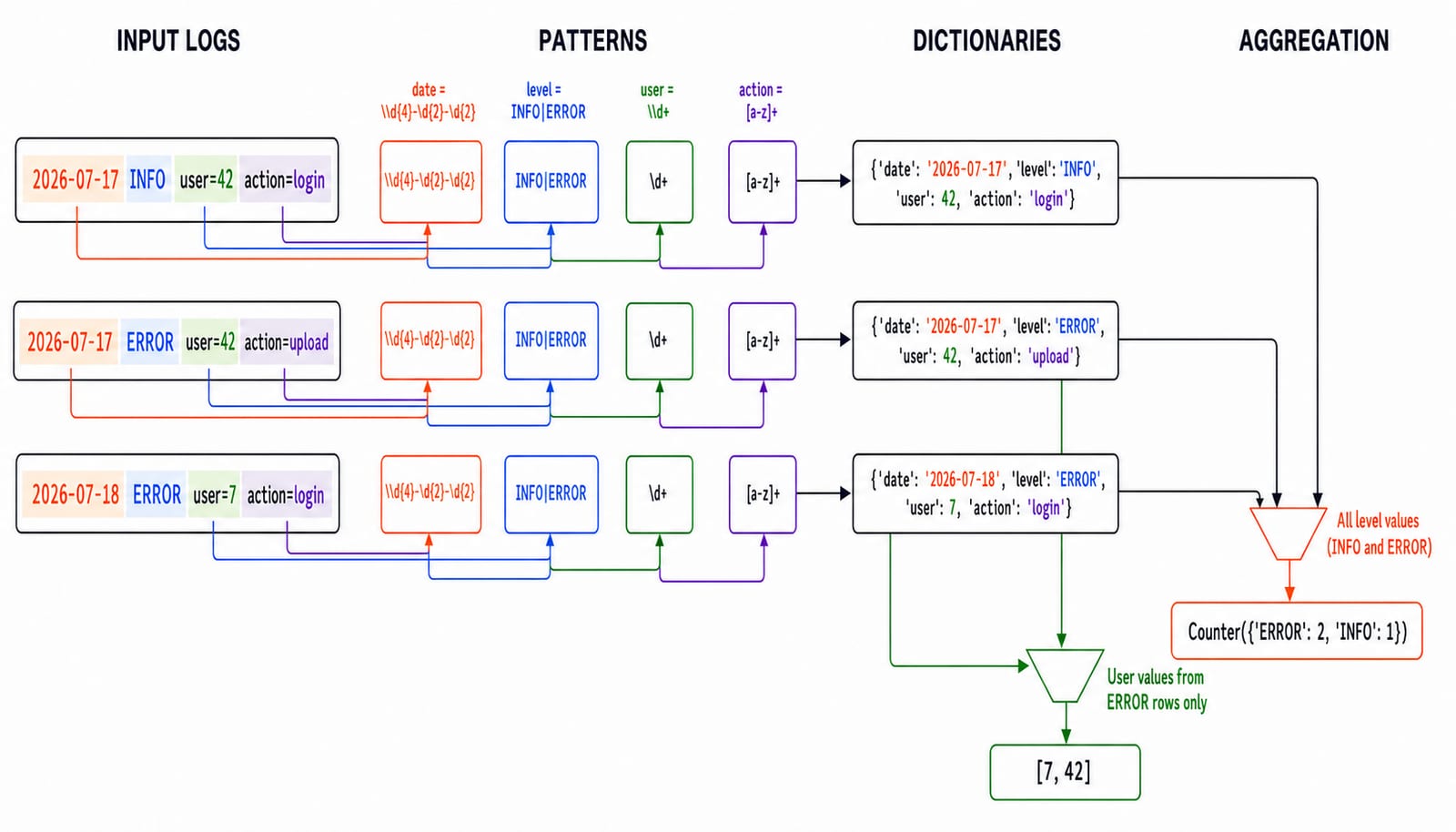
logs = """2026-07-17 INFO user=42 action=login
2026-07-17 ERROR user=42 action=upload
2026-07-18 ERROR user=7 action=login"""

line_re = re.compile(
    r"^(?P<date>\d{4}-\d{2}-\d{2}) "
    r"(?P<level>INFO|ERROR) "
    r"user=(?P<user>\d+) "
    r"action=(?P<action>[a-z]+)$",
    re.MULTILINE,
)

records = [
    {**match.groupdict(), "user": int(match["user"])}
    for match in line_re.finditer(logs)
]
counts = Counter(record["level"] for record in records)
error_users = sorted(
    {record["user"] for record in records if record["level"] == "ERROR"}
)

print(records)
print(counts)
print(error_users)
Records are {'date': '2026-07-17', 'level': 'INFO', 'user': 42, 'action': 'login'}, {'date': '2026-07-17', 'level': 'ERROR', 'user': 42, 'action': 'upload'} and {'date': '2026-07-18', 'level': 'ERROR', 'user': 7, 'action': 'login'}. Outputs are Counter({'ERROR': 2, 'INFO': 1}) and [7, 42]. re.MULTILINE makes ^ and $ operate per line; named groups keep extraction readable.
Check three transfers:
Extract tags from
Learn #Python, #regex and #100DaysOfCode.withr"(?<!\w)#[A-Za-z0-9_]+". Answer:['#Python', '#regex', '#100DaysOfCode'].Validate with
r"KG-[A-Z]{2}-\d{3}".KG-PY-027succeeds;KG-PY-27andKG-py-027fail.Change the level to
INFO|WARN|ERRORand add2026-07-18 WARN user=9 action=retry. The new counts areERROR: 2,INFO: 1,WARN: 1.
Predict a span, select a method, repair greediness, extract named fields and explain failed validation. Python Standard Library Tour: Practical Tutorial with Examples uses structured CSV rows and several modules to build a JSON report; this parser instead extracts fields from unstructured log lines with named regex groups.
Regular expressions in Python: the short version and next step
Write raw-string patterns.
Escape literal metacharacters.
Choose the matching method by intent.
Use
fullmatchfor controlled validation.Prefer named groups for structured extraction.
Test success, failure and boundary cases.
Regular expressions can match a filename, parse three log records and count two errors. Continue with Python Course: Concepts, MCQs & Coding when you want the complete language sequence and practice.
Keep learning

JSON and CSV in Python: Read, Write and Convert Data with Worked Examples
Use Python's standard library to read, update, write and convert JSON and CSV safely. The examples trace types, quoting, calculations and validation.
Updated 9 Nov 20265 min readPython

Date and Time in Python: datetime Tutorial with Parsing, Arithmetic and Time Zones
Build reliable Python date-time values from input text, calculate across midnight, and convert one instant between Asia/Kolkata and UTC.
Updated 8 Nov 20265 min readPython

Python Collections Module: Counter, defaultdict, deque and namedtuple with Worked Examples
Counter counts values, defaultdict creates missing groups, deque works at both ends, and namedtuple gives fixed records readable fields.
Updated 7 Nov 20265 min readPython

Python for GATE: DA Syllabus, Observed Weightage and Prep Order
Settle the DA-versus-CS language question, see what one official DA paper contained, and build Python, data structures and algorithms in the right sequence.
Updated 6 Nov 20265 min readPython