JavaScript Callbacks: Synchronous, Async and Error-First Examples
Learn why some callbacks run now and others run later. Trace arrays and timers, then build a safe error-first quiz workflow with exact outputs.
KnowledgeGate Team
Exam prep & CS education
Updated 5 Sep 20266 min read
setTimeout and array methods both accept callbacks, yet one runs later while the others run immediately. Learn to predict output order, build an error-first workflow, and avoid early execution, duplicate completion, and unreadable nesting. For language basics, start with the complete beginner JavaScript sequence.
Related reading: JavaScript error handling and JavaScript function binding.
What a callback is in JavaScript
A callback is a function passed to another function, which decides when to invoke it and what arguments to provide. Passing greet passes the function; greet("Asha") calls it immediately and passes its return value.
function greet(name) {
  return `Hello, ${name}`;
}

function deliver(name, formatter) {
  console.log(formatter(name));
}

deliver("Asha", greet);
deliver("Ravi", name => `Welcome, ${name}!`);
The exact output is:
Hello, Asha
Welcome, Ravi!
The first callback is named and the second anonymous. "Callback" describes their role, not special syntax, and does not guarantee asynchronous execution. In a browser, this code sits inside the wider world of HTML, HTTP, and URLs covered in Web Technologies for Teaching and CS Exams.
Synchronous callbacks with array methods
Array methods call a supplied function for each relevant element. Consider this dataset:
const marks = [4, 7, 10, 13];

const boosted = marks.map(mark => mark + 2);
const doubleDigits = marks.filter(mark => mark >= 10);
const total = marks.reduce((total, mark) => total + mark, 0);

console.log(boosted);      // [6, 9, 12, 15]
console.log(doubleDigits); // [10, 13]
console.log(total);        // 34
For map, the callback receives each mark. The map callback also makes its index available:
Input | Index | Callback result |
|---|---|---|
4 | 0 | 6 |
7 | 1 | 9 |
10 | 2 | 12 |
13 | 3 | 15 |
The final array is [6, 9, 12, 15]. Because map finishes all four calls before the next statement, it is synchronous. The reduce calculation is 0 + 4 + 7 + 10 + 13 = 34.
A small higher-order function exposes the same mechanism:
function transform(values, callback) {
  const result = [];
  for (const value of values) result.push(callback(value));
  return result;
}

const input = [2, 5, 8];
console.log(transform(input, value => value * 3)); // [6, 15, 24]
console.log(input);                                // [2, 5, 8]
The callback transforms each value without changing the input.
Asynchronous callbacks and execution order
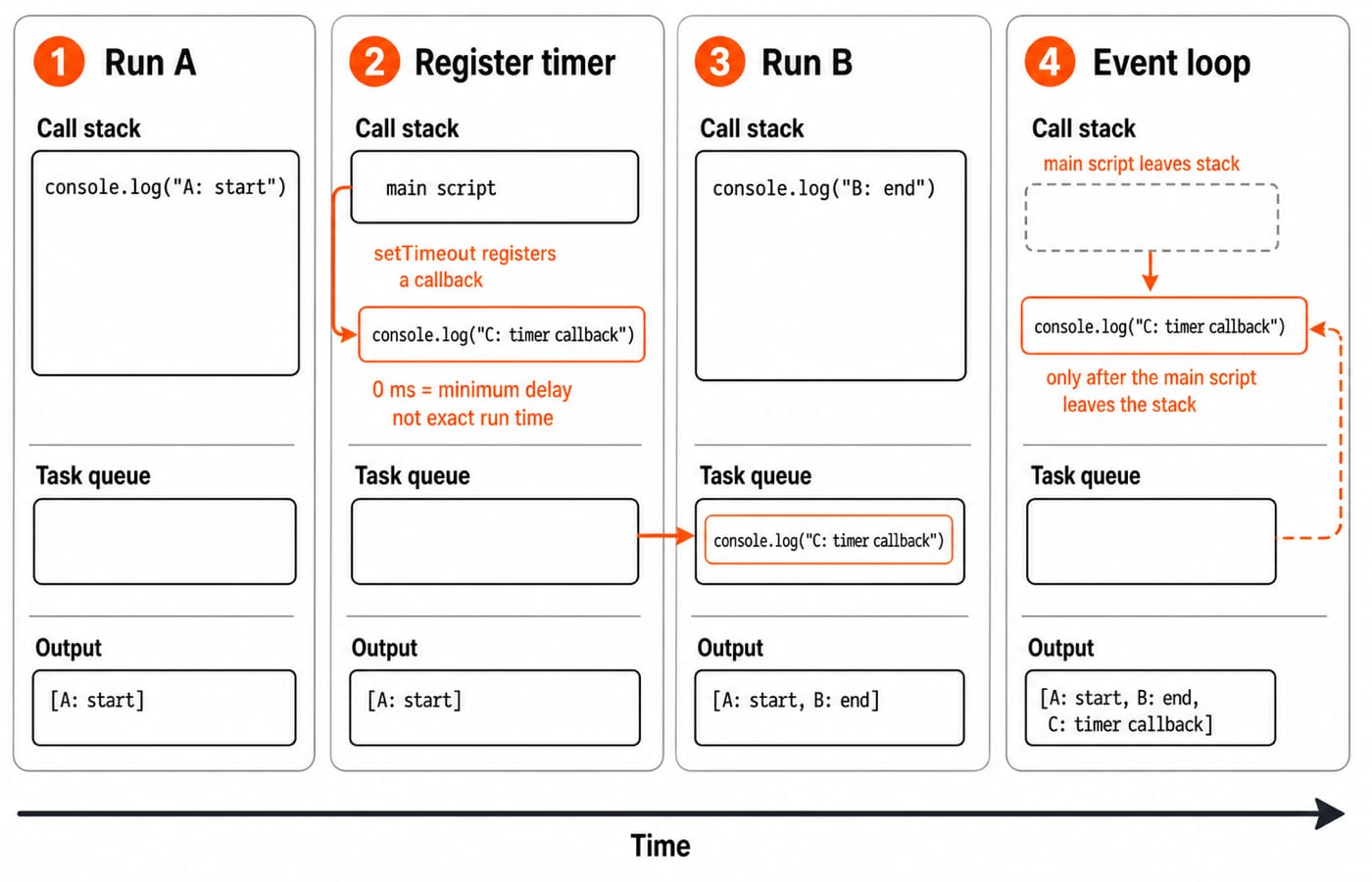
Now trace a timer callback:
console.log("A: start");
setTimeout(() => console.log("C: timer callback"), 0);
console.log("B: end");
The output is A: start, B: end, then C: timer callback. The script runs on the call stack; the timer callback waits in a task queue until the script finishes and the event loop can move it onto the stack. A delay of 0 requests a minimum delay, not immediate execution or exact timing.
Worked example: validate and save a quiz attempt
This example runs in a browser console or Node.js. The (error, result) callback shape is a Node-style convention, not JavaScript syntax.
const attempts = [];

function validateSubmission(submission, callback) {
  setTimeout(() => {
    if (submission.answer !== "B") {
      callback(new Error(`Expected B, received ${submission.answer}`));
      return;
    }
    callback(null, { ...submission, score: 1 });
  }, 80);
}

function saveAttempt(validated, callback) {
  setTimeout(() => {
    const saved = {
      ...validated,
      attemptId: `A-${204 + attempts.length}`
    };
    attempts.push(saved);
    callback(null, saved);
  }, 40);
}

function submitQuiz(submission, callback) {
  validateSubmission(submission, (error, validated) => {
    if (error) return callback(error);
    saveAttempt(validated, callback);
  });
}

submitQuiz({ questionId: "JS-16", answer: "B" }, (error, saved) => {
  if (error) return console.log(`Rejected: ${error.message}`);
  console.log(`Saved ${saved.attemptId}: ${saved.questionId} scored ${saved.score}`);

  submitQuiz({ questionId: "JS-16", answer: "C" }, rejectionError => {
    if (rejectionError) console.log(`Rejected: ${rejectionError.message}`);
    console.log(`Stored attempts: ${attempts.length}`);
  });
});
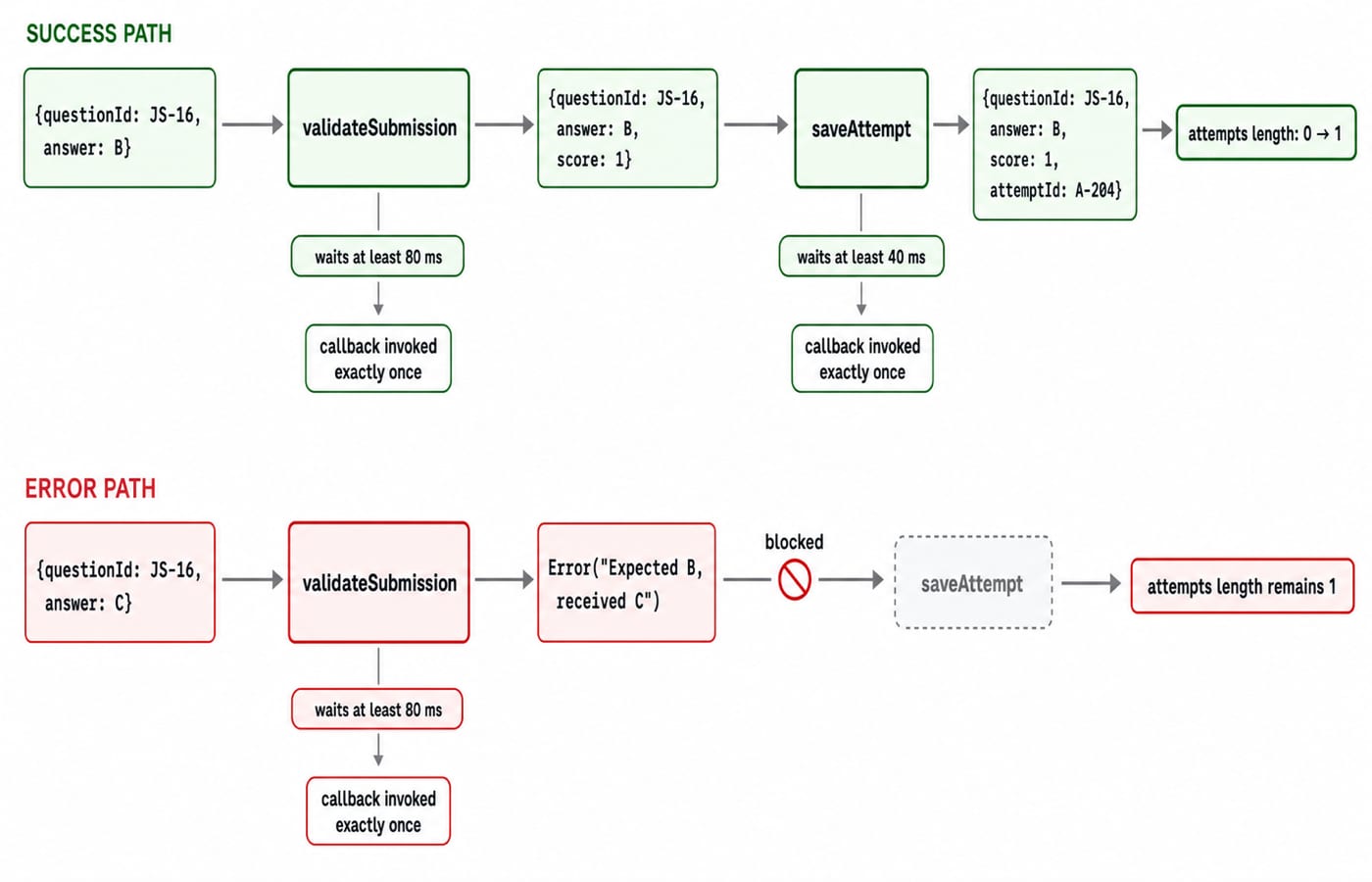
The first submission waits at least 80 ms for validation and 40 ms for saving, then prints Saved A-204: JS-16 scored 1. Only then does the rejected submission start, making the remaining output deterministic:
Rejected: Expected B, received C
Stored attempts: 1
The array contains only { questionId: "JS-16", answer: "B", score: 1, attemptId: "A-204" }; the rejected answer never reaches saveAttempt.
Design callbacks that are safe to use
The quiz workflow suggests four rules:
Document the callback's argument shape.
Keep success and error exits explicit.
Return after invoking an error callback.
Guarantee one completion call per operation.
The compact form is:
if (invalid) return callback(error);
callback(null, value);
Named callbacks reduce nesting, improve stack traces, and ease testing. Reusing the quiz functions and values, the outer flow becomes:
function handleRejected(error) {
  console.log(`Rejected: ${error.message}`);
  console.log(`Stored attempts: ${attempts.length}`);
}

function handleSaved(saved) {
  console.log(`Saved ${saved.attemptId}: ${saved.questionId} scored ${saved.score}`);
  submitQuiz({ questionId: "JS-16", answer: "C" }, error => {
    if (error) handleRejected(error);
  });
}

submitQuiz({ questionId: "JS-16", answer: "B" }, (error, saved) => {
  if (error) return handleRejected(error);
  handleSaved(saved);
});
With a fresh attempts array, this prints the same three lines and leaves attempts.length === 1.
The caller supplies what happens next; validateSubmission and saveAttempt control when and with which values. For server-side JavaScript, Node, Express, and application projects, follow the MERN Stack course. The Skills category connects it to practical web development.
Common callback mistakes and their observable failure states
Calling instead of passing:
function greet(name) { console.log(`Hello, ${name}`); }
setTimeout(greet("Asha"), 1000);       // wrong
setTimeout(() => greet("Asha"), 1000); // correct
The wrong line runs greet immediately and supplies its return value instead of a function. In Node.js, the returned undefined value makes setTimeout throw TypeError [ERR_INVALID_ARG_TYPE]. In browsers, greet still runs immediately and no useful callback is scheduled. The correct line passes a function for later invocation. The delay is a minimum, not an exact one-second promise.
Calling twice after an error:
if (!submission.answer) callback(new Error("Missing answer"));
callback(null, submission);
For { questionId: "JS-16", answer: "" }, the callback receives an error and then a result. Repair it with if (!submission.answer) return callback(new Error("Missing answer"));.
Three other traps have precise fixes:
Check
if (typeof callback === "function")before invoking an optional callback. Without the guard, an omitted callback throws TypeError: callback is not a function.Passing
player.showScorebare loses its intended receiver forplayer = { score: 7, showScore() { console.log(this.score); } }. Passplayer.showScore.bind(player)to print7. In a strict-mode or module callback call, this is undefined and accessing this.score throws a TypeError. PassDeep anonymous nesting creates callback hell. Name each step and handle errors first. Promises and
async/awaitare later alternatives.
How assessments and interviews test callbacks
JavaScript assessments ask you to predict console order, distinguish passing from invoking, trace array callbacks, spot double invocation, or name nested functions. Typical checks include:
function run(fn) { return fn(5); } run(n => n * n)returns25becauseruninvokes the callback with5, and5 * 5 = 25.The A/B/C timer program prints
A,B,Cbecause the timer callback waits until the current script finishes.["js", "html", "css"].filter(word => word.length === 2)returns["js"]because only"js"has length2.
Try two exercises. First, write calculate(8, 3, operation) so callbacks can add or multiply the inputs:
function calculate(a, b, operation) { return operation(a, b); }
calculate(8, 3, (a, b) => a + b); // 11
calculate(8, 3, (a, b) => a * b); // 24
Second, repair a loader that calls its callback twice for id = -1. Use if (id < 0) return callback(new Error("Invalid id"));. The success branch can call callback(null, { id: 7, name: "Asha" }), so id = -1 completes once with an error and id = 7 once with the required object. Practise output tracing under time pressure with the Coding Round Strategy for Placements.
Short version and the next practice step
Callbacks are function values passed for later invocation.
They may run synchronously or asynchronously.
The receiving function controls their timing and arguments.
Error-first callbacks separate failure from success.
Every branch should complete exactly once.
Use the quiz pipeline as a safe multi-step model. Retype the three runnable examples, then change the accepted answer from "B" to "C", update the error template from Expected B to Expected C, and swap the driver to submit "C" first and "B" second. Before running it, predict the successful object: { questionId: "JS-16", answer: "C", score: 1, attemptId: "A-204" }. Continue with the Complete JavaScript course linked above or move to the MERN Stack course for full-stack projects.
Keep learning
Functions and Arrow Functions in JavaScript: Syntax, Scope and Runnable Examples
Build function declarations, expressions and arrows in JavaScript, then trace parameters, closures, lexical this and array callbacks through exact outputs.
Updated 19 Oct 20266 min readWeb Development
Modules in JavaScript: Import, Export, and Runnable Examples
Build JavaScript modules from scratch with a shopping-cart project that runs in Node.js and the browser. Learn live bindings, re-exports, lazy loading, and practical fixes.
Updated 15 Oct 20265 min readWeb Development

LocalStorage and Cookies in JavaScript: Store, Read and Delete Data
Run one lesson-progress object and one preference cookie through their complete life cycles, then learn which browser store fits a feature and which security traps to avoid.
Updated 11 Oct 20266 min readWeb Development
JavaScript Event Delegation: Bubbling, target and currentTarget with Runnable Examples
Learn how browser events travel through the DOM, then build one delegated listener that handles nested controls and rows added later.
Updated 6 Oct 20265 min readWeb Development