Bad JSON, an impossible inventory request and a failed network response can all stop the same feature, but they do not cross the same error boundary. A parser throws synchronously, validation throws only when you design it to, and a Promise failure is visible only to code that awaits or chains it. Trace one reservation from parsing through domain validation to asynchronous status handling, with exact outputs at each boundary.
What JavaScript calls an error
JavaScript normally represents a failure with an Error object. Its stable fields are name and message; many engines also provide stack, but exact messages and stack formatting can vary by runtime.
Test these probes separately. JSON.parse('{"requested":4') throws a SyntaxError. Reading missingTotal before any declaration throws a ReferenceError. Calling null.map() throws a TypeError. Do not place all three unguarded in one program, because execution stops at the first exception.
Not every invalid result throws. Number('four') evaluates to NaN, so JavaScript continues. Your program must test that result if it is unacceptable. You can also create a standard error deliberately, such as new RangeError(...), and use throw to move control to an appropriate error boundary.
Start with try, catch and finally
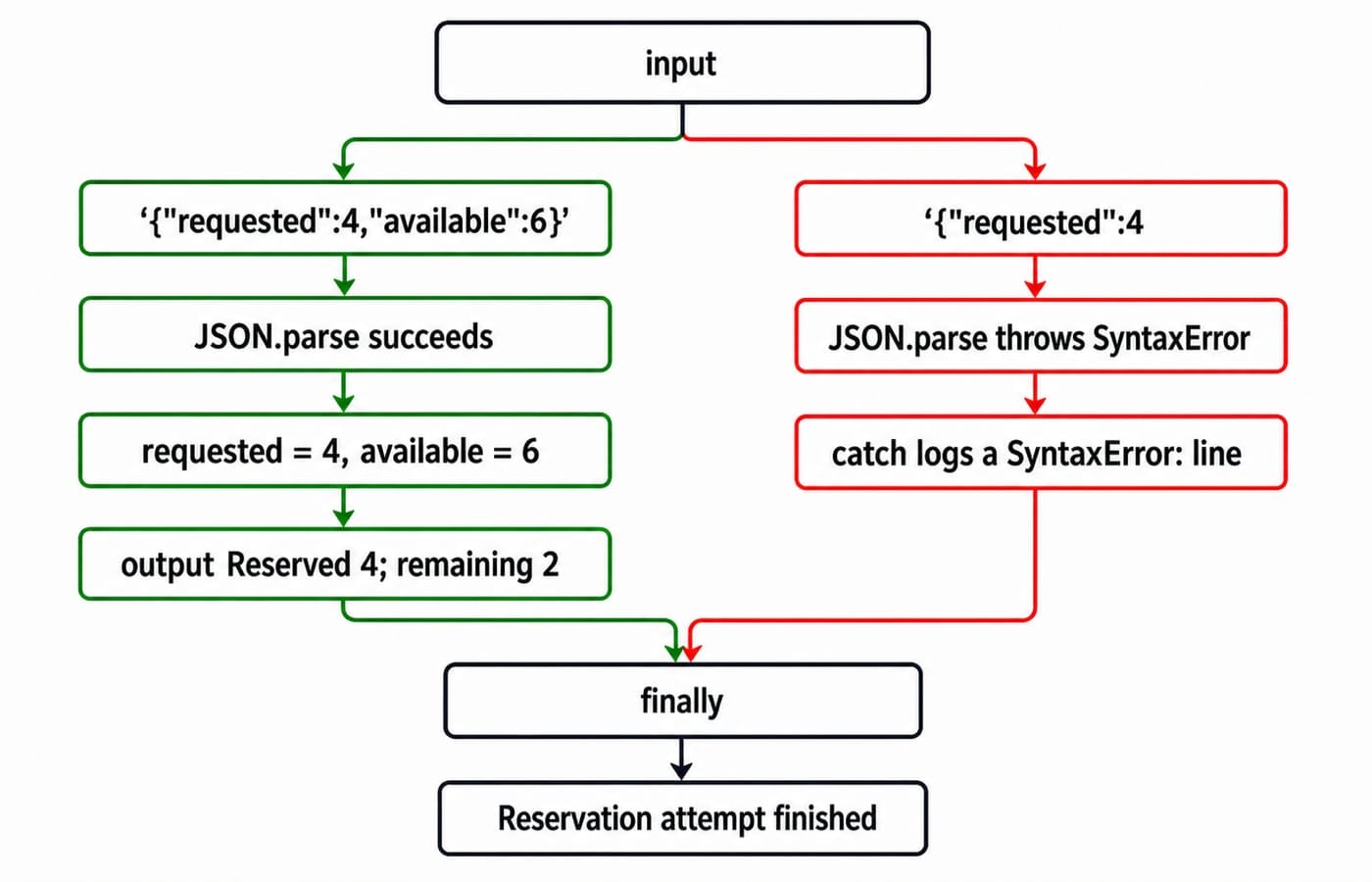
During one reservation attempt, the try block contains the parsing operation that may throw. catch receives the thrown value, while finally runs after the successful or failed path.
const input = '{"requested":4,"available":6}';

try {
  const { requested, available } = JSON.parse(input);
  console.log(`Reserved ${requested}; remaining ${available - requested}`);
} catch (error) {
  console.log(`${error.name}: ${error.message}`);
} finally {
  console.log('Reservation attempt finished');
}
The valid run prints exactly these two lines, in order:
Reserved 4; remaining 2
Reservation attempt finished
Change only input to '{"requested":4'. Parsing now fails. The first output line begins SyntaxError:, but its remaining wording depends on the runtime. Reservation attempt finished still runs last. Use finally for cleanup that must happen on either path, not to hide or replace an error.
Throw useful validation and domain errors
Parsing proves that the text is valid JSON, not that the values make sense. Put those rules in the domain function and throw structured errors:
class InventoryError extends Error {
  constructor(requested, available) {
    super(`Requested ${requested}, only ${available} available`);
    this.name = 'InventoryError';
    this.requested = requested;
    this.available = available;
  }
}

function reserve(requested, available) {
  if (!Number.isInteger(requested) || requested < 1) {
    throw new RangeError('Requested quantity must be a positive integer');
  }
  if (requested > available) {
    throw new InventoryError(requested, available);
  }
  return { reserved: requested, remaining: available - requested };
}

try {
  console.log(reserve(7, 6));
} catch (error) {
  if (error instanceof RangeError) {
    console.log(error.message);
  } else if (error instanceof InventoryError) {
    console.log(error.message, error.requested, error.available);
  } else {
    throw error;
  }
}
reserve(4, 6) returns { reserved: 4, remaining: 2 }. reserve(0, 6) throws RangeError with Requested quantity must be a positive integer. reserve(7, 6) throws InventoryError with Requested 7, only 6 available. Rethrowing the unknown branch prevents a programming bug from being mislabelled as expected inventory trouble. Avoid throw 'out of stock'; a string lacks the standard Error structure.
Put the catch at the boundary that can see the error
An outer synchronous try finishes before a timer callback runs, so it cannot catch an exception thrown later inside that callback. Place the boundary where the delayed work executes:
setTimeout(() => {
  try {
    throw new Error('Delayed failure');
  } catch (error) {
    console.log(error.message);
  }
}, 0);
The eventual output is Delayed failure.
Catch at a boundary that can do something meaningful. A parsing boundary can ask for corrected input. An inventory boundary can show current availability. For an unexpected programming bug, record useful context and usually rethrow it. Silently converting every failure into success makes later debugging harder. The way an uncaught error is displayed can differ across runtimes, but this boundary rule does not.
Handle Promise and async errors without missing HTTP failures
fakeFetch returns a deterministic response object, so every run produces the same values without contacting a live service:
async function fakeFetch(status) {
  return {
    ok: status >= 200 && status < 300,
    status,
    json: async () => ({ available: 3 })
  };
}

async function loadStock(status) {
  try {
    const response = await fakeFetch(status);
    if (!response.ok) {
      throw new Error('Request failed: ' + response.status);
    }
    const data = await response.json();
    return data.available;
  } catch (error) {
    return { available: 0, reason: error.message };
  }
}
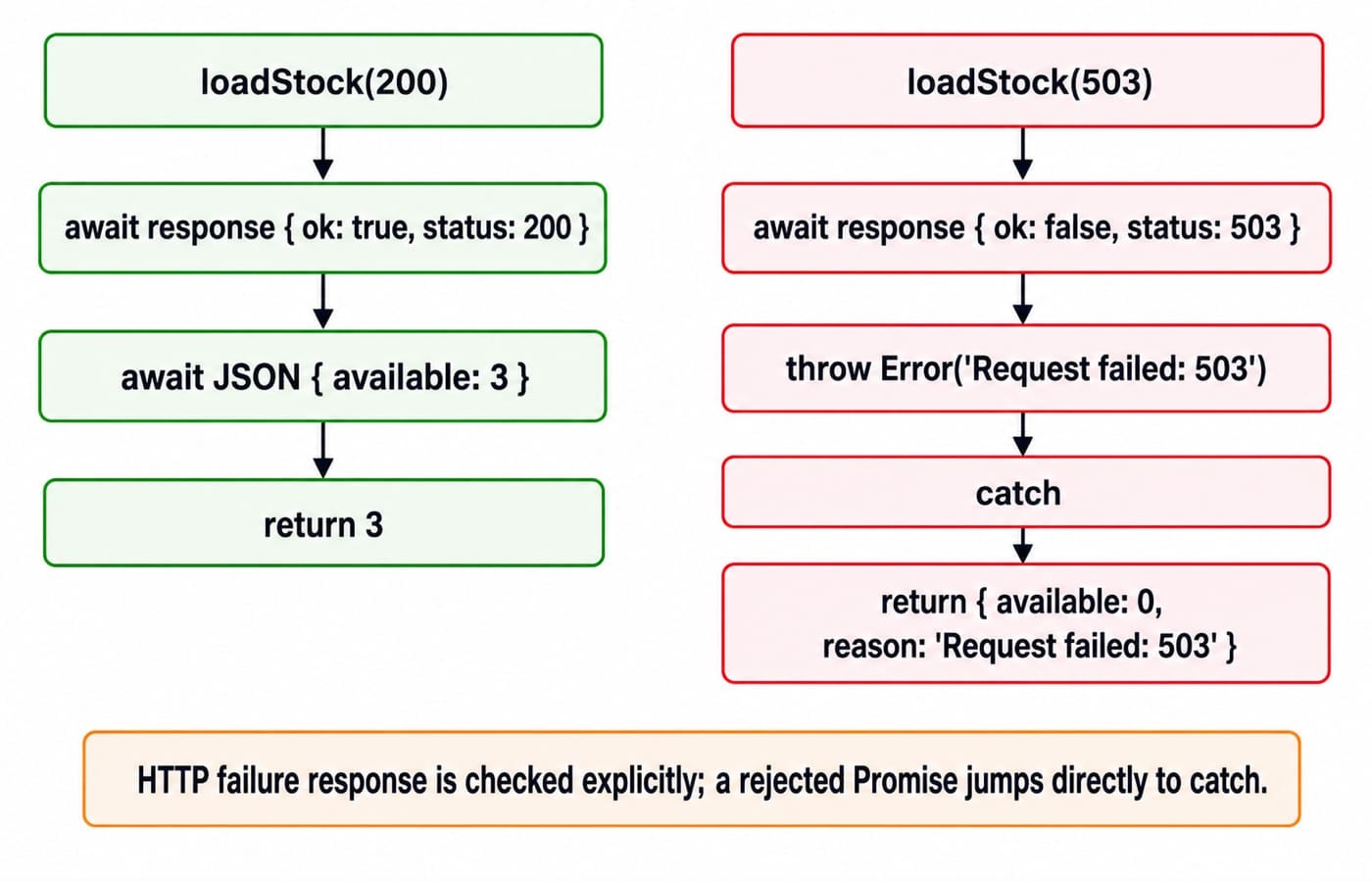
await loadStock(200) returns 3. await loadStock(503) returns { available: 0, reason: 'Request failed: 503' }.
For request construction, JSON POST, CORS and cancellation, follow the JavaScript Fetch and AJAX tutorial. In the narrower failure-boundary problem, a Fetch-style request does not reject merely because the server responds with HTTP 503, as MDN confirms in Using the Fetch API. Checking response.ok creates the application error; a genuinely rejected Promise jumps straight to catch.
The await matters because it keeps the rejected Promise inside this try...catch. Calling task() without await lets the synchronous block finish before rejection. If a caller uses Promise chaining instead, the local equivalent is task().catch(handler). Use the form that matches the caller; wrapping the same call in both forms only complicates ownership.
Common traps that make failures harder to debug
An empty catch {} turns a visible failure into unexplained behaviour. Recover deliberately, or log enough context and rethrow when the caller must decide.
Returning from finally is another trap. This runnable warning returns 9, because the finally return overrides the earlier return 4:
function finalReturn() { try { return 4; } finally { return 9; } }

console.log(finalReturn()); // 9
Forgetting await creates a similar boundary mistake:
const failingTask = () =>
  Promise.reject(new Error('stock service unavailable'));
Calling failingTask() inside a synchronous try does not route its later rejection into that catch. Inside an async function, await failingTask() inside try does. A finally block can release a lock, close a resource or clear a loading state after either outcome. Avoid logging the same error at every layer, because duplicates obscure the original event and its useful context.
Check understanding with three short exercises
Change the valid JSON input to
'{"requested":2,"available":5}'. Predict both output lines.Call
reserve(-2, 6). Identify the error class and exact message.Call
await loadStock(404). Write the exact returned value.
Answer key: For exercise 1, parsing succeeds inside the synchronous boundary, so the output is Reserved 2; remaining 3, followed by Reservation attempt finished. For exercise 2, validation throws RangeError with Requested quantity must be a positive integer before inventory comparison. For exercise 3, the explicit status check throws inside the awaited boundary, so the catch returns { available: 0, reason: 'Request failed: 404' }.
These are useful output-tracing, validation and async-repair drills. After checking the answers, rerun each case with one value changed and explain which boundary receives the failure.
The short version and next step
Throw Error objects. Catch only where recovery or useful context is possible. Check non-success HTTP responses explicitly. Await a Promise inside the boundary meant to handle its rejection.
Build the language foundation in the complete JavaScript course, or apply the same patterns in a backend stack. The Coding & Skills category is the broader route when you want to compare course options.