Basics of Memory MCQs: 12 Solved Questions with Explanations
Choose each answer before reading the explanation. These 12 solved questions cover memory units, address counts, hierarchy, SRAM, cache and access methods.
KnowledgeGate Team
Exam prep & CS education
Updated 8 Aug 20266 min read
Basic memory questions look like recall, but their options mix units, technologies, hierarchy positions and access methods. Choose an option before reading each explanation.
Most of these questions turn on three facts: four bits make a nibble and eight make a byte, n address lines select 2^n locations, and static is not the same as non-volatile. The rest is classification, so name the memory layer first, then run the arithmetic.
1. Memory unit MCQs: bit, nibble, byte, KB, MB, GB and TB
Q1. One byte equals how many bits?
Bihar STET, 2019.
1 Byte = ?
(a)
8 bits(b)
4 bits(c)
2 bits(d)
9 bits(e)
16 bits
Answer: (a) 8 bits. Solved page
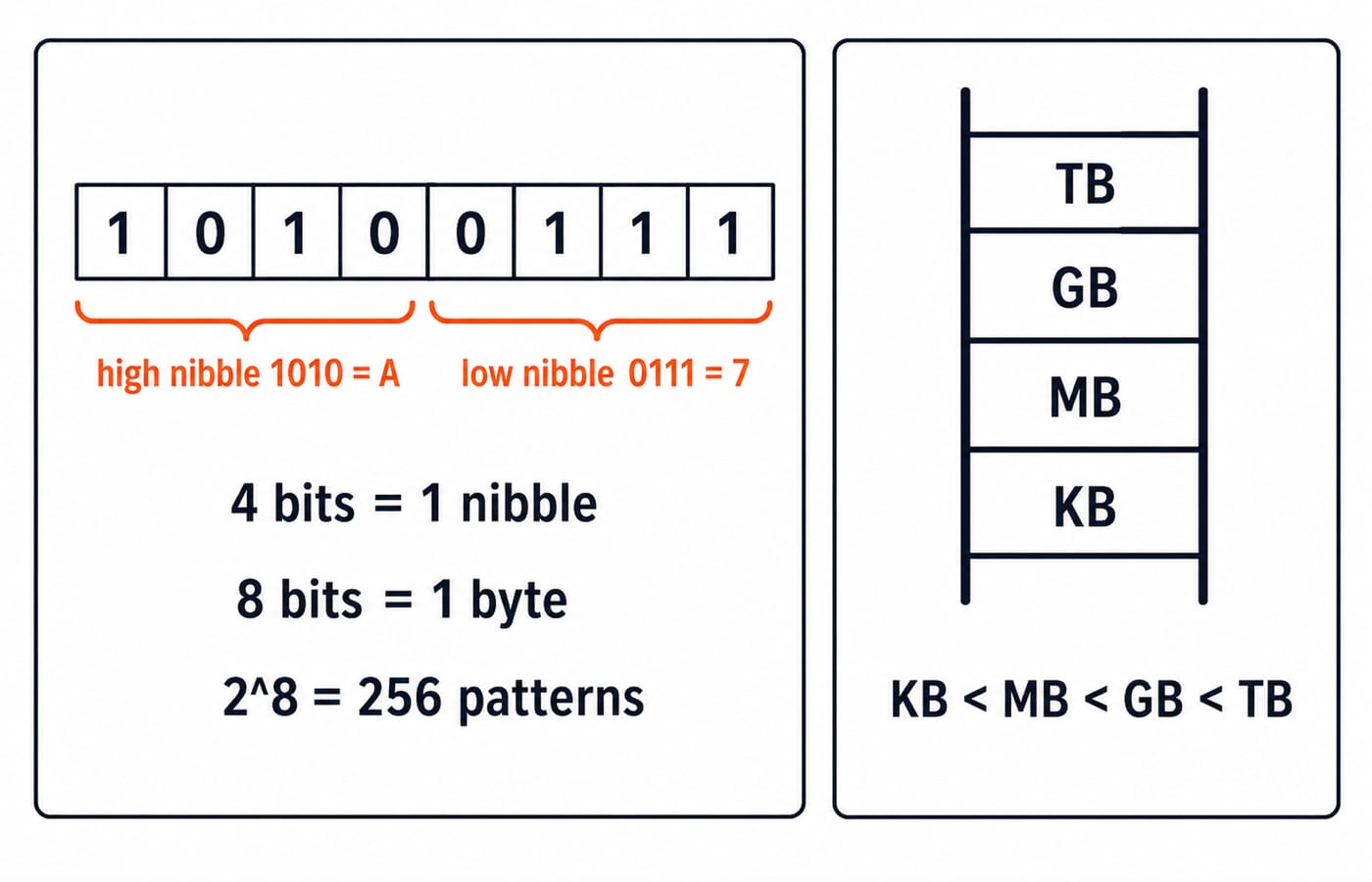
A bit is one binary position, 0 or 1. A byte contains eight positions, so 1010 0111 is one byte. Those positions represent 2^8 = 256 patterns, from 00000000 to 11111111. Four bits form only half a byte.
Q2. Four bits form which memory unit?
RSSB, 2025.
In computer memory, 4 bits is equal to:
(a)
1024 Bytes(b)
2 Kilo Bytes(c)
1 Nibble(d)
1 MB
Answer: (c) 1 Nibble. Solved page
A nibble is four bits. Split 1010 0111: the high nibble is 1010 and the low nibble is 0111. Each maps to one hexadecimal digit: 1010 is A, 0111 is 7, and the byte is A7. The other options are much larger units.
Q3. Put KB, MB, GB and TB in order
EMRS, 2023.
Arrange the following memory units in ascending order (small → big):
Giga Byte, Kilo Byte, Mega Byte, Tera Byte
(a)
KB < GB < MB < TB(b)
KB < MB < TB < GB(c)
GB < KB < MB < TB(d)
KB < MB < GB < TB
Answer: (d) KB < MB < GB < TB. Solved page
Read the prefixes from small to large: kilo, mega, giga, tera. The ascending chain is KB < MB < GB < TB. Decimal and binary capacity conventions do not change this order.
2. Address-bus MCQ: turn 10 bits into 1,024 locations
Q4. How many units can a 10-bit address bus select?
DSSSB, 2018.
The number of addressable memory units for a 10-bit size address bus is:
(a)
512(b)
256(c)
1023(d)
1024
Answer: (d) 1024. Solved page
Each of 10 address lines can be 0 or 1, giving 2^10 = 1,024 patterns from 0000000000 to 1111111111. The final pattern is address 1,023, but the count is 1,024. The units are bytes in a byte-addressable machine and words in a word-addressable machine.
3. Primary versus secondary memory MCQs: location, persistence and cost per bit
Q5. Where does a hard disk belong?
UP Police, 2017.
Hard disk is an example of _________.
(a)
Main memory(b)
Secondary memory(c)
Cache memory(d)
Volatile memory
Answer: (b) Secondary memory. Solved page
A hard disk stores data beyond the CPU's current working set and retains it after shutdown, so it is secondary memory. RAM is working main memory, while cache is a smaller, faster layer near the processor. A hard disk is persistent, not volatile.
Q6. Which listed memory has the lowest cost per bit?
BPSC, 2023.
The cost of storing a bit is minimum in
(a)
cache(b)
register(c)
magnetic tape(d)
More than one of the above(e)
None of the above
Answer: (c) magnetic tape. Solved page
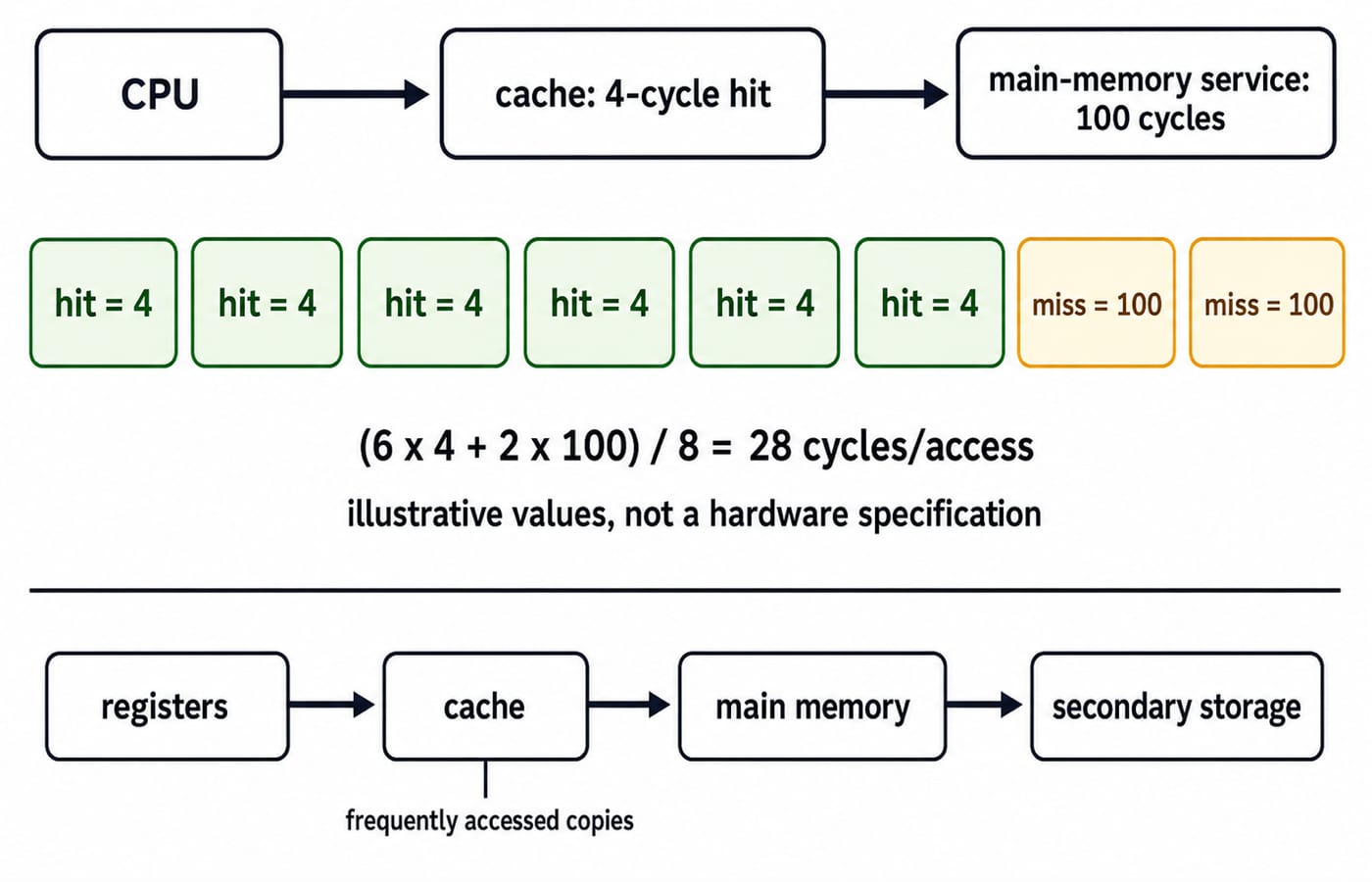
The memory hierarchy trades speed against capacity and cost per stored bit. Registers and cache prioritise fast processor access, so they are expensive per bit. Magnetic tape provides dense, long-term, sequential storage. Among these choices, it has the lowest cost per bit. The whole ladder, from registers down to magnetic tape, is built up layer by layer in GATE Guidance by Sanchit Sir.
Q7. What survives the power-off test?
KVS, 2023.
Which of the following aspect(s) is/are correct about secondary memory?
(a) Volatile
(b) Non-Volatile
(c) Permanent Storage of data
(d) Temporary Storage of data
Choose the correct answer from the codes given below:
(a)
Only (a) and (c) are correct(b)
Only (a) and (d) are correct(c)
Only (b) and (c) are correct(d)
Only (b) and (d) are correct
Answer: (c) Only (b) and (c) are correct. Solved page
Suppose notes.bin is on a hard disk and a working copy is in RAM. After power is removed, the RAM copy disappears but the disk copy remains. Secondary memory is therefore non-volatile and permanent in this classification. Statements (b) and (c) match.
4. SRAM and non-volatile memory MCQs: do not confuse cell design with persistence
Q8. What forms an SRAM cell?
DSSSB, 2022.
A cell of the SRAM is made with ______.
(a)
flip-flops(b)
magnetic dipoles(c)
capacitors(d)
magnetic core
Answer: (a) flip-flops. Solved page
An SRAM bit cell uses a bistable latch, commonly described as a flip-flop. A typical six-transistor cell uses cross-coupled inverters and retains its state without refresh while power is present. Capacitor-based storage describes DRAM; magnetic dipoles and cores belong to other technologies.
Q9. Which memory retains content when power fails?
KVS, 2017.
The memory which does not loose its content on failure of power supply is known as ______ memory.
(a)
Main memory(b)
Volatile(c)
Non-volatile(d)
RAM
Answer: (c) Non-volatile. Solved page
Do not confuse static with non-volatile. Powered SRAM retains a test bit 1 without refresh, but loses it when power fails. Non-volatile memory retains the bit without power. Main memory and RAM are ordinarily volatile in this context.
5. Cache-memory MCQs: bridge the processor-memory speed gap
Q10. Which memory reduces the processor-memory speed mismatch?
RSSB, 2022.
Which of the following memory is used to minimize memory–processor speed mismatch?
(a)
UVEPROM(b)
Flash memory(c)
DVD(d)
Cache memory
Answer: (d) Cache memory. Solved page
Cache reduces this mismatch by keeping nearby copies of data the processor is likely to access. A cache hit avoids the slower main-memory path. UVEPROM and flash are non-volatile technologies, while a DVD is secondary storage; none performs this cache role.
Q11. What is the purpose of cache?
EMRS, 2023.
What is the purpose of a cache in a computer system?
(a)
To provide Internet connectivity(b)
To store data permanently(c)
To protect against viruses and worms(d)
To improve the performance by storing frequently accessed data
Answer: (d) To improve the performance by storing frequently accessed data. Solved page
In an illustrative eight-access model, six hits at 4 cycles cost 6 x 4 = 24 cycles. Two misses at 100 cycles cost 2 x 100 = 200 cycles. The total is 24 + 200 = 224, and 224 / 8 = 28 cycles per access. Without hits, eight slower accesses average 100 cycles. Raise the hit count to seven and the average falls to (7 x 4 + 100) / 8 = 16 cycles, which is why hit rate dominates cache performance.
Cache and virtual memory solve different problems. For virtual memory and paging practice, continue with these Operating System MCQs.
6. Memory access-method MCQ: sequential, direct, random and associative
Q12. What system has these four access methods?
KVS, 2013.
Sequential, direct, random and associative are access methods and key characteristics of computer ____ system.
(a)
Stack(b)
Counter(c)
Memory(d)
Core
Answer: (c) Memory. Solved page
For records R0 through R7, sequential access reaches R6 through R0, R1, R2, R3, R4, R5, R6. Direct access moves near R6, then locates it. Random access selects address 6; associative access searches by content such as tag 1010. These are memory-system characteristics.
7. Exam traps and the next memory-practice step
Keep these six checks together:
4 bits = 1 nibble.8 bits = 1 byte;1010 0111is two nibbles and one byte.n address bits = 2^n locations;10 bits = 1,024 locations.Hard disk and magnetic tape are secondary storage.
SRAM is static but normally volatile.
Cache is fast working storage, not permanent storage.
Hide the answers and solve all 12 again. Label each by topic. If you cannot justify a choice in one sentence, revisit the worked value instead of memorising the option number.
For the wider exam map, use UGC NET Computer Science. Practise timing with the GATE Test Series, or compare paths under GATE CS Exam Preparation.
The short version: classify, run the smallest exact check, then choose. Memory MCQs become connected, not isolated facts.
Keep learning
Instruction Formats and Addressing Modes MCQs: 12 Solved Cross-Concept Questions
Solve 12 cross-concept COA questions that connect addressing-mode choices with PC rules, memory references, opcode fields, and byte-aligned instructions.
3 Oct 20267 min readComputer Organization MCQs

Interrupt-Driven I/O MCQs: 12 Solved Questions with Explanations
Attempt 12 previous-year interrupt-driven I/O questions, then check each answer with a concise explanation. The set covers ISR order, vectoring, priority, and CPU-time numericals.
28 Sep 20268 min readComputer Organization MCQs

Bitmap and Pixmap MCQs: 12 Solved Pixel Depth and Memory Questions
Build a reliable pixel-memory method through 12 live MCQs covering bitmaps, pixmaps, lookup tables, uncompressed storage, refresh rates, masks, and dithering.
Updated 25 Sep 20267 min readComputer Organization MCQs

Assembly & Assembler Design MCQs: 11 Solved PYQs Explained
Attempt 11 published PYQs on assembler directives, language levels, tables, register-pair instructions, debugging and fixed-width arithmetic, then check each worked explanation.
Updated 24 Sep 20267 min readComputer Organization MCQs