Bitmap and Pixmap MCQs: 12 Solved Pixel Depth and Memory Questions
Build a reliable pixel-memory method through 12 live MCQs covering bitmaps, pixmaps, lookup tables, uncompressed storage, refresh rates, masks, and dithering.
KnowledgeGate Team
Exam prep & CS education
Updated 25 Sep 20267 min read
Pixel depth is measured in bits, but storage answers are usually requested in bytes, KiB, or MiB. That unit switch can change an answer by a factor of eight: a 1024 × 1024 uncompressed image at 8 bits per pixel occupies 1,048,576 bytes, or 1 MiB, not 8 MiB. For each numerical, track the pixel count, bit total, byte conversion, and storage convention.
Bitmap, pixmap, pixel depth, and frame-buffer formulas
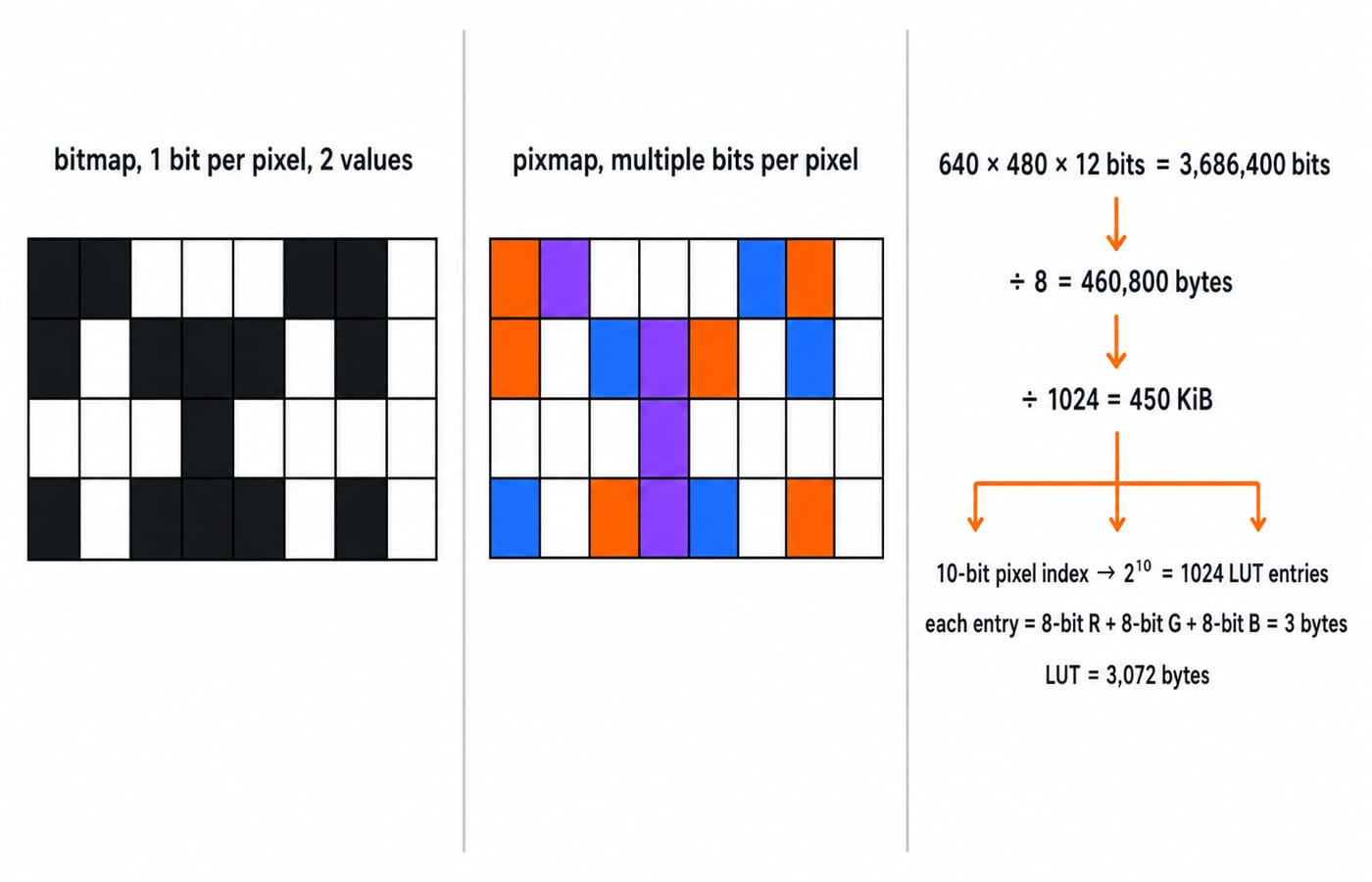
Strictly, a bitmap uses 1 bit per pixel and represents two values. A pixmap uses multiple bits per pixel. Everyday usage often calls any raster image a bitmap, so Bitmap and pixmap can both describe raster images in everyday usage.
Keep four tools ready:
Values or indices from a depth of b bits: 2^b.
Frame-buffer bytes: width × height × bits per pixel ÷ 8.
LUT bytes: 2^N entries × bits stored per entry ÷ 8.
Refresh rate: 1 ÷ frame-refresh time.
For a 640 × 480 frame at 12 bits per pixel, 640 × 480 = 307,200 pixels. Storage is 307,200 × 12 = 3,686,400 bits, then 3,686,400 ÷ 8 = 460,800 bytes, and finally 460,800 ÷ 1024 = 450 KiB. Powers of two and careful base conversion are doing the work at every step.
Concept checks: bitmap, pixmap, raster image, and pixel mask
Question 1
If multiple bits per pixel are used to store an image, then the frame buffer is known as _____.
A. Bit map
B. Binary map
C. Pix map
D. Image map
Answer: C. Pix map. Multiple bits mean that pixel depth is greater than 1, which is the strict definition of a pixmap. A 1-bit frame buffer is a bitmap, while an image map is an unrelated web term.
Question 2
What does a pixel mask mean?
A. string containing only 1s
B. string containing only 0s
C. string containing two 0s
D. string containing 1s and 0’s
Answer: D. string containing 1's and 0’s. A binary mask commonly uses 1 for an included or selected pixel and 0 for an excluded pixel. In 1 0 1 0, pixels 1 and 3 are selected.
Question 3
Raster images are commonly called
A. pixmap
B. bitmap
C. Both (a) and (b)
D. None of the above
Answer: C. Both (a) and (b). In broad everyday usage, both names describe raster images. In stricter graphics terminology, bitmap usually means 1 bit per pixel and pixmap means multiple bits, so the conventions are related but not perfectly uniform.
Pixel depth and colour lookup table MCQs
Question 4
Consider a N-bit plane frame buffer with W-bit wide lookup table with W > N. How many intensity levels are available at a time ?
A. 2^N
B. 2^W
C. 2^(N + W)
D. 2^N - 1
Answer: A. 2^N. An N-bit pixel index can address 2^N entries. With N = 3 and W = 8, 8 entries are selectable at a time, while each selected entry can hold an 8-bit intensity from 0 to 255.
Question 5
If the frame buffer has 8 bits per pixel and 8 bits are allocated for each of the R, G, B components, what would be the size of the lookup table?
A. 24 bytes
B. 1024 bytes
C. 768 bytes
D. 256 bytes
Answer: C. 768 bytes. Eight index bits give 2^8 = 256 entries. Each entry is 24 bits, or 3 bytes, so 256 × 3 = 768 bytes; the trap is treating the 8-bit index as the complete RGB entry.
Question 6
If the frame buffer has 10 bits per pixel and 8 bits are allocated to each of the R, G, and B components, what is the size of the colour lookup table (LUT)?
A. (2^8 + 2^9) bytes
B. (2^10 + 2^8) bytes
C. (2^10 + 2^24) bytes
D. (2^10 + 2^11) bytes
Answer: D. (2^10 + 2^11) bytes. The index selects 2^10 = 1,024 entries, and each RGB entry takes 3 bytes, giving 1,024 × 3 = 3,072 bytes. Option D equals 1,024 + 2,048 = 3,072.
Frame-buffer and uncompressed image storage MCQs
Question 7
A system is having 8 M bytes of video memory for bit-mapped graphics with 64-bit colour. What is the maximum resolution it can support?
A. 800 x 600
B. 1024 x 768
C. 1280 x 1024
D. 1920 x 1440
Answer: B. 1024 x 768. Under the binary-memory interpretation, 8 × 1024 × 1024 bytes divided by 8 bytes per 64-bit pixel gives 1,048,576 pixels. The candidates need 480,000; 786,432; 1,310,720; and 2,764,800 pixels respectively, so B is the largest listed resolution that fits.
Question 8
Given an image of size 1024 × 1024 pixels in which the intensity of each pixel is an 8-bit quantity, it requires _______ of storage space if the image is not compressed.
A. one Terabyte
B. one Megabyte
C. 8 Megabytes
D. 8 Terabytes
Answer: B. one Megabyte. The image takes 1024 × 1024 × 8 = 8,388,608 bits. Dividing by 8 gives 1,048,576 bytes, or 1 MiB, corresponding to the “one Megabyte” option.
Question 9
Consider a raster system with resolution 640 by 480. What size is frame buffer (in bytes) for this system to store 12 bits per pixel?
A. 450 kilobytes
B. 500 kilobytes
C. 350 kilobytes
D. 400 kilobytes
Answer: A. 450 kilobytes. There are 640 × 480 = 307,200 pixels, requiring 307,200 × 12 = 3,686,400 bits. Divide by 8 to get 460,800 bytes, then by 1024 to get 450 KiB. Using 1 KB = 1,000 bytes gives 460.8 KB, so the expected convention is clear from the options.
Mixed pixel-memory questions: refresh, combined images, and dithering
Question 10
A graphic display system has a frame buffer that is 640 pixels wide, 480 pixels high and 1 bit of color depth. If the access time for each pixel on the average is 200 nanoseconds, then the refresh rate of this frame buffer is approximately :
A. 16 frames per second
B. 19 frames per second
C. 21 frames per second
D. 23 frames per second
Answer: A. 16 frames per second. One frame contains 640 × 480 = 307,200 pixels, so its refresh time is 307,200 × 200 = 61,440,000 ns, or 0.06144 s. The rate is 1 ÷ 0.06144 ≈ 16.28 frames per second.
Question 11
Suppose you have eight 'black and white' images taken with a 1‐megapixel camera and one '8‐color' image taken by an 8‐megapixel camera. How much hard disk space in total do you need to store these images on your computer?
A. 1 GB
B. 4 MB
C. 3 MB
D. 3 GB
Answer: B. 4 MB. Using the decimal-MB assumption, the eight 1-megapixel black-and-white images at 1 bit per pixel total 8,000,000 bits, or 1 MB. Eight colours need log₂ 8 = 3 bits per pixel, so the 8-megapixel image takes 24,000,000 bits, or 3 MB. Together they require 4 MB.
Question 12
A technique used to approximate halftones without reducing spatial resolution is known as _________.
A. Halftoning
B. Dithering
C. Error diffusion
D. None of the above
Answer: B. Dithering. Dithering arranges available pixel values so that the eye perceives intermediate tones without reducing the pixel grid's spatial resolution. Error diffusion is one dithering method, while halftoning is the broader goal.
The five traps these bitmap and pixmap MCQs expose
Use this five-step check for every storage calculation:
Decide whether the stated depth means bits per pixel or bits per component.
Calculate the pixel count as width × height.
Stay in bits until the storage calculation is complete.
Divide by 8 exactly once to reach bytes.
State whether the answer uses decimal MB or binary MiB or KiB.
The fastest sanity check is that 8 bpp is exactly 1 byte per pixel. For indexed colour, an N-bit frame-buffer index creates 2^N LUT addresses, while R + G + B determines the bytes in each LUT entry. Adding exponents or multiplying by 24 without converting bits to bytes leads straight to distractor answers.
Keep the boundaries clear too. Frame-buffer video memory here is not the cache organisation taught in Cache Memory: Mapping and Hit Ratio, and pixel bit patterns are not the numeric encoding taught in Floating Point Representation: IEEE 754 Format.
Short version and what to practise next
2^b gives the available values or indices.
Width × height × bpp ÷ 8 gives uncompressed bytes.
Indexed-colour LUT size separates entry count from entry width.
Every final answer needs an explicit decimal or binary byte convention.
If you are preparing for UGC NET Computer Science, NTA-UGC-NET Paper 2 provides the wider subject sequence, while the NET course category helps you choose the relevant path. Teaching-recruitment readers can use DSSSB TGT Computer Science 2026 Section B for the corresponding computer-science preparation route. Whichever route you follow, practise the unit conversion on paper before trusting an option.
Keep learning
Instruction Formats and Addressing Modes MCQs: 12 Solved Cross-Concept Questions
Solve 12 cross-concept COA questions that connect addressing-mode choices with PC rules, memory references, opcode fields, and byte-aligned instructions.
3 Oct 20267 min readComputer Organization MCQs
Interrupt-Driven I/O MCQs: 12 Solved Questions with Explanations
Attempt 12 previous-year interrupt-driven I/O questions, then check each answer with a concise explanation. The set covers ISR order, vectoring, priority, and CPU-time numericals.
28 Sep 20268 min readComputer Organization MCQs

Assembly & Assembler Design MCQs: 11 Solved PYQs Explained
Attempt 11 published PYQs on assembler directives, language levels, tables, register-pair instructions, debugging and fixed-width arithmetic, then check each worked explanation.
Updated 24 Sep 20267 min readComputer Organization MCQs

Disk Structure & Address MCQs: 10 Solved PYQs with CHS Calculations
Solve 10 published disk structure PYQs with concise explanations for geometry, capacity, sector addressing, CHS conversion, file placement, CLV and CAV.
Updated 22 Sep 20267 min readComputer Organization MCQs