Computer Memory Basics: Addressability, Capacity and Chip Organisation with Worked Examples
Learn to separate addresses, bytes, words, address lines and data lines. Worked examples cover a 256 KiB byte-addressable memory, chip organisation, and a 16K x 16 expansion.
KnowledgeGate Team
Exam prep & CS education
Updated 26 Aug 20266 min read

Students usually know that memory stores bits. The trouble begins when one number counts addresses, another counts bytes, and a third describes words or bus lines. A reliable solution starts by identifying the addressable unit, then derives every quantity as a power of two and checks it against total capacity. With that method, address-space, memory-organisation and chip-expansion problems become connected calculations instead of disconnected formulas to memorise or numbers to guess.
Related reading: memory organisation and cache mapping.
1. Computer Memory Basics: Location, Address, Word and Addressability
A memory location is one independently selectable storage unit. Its address is the binary identifier that selects it. Addressability tells us how many bits are stored in each location.
A byte is always 8 bits. A word is the processor's chosen working group of bits, so it may be 16, 32, 64 or another architecture-defined width.
For a 32-bit word, byte-addressable memory uses four consecutive addresses because each selects 8 bits. In 32-bit word-addressable memory, one address selects the whole word. The word length is identical, but the meaning of an address differs.
Term | What it counts | Unit | Common trap |
|---|---|---|---|
Location | Independently selectable storage units | locations | Assuming every location is one byte |
Address | Identifier of one location | binary value | Confusing an address with its stored data |
Addressability | Data selected by one address | bits per location | Assuming it equals word length |
Word length | Processor's working data width | bits | Treating every word as one address |
Capacity | Total stored information | bits or bytes | Mixing bits and bytes |
Address bus | Selection signals sent to memory | lines | Using data width to count locations |
Data bus | Bits transferred together | lines | Treating it as the address-space size |
2. Memory Capacity and Address Lines: The Core Equations
Use binary units: 1 KiB = 2^10 bytes, 1 MiB = 2^20 bytes, and 1 byte = 8 bits. Writing KiB keeps K from becoming ambiguous.
For n address lines:
number of locations = 2^ncapacity in bits = number of locations x bits per addressable locationhighest zero-based address = 2^n - 1
Two quick checks prevent mistakes. A 1 KiB byte-addressable memory contains 2^10 byte locations, so it needs 10 address bits. Addresses 0 through 4095 represent 4096 locations because both endpoints count. Since 4096 = 2^12, 12 address bits are required.
3. Byte-Addressable Memory: A Fully Worked 256 KiB Example
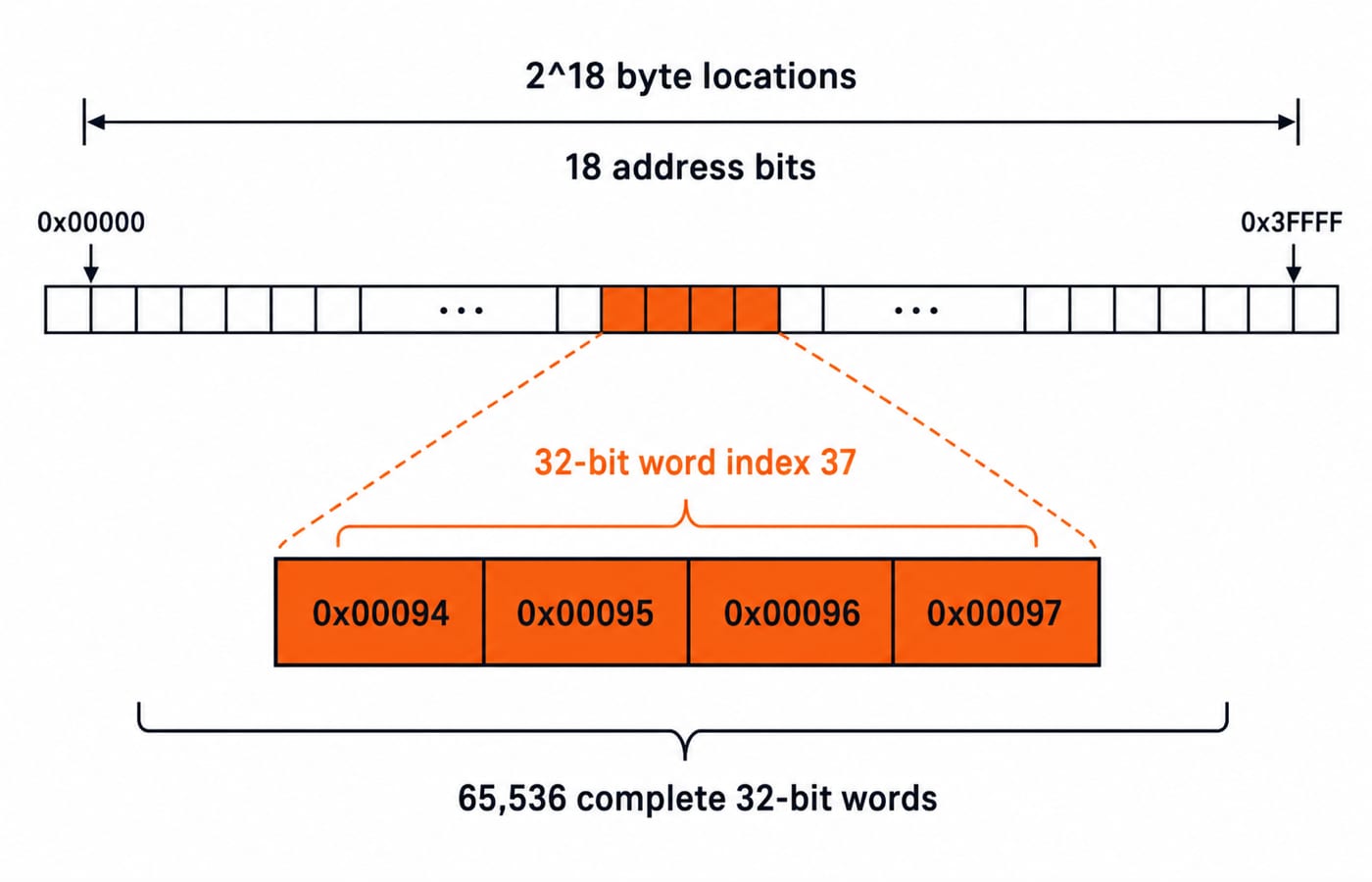
Consider a byte-addressable memory with a capacity of 256 KiB that stores 32-bit words. We need its byte locations, address bits, address range, complete words, and the byte addresses used by zero-based word index 37.
First convert the capacity:
256 KiB = 256 x 1024 B = 2^8 x 2^10 B = 2^18 B = 262,144 B
Because one address selects one byte, there are 2^18 byte locations and therefore 18 address bits. The inclusive address range is decimal 0 to 262,143, or hexadecimal 0x00000 to 0x3FFFF.
A 32-bit word contains 4 bytes, so:
number of complete words = 2^18 / 2^2 = 2^16 = 65,536
Word index 37 begins at byte address 37 x 4 = 148 = 0x00094. Its four bytes occupy 0x00094 through 0x00097.
Now check the result in both directions. 65,536 words x 4 bytes = 262,144 bytes, which matches the given capacity. The final word begins at 0x3FFFC and occupies four bytes through 0x3FFFF, exactly the highest valid address.
4. Memory Chip Organisation: How to Read 4K x 8 Correctly
The organisation 4K x 8 means 4096 addressable locations with 8 bits each, not 4096 bytes multiplied by an unexplained factor. Its capacity is 4096 x 8 = 32,768 bits = 4096 bytes = 4 KiB. It requires 12 address inputs and 8 data pins.
Compare that with 2K x 16. It has 2048 locations, 16 bits per location, 11 address inputs and 16 data pins. Its capacity is also 2048 x 16 = 32,768 bits = 4096 bytes = 4 KiB.
Organisation | Locations | Bits per location | Address lines | Data lines | Total capacity |
|---|---|---|---|---|---|
4K x 8 | 4096 | 8 | 12 | 8 | 32,768 bits = 4 KiB |
2K x 16 | 2048 | 16 | 11 | 16 | 32,768 bits = 4 KiB |
Equal capacity does not imply equal organisation or pin requirements. One design is deeper, the other wider.
5. Memory Expansion: Build 16K x 16 from 4K x 8 Chips
To build 16K x 16 from 4K x 8 chips, separate depth from width.
Depth factor:
16K / 4K = 4banks.Width factor:
16 / 8 = 2chips in parallel per bank.Total chips:
4 x 2 = 8.
Each 4K chip needs address inputs A0 through A11. The complete 16K memory needs A0 through A13. Connect A0-A11 to every chip. Feed A12-A13 to a 2-to-4 decoder, whose four outputs select exactly one bank. Within the selected bank, one chip supplies D0-D7 and its parallel partner supplies D8-D15.
The map is: bank 0 covers 0x0000-0x0FFF, bank 1 0x1000-0x1FFF, bank 2 0x2000-0x2FFF, and bank 3 0x3000-0x3FFF.
Capacity gives the final check. Eight chips at 4 KiB each provide 32 KiB. The target organisation gives 16K x 16 bits = 16,384 x 16 = 262,144 bits = 32,768 bytes = 32 KiB. Both calculations agree.
6. Memory Problem Traps: Units, Addressability and Off-by-One Errors
Mixing bits and bytes creates a factor-of-eight error. Treating a 32-bit word as one address in byte-addressable memory removes the required factor of four. Keep the unit beside every value, and preserve the question's convention for K or use KiB explicitly.
Remember that n address bits create 2^n addresses, but the largest zero-based address is 2^n - 1. Address-bus width controls how many locations can be selected. Data-bus width controls how many bits can move in one transfer. A 32-bit data path alone does not prove a 2^32-byte address space.
For expansion, parallel chips increase word width, while banks selected by higher address bits increase depth. Calculate both factors and multiply them. Then recompute total bits from the finished organisation.
7. How GATE Tests Memory Basics: A Reliable Solving Order
Typical problem forms include direct capacity conversion, finding address or data lines, recovering an organisation from an address range, locating a word in byte-addressable memory, comparing equal-capacity chips, and combining depth with width during chip construction.
Use the same order every time:
Identify the addressable unit.
Convert capacity to bits or bytes.
Write the number of locations as a power of two.
Separate address width from data width.
Verify by multiplying locations by bits per location.
KnowledgeGate offers over 120 practice questions in COA > Basics of COA > Basics of Memory. After these fundamentals, study Memory Hierarchy and Virtual Memory Explained for the next conceptual layer, then use Cache Memory: Mapping and Hit Ratio for mapping numericals. For current syllabus or exam-pattern specifics, consult the official GATE 2026 downloads page rather than relying on memory.
8. Computer Memory Basics: The Short Version and Next Step
Keep the chain visible: address lines -> locations -> addressability -> total capacity. For chip construction, add the independent depth factor x width factor check.
Use GATE Guidance by Sanchit Sir when you want a structured, subject-wise preparation path. Move to the GATE Test Series after covering the concepts, and use the GATE CS Exam Preparation category as the broader course directory.
As a final exercise, redo the 256 KiB calculation for word-addressable memory. Then rebuild the 16K x 16 design without looking at the decoder diagram. If both answers survive the capacity check, the method is working.
Keep learning

Pipelining Basics in Computer Architecture: Clock Cycle, Speedup and Hazard Worked Examples
Learn how to calculate a pipeline clock, fill and drain time, finite-batch speedup, latency, throughput, and the cost of a load-use stall.
Updated 23 Oct 20266 min readComputer Organization & Architecture

Data Manipulation Micro-Operations in COA: Arithmetic, Logic and Shift Operations Worked Step by Step
Learn a fixed-width method for tracing arithmetic, logic, and shift micro-operations. Every example tracks register values, result bits, carry, and overflow.
Updated 19 Oct 20265 min readComputer Organization & Architecture

Assembly Language and Assembler Design: Two-Pass Translation with a Complete Worked Example
Follow a 16-bit Basic Computer program through pass one, pass two, hexadecimal encoding and execution, with every symbol, address and result shown.
Updated 15 Oct 20266 min readComputer Organization & Architecture

Computer Classification and Flynn’s Taxonomy: The Four Classes with a Worked Vector Example
A machine can belong to several computer classes at once. Learn the four classification axes, Flynn’s matrix, vector and multicore traces, and exam traps.
Updated 11 Oct 20266 min readComputer Organization & Architecture