

Python Conditional Statements Explained: if, elif, else, Nested Logic and Worked Examples
Learn a reliable way to trace Python branches, from Boolean expressions and short-circuiting to nested decisions, truthiness, boundary checks, and a complete scholarship classifier.
KnowledgeGate Team
Exam prep & CS education
Updated 17 Nov 20266 min read

Python evaluates each condition as a Boolean, checks an if/elif/else chain from top to bottom, and executes the first true branch. Conditionals in Python owns the beginner syntax and grading example; the branch-prediction method here focuses on short-circuit safety, boundary partitions, nested failure paths, and diagnostic traces. The Coding & Skills category places these ideas in the wider programming path.
A condition changes control flow, not the value being tested
A condition is an expression evaluated in a Boolean context. Python enters its indented suite when it is true and skips the suite when it is false. Indentation defines program structure.
The three shapes differ:
A standalone
ifperforms an optional action.ifwithelseselects exactly one of two alternatives.An
if/elif/elsechain selects among several mutually exclusive alternatives.
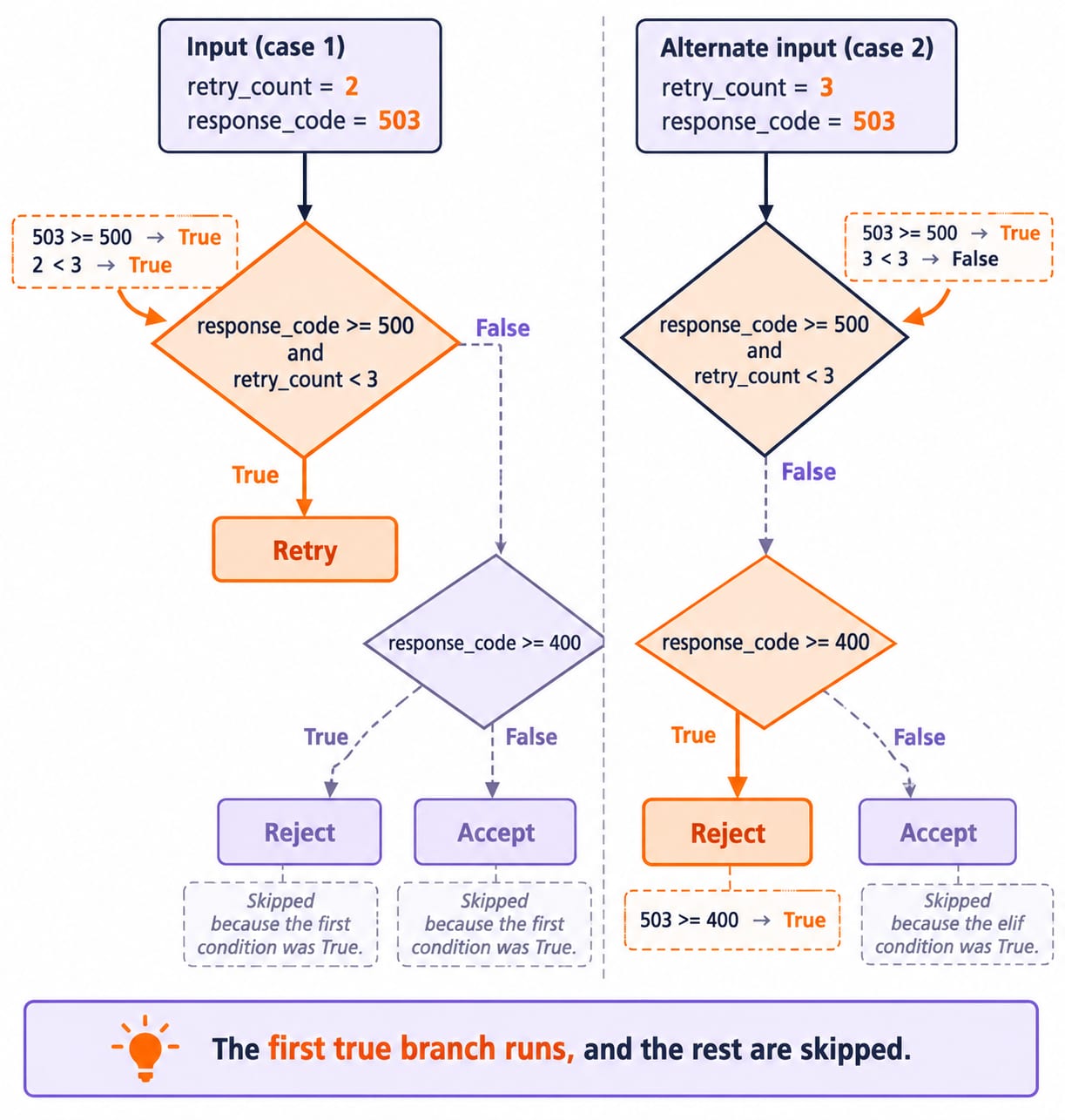
Python checks top to bottom. The first true branch runs, and the rest are skipped.
retry_count = 2
response_code = 503

if response_code >= 500 and retry_count < 3:
    print("Retry")
elif response_code >= 400:
    print("Reject")
else:
    print("Accept")
The first test combines two true comparisons: 503 >= 500 and 2 < 3. Python prints Retry and skips the remaining branches. If retry_count were 3, the first test would be false and the 503 response would reach Reject. Three separate if statements would instead be independent decisions.
Build conditions from comparisons, Boolean operators, and precedence
Comparisons include ==, !=, <, <=, >, and >=. Boolean precedence is not, then and, then or. Use parentheses when they clarify the intended grouping.
Take has_ticket = True, identity_verified = True, and emergency_override = False:
(has_ticket and identity_verified) or emergency_overrideIt becomes (True and True) or False, then True or False, then True. has_ticket and (identity_verified or emergency_override) also happens to be true, but expresses a different rule because it never allows the override to bypass the ticket check.
Boolean operators also short-circuit. With user = None, this condition is safe:
user is not None and user["active"]The first operand is false, so Python skips the dictionary lookup and the condition is false. Reversing the operands would subscript None before the guard.
Worked example: trace a scholarship classifier branch by branch
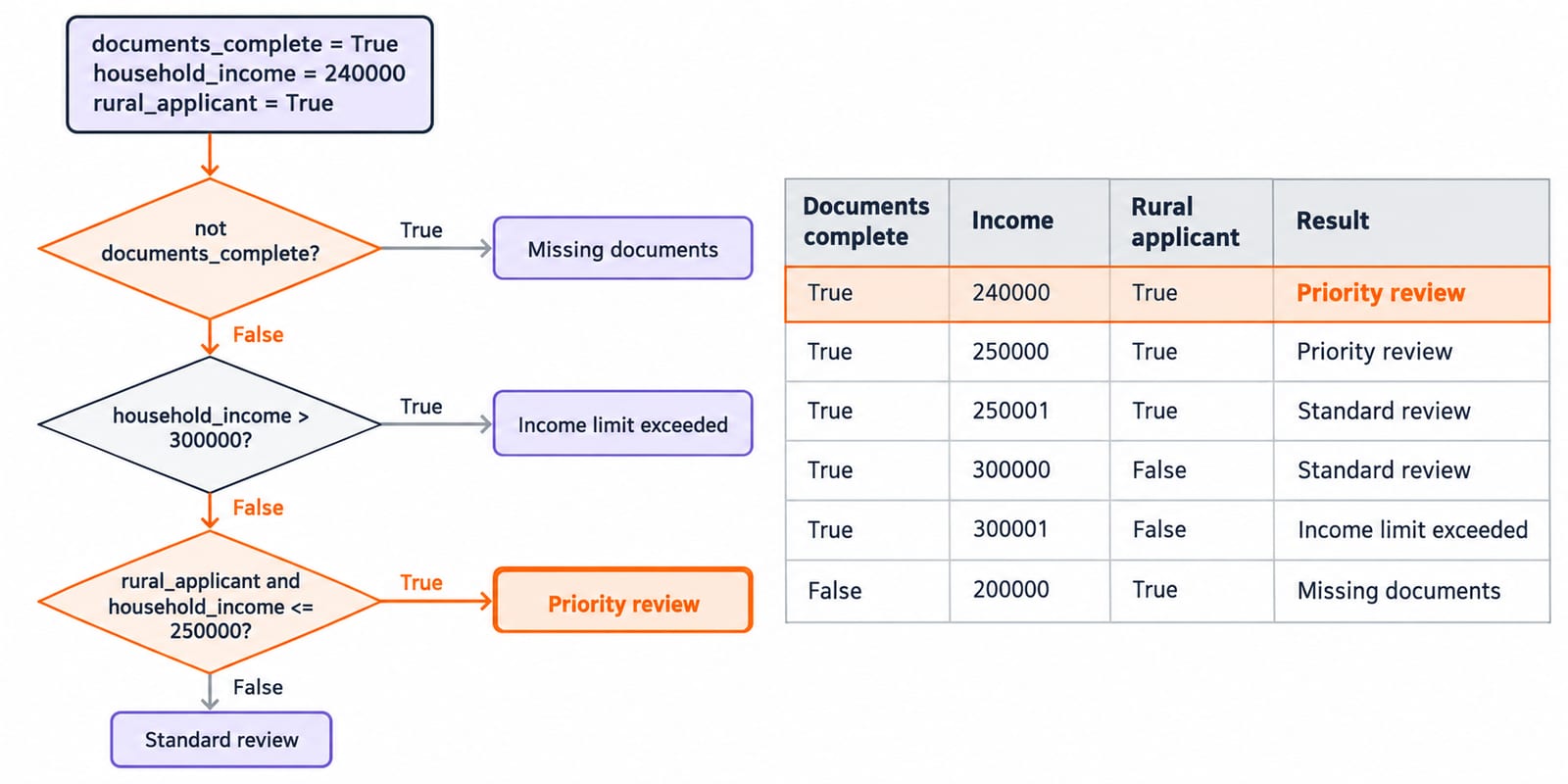
Translate a scholarship review policy into one disqualifying check, one priority rule, and a standard-review fallback:
documents_complete = True
household_income = 240000
rural_applicant = True

if not documents_complete:
    result = "Missing documents"
elif household_income > 300000:
    result = "Income limit exceeded"
elif rural_applicant and household_income <= 250000:
    result = "Priority review"
else:
    result = "Standard review"
Trace every test in order:
not True is false, so skip the missing-documents result.
240000 > 300000 is false, so the income limit is not exceeded.
rural_applicant is True and 240000 <= 250000 is true, so set result to Priority review.
The final else is skipped, and exactly one branch executes. Boundary rows expose both gaps and incorrect ordering:
Documents complete | Income | Rural applicant | Result |
|---|---|---|---|
True | 240000 | True | Priority review |
True | 250000 | True | Priority review |
True | 250001 | True | Standard review |
True | 300000 | False | Standard review |
True | 300001 | False | Income limit exceeded |
False | 200000 | True | Missing documents |
Document completeness and the upper income limit belong before the priority rule. Otherwise, an incomplete application could receive priority before its disqualifying condition is evaluated.
Choose a flat chain, nesting, or a compound condition deliberately
Use a flat chain for same-level alternatives, nesting when a later decision matters only after an earlier success, and a compound condition when the rule remains readable as one sentence.
logged_in = True
role = "editor"
two_factor = False

if logged_in:
    if role == "editor":
        if two_factor:
            print("Editor access granted")
        else:
            print("Complete two-factor authentication")
    else:
        print("Editor role required")
else:
    print("Please log in")
Python enters the true outer condition. The role check is true, but two_factor is false, so the output is Complete two-factor authentication. The outer else is not considered.
A success-only check could use if logged_in and role == "editor" and two_factor. Nesting is better here because it identifies the failed stage. Do not flatten logic when that hides the failure.
Truthiness and chained comparisons create compact code with edge cases
Here, 0, 0.0, "", [], {}, and None are false in a condition, while non-empty strings and containers are true. Thus bool("False") is True: it is a non-empty string, not the Boolean False.
payload = {}
if payload:
    print(payload["status"])
else:
    print("No response data")
The empty dictionary is false, so Python prints No response data and skips the unsafe key lookup. Change payload to {"status": "ok"}, and it prints ok.
With score = 76, the chained comparison 70 <= score < 85 is true because 70 <= 76 and 76 < 85. A score of 70 is included; 85 is excluded and belongs to the higher band.
Common conditional-statement traps and their corrections
Separate decisions can legitimately produce multiple results:
cpu_busy = True
disk_full = True

if cpu_busy:
    print("CPU alert")
if disk_full:
    print("Disk alert")
Both flags are true, so the program prints two alerts. Replacing the second if with elif would hide the disk alert. Use elif only when the outcomes are mutually exclusive.
Overlapping thresholds have the opposite requirement. With latency_ms = 920, placing if latency_ms >= 400 before elif latency_ms >= 900 selects Slow too early. Check the narrower Critical threshold first, then the broader Slow threshold, and test 399, 400, 899, and 900.
Other errors include using = instead of ==, choosing and when either alternative qualifies, and misaligning else. State the rule in plain English, decide whether it means all or any, then align and trace it. With role = "editor", role == "admin" or role == "editor" is true; joining those comparisons with and is false.
How output and logic questions test the execution model
Practise four forms: predict a printed branch, find a missing boundary, repair a condition that accepts wrong inputs, and explain short-circuiting. Write current values beside each condition instead of guessing from indentation.
Try this solved check:
attempts = 2
remaining = 0

if attempts < 3 and remaining > 0:
    print("A")
elif attempts == 2 or remaining == 0:
    print("B")
else:
    print("C")
The first condition is True and False, hence false. In the second condition, attempts == 2 is true, so or short-circuits without needing the second operand to establish the result. The output is B.
For adjacent trace practice, try Python output-based questions on lists, slicing, and mutability. Keep the same habit: write current values beside each condition before predicting the printed branch.
Conditional statements in one minute, then the next coding step
Use this checklist:
State the cases in plain language.
Write the narrowest or disqualifying checks first.
Decide whether the branches are independent or exclusive.
Test values just below, at, and above every boundary.
Trace only the branch Python actually enters.
For structured Python concepts and coding questions, continue with Python Programming. To apply control flow inside data-structure and algorithm problems, use Data Structures and Algorithms Using Python.
Then apply conditions in classic programs in C, Java and Python, including prime and GCD problems. Rerun the scholarship-policy trace for all six boundary rows on paper, code it, and confirm each input reaches one expected result.
Keep learning
Python Dictionaries Explained: Keys, Methods, Worked Examples and Exam Traps
Learn how Python dictionaries store, retrieve and mutate values. Trace a complete frequency counter, then practise the membership, aliasing and duplicate-key traps that make output questions tricky.
Updated 18 Nov 20265 min readPython
Python Scope and Flow Explained: Worked Examples and Exam Question Patterns
Learn to separate Python name resolution from execution order with a nested-function trace, an UnboundLocalError repair, module examples, and exam-style checks.
Updated 16 Nov 20266 min readPython

Asyncio in Python: Event Loops, Coroutines and Runnable Examples
Build a clear mental model of Python's event loop, then run two dependency-free examples covering concurrent waits, result ordering, timeouts and cleanup.
Updated 15 Nov 20266 min readPython
Python Memory Model and Garbage Collection: References, Cycles, and Profiling
Build a practical model of Python references, then trace aliases, collect a two-object cycle, and measure allocation growth by line.
Updated 15 Nov 20265 min readPython