

Types of Software Explained: Classification, Worked Examples and Exam Traps
Classify system, application, programming and utility software by the job each performs. Then apply the rule to memory use, a program lifecycle and common exam traps.
KnowledgeGate Team
Exam prep & CS education
Updated 12 Nov 20266 min read
Memorising “system software” and “application software” is not enough when an option says firmware, compiler, device driver, antivirus, middleware or IDE. The difficulty is deciding which job matters most when textbooks use overlapping categories. In GATE CS preparation, classify by primary job first: hardware or resource control is system software, end-user work is application software, program creation is programming software, and maintenance or protection is utility software. If the stem supplies its own taxonomy, follow it.
Types of software: classify by the job being performed
Software is the collection of instructions and associated data that directs a computer to perform work. The clearest starting model has four functional categories.
Type | Primary job | Typical examples | Question to ask |
|---|---|---|---|
System software | Manages the platform and hardware resources | OS, kernel, driver, firmware | Does it control hardware or core resources? |
Application software | Performs an end-user task | Spreadsheet, payroll system, browser | Does it complete the user’s task? |
Programming software | Helps create, translate, test or debug programs | Editor, IDE, compiler, linker, debugger | Does it help build software? |
Utility software | Maintains, protects or optimises the system | Antivirus, backup, compression, disk checker | Does it protect or maintain the system? |
These are functional categories, not airtight boxes. Many books place utilities and language translators inside system software. If an exam stem supplies its own classification scheme, follow it. Otherwise, choose the most specific category that describes the item’s primary role.
System software: OS, drivers, firmware and translators
System software connects hardware capabilities to the programs that use them. Firmware starts or configures hardware at a low level. The operating system manages CPU time, memory, files and devices, while a device driver gives the OS the instructions needed to control a particular device.
A compiler, assembler or linker is often described as a language processor within system software. If “programming software” appears as a separate option, however, that more specific label usually wins because these tools help create or translate programs.
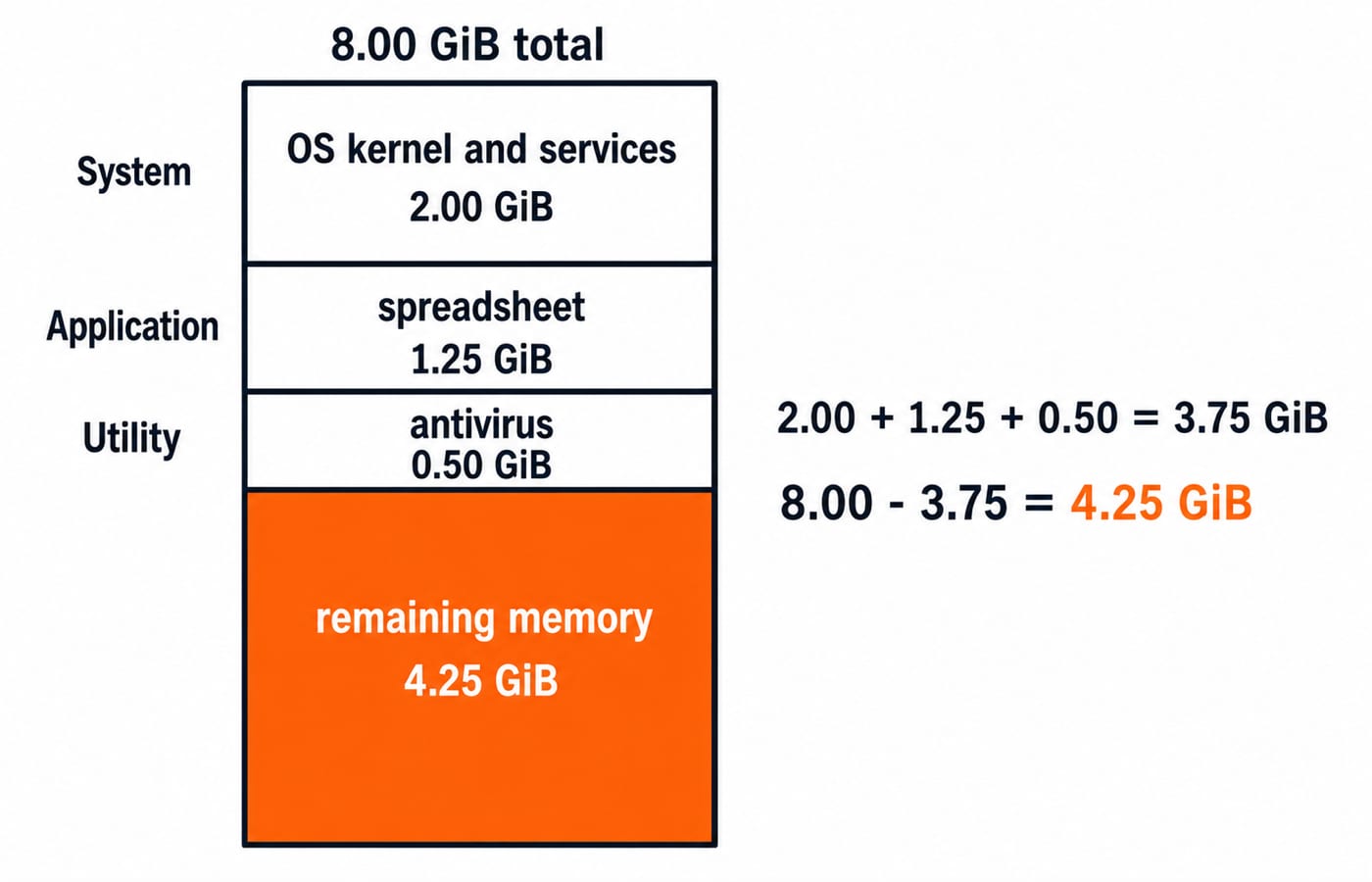
Consider an 8.00 GiB machine. First classify the occupied components: OS kernel and services are system software, a spreadsheet is application software, and antivirus is utility software. Their memory use is 2.00 GiB, 1.25 GiB and 0.50 GiB respectively.
Total occupied memory =
2.00 + 1.25 + 0.50 = 3.75 GiB.Simplified remaining memory =
8.00 - 3.75 = 4.25 GiB.
The arithmetic measures memory, but RAM usage does not determine software type. The primary job does.
Application software: general-purpose, special-purpose and custom
Application software is defined by the user’s task, not by where the software runs. A spreadsheet or word processor is general-purpose software. A billing tool or photo editor is special-purpose software, while a college fee-management system built for one institution is custom software.
Desktop, mobile, web and software as a service describe delivery or usage models. They do not replace the system-versus-application distinction.
Apply that distinction to three connected cases. Chrome displaying an employee portal is application software because it serves the user’s browsing task. The portal’s payroll module is also application software because it processes payroll. The printer driver used to print a payslip remains system software because it lets the OS control the printer.
Utility and programming software: the categories that cause traps
Utilities maintain, protect or optimise a computer. Backup software, antivirus, compression tools, disk checkers and diagnostic tools fit this role. A textbook may list utility software separately or treat it as a subtype of system software, so inspect the categories supplied by the question before choosing.
Programming software supports program creation. Source-code editors, IDEs, compilers, interpreters, assemblers, linkers and debuggers belong here when the category is available. GCC compiling source code is a programming tool, the resulting payroll executable is an application, and the OS loader that starts it is system software.
Ambiguous item | Most specific label | Fallback convention |
|---|---|---|
Compiler | Programming software | Language processor within system software |
Antivirus | Utility software | System utility |
Firmware | System software in non-volatile memory | Never hardware merely because it is stored on a chip |
The rule is simple: use the most specific valid label, while honouring the taxonomy stated in the stem.
Types of software worked example: source code to a running payroll program
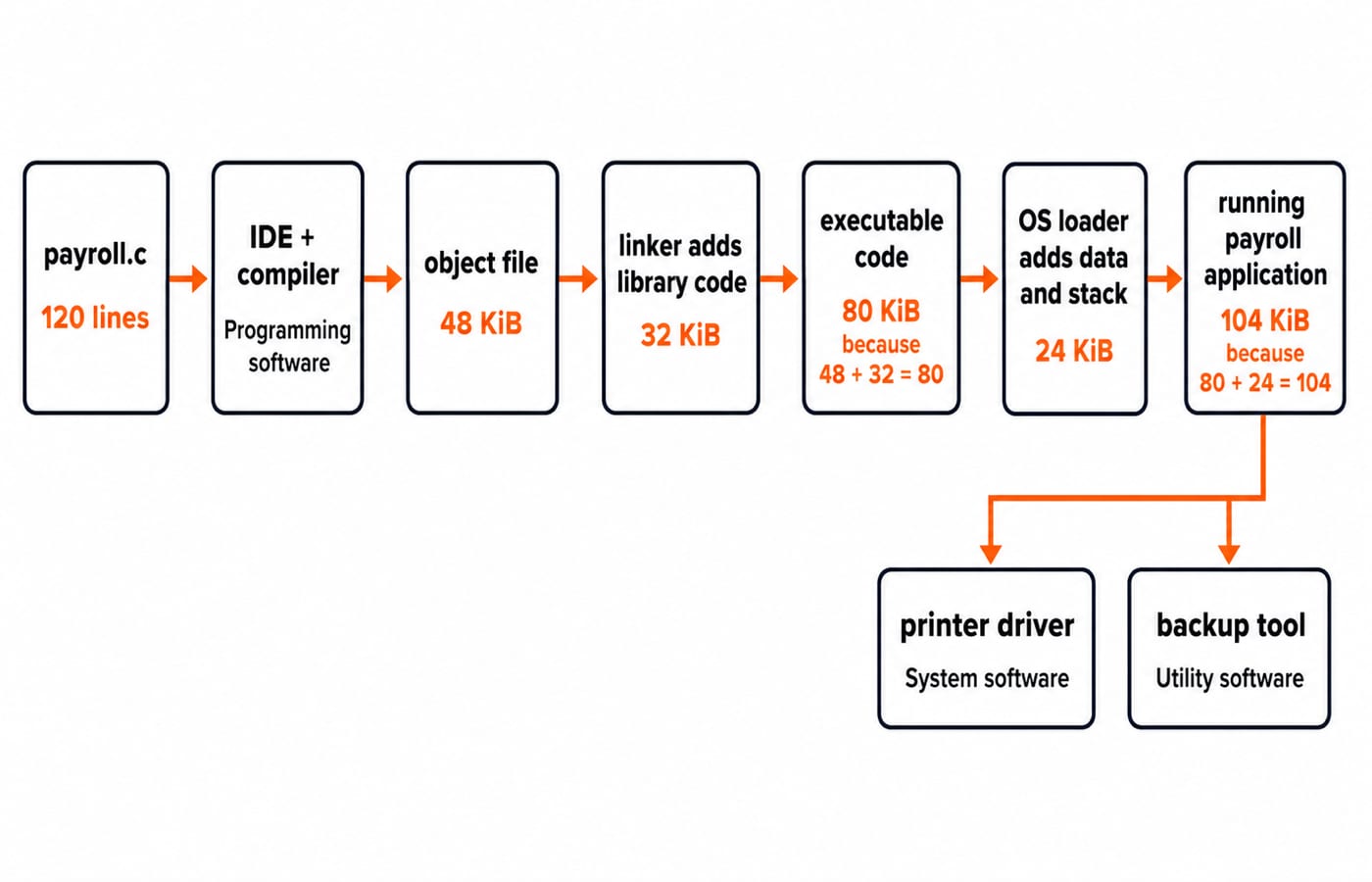
Suppose a student writes a 120-line file named payroll.c in an IDE. Classify each stage before calculating its size.
The IDE is programming software because it supports writing and testing code.
The compiler, also programming software, translates
payroll.cand creates a 48 KiB object file.The linker is programming software. It adds 32 KiB of library code, so the simplified executable code size is
48 + 32 = 80 KiB.The OS loader is system software. It reserves the 80 KiB executable plus 24 KiB for data and stack, giving a simplified loaded footprint of
80 + 24 = 104 KiB.Once running, the payroll program is application software because it performs the user’s payroll task.
A printer driver used for payslips is system software. A backup tool that copies the generated payslip is utility software.
Real executable files can include headers, relocation data, alignment padding and shared libraries. Under the stated simplified model, add only the 80 KiB executable and 24 KiB for data and stack, giving 104 KiB; unlisted overhead is outside the calculation.
Types of software in objective questions: four common exam angles
Direct classification asks for one label. Matching maps several items to labels; for example, map Linux kernel, LibreOffice Calc, GCC, antivirus to system, application, programming, utility when all four categories are supplied. Odd-one-out supplies three items with the same primary role and one with a different role. If programming software is absent, GCC may be grouped as a language processor under system software.
For an execution-order question, reason from the lowest layer upwards:
Firmware initialises the hardware.
The bootloader locates the operating system.
The operating system starts and loads the required drivers.
The application starts.
The correct order is therefore firmware, bootloader, OS/drivers, application. A bootloader prepares the machine to start an OS, so it is not an end-user application. The broader Operating Systems for GATE: Deadlocks, Scheduling, Memory guide explains why the OS and drivers belong to the system layer.
Types of software traps and boundary cases
Use the pattern “tempting answer, why it fails, better rule” when an item feels ambiguous.
Firmware is hardware. This is tempting because firmware is stored on a chip. Storage location does not change the fact that firmware contains software instructions closely tied to hardware.
A browser is system software. Other tools may depend on a browser, but its primary job is to perform the user’s web task, so it is application software.
Antivirus is application software. A user can open its interface, but its primary role is protection and maintenance, so utility is the better label when available.
Middleware always has one category. Middleware enables communication between applications or services. Its label depends on the taxonomy and context supplied by the stem.
Embedded software is broader than firmware. A device can contain low-level firmware, an embedded operating system and application logic at the same time. For the broader TGT/PGT map across computer generations, CPU, memory and number systems, use Computer Fundamentals for CS Teaching Exams. Functional-category questions instead turn on the software’s primary role and the taxonomy named in the stem.
Types of software: the short version and next step
Ask four questions in order. Does it manage hardware or resources? Choose system software. Does it perform the user’s task? Choose application software. Does it create, translate or debug programs? Choose programming software. Does it maintain, protect or optimise? Choose utility software. If the question names a different taxonomy, honour that scheme.
For structured exam preparation across core subjects, GATE Guidance by Sanchit Sir gives you a sequenced route. If you want a broader core-CS learning path, ZERO TO HERO is the relevant next step. Keep the four role questions beside you, then practise applying them to unfamiliar examples.
Keep learning
RISC vs CISC Architecture: Control Units, CPI Worked Example and Exam Patterns
Understand what RISC and CISC actually classify, then compare code size and performance with step-by-step instruction and CPU-time examples.
Updated 26 Oct 20266 min readComputer Organization & Architecture
Computer Classification and Flynn’s Taxonomy: The Four Classes with a Worked Vector Example
A machine can belong to several computer classes at once. Learn the four classification axes, Flynn’s matrix, vector and multicore traces, and exam traps.
Updated 11 Oct 20266 min read58 viewsComputer Organization & Architecture
Multiprocessor Classification: Flynn Taxonomy, Memory Models and Exam-Style Worked Examples
Learn how to choose the right multiprocessor classification axis, then solve a four-lane SIMD trace and a NUMA average-access-time problem step by step.
Updated 27 Sep 20266 min readComputer Organization & Architecture
Instruction Types in Computer Organization: Concepts, Worked Trace and GATE Question Patterns
Classify instructions by the state they change, then trace a toy CPU across registers, flags, memory, a branch, an output port, and the program counter.
Updated 12 Sep 20266 min readComputer Organization & Architecture