

Computer Graphics Fundamentals: Applications, Core Components and a Worked Pixel Pipeline
Follow a triangle from object coordinates to a tested screen pixel, then calculate the colour and depth-buffer memory needed to store the result.
KnowledgeGate Team
Exam prep & CS education
Updated 11 Nov 20266 min read
It is easy to list monitors, games and CAD as computer-graphics examples without understanding how a model becomes coloured pixels. Computer graphics is the creation, storage, manipulation and presentation of visual information by a computer. The component chain, triangle pipeline, and storage calculation connect the system's input, processing, memory, and display stages.
Computer graphics applications: what the system must produce
Applications differ mainly in their visual job:
CAD and architecture turn dimensions and control points into precise models and drawings.
A graphical user interface turns a click or drag into an updated 2D element.
Scientific and medical visualisation turn measured or scanned data into plots, surfaces or volume views.
Simulators, games and animation turn geometry, time and user control into changing frames.
A GIS turns coordinates and spatial layers into a map.
Education and virtual environments turn learner or controller input into visual feedback.
Synthetic-image generation starts with a scene description and produces an image. Image processing starts with a captured image and changes or analyses it. One system can combine both, for example by adding generated labels to a processed scan.
Non-interactive graphics follows a predetermined description. Interactive graphics accepts events: dragging a square from x = 40 to x = 120 changes its position and redraws it.
Computer graphics system components: from input to display
The components form a chain, and each has a specific boundary.
Component | Role |
|---|---|
Application software | Defines the scene and updates its model |
Input devices | Supply events or data |
CPU | Runs application logic, transformations or rendering preparation |
GPU or graphics processor | Executes graphics operations such as transformation and rasterisation |
Graphics memory | Holds data used by the graphics processor |
Frame buffer | Stores the image's pixel values |
Display controller | Reads the completed frame buffer in display order |
Output device | Presents the result |
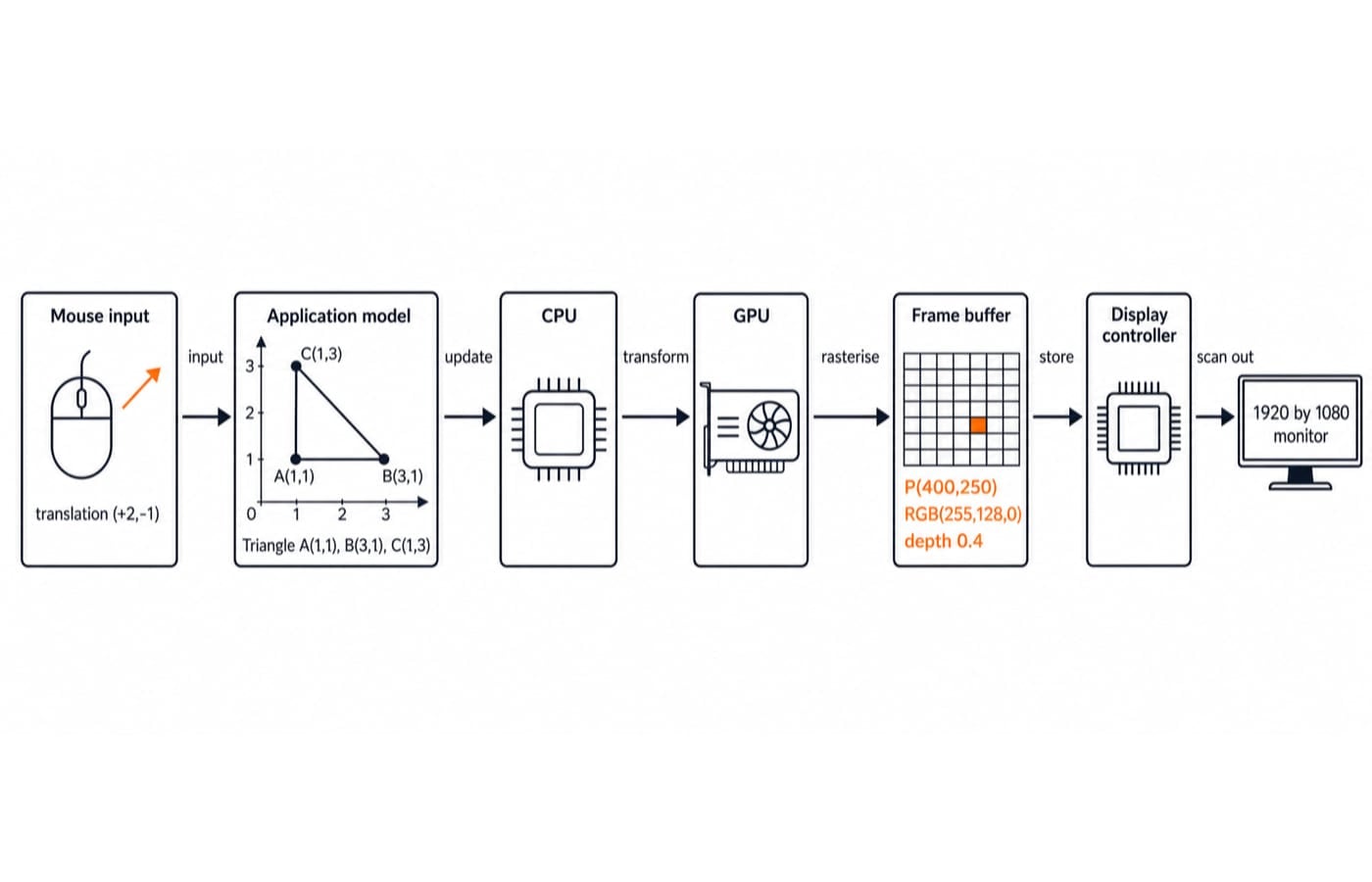
A mouse drag changes a triangle's translation from (0, 0) to (+2, -1). The application updates its model, processors transform and rasterise it, and the colour buffer receives RGB values. The controller scans the completed image to the monitor. A mouse or scanner is an input device; a monitor, printer or plotter is an output device.
The graphics API and renderer are software. The processor, memory, controller and display are hardware, so a GPU is not a display. Double buffering draws into a back buffer before presentation and therefore needs two colour buffers.
Graphics representations: primitives, vectors, rasters and pixels
A scene contains primitives such as points, lines, polygons, curves, text and images. Vectors preserve geometric instructions; a raster is a rectangular grid of addressable pixels. Even vector sources must be rasterised for an ordinary raster display.
Consider a 4 by 3 frame buffer with top-left origin, x = 0 to 3, y = 0 to 2, row-major storage and 24-bit RGB. Pixel P(2,1) is RGB (255,128,0). Number Systems and Base Conversions Explained shows why this is hexadecimal FF8000.
At 3 bytes per pixel, its offset is (1 * 4 + 2) * 3 = 18. The buffer needs 4 * 3 * 24 = 288 bits, or 36 bytes. Resolution counts pixels, bit depth counts bits per pixel, and physical size is separate.
Frame-buffer memory: a fully worked display calculation
For a 1920 by 1080 colour buffer at 24 bits per pixel:
Pixels:
1920 * 1080 = 2,073,600.Bits:
2,073,600 * 24 = 49,766,400.Bytes:
49,766,400 / 8 = 6,220,800.MiB:
6,220,800 / 1,048,576 = 5.93 MiB.
Two colour buffers use 2 * 6,220,800 = 12,441,600 bytes, about 11.87 MiB. A 32-bit depth buffer needs 2,073,600 * 4 = 8,294,400 bytes, about 7.91 MiB. Together: 12,441,600 + 8,294,400 = 20,736,000 bytes, about 19.78 MiB.
This counts two 24-bit colour buffers and one 32-bit depth buffer, not total GPU memory. Remember / 8 from bits to bytes, and use 1,048,576 rather than 1000 when converting bytes to MiB. For wider context, see Memory Hierarchy and Virtual Memory Explained.
Computer graphics pipeline: work a triangle into screen pixels
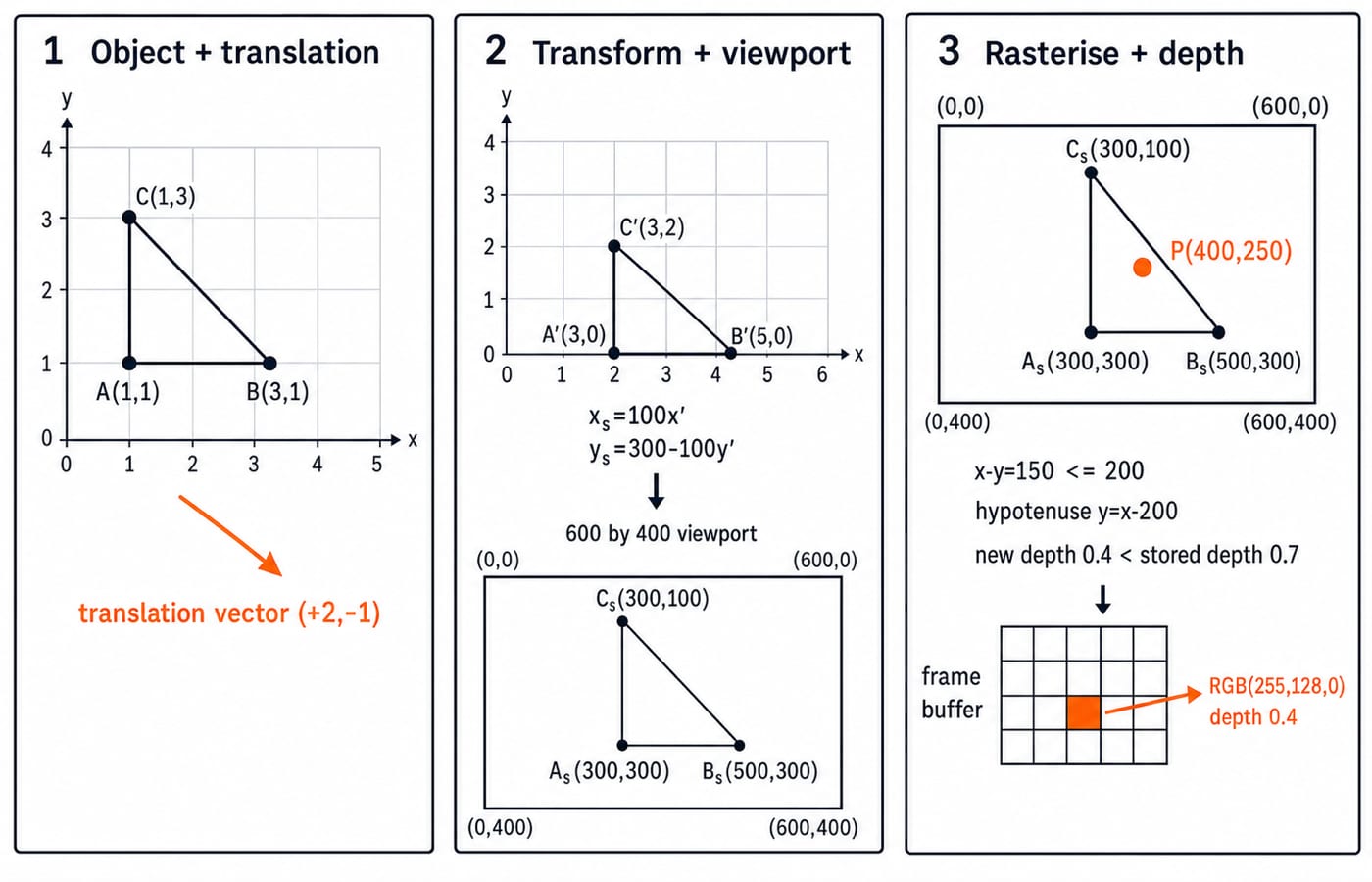
Start with object-coordinate vertices A(1,1), B(3,1) and C(1,3). Translate them by (+2,-1) using
T = [[1,0,2],[0,1,-1],[0,0,1]].
For A, T * [1,1,1]^T = [1*1 + 0*1 + 2*1, 0*1 + 1*1 - 1*1, 1]^T = [3,0,1]^T. The results are A'(3,0), B'(5,0) and C'(3,2).
For a 600 by 400 viewport, x_s = 100x' and y_s = 300 - 100y' give A_s(300,300), B_s(500,300) and C_s(300,100). The y rule flips the upward mathematical axis into a downward screen axis.
Rasterisation finds covered fragments. For P(400,250), x >= 300, y <= 300, and x - y = 150 <= 200. It is on the interior side of y = x - 200, so it lies inside.
Assign RGB (255,128,0) and depth 0.4. With smaller values nearer, 0.4 beats the stored 0.7, so colour and depth are updated. The controller later reads the completed buffer.
How computer graphics fundamentals are tested
Questions can ask you to match applications and graphics types, identify component roles, order pipeline stages, distinguish raster and vector, calculate storage, transform coordinates, or trace a depth test. CS Fundamentals for Exams and Placements supplies broader learning context.
Use a fixed order: write the coordinate convention, identify the representation, calculate pixels, multiply by bits per pixel, convert units, apply transforms as stated, map to the viewport, then evaluate visibility and storage. Keep units beside each line.
For a quick check, a 1280 by 720 buffer at 32 bits per pixel stores 1280 * 720 * 4 = 3,686,400 bytes, about 3.52 MiB. Two such colour buffers need 7,372,800 bytes, about 7.03 MiB.
Computer graphics traps that break the mental model
Misconception | Why it fails and how to repair it |
|---|---|
The GPU is the monitor | The GPU computes; the monitor presents. Separate processing from output. |
A frame buffer stores vector commands | It stores pixels, not geometry. Separate scene from raster. |
More pixels mean a larger display | Resolution and physical dimensions are independent. State the property. |
Every screen uses the same origin | Different origins flip results. Declare the convention first. |
Transform order does not matter | Order changes coordinates. Follow the stated sequence. |
Every altered photograph is generated graphics | A captured image can be processed. Identify the input. |
An inside fragment must be visible | A nearer surface can hide it. Run the depth test. |
Two checks expose slips. Since A'(3,0) maps to (300,300), the y-axis rule is consistent. Since row 1, column 2 starts at byte offset 18, the row stride and three-byte pixel size are included.
Geometry describes what exists, transformations place it, rasterisation finds covered pixels, depth testing resolves visibility, the frame buffer stores the result, and the display presents it.
Computer graphics fundamentals: the short version and next step
Applications determine the visual task; components divide input, processing, storage and output. The pipeline converts primitives into tested fragments. Resolution and bit depth determine storage.
In the worked example, the triangle reaches screen vertices (300,300), (500,300) and (300,100). Pixel P(400,250) becomes visible as RGB (255,128,0) at depth 0.4, while one 1920 by 1080 24-bit colour buffer needs about 5.93 MiB.
Redraw the component chain, then recompute the 1280 by 720 buffer and triangle translation. For a broader CS and semester route including Computer Graphics, use Zero to Hero Complete CS Course. For an exam-focused route also covering it, use NTA-UGC-NET Paper 2.
Keep learning

Computer Graphics Applications and Core Components MCQs: 12 Solved Questions with Explanations
Solve 12 published computer graphics questions, then use the explanations and worked calculations to strengthen the distinctions that make each answer clear.
Updated 29 Oct 20267 min read52 viewsAlgorithms MCQs
Introduction to Viewing in Computer Graphics: Window-to-Viewport Mapping with a Worked Example
Follow a point and a triangle from a world window to a viewport. Derive the transform, audit the arithmetic, and separate clipping, distortion, and y-axis reversal.
Updated 19 Aug 20266 min readEngineering Mathematics

Fundamentals of Systems and Information Systems: Types, Components and a Worked Inventory Model
Learn the system vocabulary, compare classifications and TPS, MIS, DSS and ESS, then follow one warehouse case from raw transactions to a 480-unit order.
Updated 15 Nov 20266 min readGATE Strategy & Roadmap

Natural Language Processing Explained: Pipeline, TF-IDF Worked Example and Exam Patterns
Start from raw text, build BoW and TF-IDF vectors, compute cosine similarity, examine ambiguity, and finish with evaluation and exam-style checks.
Updated 15 Oct 20266 min readML & Data Science