Teaching-Learning Aids and ICT Integration for Teaching Exams: Notes with Worked Classroom Examples
Learn how to select and sequence teaching-learning aids, recognise genuine ICT integration, and solve classroom scenarios with worked calculations.
KnowledgeGate Team
Exam prep & CS education
Updated 15 Oct 20265 min read
Many aspirants memorise lists of charts, models and digital tools but cannot choose an aid for a classroom situation. Teaching exams test application, not recall. Classify aids by sensory mode, projection, digital status and learner role; distinguish ICT integration from simple device use; and apply the ideas to a classroom case and common traps.
Teaching-learning aids: meaning, purpose and scope
A teaching-learning aid is planned material, medium or tool that makes an objective easier to observe, practise, discuss or assess. Its value lies in learner activity. Mere presence does not make a device an aid.
Resource and purpose differ. A wall chart organises four water-cycle stages; labelled cards let pupils arrange them; a 90-second animation shows movement; a five-item exit ticket checks understanding.
Start with objective and learner need, then choose the simplest reliable aid. Digital is not inherently better than low-tech.
Teaching-learning aids classification: use more than one lens
Example | Sensory mode | Projected or non-projected | Digital or non-digital | Learner role |
|---|---|---|---|---|
Chalkboard sketch | Visual | Non-projected | Non-digital | Mainly receptive unless learners add labels |
Radio clip | Audio | Non-projected | May be digital or analogue | Receptive |
Physical globe | Visual and tactile | Non-projected | Non-digital | Interactive |
Narrated projector animation | Audio-visual | Projected | Digital | Mainly receptive |
Live quiz | Visual/textual | Projected or personal-screen | Digital | Interactive |
Classifications overlap. A narrated animation is digital, projected and audio-visual, so the stem decides which label matters.
Tool names do not reveal pedagogy. A static projector lecture is one-way; paired cardboard cards create active learning.
ICT integration changes the learning action
Availability puts a projector in the room. Use displays a PDF. Integration has pupils predict, submit or manipulate a response, receive feedback, then revise towards the objective.
ICT can represent with images, audio or simulation; improve access with captions, replay or adjustable text; enable shared tasks; give quiz or annotated feedback; and continue through offline or online spaces.
Scenarios may expose unreliable internet, inaccessible text, passive screen time, distraction, privacy concerns or unequal access. Redesign by pre-downloading resources, pairing learners, adding captions or providing a non-digital equivalent. Do not reject technology.
A second classroom example tests access as well as activity. A Class VII teacher wants pupils to compare the tone of two short speeches. Projecting a transcript is only device use. Instead, pairs hear captioned, pre-downloaded clips, highlight one phrase from each transcript, submit a comparison and revise it after feedback. Printed transcripts keep the task accessible to pupils who cannot rely on audio, and teacher-read excerpts provide a non-digital fallback. The objective and learner action stay constant while the medium changes.
Worked classroom example: sequence aids for 35 minutes
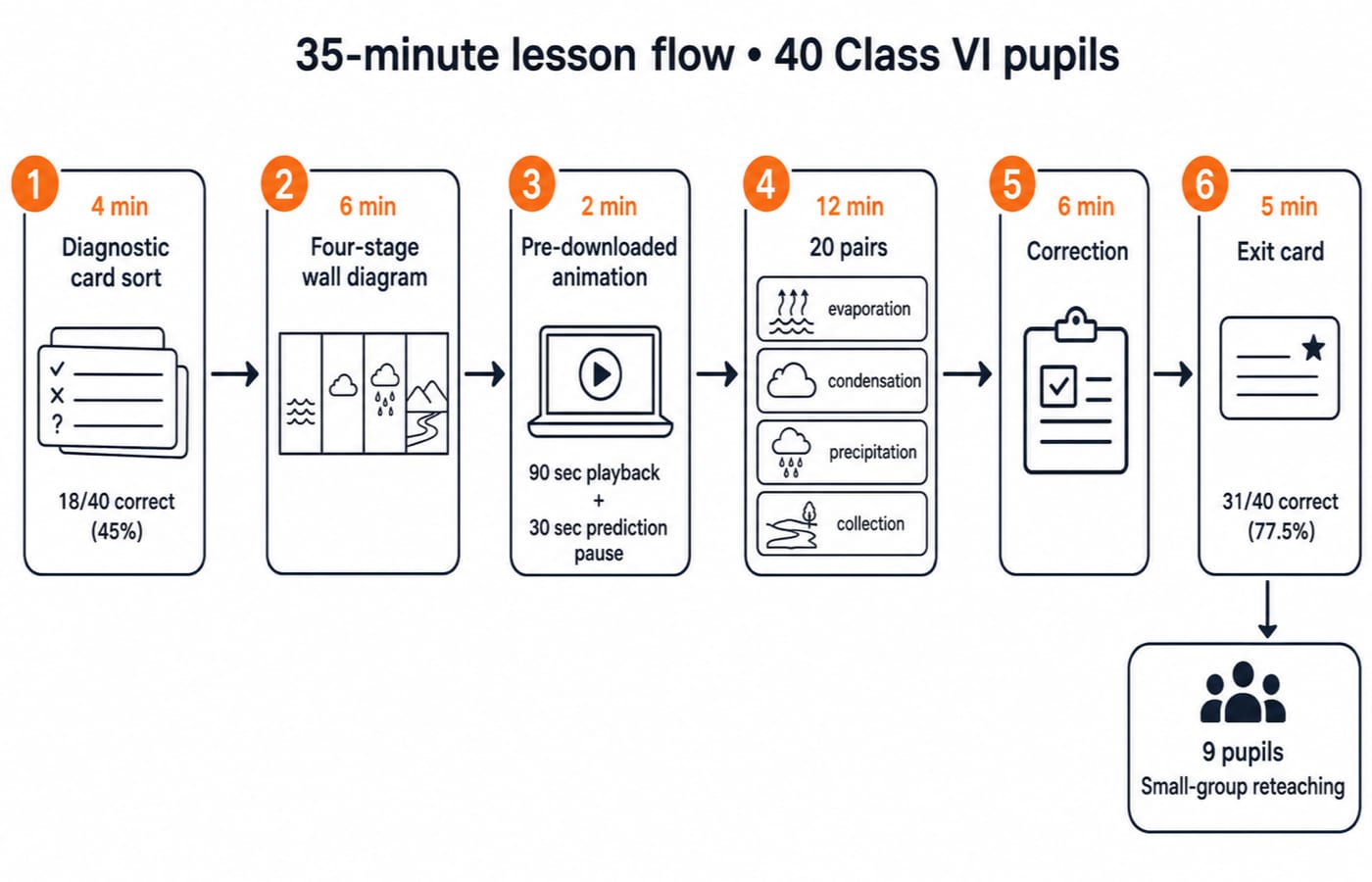
This illustrative planning case is not reported research. A Class VI teacher has 40 pupils, one projector, unreliable internet and 35 minutes. Pupils must sequence evaporation, condensation, precipitation and collection. A diagnostic card sort finds 18 of 40 correct: 18 ÷ 40 × 100 = 45%.
Allow 4 minutes for diagnostic cards, 6 for a labelled wall diagram and 2 for a pre-downloaded animation: 90 seconds of playback plus a 30-second prediction pause. Then 20 pairs use one four-card set each for 12 minutes and explain a transition. Use 6 minutes for correction and discussion, and 5 for exit cards. Total: 4 + 6 + 2 + 12 + 6 + 5 = 35 minutes.
The sequence uses animation for movement, paired cards for action, and an exit card for assessment. Suppose 31 of 40 are correct: 31 ÷ 40 × 100 = 77.5%. This gives 31 - 18 = 13 additional pupils and 77.5% - 45% = 32.5 percentage points. Nine remain below the objective, so reteach them in a small group with physical cards. Do not attribute the change to the animation alone.
Selecting an aid with a worked decision matrix
This transparent classroom-planning heuristic is not an official exam formula. Score each option from 1 to 5; the weights total 100%.
Option | Objective fit 40% | Participation 25% | Access and reliability 20% | Feedback 15% | Weighted total |
|---|---|---|---|---|---|
Wall chart | 4 | 2 | 5 | 1 | 3.25 |
Live internet quiz | 4 | 5 | 2 | 5 | 4.00 |
Pre-downloaded animation plus physical cards | 5 | 5 | 5 | 4 | 4.85 |
Wall chart:
4(0.40) + 2(0.25) + 5(0.20) + 1(0.15) = 1.60 + 0.50 + 1.00 + 0.15 = 3.25.Live internet quiz:
4(0.40) + 5(0.25) + 2(0.20) + 5(0.15) = 1.60 + 1.25 + 0.40 + 0.75 = 4.00.Animation plus cards:
5(0.40) + 5(0.25) + 5(0.20) + 4(0.15) = 2.00 + 1.25 + 1.00 + 0.60 = 4.85.
The 4.85 option suits this class through accurate representation, pair participation and offline reliability. Change the objective or access, and the scores and choice may change.
Teaching-exam question patterns and distractors
Questions may ask you to classify an aid by use, choose a resource for an objective and constraint, or distinguish passive device use from learner-centred integration. Playing a video and moving on is passive. Pausing for predictions, arranging four stage cards and correcting the sequence after feedback is integration because it builds in learner action and feedback.
Reject familiar distractors. “Most expensive” ignores fitness for purpose. “Digital is always better” ignores access and pedagogy. “More media means more learning” risks cognitive overload. “ICT replaces the teacher” ignores facilitation, questioning and feedback.
For demonstrations and misconceptions, revise Computer Science Pedagogy for Teacher Exams. The water-cycle case connects with activity-led teaching in CTET EVS Pedagogy: Concepts and Pattern.
Teaching-learning aids revision map and next step
Preparation need | What the course covers | Next step |
|---|---|---|
CTET primary-level preparation | The CTET Paper 1 Course 2026 covers Child Development and Pedagogy plus Teaching-Learning Aids and ICT Integration. | Map aids to learner action. |
Teaching and research aptitude preparation | The NTA UGC NET Paper 1 Course covers Teaching-Learning Aids and ICT Integration under Teaching Aptitude and includes a separate ICT unit. | Compare use with integration. |
For CTET and UPTET routes, use the Govt Teaching Eligibility Tests category to choose a course that matches your target exam, and confirm eligibility and dates from the official board notification.
Try a 25-minute drill: 8 minutes recreating the table, 10 solving five scenarios, 5 recomputing 3.25, 4.00 and 4.85, and 2 reciting the rule. Objective first, learner action second, reliable tool third, feedback always.
Keep learning
Classroom Management and Communication for Teaching Exams: Complete Notes and Worked Scenarios
Connect classroom management, communication, feedback, discipline, and teacher immediacy, then practise an exam-style vignette with a step-by-step solution.
Updated 19 Oct 20266 min readCTET & UPTET

Nature, Objectives and Characteristics of Teaching: Concept Notes for Teaching Exams
Learn to separate what teaching is, what change it seeks and how an effective teaching process operates. A worked fraction lesson connects every concept.
Updated 10 Oct 20265 min readCTET & UPTET
सामान्य अशुद्धियाँ (Samanya Ashuddhiyaan): Complete Hindi Grammar Notes for CTET and TET Exams
Learn to identify and correct Hindi word-form, agreement, pronoun and redundancy errors through exact examples, a worked MCQ and a scored diagnostic.
Updated 6 Oct 20266 min readCTET & UPTET

Universities and Learning Programmes for Teaching Exams: Types, Modes and Solved Examples
Separate university status, delivery mode and programme purpose with a repeatable method, then test it on five UGC NET-style classification cases.
Updated 2 Oct 20265 min readCTET & UPTET