

SQL with Node.js: Query PostgreSQL Safely with Runnable Examples
Build a small CommonJS command-line project that reads and writes PostgreSQL safely, then protects a two-table library loan with one transaction.
KnowledgeGate Team
Exam prep & CS education
Updated 27 Nov 20266 min read
Knowing SELECT does not explain how Node connects, sends safe values, reads rows, or keeps changes atomic. Node connects to PostgreSQL with pg, sends parameterised queries, and uses a transaction so a loan changes both tables or neither. You need Node.js, a running PostgreSQL server, and terminal access.
1. Build the SQL-to-Node mental model
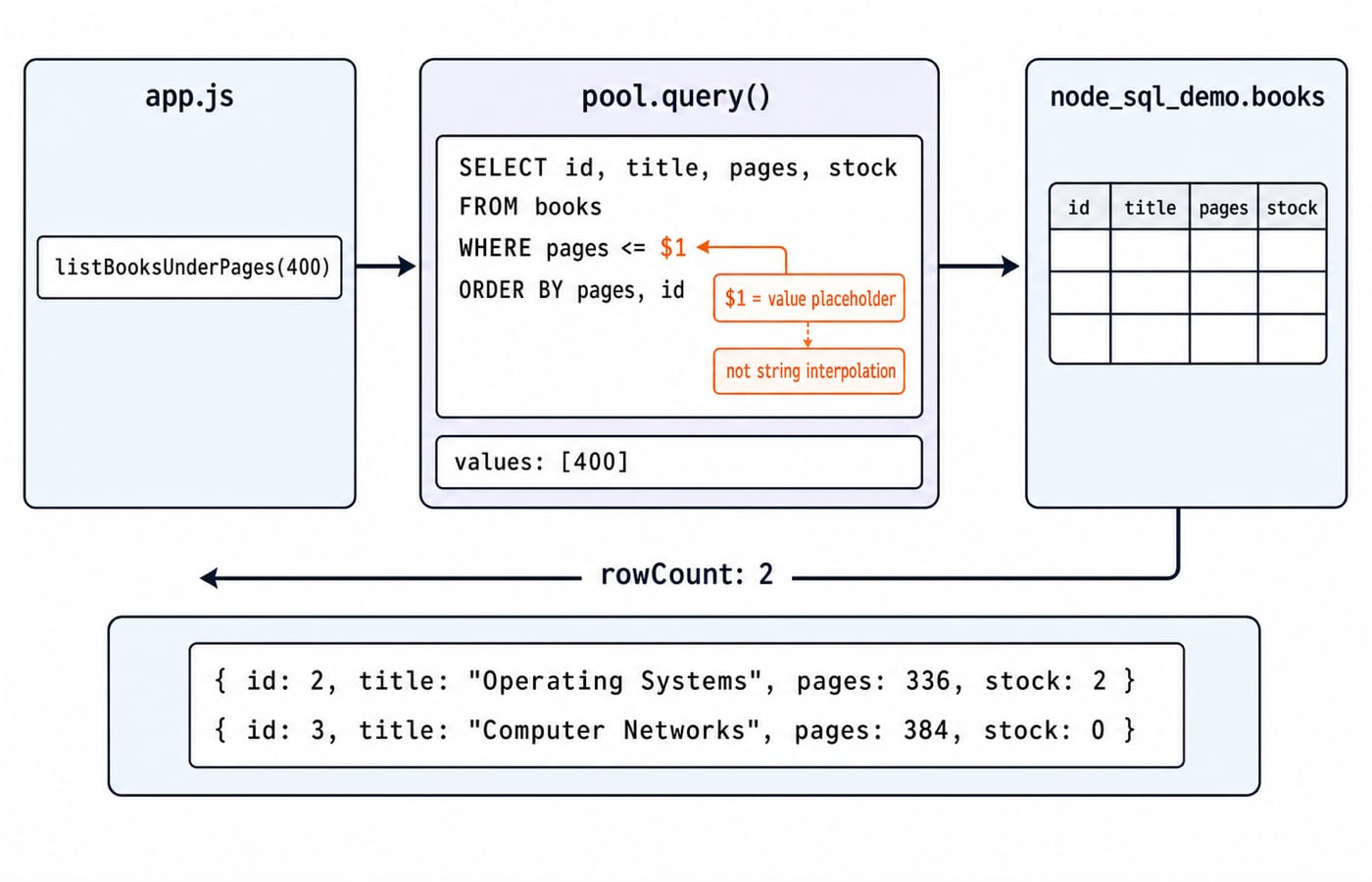
PostgreSQL executes SQL; pg sends text and values and returns rows, rowCount, and command. The path is app.js -> pg Pool -> PostgreSQL -> node_sql_demo -> books and loans -> JavaScript.
Independent queries share a pool; transactions check out one client, as node-postgres recommends. Pooling does not make one SQL statement faster. Use Express Basics in Node.js for HTTP routing, request validation, and the in-memory books array. From that persistence boundary, PostgreSQL adds constraints, parameterised SQL, row locks, and a foreign-keyed loans table. A document-modelled library would put validation and query behaviour in a Mongoose schema. Coding & Skills is the broader development route.
2. Create the project, connection, and repeatable schema
Create the project and install pg:
mkdir node-sql-demo
cd node-sql-demo
npm init -y
npm install pg
export DATABASE_URL='postgresql://postgres:postgres@127.0.0.1:5432/node_sql_demo'
Use a disposable database with matching credentials; never commit the URL. Re-running this schema deletes its tables.
Save this as schema.sql:
DROP TABLE IF EXISTS loans;
DROP TABLE IF EXISTS books;

CREATE TABLE books (
  id integer GENERATED ALWAYS AS IDENTITY PRIMARY KEY,
  title text NOT NULL,
  author text NOT NULL,
  pages integer NOT NULL CHECK (pages > 0),
  stock integer NOT NULL CHECK (stock >= 0)
);

CREATE TABLE loans (
  id integer GENERATED ALWAYS AS IDENTITY PRIMARY KEY,
  book_id integer NOT NULL REFERENCES books(id),
  member_code text NOT NULL,
  quantity integer NOT NULL CHECK (quantity > 0)
);

INSERT INTO books (title, author, pages, stock) VALUES
  ('Database Systems', 'Asha Rao', 512, 4),
  ('Operating Systems', 'Kabir Sen', 336, 2),
  ('Computer Networks', 'Meera Shah', 384, 0);
NOT NULL, CHECK, primary keys, and foreign keys reject invalid states but do not replace application validation.
Run psql "$DATABASE_URL" -f schema.sql, then psql "$DATABASE_URL" -c "SELECT id, title, pages, stock FROM books ORDER BY id;". Expect (1, Database Systems, 512, 4), (2, Operating Systems, 336, 2), and (3, Computer Networks, 384, 0). Otherwise use another PostgreSQL client.
3. Read rows with a pool and parameterised values
app.js uses one module-level pool. Its max: 5 is a demo limit. listBooksUnderPages(400) sends WHERE pages <= $1 and [400] separately.
rowCount === 2: ID 2, Operating Systems, 336 pages, stock 2; then ID 3, Computer Networks, 384 pages, stock 0. ID 1 has 512 pages. Review SQL Queries and Joins in DBMS.
The node-postgres query documentation keeps values separate. Never interpolate input into SQL, as in WHERE pages <= ${input}. Use WHERE pages <= $1 with [400]. Placeholders cannot represent identifiers such as the table name books.
4. Insert and update rows, then check what changed
The program rejects blank titles or authors, non-positive pages, and negative stock before writing. PostgreSQL constraints provide a second line of defence. addBook() inserts SQL Practice Workbook, Nila Verma, 288 pages, stock 6. RETURNING yields { id: 4, title: "SQL Practice Workbook", author: "Nila Verma", pages: 288, stock: 6 } without another read.
reserveStock(4, 2) validates its positive integer inputs, then computes 6 - 2 = 4. Next, reserveStock(4, 5) fails 4 >= 5, returns rowCount: 0, throws INSUFFICIENT_STOCK, and leaves 4. Zero rows are an application outcome; rejected queries are database errors. One conditional statement avoids stale-stock races.
5. Keep a two-table loan atomic with one checked-out client
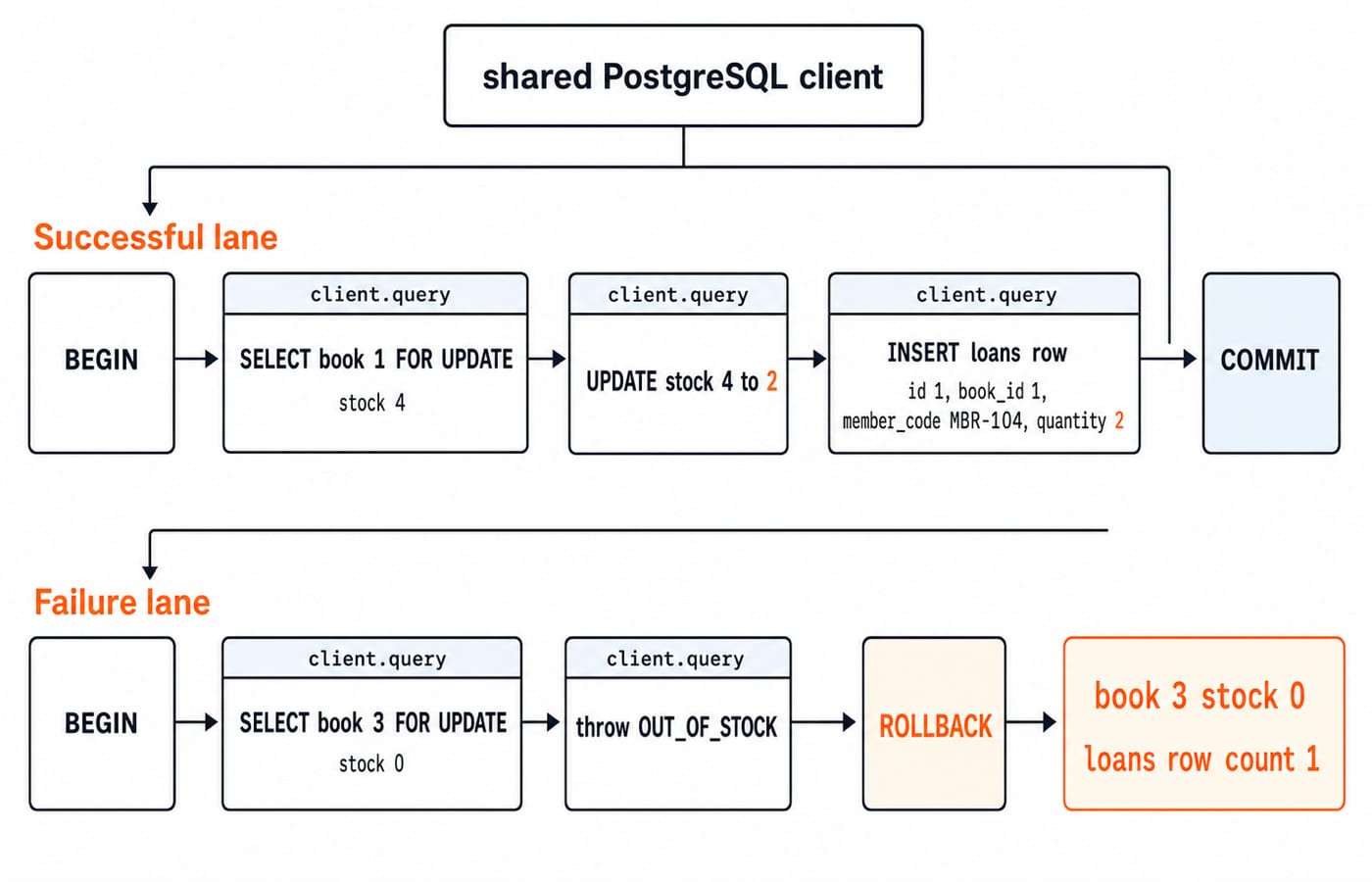
Following node-postgres transaction guidance, one client runs BEGIN through COMMIT or ROLLBACK. SELECT ... FOR UPDATE locks the book while it is checked, updated, and loaned.
loanBook(1, "MBR-104", 2) computes stock 4 - 2 = 2, inserts loan ID 1, and returns { loanId: 1, bookId: 1, memberCode: "MBR-104", quantity: 2, remainingStock: 2 }.
For loanBook(3, "MBR-207", 1), stock 0 causes OUT_OF_STOCK and ROLLBACK. Book 3 stays at 0; loans keeps only ID 1. Rollback does not retry, and finally releases the client.
6. Assemble the runnable file and diagnose common failures
Save this complete CommonJS program as app.js:
const { Pool } = require("pg");
if (!process.env.DATABASE_URL) throw new Error("DATABASE_URL is required");
const pool = new Pool({ connectionString: process.env.DATABASE_URL,
  max: 5, connectionTimeoutMillis: 2000 });

function requirePositiveInteger(value, label) {
  if (!Number.isInteger(value) || value <= 0) {
    throw new Error(`${label}_MUST_BE_POSITIVE_INTEGER`);
  }
}

function validateBook(book) {
  const validText = (value) =>
    typeof value === "string" && value.trim().length > 0;
  if (!validText(book.title) || !validText(book.author)) {
    throw new Error("INVALID_BOOK_TEXT");
  }
  requirePositiveInteger(book.pages, "PAGES");
  if (!Number.isInteger(book.stock) || book.stock < 0) {
    throw new Error("INVALID_BOOK_STOCK");
  }
}

async function listBooksUnderPages(maxPages) {
  return pool.query(`SELECT id, title, pages, stock FROM books
    WHERE pages <= $1 ORDER BY pages, id`, [maxPages]);
}

async function addBook(book) {
  validateBook(book);
  const { rows } = await pool.query(`INSERT INTO books
    (title, author, pages, stock) VALUES ($1, $2, $3, $4)
    RETURNING id, title, author, pages, stock`,
    [book.title, book.author, book.pages, book.stock]);
  return rows[0];
}

async function reserveStock(bookId, quantity) {
  requirePositiveInteger(bookId, "BOOK_ID");
  requirePositiveInteger(quantity, "QUANTITY");
  const { rowCount, rows } = await pool.query(`UPDATE books
    SET stock = stock - $1 WHERE id = $2 AND stock >= $1
    RETURNING id, title, stock`, [quantity, bookId]);
  if (!rowCount) throw new Error("INSUFFICIENT_STOCK");
  return rows[0];
}

async function loanBook(bookId, memberCode, quantity) {
  requirePositiveInteger(bookId, "BOOK_ID");
  requirePositiveInteger(quantity, "QUANTITY");
  if (typeof memberCode !== "string" || memberCode.trim() === "") {
    throw new Error("MEMBER_CODE_REQUIRED");
  }
  const client = await pool.connect();
  try {
    await client.query("BEGIN");
    const found = await client.query(
      "SELECT stock FROM books WHERE id = $1 FOR UPDATE", [bookId]);
    if (!found.rowCount) throw new Error("BOOK_NOT_FOUND");
    if (found.rows[0].stock < quantity) throw new Error("OUT_OF_STOCK");
    const updated = await client.query(`UPDATE books SET stock = stock - $1
      WHERE id = $2 RETURNING stock`, [quantity, bookId]);
    const inserted = await client.query(`INSERT INTO loans
      (book_id, member_code, quantity) VALUES ($1, $2, $3) RETURNING id`,
      [bookId, memberCode, quantity]);
    await client.query("COMMIT");
    return {
      loanId: inserted.rows[0].id,
      bookId,
      memberCode,
      quantity,
      remainingStock: updated.rows[0].stock,
    };
  } catch (error) {
    await client.query("ROLLBACK");
    throw error;
  } finally {
    client.release();
  }
}

async function expectError(promise, message) {
  try { await promise; }
  catch (error) {
    if (error.message !== message) throw error;
    console.log(message);
  }
}

async function main() {
  console.log(await listBooksUnderPages(400));
  console.log(await addBook({
    title: "SQL Practice Workbook",
    author: "Nila Verma",
    pages: 288,
    stock: 6,
  }));
  console.log(await reserveStock(4, 2));
  await expectError(reserveStock(4, 5), "INSUFFICIENT_STOCK");
  console.log(await pool.query("SELECT id, stock FROM books WHERE id = 4"));
  console.log(await loanBook(1, "MBR-104", 2));
  await expectError(loanBook(3, "MBR-207", 1), "OUT_OF_STOCK");
  console.log(await pool.query("SELECT id, stock FROM books WHERE id = 3"));
  console.log(await pool.query(`SELECT id, book_id, member_code, quantity
    FROM loans ORDER BY id`));
}

main().catch(console.error).finally(async () => { await pool.end(); });
Reset with schema.sql, then run node app.js. A connection-refused error means PostgreSQL is not reachable at 127.0.0.1:5432; check the server and port. Authentication failure means the credentials or server authentication rules do not match. relation "books" does not exist means the schema was not loaded into the connected database. Repeated stalls can mean unreleased clients.
Expected errors are caught; the outer finally ends the pool once. Keep values out of SQL strings and transactions off pool.query().
7. How practice and interviews test SQL with Node.js
Predict: listBooksUnderPages(400) returns IDs 2 and 3 because 336 and 384 qualify; 512 does not. Stock 0 is irrelevant to this filter.
Replace "SELECT * FROM books WHERE author = '" + author + "'" with WHERE author = $1 and [author]. Kabir Sen must return only ID 2; do not escape manually.
Add inStockOnly so { maxPages: 400, inStockOnly: true } returns only ID 2. Request book 4, quantity 5, at stock 4: expect rollback, no second loan, and stock 4.
8. Short version and next step
Use a pool for independent queries, placeholders for values, RETURNING for changed rows, and one client per transaction. The proof is stock 4 -> 2 plus loan ID 1.
Reset, retype app.js, reproduce the two-row read and one-row loan, then finish the extensions. The Node.js course covers backend breadth; MERN Stack Course: Full Stack Development is project-focused.
Keep learning
Testing APIs in Node.js: Jest and Supertest Tutorial with Runnable Examples
Build a small Express task API and test its routes, validation, headers, JSON responses and state changes without opening a fixed server port.
Updated 25 Nov 20266 min readWeb Development
Sessions and Cookies in Node.js: A Runnable Express Login Tutorial
Build the complete localhost flow, then trace what the browser sends, what Express stores, and why logout makes the dashboard anonymous again.
Updated 24 Nov 20266 min readWeb Development

Node.js Security Best Practices: Harden an Express API with Runnable Examples
Build and test a small Express transfer API that layers authentication, strict Zod validation, authorisation, rate limiting, safe errors and dependency hygiene.
Updated 23 Nov 20266 min readWeb Development
File Uploads in Node.js: Multer, Validation and Runnable Examples
Build and test single-file and multi-file uploads in Express. The example covers Multer disk storage, strict limits, predictable error JSON and safer production boundaries.
Updated 22 Nov 20266 min readWeb Development