SQL Interview Questions: Joins, GROUP BY and Subqueries with Worked Result Sets
Practise seven SQL interview problems on one small dataset. Trace joins, groups, correlated subqueries, EXISTS and NULLs before checking each final result.
KnowledgeGate Team
Exam prep & CS education
Updated 20 Sep 20265 min read
Many freshers can write SELECT syntax but lose the result when one employee has two work logs, another has no department, and a subquery returns NULL. The reliable habit is to write the intermediate rows first, then filter, group or compare them. Use the six-employee dataset to predict each result on paper before reading it.
1. Predict the rows before writing the final SQL
Use these three tables.
Department | Rows |
|---|---|
|
|
|
|
|
|
Reason in this order: choose the driving table; apply ON and expand one-to-many matches; add null-extended rows; apply WHERE; form groups; compute aggregates; apply HAVING; project and order. Physical execution may differ, but this logical sequence predicts results.
The earlier SQL Queries for Placement Interviews, Step by Step owns the broad 25-query checklist on a two-table Employee-Department schema. This drill extends that base with nullable WorkLog rows so you can isolate one-to-many expansion, NULL propagation and subquery comparisons across seven exact results. The Interview & Resume Preparation Course is an optional place to explain the reasoning aloud.
2. Join questions: which rows survive, and where do duplicates come from?
Question 1: What does this inner join return?
SELECT e.emp_id, e.name, d.dept_name
FROM Employee e INNER JOIN Department d ON d.dept_id=e.dept_id;
The five rows are (101,Asha,Platform), (102,Bharat,Platform), (103,Charu,Data), (104,Dev,Data) and (106,Farah,QA). Esha disappears because NULL = dept_id is not true. A left join adds (105,Esha,NULL), but not Security because Employee still drives the query. Start from Department to retain Security.
Question 2: Trace Employee LEFT JOIN WorkLog.
SELECT e.emp_id, e.name, w.log_id, w.hours
FROM Employee e LEFT JOIN WorkLog w ON w.emp_id=e.emp_id;
The exact eight rows are (101,Asha,701,6), (101,Asha,702,4), (102,Bharat,703,5), (103,Charu,704,8), (104,Dev,705,NULL), (104,Dev,706,3), (105,Esha,NULL,NULL) and (106,Farah,NULL,NULL). Row 707 matches no employee. Asha and Dev each have two matching logs. SQL Queries and Joins in DBMS: Worked Join and GROUP BY owns the concept survey across SQL sublanguages, joins, grouping and subqueries. Here, the narrower task is to predict exact result sets and diagnose where NULL or one-to-many expansion changes them. State the expected relationship, then compare row count with distinct-key count. Do not add DISTINCT until you can explain the multiplicity.
3. GROUP BY and HAVING questions: aggregate the eight-row join correctly
Question 3: Run:
SELECT e.dept_id, COUNT(*) AS joined_rows, COUNT(w.hours) AS non_null_hour_values,
       COALESCE(SUM(w.hours),0) AS total_hours
FROM Employee e LEFT JOIN WorkLog w ON w.emp_id=e.emp_id GROUP BY e.dept_id;
SQL does not guarantee a display order for these groups:
dept_id | joined rows | non-null hours | total hours |
|---|---|---|---|
10 | 3 | 3 | 15 |
20 | 3 | 2 | 11 |
30 | 1 | 0 | 0 |
NULL | 1 | 0 | 0 |
COUNT(*) includes null-extended rows. COUNT(w.hours) ignores both a real null hour and null extension.
Question 4: Start from Department and run:
SELECT d.dept_name, COUNT(DISTINCT e.emp_id) AS employees,
       COALESCE(SUM(w.hours),0) AS total_hours
FROM Department d LEFT JOIN Employee e ON e.dept_id=d.dept_id
LEFT JOIN WorkLog w ON w.emp_id=e.emp_id
GROUP BY d.dept_id,d.dept_name HAVING COALESCE(SUM(w.hours),0)>=10;
The result is (Platform,2,15) and (Data,2,11). QA (1,0) and Security (0,0) form first, then HAVING removes them. Log multiplication makes COUNT(e.emp_id) report 3 for Platform and Data; COUNT(DISTINCT e.emp_id) reports 2. WHERE filters input rows; HAVING filters completed groups.
4. Subquery questions: calculate the inner result before comparing
Question 5: For SELECT emp_id,name,salary FROM Employee WHERE salary>(SELECT AVG(salary) FROM Employee);, calculate the scalar value first:
(90+70+80+60+75+70)/6 = 445/6 = 74.166..., about 74.17The result is Asha 90, Charu 80 and Esha 75. Scalar > requires one inner value; several returned rows would be invalid here.
Question 6: Run:
SELECT e.emp_id,e.name,e.salary FROM Employee e
WHERE e.salary>(SELECT AVG(e2.salary) FROM Employee e2 WHERE e2.dept_id=e.dept_id);
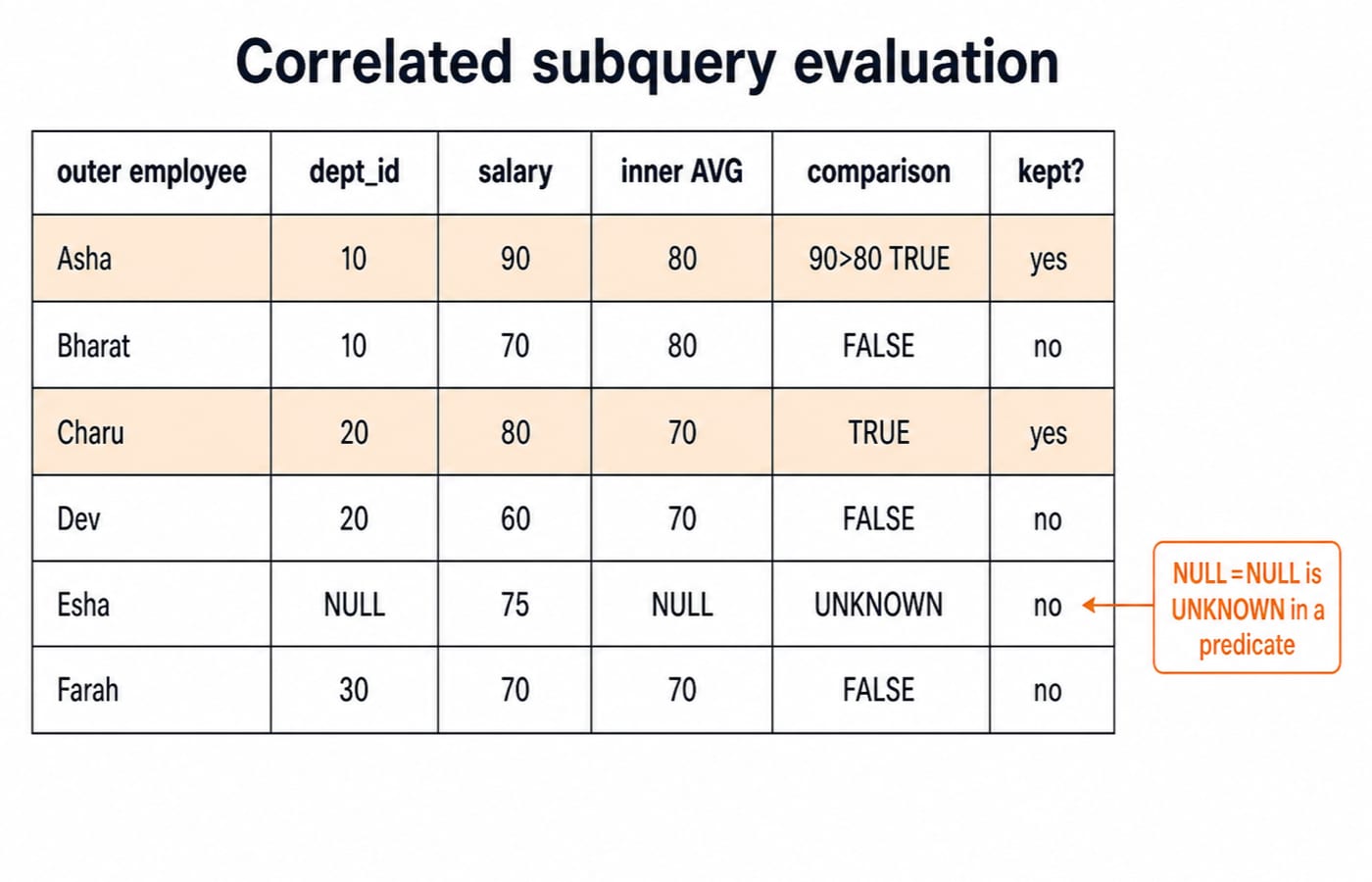
Department 10 averages (90+70)/2=80, so Asha passes and Bharat fails. Department 20 averages (80+60)/2=70, so Charu passes and Dev fails. Department 30 averages 70, so Farah fails strict >. For Esha, e2.dept_id=e.dept_id is unknown against every row; the average is NULL, and 75>NULL is unknown. The result is Asha and Charu.
The global query includes Esha; the correlated query does not. “Correlated” describes outer-row dependency, not guaranteed literal re-execution per employee. Inspect the database's plan for physical behaviour.
5. EXISTS, NOT EXISTS and the NULL trap in NOT IN
Question 7: Employees without work logs are found safely with:
SELECT e.emp_id,e.name FROM Employee e
WHERE NOT EXISTS (SELECT 1 FROM WorkLog w WHERE w.emp_id=e.emp_id);
The result is (105,Esha) and (106,Farah); row 707 matches neither. But e.emp_id NOT IN (SELECT w.emp_id FROM WorkLog w) sees 101,101,102,103,104,104,NULL. That NULL makes unmatched comparisons unknown, so it returns no employees. Prefer NOT EXISTS, or filter with WHERE w.emp_id IS NOT NULL, restoring Esha and Farah. SELECT 1 expresses that EXISTS only asks whether a row exists. It is not universally faster than a join or IN; plans depend on the optimiser and data.
6. SQL interview traps: diagnose the wrong intermediate result
Shortcut | Actual effect here | Repair |
|---|---|---|
Put | Four rows remain: Asha twice, Bharat once, Charu once. Dev, Esha and Farah vanish. | Put it in |
Use | QA and the | Count the nullable right-side key or value the question requires. |
Write | Invalid because groups do not exist there. | Use |
Add | Destroys information. | Aggregate at the intended grain. |
For manager names, self-join Employee staff LEFT JOIN Employee manager ON manager.emp_id=staff.manager_id. Asha, Charu and Farah keep a null manager; Bharat maps to Asha, Dev to Charu, and Esha to Asha. For salaries from a multi-row subquery, use IN: duplicates do not change membership, while NULL can make a nonmatch unknown.
SQL dialects differ on alias visibility, null ordering and grouping extensions. Flag engine-specific syntax.
7. A 20-minute SQL reasoning drill and the next step
Use this 20-minute oral drill to rehearse the full reasoning chain:
0-4: predict the five inner-join and six left-join rows.4-8: write the eight Employee-to-WorkLog rows.8-12: derive totals15,11,0,0; explainCOUNT(*)versusCOUNT(hours).12-16: calculate445/6and department averages80,70,70.16-20: explain whyNOT EXISTSreturns Esha and Farah but unfilteredNOT INreturns no rows.
The short version is simple: expand joins into rows, mark every NULL, form groups, calculate the inner subquery result, then compare. For optional broader revision, continue with CS Fundamentals for Placements by Sanchit Sir or browse Placement Preparation.
Keep learning
Placement Mock Analysis: One Error Ledger Across Every Test Round
Use one error ledger without flattening unlike round results. This worked example shows how to find the first wrong step, prioritise repairs and close errors only after fresh retests.
Updated 4 Oct 20265 min readInterview Corner
Internship to PPO: Build a Weekly Evidence Trail Before the Final Review
Use a weekly outcome ledger to make your internship work visible before the final review. This practice model shows how to record delivery, feedback, effect and handoff honestly.
Updated 28 Sep 20265 min readInterview Corner
DSA Mock Interview Rubric: A 100-Point Scorecard for Reasoning, Code and Communication
A practical six-part scorecard for running comparable DSA mocks, grading visible evidence and turning weak areas into the next week's practice.
Updated 25 Sep 20265 min readInterview Corner
Campus Recruitment Timeline: Stage by Stage from Pre-Placement Talk to Written Offer
Follow a campus drive without guessing. Build an evidence sheet, verify eligibility, plan each preparation window and check the written offer before responding.
Updated 24 Sep 20265 min readInterview Corner