RRB NTPC Computer Awareness: Hardware, Software, Memory and Storage Explained
Build one clear model of a computer, then use it to classify devices, software, memory and storage. Includes two worked calculations and five mini-questions.
KnowledgeGate Team
Exam prep & CS education
Updated 28 Jul 20266 min read
A keyboard, RAM, an SSD, Windows and a PDF are all connected to a computer, but they do not belong to the same category. Objective questions exploit these boundaries by placing familiar terms in unfamiliar combinations. For RRB NTPC preparation, you need one working model that separates hardware from software, working memory from permanent storage, and devices from data. Computers sit inside General Awareness there, next to science, technology and environment, so the depth that pays is recognition and classification, not engineering detail.
Start with one complete computer, not five isolated definitions
Suppose a desktop receives 37 + 25 through its keyboard. The calculator application supplies the operation, while the CPU's control unit coordinates the work and its ALU produces 62. A register briefly holds the active result. The running calculator and its working data occupy part of an 8 GiB RAM module, and the monitor displays 62. When the user saves rrb-notes.pdf, the 4 MiB file remains on a 512 GB SSD after shutdown.
Item | Hardware or software/data | Role | Volatile? |
|---|---|---|---|
Keyboard | Hardware | Input | No |
CPU | Hardware | Processing | No |
RAM | Hardware | Working memory | Yes |
SSD | Hardware | Secondary storage | No |
Operating system | System software | Coordinates resources | Not applicable |
Calculator | Application software | Performs the requested task | Not applicable |
| Data file | Stores document data | Not applicable |
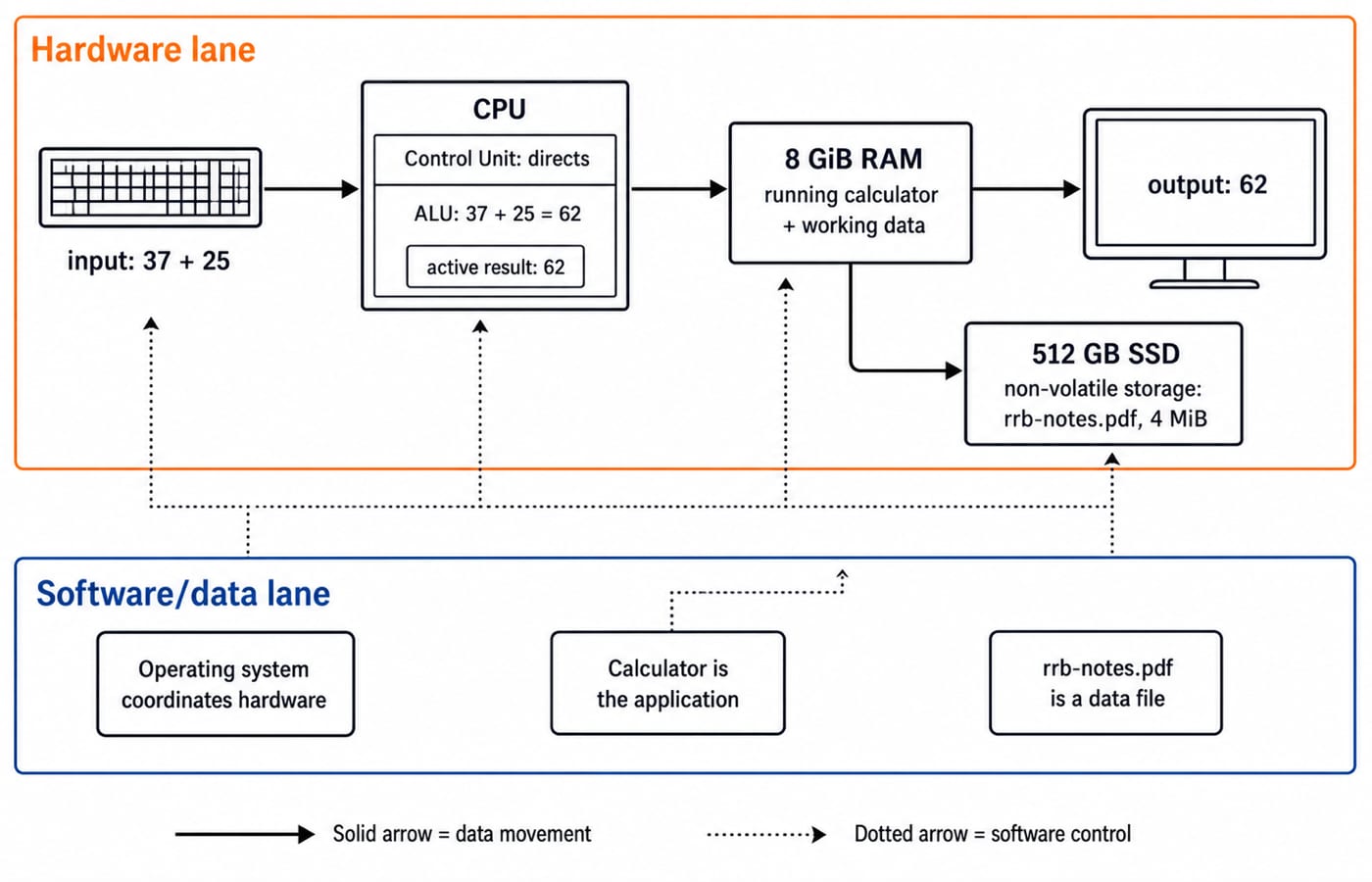
“Not applicable” is better than forcing software or files into a column about hardware volatility. The same hardware, software and data boundaries are worked at greater length in Computer Fundamentals for CS Teaching Exams.
Classify hardware by the job it performs
Classify a device by its function. A keyboard, mouse, scanner and microphone are input devices. A monitor, speaker and printer are output devices. The CPU performs processing. HDDs, SSDs, memory cards and pen drives provide storage. A touchscreen both displays output and senses touch input, so exclude it when a question asks for an input-only device.
Inside the CPU, the control unit directs instruction flow, the ALU performs arithmetic and logical operations, and registers hold tiny amounts of data currently in use. In 37 + 25 = 62, 37 and 25 are operands, addition is the ALU operation, and 62 is the result.
Keep three pairs clear: a scanner inputs while a printer outputs; the system unit contains the CPU and other components, so the two terms are not synonyms; and a RAM module supplies volatile working memory while a storage drive retains saved data.
Separate system software, applications, utilities, drivers and data
Software is a set of instructions. Linux and Windows are operating-system software. A printer driver helps the operating system control a particular device. Antivirus and backup tools are utilities, while a word processor and web browser are applications. Firmware is software held in non-volatile memory. Items ending in .pdf, .docx and .jpg are data files, not applications.
Follow one boot-to-save sequence. Firmware starts the machine, then the operating system is loaded from the SSD into RAM. The operating system manages processes, memory, files and devices. A word processor opens the data file rrb-notes.docx from the SSD, works with it in RAM, and saves the changed file back to the SSD. If the user prints it, a printer driver translates the software request into instructions the printer hardware can use. Hardware and software cooperate at every step.
Understand memory hierarchy without calling every device memory
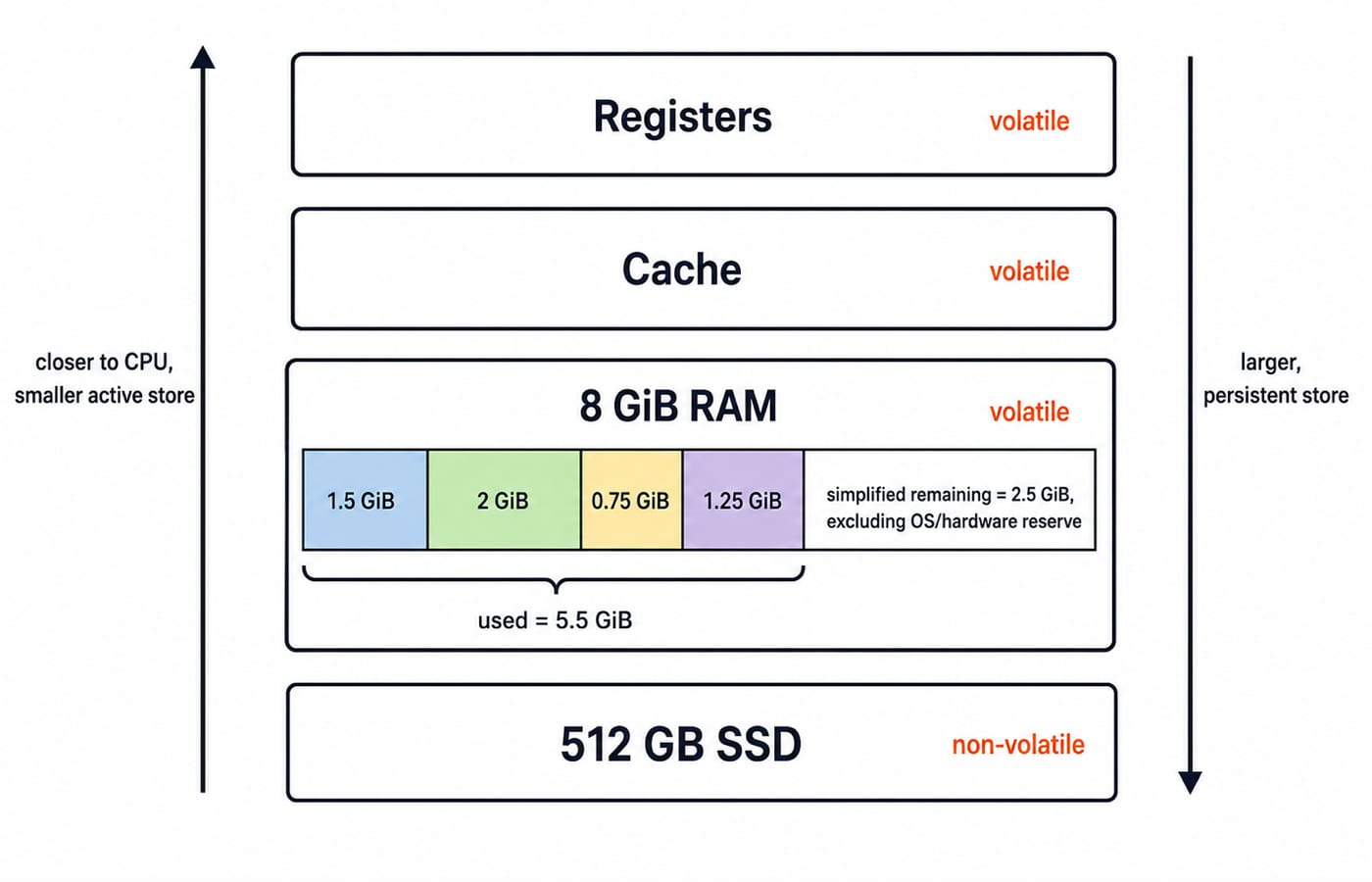
Use this functional order: registers -> cache -> RAM -> SSD/HDD. Storage nearer the CPU holds immediately active information and is smaller. Secondary storage holds much more data for longer. Registers, cache and ordinary RAM are volatile, while SSDs and HDDs are non-volatile. ROM is separate: it is non-volatile primary memory used for fixed startup instructions, not a replacement for an SSD.
Now consider a simplified 8 GiB RAM capacity check. Four running workloads use 1.5 GiB, 2 GiB, 0.75 GiB and 1.25 GiB:
Used memory =
1.5 + 2 + 0.75 + 1.25 = 5.5 GiB.Remaining memory =
8 - 5.5 = 2.5 GiB.
This ignores memory reserved for the operating system and hardware, so it is classification arithmetic, not a real Task Manager prediction.
Why the hierarchy exists at all, and what happens when RAM runs short, is taken further in Memory Hierarchy and Virtual Memory Explained.
Convert storage units with the convention stated in the question
The binary-unit ladder is 1 byte = 8 bits, 1 KiB = 1024 bytes, and 1 MiB = 1024 KiB = 1,048,576 bytes. Some questions write KB or MB but intend powers of 1024. Always use the convention supplied in the question, and never mix decimal and binary units silently.
For the 4 MiB file:
Bytes =
4 x 1024 x 1024 = 4,194,304 bytes.Bits =
4,194,304 x 8 = 33,554,432 bits.With
4096-byteblocks, blocks used =4,194,304 / 4096 = 1024complete blocks.
The third result assumes no metadata or partial-block overhead. Mechanism is another useful classification: an HDD is magnetic, CD and DVD are optical, and an SSD, pen drive and memory card use flash storage. Do not confuse capacity with format. 4 MiB is a file size, .pdf is a file-format extension, and 512 GB is the drive's labelled capacity.
Defuse common hardware, software and storage traps
Wrong shortcut | Why it fails | Correct rule |
|---|---|---|
CPU means the whole cabinet | A system unit contains the CPU and other components | CPU is the processor |
RAM stores files permanently | Ordinary RAM loses its contents without power | SSD or HDD retains saved files |
ROM and RAM are the same | Both are primary memory but differ in volatility and use | Classify each separately |
Driver is hardware | It contains instructions that let the OS communicate with a device | Driver is software |
Touchscreen is output only | Touch senses input while the display produces output | It performs both roles |
PDF is an application | It is a data-file format | A PDF reader is the application |
Everyday speech may use “memory” loosely. An objective question can distinguish primary memory from secondary storage, so answer from the definitions and options given, not shop-floor phrases such as “phone memory”.
See how objective questions test distinctions and calculations
Which is both input and output: A keyboard, B touchscreen, C printer, D scanner? Answer: B. A touchscreen displays output and senses input; each other option performs only one of those roles.
Which normally loses its working contents when power is removed: A RAM, B SSD, C DVD, D pen drive? Answer: A. Ordinary RAM is volatile; the other options are non-volatile storage.
Which is system software: A operating system, B spreadsheet workbook, C monitor, D JPEG file? Answer: A. The workbook and JPEG are data files, while the monitor is hardware.
With binary units, how many bytes are in
4 MiB: A 4096, B 4,000,000, C 4,194,304, D 33,554,432? Answer: C. Write4 x 1024 x 1024; option D is the bit count.Which component performs
37 + 25: A ALU, B printer, C SSD, D scanner? Answer: A. Arithmetic is an ALU function; the other options provide output, storage or input.
The technique is simple: name the tested category, eliminate options from other categories, then calculate only if needed. Practise it on mixed sets that force a category decision before any arithmetic: a stem that pits a device against a file format, or one that pits a capacity against a unit. Where the rest of General Awareness fits around this topic is mapped in RRB NTPC Syllabus: Maths, Reasoning and General Awareness Study Map.
The short version and your next action
Hardware is the physical equipment. Software is the instruction set. RAM is volatile working memory. SSD and HDD are non-volatile secondary storage. Redo the five-question check without notes, then revisit only your first wrong distinction. If you would rather have this sequenced with the rest of the paper, the RRB NTPC Complete Preparation Course carries General Awareness alongside Mathematics and Reasoning.
Keep learning
RRB NTPC Posts Explained: Match Duties and Skill Tests to Your Preference Order
Compare the six graduate roles in CEN 06/2025 by typical duties, work setting, medical standard and skill stage. Then build a personal preference order using elimination and a weighted example.
Updated 16 Aug 20266 min read95 viewsRRB NTPC

RRB NTPC Normalisation and Cutoffs: Read Raw Marks, Percentile and RRB Score
Learn what raw marks, percentile, RRB Score and Normalized Marks mean, then use worked examples to compare your score with the correct cutoff row.
Updated 14 Aug 20264 min read64 viewsRRB NTPC
RRB NTPC PYQ Analysis: Separate CBT 1 Screening From CBT 2 Merit
Do not mix CBT 1 and CBT 2 questions in one notebook. Use separate ledgers to measure screening coverage, later-stage accuracy, error types and repair actions.
Updated 12 Aug 20265 min readRRB NTPC

RRB NTPC CBAT Preparation: Build Accuracy Across All Five Tests
Find the weak process hidden by one total practice score. Build a separate CBAT baseline, run precise repair drills, and retest every battery on fresh material.
Updated 10 Aug 20265 min readRRB NTPC