SSC CGL Computer Awareness: Hardware, Software and Networks Explained
Build one connected model of computer hardware, memory, software, operating systems and networks, then test it with worked examples and common objective-question traps.
KnowledgeGate Team
Exam prep & CS education
Updated 27 Jul 20266 min read
You may use a laptop and phone every day yet still confuse RAM with storage, an operating system with an application, or a switch with a router when the options look similar. SSC CGL tests exactly that confusion: Computer Knowledge is a qualifying module inside Tier 2 Paper 1, asked at recognition depth rather than theory depth, and a qualifying module you miss can void a paper you prepared a year for. One connected model carries most of it: hardware performs the work, software supplies instructions, the operating system manages resources, and a network moves data between systems. Computer fundamentals, memory and storage, software and operating systems, and networking are four of the module's six areas; the other two, MS Office and security, are mapped with the depth each needs in the full SSC CGL Tier 2 Computer Knowledge topic map.
Hardware: input, processing, output and storage
A computer follows a four-part flow. Keyboards, mice, scanners and microphones supply input. The CPU processes it. Monitors, printers and speakers provide output. SSDs, HDDs, memory cards and optical discs store data persistently. A touchscreen is both input and output, a useful objective-question trap.
Inside the CPU, the control unit directs operations, the ALU performs arithmetic and logic, and registers hold the smallest, fastest working values. The motherboard connects these parts, buses carry signals, and ports connect external devices.
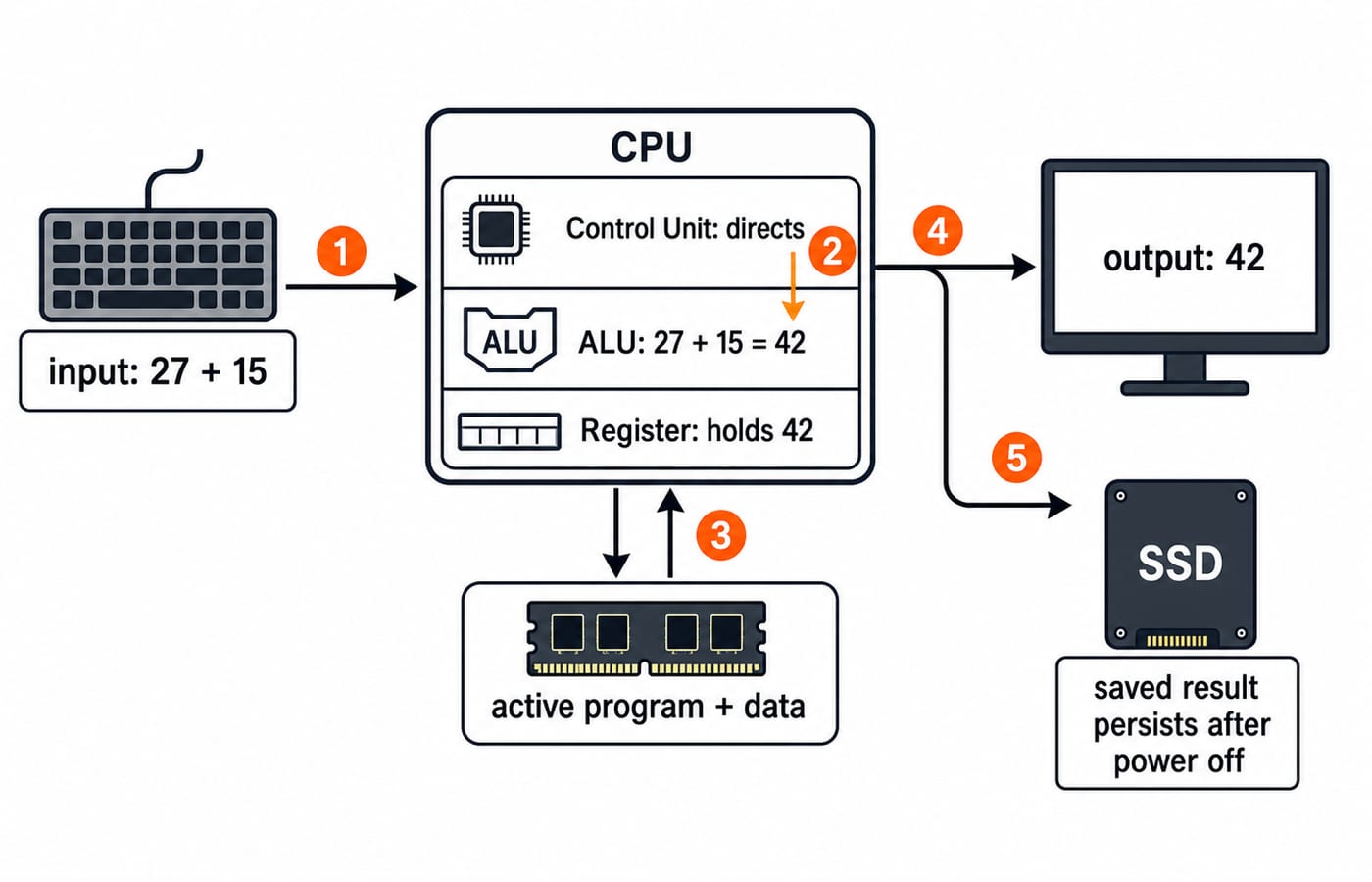
Trace 27 + 15. The keyboard supplies the input. The control unit coordinates the instruction, the ALU produces 42, and a register holds the working result. The monitor displays 42. RAM holds the active program and data during this work, while saving writes the file to the SSD, where it remains after shutdown.
Memory and storage: hierarchy, volatility and units
Picture the hierarchy as registers, cache, RAM, SSD or HDD, then optical or archival media. Memory nearer the CPU is faster, smaller and costlier per unit; secondary storage is slower, larger and persistent. That trade-off is the whole reason the hierarchy exists, and it is why a stem that stresses speed and a stem that stresses capacity usually want different answers.
Registers, cache and RAM are volatile: their working contents disappear without power. ROM, SSD, HDD, flash memory and optical media are non-volatile. RAM is the active work area; ROM retains startup or firmware instructions; cache keeps frequently needed data near the CPU; secondary storage keeps files.
Objective questions commonly use powers of 1024. The technically explicit binary names are KiB, MiB and GiB. For an 8 GiB capacity:
8 GiB = 8 x 1024 MiB = 8192 MiB.Reserve
512 MiB:8192 - 512 = 7680 MiBusable.Convert back:
7680 / 1024 = 7.5 GiBusable.Byte check:
8 GiB = 8,589,934,592 bytesand512 MiB = 536,870,912 bytes.Therefore, usable memory is
8,589,934,592 - 536,870,912 = 8,053,063,680 bytes.
Two habits carry these marks: convert everything into one unit before you subtract, and treat 1 GiB as 1024 MiB, never 1000.
Software types: system, application, utility and firmware
Classify software by function, not product lists.
Type | Job | Examples | Common distractor |
|---|---|---|---|
System software | Manages hardware, supports apps | Operating system, device driver | Browser does not schedule CPU work |
Application software | Performs user tasks | Word processor, spreadsheet, browser, media player | Driver does not edit documents |
Utility software | Maintains or protects system | Backup, antivirus, compression, disk clean-up | May be grouped as system software |
Firmware | Controls a device closely | Motherboard boot firmware, router firmware | Software, not hardware |
A browser accesses the web but does not allocate memory. A printer driver helps the operating system communicate with a printer. Some textbooks place utilities and language translators under system software. If options overlap, follow the stem's function.
What the operating system actually manages
The operating system sits between users or applications and hardware. It schedules processes, allocates memory, manages files and folders, controls device input and output, enforces user accounts and security, and provides a user interface. Windows and Linux are familiar examples.
A browser executable stored on an SSD is a program. When opened, its running instance is a process that uses RAM and CPU time. Open two independent browser instances and the operating system has two running workloads to schedule, even though both came from browser software.
File extensions also provide useful clues: .docx is a word-processing document, .xlsx a spreadsheet workbook, .pdf a portable document, and .exe a Windows executable. Common actions are Ctrl+C for copy, Ctrl+V for paste, Ctrl+X for cut, Ctrl+Z for undo, and Ctrl+S for save.
Networks and the internet: devices, addresses and protocols
A LAN covers a limited local area; a WAN spans much larger areas. A PAN centres on one person, while a MAN covers a metropolitan area. The internet is global network infrastructure. The World Wide Web is one service on it.
A NIC connects a host to a network. A switch forwards frames within a LAN; a router forwards packets between IP networks. A wireless access point connects Wi-Fi devices to a LAN. A modem or ONT handles the provider access link. A repeater extends a signal. A switch is not a router, and a router is not the access-link modem.
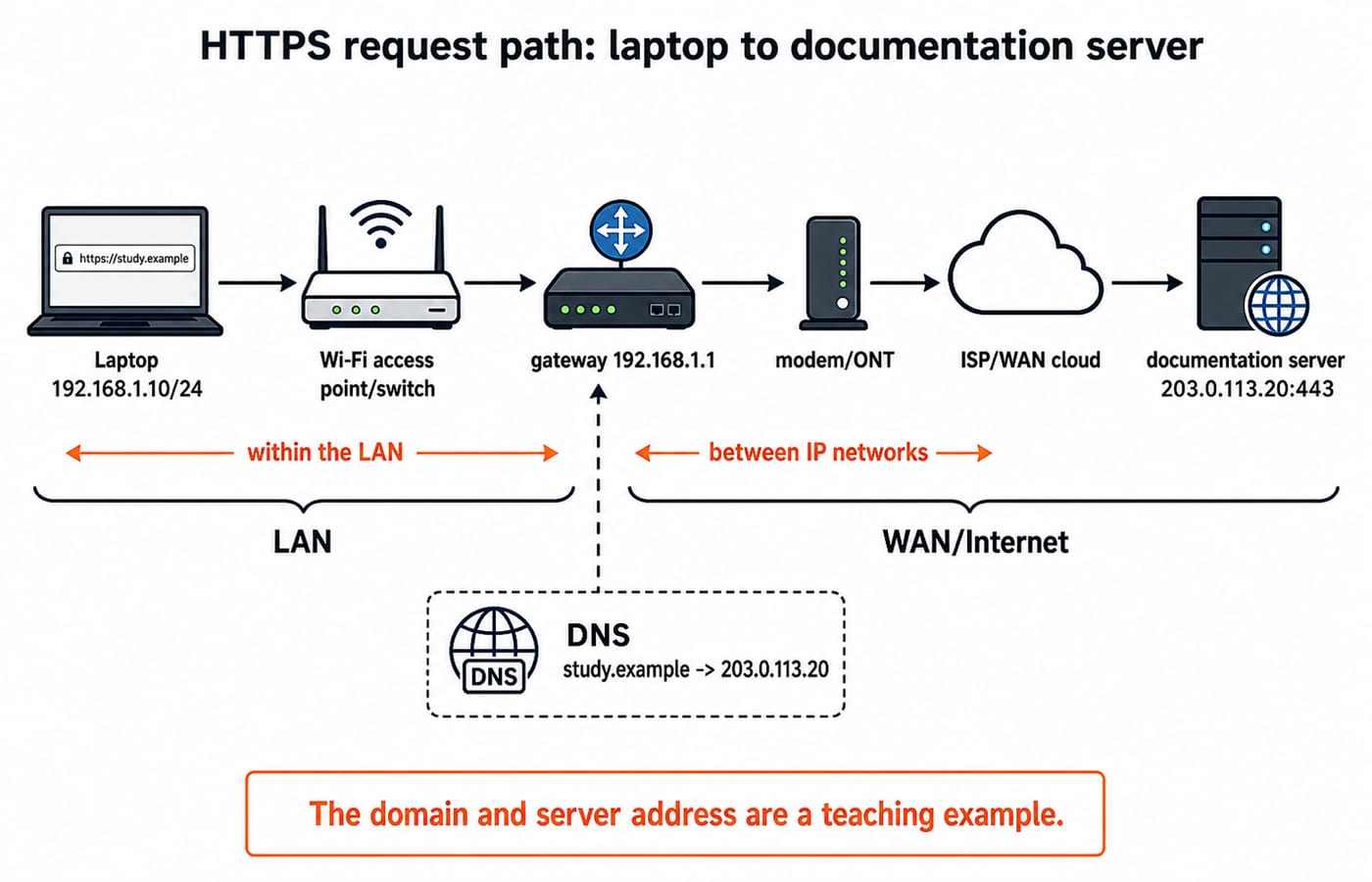
Trace one request end to end. A laptop has IP address 192.168.1.10/24, and its router or gateway is 192.168.1.1. The user enters https://study.example. DNS maps that domain name to the server's address, 203.0.113.20. The HTTPS request uses TCP port 443 and travels through the access point or switch, router, modem or ONT, and provider network to the server.
An IP address gives a logical network location. A MAC address identifies an interface on the local link. A domain name is resolved through DNS. HTTP and HTTPS carry web traffic, SMTP sends email, and FTP transfers files.
High-frequency traps and the correction for each
Do not confuse | Misleading clue and rejection rule |
|---|---|
RAM vs SSD | Files survive shutdown? Choose SSD. |
ROM vs RAM | Startup content? Choose ROM, not RAM. |
Cache vs storage | Persistent data? Reject CPU-near cache. |
Browser vs search engine | Client app? Browser. Discovery service? Search engine. |
Internet vs web | Infrastructure? Internet. Page service? Web. |
Switch vs router | Different networks? Router, not switch. |
IP address vs MAC address | Logical address? IP. Interface identifier? MAC. |
Operating system vs application | Resource manager? OS. User task? Application. |
If files survive shutdown, reject RAM and cache. Connecting two IP networks means router, not switch. Match the job, not a familiar word.
SSC CGL objective questions: turning the distinctions into answers
Five one-line facts at the depth the module asks. Cover the page and reproduce each:
8192 MiB = 8 GiB, because8192 / 1024 = 8.The ALU performs
27 + 15; the control unit coordinates it.Among RAM, ROM, SSD and HDD, RAM is volatile.
A router connects different IP networks.
DNS maps a domain name to an IP address.
Apply a three-pass method: underline the job word, eliminate options from the wrong category, then verify the unit or expansion. For “Which device connects two networks?”, reject keyboard and monitor because they are I/O devices. Reject switch because its role is within the LAN. Select router. For timed retrieval on the same material, work through SSC CGL Tier 2 Computer Knowledge questions with answers.
The short version and the next study step
Hardware does, software directs, the operating system manages, and the network connects. Check that you can recall seven areas: CPU parts, input and output, volatile and non-volatile memory, memory units, software classes, operating-system jobs, and network devices and protocols. Test them without notes.
SSC fixes the module's question count, marks and qualifying rule per cycle, so confirm them in the current notification at ssc.gov.in. Then add the module's remaining two areas, MS Office and security.
The SSC CGL Tier 2 course carries Computer Knowledge alongside the scoring sections; if Tier 1 is still ahead of you, start with the SSC CGL Tier 1 course. Everything else for the exam, subject by subject, sits on the SSC CGL category page.
Keep learning
SSC MTS Eligibility and Selection Process: Age, Qualification and Stages
Check your qualification date and birth-date window before planning preparation. This dated SSC MTS example explains age relaxation, the two CBE sessions and Havaldar's additional physical tests.
Updated 5 Oct 20264 min readSSC CGL

SSC CHSL Cutoff Trends: Compare Results and Set a Target Score
Compare the right CHSL result rows before choosing a practice target. Work through a historical benchmark, a personal buffer and two mock-test blocks to decide what to improve next.
Updated 30 Sep 20264 min readSSC CGL
SSC CGL Cutoffs Explained: Compare Tiers, Posts and Categories
A practical test for deciding whether two SSC CGL cutoff figures are genuinely comparable, with completed-result examples and a worksheet for rejecting mismatched rows.
Updated 19 Aug 20265 min readSSC CGL
SSC CGL Mock Analysis: Build an Error Ledger That Guides Every Revision
Turn each useful mock error or delay into evidence, a focused drill, a retest date, and a clear decision to close or reopen the row.
Updated 17 Aug 20265 min readSSC CGL