SQL OUTER JOINs: LEFT, RIGHT, and FULL with Worked Examples
Learn outer joins from a five-employee, four-department dataset. Trace preserved rows, NULLs, filter placement, row counts, and four exact exercise answers.
KnowledgeGate Team
Exam prep & CS education
Updated 20 Sep 20266 min read
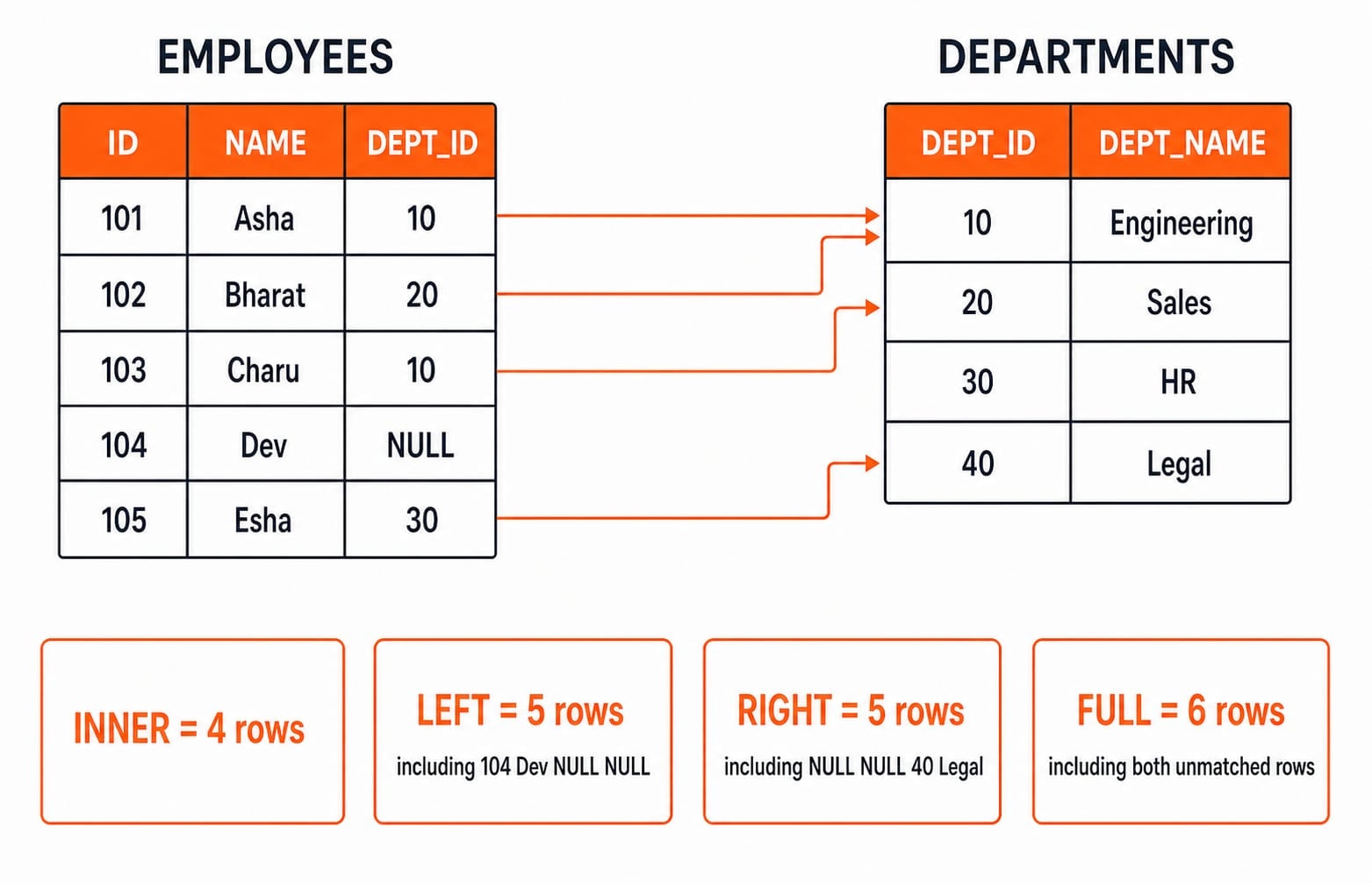
An INNER JOIN drops employees without departments and departments without employees. LEFT preserves every row from the left table, RIGHT every row from the right table, and FULL unmatched rows from both. Missing partners become SQL NULL, and moving a predicate between ON and WHERE can change which rows survive.
Related reading: inner and outer joins and SQL joins.
OUTER JOIN meaning and the three preserved-side choices
Use one rule: the join condition finds matches, while the join type decides which unmatched rows survive.
Join type | Rows returned |
|---|---|
| Matched combinations only |
| Matches plus every unmatched left row |
| Matches plus every unmatched right row |
| Matches plus unmatched rows from both sides |
OUTER is optional: LEFT JOIN and LEFT OUTER JOIN mean the same operation. Left and right refer to query positions, not business importance; reversing table order reverses them. Therefore, equivalent conditions make employees LEFT JOIN departments and departments RIGHT JOIN employees preserve the employee side.
Joins sit inside DBMS in the CS Fundamentals learning path. Join Operations in DBMS: Inner, Left, Right and Full Outer Joins Worked Step by Step develops conceptual pair-counting, relational-algebra symbols, and duplicate-key cardinality. Executable queries are the complementary route for tracing exact LEFT, RIGHT, FULL, and filter-placement outputs.
Build the exact employees and departments dataset
Run this setup. It omits a foreign key to focus on join behaviour; the unmatched employee deliberately has NULL as the department reference.
CREATE TABLE departments (
    department_id   INT PRIMARY KEY,
    department_name VARCHAR(30) NOT NULL
);

CREATE TABLE employees (
    employee_id   INT PRIMARY KEY,
    employee_name VARCHAR(30) NOT NULL,
    department_id INT
);

INSERT INTO departments (department_id, department_name) VALUES
    (10, 'Engineering'),
    (20, 'Sales'),
    (30, 'HR'),
    (40, 'Legal');

INSERT INTO employees (employee_id, employee_name, department_id) VALUES
    (101, 'Asha',   10),
    (102, 'Bharat', 20),
    (103, 'Charu',  10),
    (104, 'Dev',  NULL),
    (105, 'Esha',   30);
employee_id | employee_name | department_id |
|---|---|---|
101 | Asha | 10 |
102 | Bharat | 20 |
103 | Charu | 10 |
104 | Dev | NULL |
105 | Esha | 30 |
department_id | department_name |
|---|---|
10 | Engineering |
20 | Sales |
30 | HR |
40 | Legal |
Matches are Asha 10 to Engineering, Bharat 20 to Sales, Charu 10 to Engineering, and Esha 30 to HR. Dev has no department; Legal 40 has no employee. Engineering matches two employees because joins return row combinations, not one row per department.
Result order is not guaranteed without ORDER BY, so every displayed query requests one. Here NULL means a missing join partner, not the text 'NULL' or zero.
Use INNER JOIN as the matched-row baseline
SELECT e.employee_id, e.employee_name,
       d.department_id, d.department_name
FROM employees AS e
INNER JOIN departments AS d
    ON e.department_id = d.department_id
ORDER BY e.employee_id;
employee_id | employee_name | department_id | department_name |
|---|---|---|---|
101 | Asha | 10 | Engineering |
102 | Bharat | 20 | Sales |
103 | Charu | 10 | Engineering |
105 | Esha | 30 | HR |
Trace Charu: employee 103 carries department ID 10, matches the Engineering key 10, and produces one combined row. Dev disappears because NULL does not satisfy equality. Legal disappears because no employee carries 40. The baseline is four matched employee-department combinations, although the sources contain five employees and four departments.
LEFT OUTER JOIN preserves every employee
SELECT e.employee_id, e.employee_name,
       d.department_id, d.department_name
FROM employees AS e
LEFT OUTER JOIN departments AS d
    ON e.department_id = d.department_id
ORDER BY e.employee_id;
employee_id | employee_name | department_id | department_name |
|---|---|---|---|
101 | Asha | 10 | Engineering |
102 | Bharat | 20 | Sales |
103 | Charu | 10 | Engineering |
104 | Dev | NULL | NULL |
105 | Esha | 30 | HR |
Asha, Bharat, Charu, and Esha emit matched rows. Dev has no match, but LEFT preserves employee 104, so all selected department columns become NULL. This answers, "Show every employee, with department details when available." It does not invent a department for Dev. Add WHERE d.department_id IS NULL to return only 104 | Dev.
RIGHT and FULL OUTER JOINs on the same values
The right-preserving form returns five rows in department order:
SELECT e.employee_id, e.employee_name,
       d.department_id, d.department_name
FROM employees AS e
RIGHT OUTER JOIN departments AS d
    ON e.department_id = d.department_id
ORDER BY d.department_id, e.employee_id;
employee_id | employee_name | department_id | department_name |
|---|---|---|---|
101 | Asha | 10 | Engineering |
103 | Charu | 10 | Engineering |
102 | Bharat | 20 | Sales |
105 | Esha | 30 | HR |
NULL | NULL | 40 | Legal |
Legal survives because departments is on the right. Dev does not because the employee side is not preserved. An equivalent and often clearer rewrite is:
SELECT e.employee_id, e.employee_name,
       d.department_id, d.department_name
FROM departments AS d
LEFT JOIN employees AS e
    ON e.department_id = d.department_id
ORDER BY d.department_id, e.employee_id;
Now preserve both sides:
SELECT e.employee_id, e.employee_name,
       d.department_id, d.department_name
FROM employees AS e
FULL OUTER JOIN departments AS d
    ON e.department_id = d.department_id
ORDER BY CASE WHEN e.employee_id IS NULL THEN 1 ELSE 0 END,
         e.employee_id;
The exact rows are 101 | Asha | 10 | Engineering, 102 | Bharat | 20 | Sales, 103 | Charu | 10 | Engineering, 104 | Dev | NULL | NULL, 105 | Esha | 30 | HR, and NULL | NULL | 40 | Legal. The count is four matched combinations + one left-only row + one right-only row = six. It is not 5 + 4, because that would count matched combinations twice.
Support for RIGHT and FULL OUTER JOIN varies by database and version, so check the current documentation for your engine. If FULL is unavailable, combine every employees LEFT JOIN departments row with UNION ALL and only the anti-matched rows from departments LEFT JOIN employees WHERE e.employee_id IS NULL. The filter prevents the four matched combinations from appearing twice.
The ON versus WHERE trap, NULLs, and duplicate matches
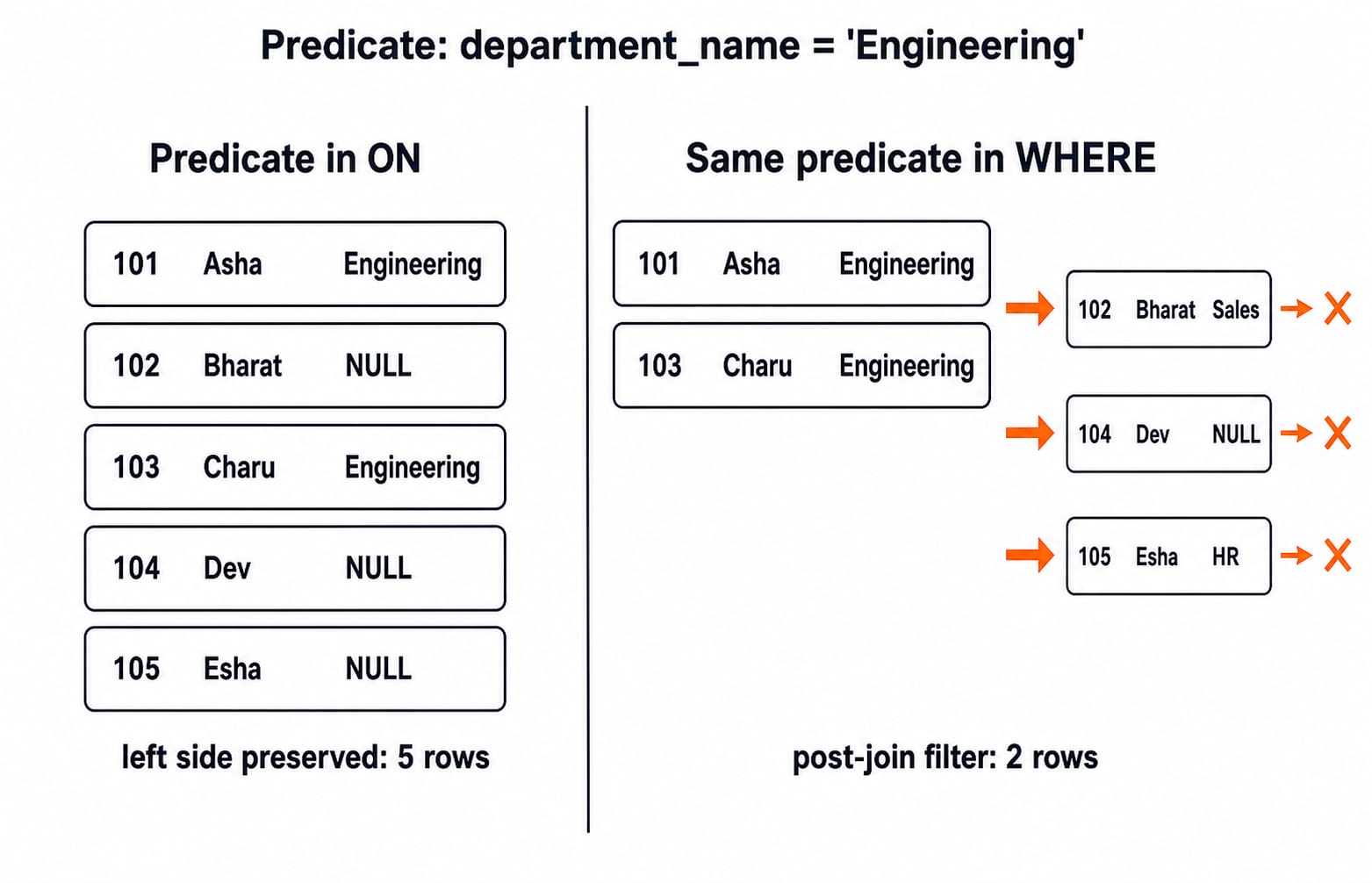
Query A keeps the Engineering predicate inside ON:
SELECT e.employee_id, e.employee_name, d.department_name
FROM employees AS e
LEFT JOIN departments AS d
    ON e.department_id = d.department_id
   AND d.department_name = 'Engineering'
ORDER BY e.employee_id;
All five employee IDs survive. Asha and Charu show Engineering; Bharat, Dev, and Esha show NULL. Query B moves the predicate to WHERE:
SELECT e.employee_id, e.employee_name, d.department_name
FROM employees AS e
LEFT JOIN departments AS d
    ON e.department_id = d.department_id
WHERE d.department_name = 'Engineering'
ORDER BY e.employee_id;
Only 101 | Asha | Engineering and 103 | Charu | Engineering survive. The post-join filter rejects Sales, HR, and the NULL-extended row.
Common mistakes follow a clear cause and repair:
A missing
ONcan create every left-right pair. Match the intended keys explicitly.Joining on
department_namecan mis-match repeated or mutable labels. Join stable IDs.WHERE d.department_id IS NOT NULLafter LEFT removes unmatched rows, effectively keeping matches only.NULL = NULLis not a successful equality match. UseIS NULLto test missing values.
Department 10 appears once but matches Asha and Charu, so every join retaining matches produces two Engineering rows. Do not add DISTINCT merely to hide this expected one-to-many result.
Exercises and the way assessments test OUTER JOINs
Stable assessment formats ask you to predict rows, choose a preserved side, count one-to-many matches, find unmatched records with IS NULL, or compare predicates in ON and WHERE.
Solve these before reading the answers:
Run
employees LEFT JOIN departmentswithWHERE d.department_id IS NULL.Run
departments LEFT JOIN employeeswithWHERE e.employee_id IS NULL.Predict the RIGHT join row count.
Insert
(106, 'Farah', 40)and predict the FULL join count.
Answers
104 | Devis the only unmatched employee.40 | Legalis the only unmatched department.The answer is 5: four matched combinations + unmatched Legal.
The answer remains 6: Farah creates a fifth matched employee row, the former Legal-only row disappears, and Dev remains left-only. So 5 matched + 1 left-only = 6.
KnowledgeGate offers over 20 practice and previous-year questions on SQL Join Operations (Inner & Outer). Continue with SQL Query MCQs: 12 Solved (SELECT, Joins, Subqueries) or the CS Fundamentals for Placements by Sanchit Sir course.
OUTER JOINs in SQL: short version and next step
INNER keeps matches. LEFT adds left-only rows, RIGHT adds right-only rows, and FULL adds both. Missing-partner columns become NULL. A predicate in WHERE can remove the rows an outer join preserved. Here Dev 104 is left-only and Legal 40 is right-only.
Retype the setup, predict the six FULL rows, then verify them. Add Farah (106, 'Farah', 40) and explain why the count stays 6 before rewriting RIGHT as LEFT.
For a wider semester route across core CS subjects, continue with ZERO TO HERO. When choosing an outer join, ask one practical question: Which table's unmatched rows must survive? The answer selects LEFT, RIGHT, or FULL.
Keep learning
Data Mining and Data Warehouse Explained: Concepts, OLAP and Worked Examples
Follow six orders from operational sources into a warehouse, calculate OLAP totals, and test an association rule on five shopping baskets.
Updated 4 Oct 20266 min readDBMS

Set Operations and Cartesian Product in Relational Algebra: Worked Examples and Exam Traps
Learn when relational set operations are legal, calculate exact union and difference results, enumerate a Cartesian product, and trace how a join filters it.
Updated 29 Sep 20266 min readDBMS
DBMS Interview Questions: Keys, Normalisation and Transactions Through One Worked Schema
Build defensible DBMS interview answers by tracing keys, normal forms, ACID and isolation through one university-enrolment database.
Updated 25 Sep 20265 min readDBMS
Super Key, Candidate Key and Primary Key: A Worked DBMS Example
Use one ENROLMENT relation to derive two candidate keys, enumerate every super key, select a primary key and translate the result into SQL.
Updated 24 Sep 20266 min readDBMS