Python Loop Patterns and Idioms: A Practical Tutorial
Move beyond manual counters and fragile flags. Learn the Python loop idioms that make iteration, filtering, aggregation, pairing, and search easier to read.
KnowledgeGate Team
Exam prep & CS education
Updated 3 Sep 20265 min read

A basic for loop works, but manual counters, parallel indexes, and flags soon make code harder to read and easier to break. Python loops support direct iteration, enumerate(), zip(), dictionary traversal, comprehensions, and loop control. All of them still rest on lists, tuples, dictionaries and the if statement, so shore those up in the Coding & Skill Development courses if they feel shaky.
Start with the job the loop must do
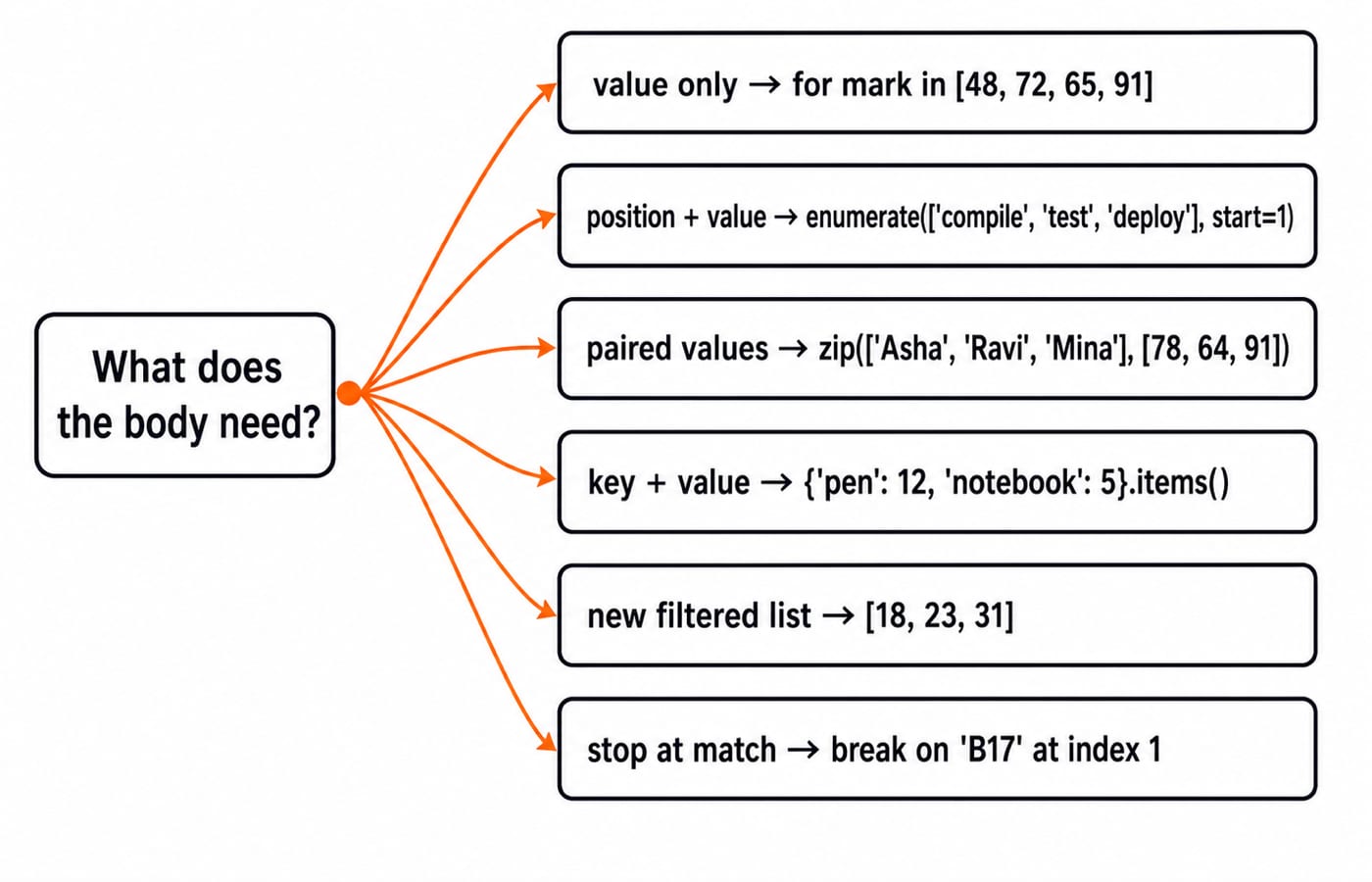
Loops usually visit, transform, filter, aggregate, or stop at a match. Let the job choose the pattern instead of habit.
For a value-only aggregation, iterate over the values directly:
marks = [48, 72, 65, 91]
total = 0

for mark in marks:
    total += mark

print(total)  # 276
Because position does not affect the result, range(len(marks)) adds noise. Use this rule:
Value only: direct iteration.
Position and value:
enumerate().Paired iterables:
zip().Dictionary key and value:
.items().A simple transformed or filtered collection: a comprehension.
An early answer:
break, or a predicate such asany().
Replace manual counters and parallel indexes
enumerate() produces each position together with its value:
stages = ["compile", "test", "deploy"]

for position, stage in enumerate(stages, start=1):
    print(position, stage)
The output, on separate lines, is 1 compile, 2 test, and 3 deploy. No separate position += 1 is needed.
Use zip() when corresponding values come from separate iterables:
names = ["Asha", "Ravi", "Mina"]
scores = [78, 64, 91]

for name, score in zip(names, scores):
    print(f"{name}: {score}")
This prints Asha: 78, Ravi: 64, and Mina: 91. Ordinary zip() stops with the shorter iterable, so validate equal lengths when every value must have a partner.
The same tuple-unpacking idea works with mappings:
for item, stock in {"pen": 12, "notebook": 5}.items():
    print(f"{item} has {stock}")
It prints pen has 12 followed by notebook has 5.
Fully worked example: summarise valid orders in one pass
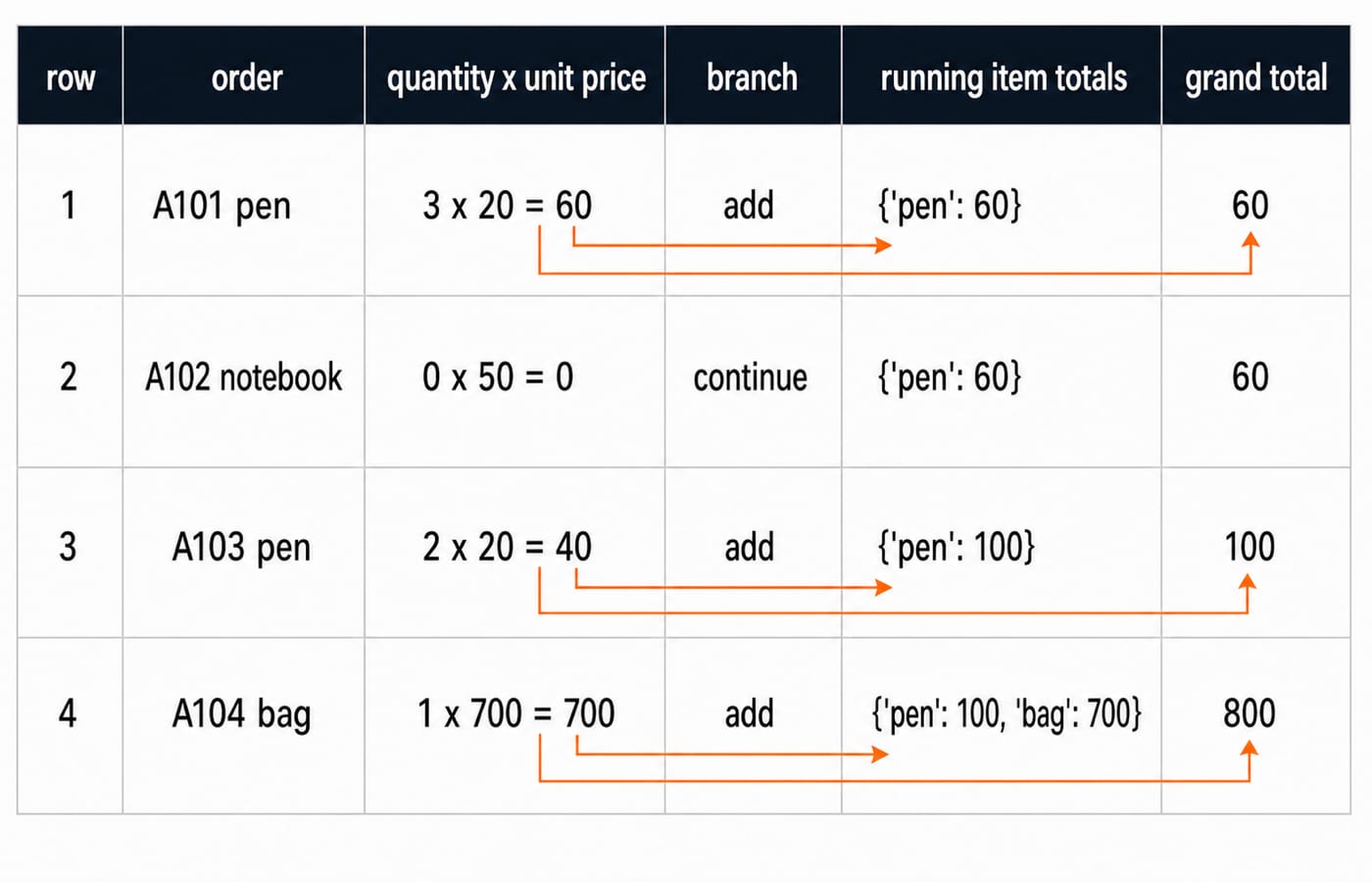
This program numbers each row, unpacks its order tuple, skips invalid quantities, and updates both item-level and overall revenue:
orders = [
    ("A101", "pen", 3, 20),
    ("A102", "notebook", 0, 50),
    ("A103", "pen", 2, 20),
    ("A104", "bag", 1, 700),
]

item_totals = {}
grand_total = 0

for row_no, (order_id, item, quantity, unit_price) in enumerate(orders, start=1):
    if quantity <= 0:
        print(f"row {row_no}: skipped {order_id}")
        continue

    subtotal = quantity * unit_price
    item_totals[item] = item_totals.get(item, 0) + subtotal
    grand_total += subtotal
    print(f"row {row_no}: {order_id} -> {subtotal}")

print(item_totals)
print(grand_total)
The exact output is:
row 1: A101 -> 60
row 2: skipped A102
row 3: A103 -> 40
row 4: A104 -> 700
{'pen': 100, 'bag': 700}
800
Row 1 contributes 3 x 20 = 60. Row 2 contributes nothing because continue runs before its subtotal. Row 3 adds 2 x 20 = 40, so the two pen orders combine to 60 + 40 = 100. Row 4 adds 1 x 700 = 700, raising the grand total from 100 to 800.
Use comprehensions when the result is the point
A list comprehension can express a simple filter directly:
readings = [18, -2, 23, 0, 31]
positives = [value for value in readings if value > 0]
print(positives)  # [18, 23, 31]
Read it left to right: produce value from readings if it is positive. The expanded form is:
positives = []
for value in readings:
    if value > 0:
        positives.append(value)
Generator expressions also answer aggregate and yes-or-no questions cleanly:
print(sum(value for value in readings if value > 0))  # 72
print(any(value < 0 for value in readings))            # True
print(all(value <= 31 for value in readings))          # True
Keep an ordinary loop for several steps, logging, multiple state updates, or break and continue. A comprehension would obscure the order summary.
Express search and control flow without fragile flags
Stop as soon as the required match appears:
codes = ["AX9", "B17", "C42"]
target = "B17"

for position, code in enumerate(codes):
    if code == target:
        print(f"{target} found at index {position}")
        break
else:
    print(f"{target} not found")
This prints B17 found at index 1. With target = "D10", the loop completes without break, so its else block prints D10 not found. The else belongs to the loop and runs only when the loop finishes without a break.
In the order example, continue skips only the rest of row A102. Here, break ends the entire search. If you need only a Boolean answer, any(code == "B17" for code in codes) is shorter and returns True.
Common loop errors and the readable fix
Broken pattern | Observed result | Better pattern |
|---|---|---|
| It reaches | Iterate directly, or use |
| It produces only | Validate equal lengths when every item must match |
Remove even values while traversing | Elements shift and the list becomes | Build |
An unnecessary counter beside for item in items creates state that can drift from the data. Replace it with enumerate(items). A dense one-line body that changes several variables hides the update order; split its calculations and assignments across named lines, as in the order-summary loop.
How practice questions test these patterns
Loop questions often test exact output, an idiomatic rewrite, or safe handling of an edge case. Try these before reading the answers:
Trace this nested loop:
   for i in range(1, 4):
       for j in range(i):
           print(i + j, end=" ")
Rewrite a manual counter over
["red", "blue"]withenumerate(..., start=1).Using
zip(), pair the names and scores lists from the earlier example, then keep only the names whose scores are at least70.
Answers
The output is
1 2 3 3 4 5.for position, colour in enumerate(["red", "blue"], start=1): print(position, colour)prints1 redand2 blue.[name for name, score in zip(names, scores) if score >= 70]produces["Asha", "Mina"].
For more tracing practice beyond syntax, work through Data Structures MCQs, or browse the full MCQ Practice collection.
The short version and next step
Iterate values directly when position is irrelevant.
Add positions with
enumerate().Pair streams with
zip()and unpack mappings with.items().Use comprehensions for simple new collections.
Use
break,continue, andfor...elseonly when their control flow matches the job.Use
any()andall()for direct yes-or-no questions.
Beginners can follow the broader language sequence in the Python course. If you are ready to use loops in array and algorithm problems, continue with DSA Using Python.
Now rerun the order-summary program after adding ("A105", "notebook", 2, 50). Predict before execution: the final dictionary becomes {'pen': 100, 'bag': 700, 'notebook': 100}, and the grand total becomes 900.
Keep learning
Decorators in Python: @ Syntax, Wrappers and Worked Examples
Understand when decoration happens, what a wrapper receives, and how return values travel back. Runnable examples cover parameters, stacking and built-ins.
Updated 22 Oct 20266 min readPython
Exceptions in Python: Handle Errors with try, except and finally
Learn how Python exceptions change control flow, how to catch expected failures without hiding bugs, and when to use else, finally, raise, and custom exceptions.
Updated 18 Oct 20265 min readPython

Context Managers in Python: with, __enter__, __exit__ and contextlib
Learn how Python's with statement guarantees cleanup, then build and trace class-based and generator-based context managers with runnable examples.
Updated 14 Oct 20266 min readPython
Python Arguments and Scope: Parameters, LEGB, and Worked Examples
Trace how Python binds arguments, handles mutation and rebinding, and resolves names through LEGB. Runnable examples turn scope rules into predictable output.
Updated 10 Oct 20265 min readPython