Python Variables and Data Types: Beginner Tutorial with Worked Examples
Learn how Python names bind to objects, how built-in types behave, and why conversion and mutation matter. Trace a complete learner record and test yourself with runnable examples.
KnowledgeGate Team
Exam prep & CS education
Updated 31 Aug 20265 min read
A Python variable is not a typed box that you must declare before using it. A name binds to an object, and the object's type decides which operations are valid. Reassignment changes a binding, while mutation changes an object and can affect every alias.
What a Python variable really stores
Assignment binds a name to an object:
attempts = 2
student = "Meera"
accuracy = 78.5

print(type(attempts).__name__)
The output is int. Here, attempts, student, and accuracy are identifiers. The objects 2, "Meera", and 78.5 have the types int, str, and float.
An identifier may contain letters, digits, and underscores, but it cannot begin with a digit or be a Python keyword. mock_score, _draft, and unit2 are valid. 2unit, mock-score, and class are invalid. Names are case-sensitive, so score = 37 and Score = 42 create two separate names.
Python also supports multiple assignment. After x, y = 4, 7, the statement x, y = y, x swaps the bindings. The result is x equal to 7 and y equal to 4.
Built-in Python data types beginners need first
Start by matching each type to the kind of value it represents:
count = 12                 # int
rate = 2.5                 # float
offset = 3 + 4j            # complex
passed = False             # bool
topic = "variables"        # str
result = None              # NoneType
type(result).__name__ returns NoneType. None represents the absence of a value, not zero or an empty string.
Collections hold several values. A list such as chapters = ["variables", "types"] is useful for an ordered sequence that may change. A tuple such as point = (4, 7) is an ordered record that cannot be changed in place. A set such as tags = {"python", "basics"} keeps unique values, while a dictionary such as marks = {"Python": 22, "Aptitude": 15} maps keys to values.
The way an integer is written is separate from its value. decimal = 10, binary = 0b1010, and hex_value = 0xA are all int objects equal to 10. Read number systems and base conversions for the representation behind those literals.
Worked example: model and update a learner record
Run this program exactly as shown:
student = "Meera"
attempts = 2
accuracy = 78.5
ready = False
weak_topics = ["strings", "lists"]
section_marks = {"Python": 22, "Aptitude": 15}

total = section_marks["Python"] + section_marks["Aptitude"]
attempts += 1
weak_topics.append("dictionaries")
ready = total >= 40

print(total, attempts, ready)
print(weak_topics)
print(type(student).__name__, type(accuracy).__name__)
Its exact output is:
37 3 False
['strings', 'lists', 'dictionaries']
str float
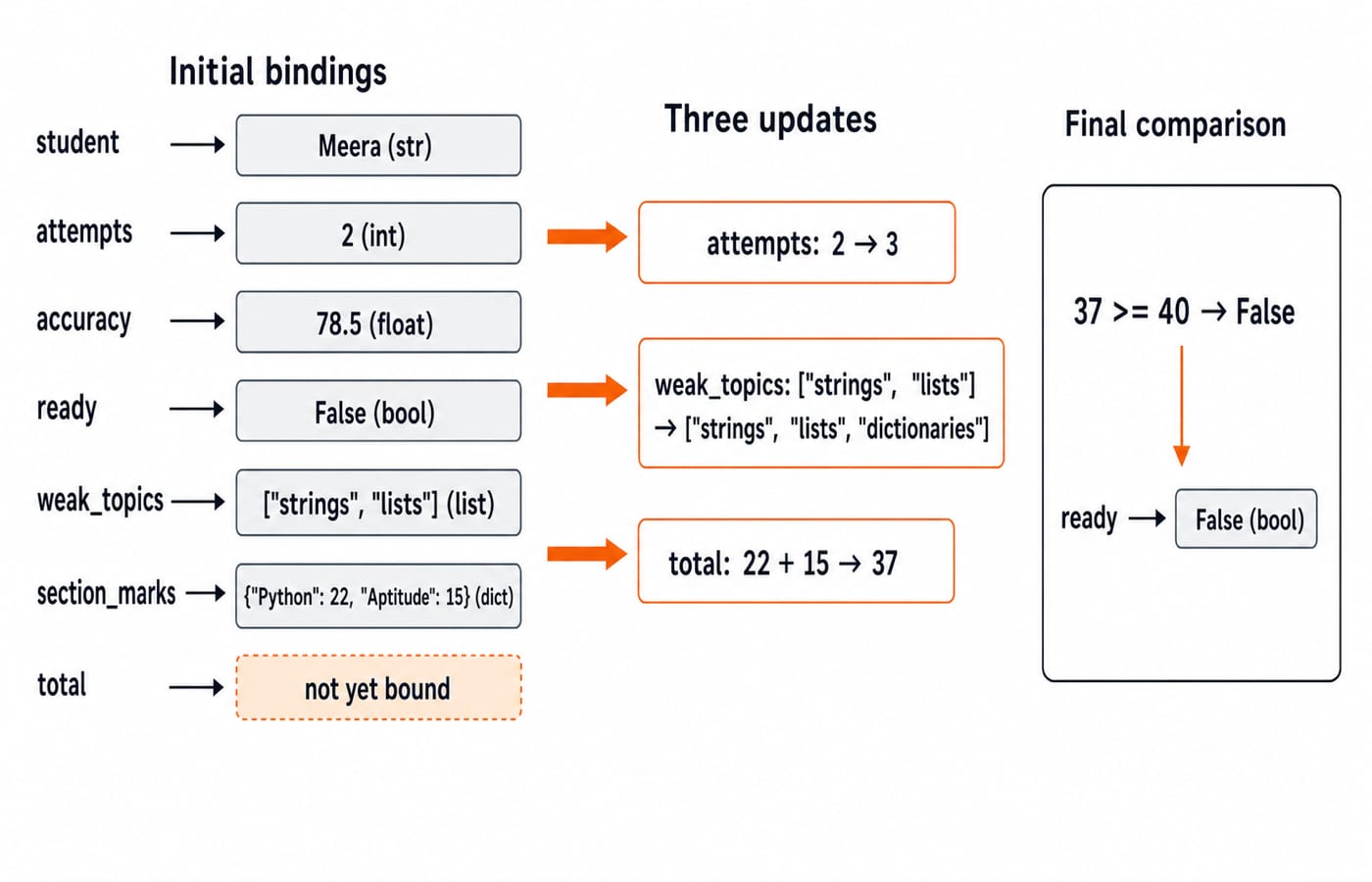
Trace each update. total is 22 + 15 = 37. The += 1 operation rebinds attempts from the integer object 2 to a new integer object 3. append() adds one item to the existing list. Finally, 37 >= 40 is false, so ready remains False.
Python infers the type of each object at runtime. There is no type declaration in these assignments, but keeping each name associated with a stable, meaningful kind of value makes later code easier to reason about.
Reassignment, dynamic typing, and explicit conversion
Objects have types, while names can be rebound:
value = 10
print(type(value).__name__)  # int
value = "ten"
print(type(value).__name__)  # str
Python permits this change, but casual type-changing makes later operations harder to predict.
Suppose input has supplied raw_score = "47" and bonus = 5. Then final_score = int(raw_score) + bonus calculates the integer 52. By contrast, raw_score + str(bonus) joins two strings and produces "475", not a numeric sum.
Inspect a string before converting when appropriate. With raw_count = "12", raw_count.isdigit() is True, and int(raw_count) is 12. However, int("12.5") raises ValueError; float("12.5") correctly produces 12.5.
Mutable and immutable values: why aliases surprise beginners
Integers, floats, booleans, strings, and tuples are immutable. Lists, dictionaries, and sets are mutable. For example, with label = "python" and upper_label = label.upper(), label remains "python" while upper_label is the new string "PYTHON".
Mutation matters when two names reach the same object:
a = [10, 20]
b = a
b.append(30)
print(a, b)
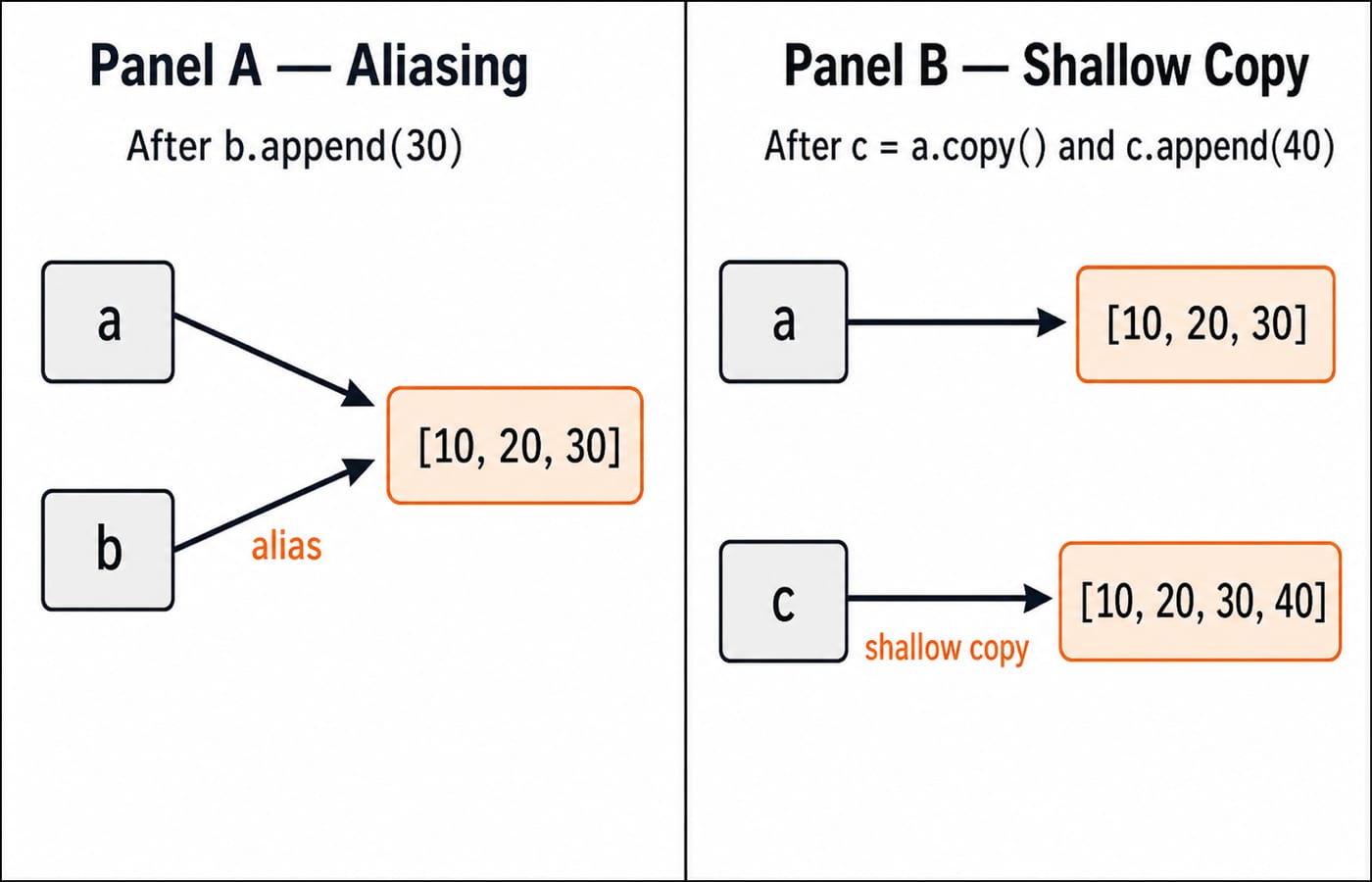
Both names print [10, 20, 30] because a and b refer to one list. Now run c = a.copy() followed by c.append(40). The original a remains [10, 20, 30], while c becomes [10, 20, 30, 40].
A tuple behaves differently. point = (4, 7) followed by point[0] = 9 raises TypeError because tuples do not support item assignment. Immutable means the object cannot be changed in place. The name point can still be rebound to another object.
Common variable and type errors, with exact fixes
Type mismatch:
age = "18"; next_age = age + 1raisesTypeError. Usenext_age = int(age) + 1, which gives19. Remember thatinput()returns a string even when the user types digits.Accidental alias:
backup = weak_topicsdoes not copy the list. Usebackup = weak_topics.copy()when you need a separate shallow list, as the aliasing diagram shows.Misleading names: avoid
type = "student"because it hides the built-intype()name. Preferstudent_type.Wrong comparison: use
result is None, notresult == None. Also separate assignment,score = 37, from the equality testscore == 37, which evaluates toTrue.
How quizzes and interviews test variables and types
Quizzes commonly ask for exact output. Interviews often add a follow-up: explain why rebinding an immutable value differs from mutating a shared object. Try these output-prediction checks before reading each explanation:
x = 8; y = x; x = 13; print(y)prints8. Rebindingxdoes not change the integer object reached throughy.items = [2, 4]; alias = items; alias[0] = 9; print(items)prints[9, 4]. Both names reach the same mutable list.print(type(5 / 2).__name__, 5 // 2)printsfloat 2. Normal division produces2.5, a float, while floor division produces2for these positive integers.
The useful reasoning routine is always the same: infer each expression's type, trace rebinding separately from mutation, predict conversions, and identify the first line that raises an error. If an exam specifies a Python version or syllabus, verify that detail in its current official notification.
The short version, practice tasks, and the next rung
Keep five points in mind:
Names bind to objects.
Objects have types.
type()inspects those types.Conversion must be explicit when types do not match.
Mutation can affect every alias to the same object.
Now run three short exercises. First, set minutes = 95, then calculate hours = minutes // 60 and remaining = minutes % 60; expect 1 hour and 35 minutes. Second, for data = ("7", 2.5, False), print each type name; expect str, float, and bool. Third, run left = [1, 2]; right = left.copy(); right[1] = 9; expect left == [1, 2] and right == [1, 9] to both be True.
For a complete language sequence, continue with the Python Programming course. If your next goal is structured problem solving, move to the DSA Using Python course. You can browse related learning paths in the Coding & Skills category.
Keep learning
Exceptions in Python: Handle Errors with try, except and finally
Learn how Python exceptions change control flow, how to catch expected failures without hiding bugs, and when to use else, finally, raise, and custom exceptions.
Updated 18 Oct 20265 min readPython
Context Managers in Python: with, __enter__, __exit__ and contextlib
Learn how Python's with statement guarantees cleanup, then build and trace class-based and generator-based context managers with runnable examples.
Updated 14 Oct 20266 min readPython
Python Arguments and Scope: Parameters, LEGB, and Worked Examples
Trace how Python binds arguments, handles mutation and rebinding, and resolves names through LEGB. Runnable examples turn scope rules into predictable output.
Updated 10 Oct 20265 min readPython
Python Control Flow and Loops: if, for, while and Worked Traces
Learn to trace Python branches and loops without skipping a state change. Worked examples cover GCD, break and continue, loop else, nested loops, and common mistakes.
Updated 6 Oct 20265 min readPython