Decorators in Python: @ Syntax, Wrappers and Worked Examples
Understand when decoration happens, what a wrapper receives, and how return values travel back. Runnable examples cover parameters, stacking and built-ins.
KnowledgeGate Team
Exam prep & CS education
Updated 22 Oct 20266 min read
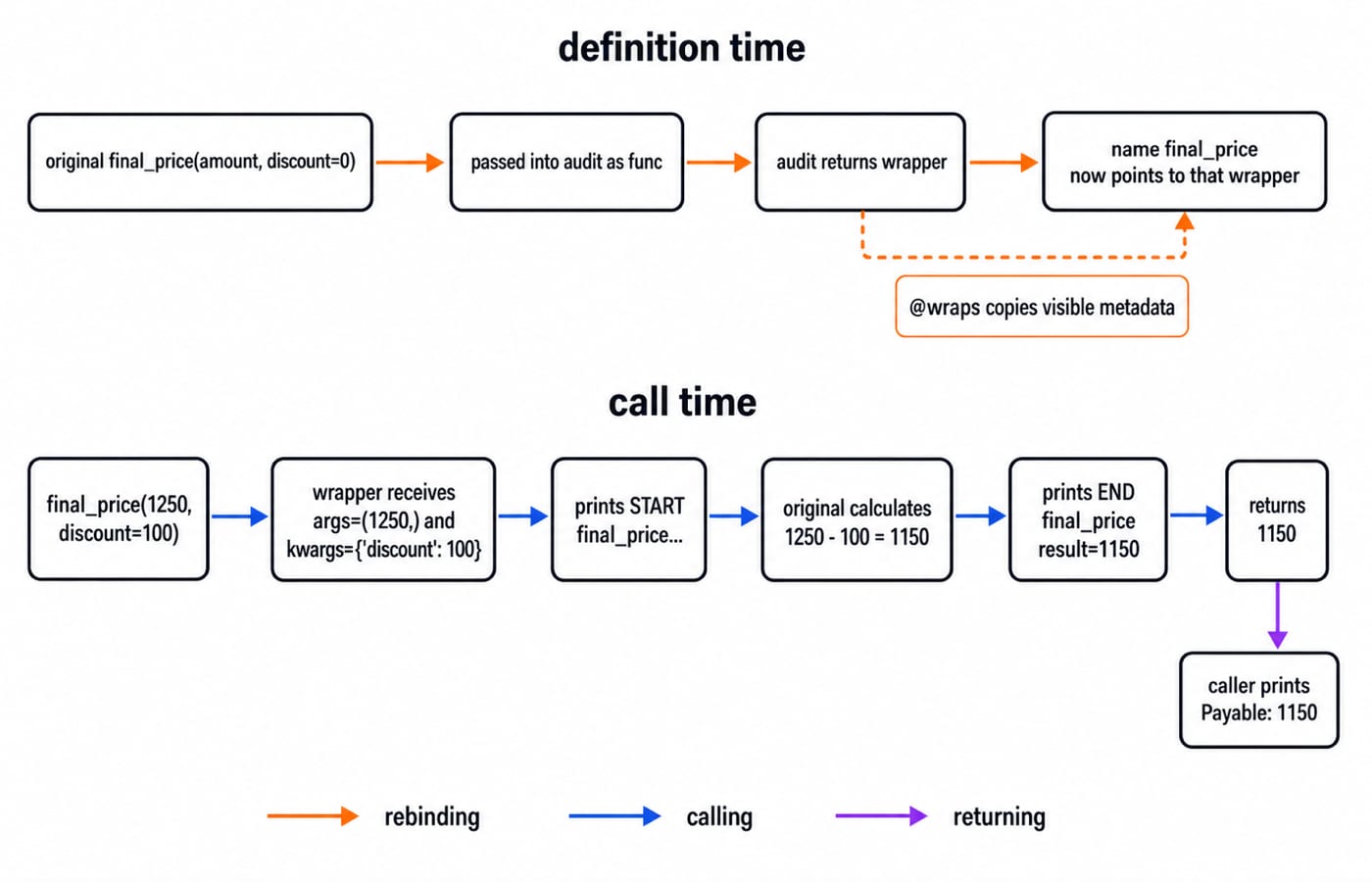
Python evaluates @something when it executes the decorated function definition, replacing the original name with the callable returned by the decorator. A later call reaches that wrapper, whose job is to forward arguments and return the original result. In final_price(1250, discount=100), the wrapper receives (1250,) and {'discount': 100}, and the original calculation returns 1150. Parameterised and stacked decorators add layers to the same rebinding model.
The prerequisite: functions are values and closures remember them
A Python function is a value. You can assign it to another name, pass it as an argument, or return it from a function.
def add_gst(amount):
    return amount * 1.18

calculator = add_gst
print(calculator(1000))  # 1180.0
calculator and add_gst now refer to the same function object. A closure adds remembered state:
def make_surcharge(rate):
    def apply(amount):
        return amount + amount * rate
    return apply

card_fee = make_surcharge(0.02)
print(card_fee(1000))  # 1020.0
Although make_surcharge has returned, apply still captures rate = 0.02. A decorator combines these ideas: according to the official Python glossary, it receives a function object and returns the callable that should replace it.
The earlier Functions in Python: Parameters, Return Values, Scope and Examples develops parameter binding, returns and scope from first principles. Decorators use those mechanics for a different purpose: replacing a function name with a wrapper that retains the original callable.
Build the first decorator without @, then add the syntax
Start with the visible assignment form:
def announce(func):
    def wrapper():
        print("Before checkout")
        result = func()
        print("After checkout")
        return result
    return wrapper

def checkout():
    return 1150

checkout = announce(checkout)
print(checkout())
The output is:
Before checkout
After checkout
1150
The original checkout is passed into announce and retained as func. The name checkout is then rebound to wrapper, but that wrapper can still call the retained original. The same decoration can be written as:
@announce
def checkout():
    return 1150
This is roughly checkout = announce(checkout) after Python creates the function body. The function-definition reference explains that the decorator expression is evaluated when the definition executes. That is decoration time. The wrapper body runs later, once per call.
Forward arguments, return the result and preserve metadata
Real wrappers must accept arguments and return the result:
from functools import wraps

def audit(func):
    @wraps(func)
    def wrapper(*args, **kwargs):
        print(f"START {func.__name__} args={args} kwargs={kwargs}")
        result = func(*args, **kwargs)
        print(f"END {func.__name__} result={result}")
        return result
    return wrapper

@audit
def final_price(amount, discount=0):
    """Return the payable amount."""
    return amount - discount

payable = final_price(1250, discount=100)
print(f"Payable: {payable}")
print(f"Name: {final_price.__name__}")
The exact output is:
START final_price args=(1250,) kwargs={'discount': 100}
END final_price result=1150
Payable: 1150
Name: final_price
The value 1250 enters args as (1250,), while discount=100 enters kwargs as {'discount': 100}. Python binds those forwarded values against final_price(amount, discount=0), then calculates 1250 - 100 = 1150. Each wrapper must return that result. *args and **kwargs make forwarding reusable, but they do not validate arguments.
If you briefly remove @wraps(func), the decorated callable reports its name as wrapper, and its docstring no longer presents the original metadata. Restore it. The official functools.wraps documentation describes the metadata it updates. This preservation does not change the arithmetic or guarantee that every introspection tool displays the original call signature.
Parameterised decorators need three layers
A parameterised decorator adds a factory outside the decorator and wrapper:
from functools import wraps

def minimum_amount(limit):
    def decorator(func):
        @wraps(func)
        def wrapper(amount, *args, **kwargs):
            if amount < limit:
                return f"Rejected: minimum is {limit}"
            return func(amount, *args, **kwargs)
        return wrapper
    return decorator

@minimum_amount(500)
def process_payment(amount, method):
    return f"Paid {amount} by {method}"

print(process_payment(300, "UPI"))
print(process_payment(750, "UPI"))
The outputs are Rejected: minimum is 500 and Paid 750 by UPI. The factory captures limit = 500, the decorator captures process_payment as func, and each call gives the wrapper its amount and method. The first path never enters the original function. The expansion is roughly process_payment = minimum_amount(500)(process_payment). Writing @minimum_amount without (500) sends the function to the wrong layer and causes a confusing failure.
Stacked decorators apply from the function outward
Stacking order matters when wrappers transform a result:
from functools import wraps

def double_result(func):
    @wraps(func)
    def wrapper(*args, **kwargs):
        return 2 * func(*args, **kwargs)
    return wrapper

def add_five(func):
    @wraps(func)
    def wrapper(*args, **kwargs):
        return func(*args, **kwargs) + 5
    return wrapper

@double_result
@add_five
def first():
    return 10

@add_five
@double_result
def second():
    return 10

print(first())   # 30
print(second())  # 25
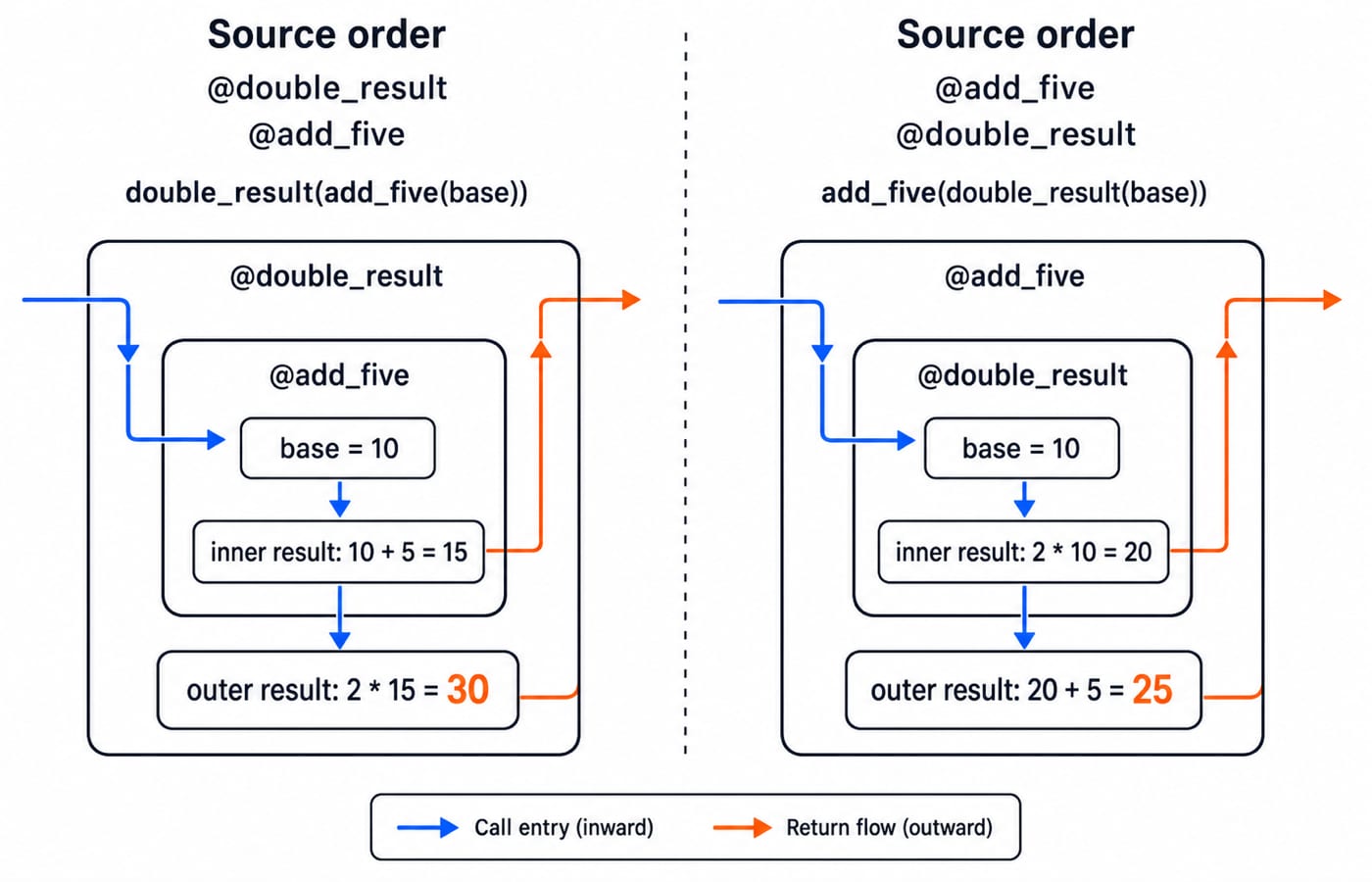
The first stack expands to double_result(add_five(first)): inner 10 + 5 = 15, then outer 2 * 15 = 30. The second is add_five(double_result(second)): inner 2 * 10 = 20, then outer 20 + 5 = 25. Decorators associate with the function from the nearest line upward. Calls enter the outermost resulting wrapper first, then results travel back outward.
Recognise @property, @classmethod and @staticmethod
Python also supplies decorators that shape class interfaces:
class Cart:
    tax_rate = 0.18

    def __init__(self, subtotal):
        self.subtotal = subtotal

    @property
    def total(self):
        return round(self.subtotal * (1 + self.tax_rate), 2)

    @classmethod
    def from_items(cls, prices):
        return cls(sum(prices))

    @staticmethod
    def valid_price(value):
        return value >= 0

cart = Cart.from_items([500, 300, 200])
print(cart.subtotal)          # 1000
print(cart.total)             # 1180.0
print(Cart.valid_price(-5))   # False
Here, 500 + 300 + 200 = 1000, then 1000 * 1.18 = 1180.0. A property is accessed without call parentheses. A class method receives cls and can construct the current class. A static method receives neither self nor cls automatically. These behaviours are defined in Python's built-in functions documentation. They are class-interface tools, not interchangeable versions of logging or validation wrappers.
Common decorator mistakes and three repair exercises
Mistake | What goes wrong | Repair |
|---|---|---|
Forget | The decorated name becomes | Return the replacement callable |
Forget | A value-returning function now returns | Return the wrapped result |
Use a fixed | Calls with arguments fail | Forward |
Call | Work runs at definition or import time | Call it inside the wrapper |
Omit | Useful metadata is hidden | Apply |
Guess stacked order | The predicted value is wrong | Expand the nested calls |
Repair these before running them:
Make a
tracedecorator aroundadd(700, 450)printCalling add, forward both inputs, and return1150.Write
@positive_onlyforsquare(n). With@wraps, makesquare(4)return16, whilesquare(-3)returnsn must be non-negativewithout calling the original function.Predict the previous stacks:
double_result(add_five(base))gives30;add_five(double_result(base))gives25.
When debugging, inspect the decorated name, identify the captured callable, trace arguments in and results out, then expand stacks from the function outward.
The short version: assessment tasks and your next step
Coding assessments may ask you to expand @decorator into assignment form, distinguish decoration time from call time, repair a missing return, forward *args, **kwargs, explain functools.wraps, trace three parameterised layers, or calculate stacking. Use 1250 - 100 = 1150 and 30 versus 25 as quick checks. KnowledgeGate has 90+ live Python questions across Functions & Modules for surrounding-topic practice.
Recall the chain: functions are values; a decorator receives a callable; it returns the replacement; the wrapper forwards inputs; it returns the result; @wraps preserves useful metadata.
Continue with the Python Course: Concepts, MCQs and Coding Questions for structured language practice, then use DSA Using Python for the next problem-solving step. The Coding & Skill Development Courses page is the broader route. When you are ready for later algorithm practice, work through Sorting Algorithms: Complexity and Comparison.
Keep learning
Exceptions in Python: Handle Errors with try, except and finally
Learn how Python exceptions change control flow, how to catch expected failures without hiding bugs, and when to use else, finally, raise, and custom exceptions.
Updated 18 Oct 20265 min readPython

Context Managers in Python: with, __enter__, __exit__ and contextlib
Learn how Python's with statement guarantees cleanup, then build and trace class-based and generator-based context managers with runnable examples.
Updated 14 Oct 20266 min readPython
Python Arguments and Scope: Parameters, LEGB, and Worked Examples
Trace how Python binds arguments, handles mutation and rebinding, and resolves names through LEGB. Runnable examples turn scope rules into predictable output.
Updated 10 Oct 20265 min readPython
Python Control Flow and Loops: if, for, while and Worked Traces
Learn to trace Python branches and loops without skipping a state change. Worked examples cover GCD, break and continue, loop else, nested loops, and common mistakes.
Updated 6 Oct 20265 min readPython