

Introduction to Visual Basic MCQs: 12 Solved Questions
Solve 12 Visual Basic MCQs with clear, worked explanations. Learn to separate VB6, VBScript and VB.NET cues before tracing files, controls, events and strings.
KnowledgeGate Team
Exam prep & CS education
Updated 8 Nov 20267 min read
The clues .vbp, Option Explicit and sender As Object, e As EventArgs all sit under the Visual Basic label, but they point to classic VB6, VBScript and VB.NET contexts. Treating every rule as universal causes avoidable errors. A reliable solution identifies the dialect cue before applying the relevant file, control, event, operator or string rule. The Introduction to VB topic carries about 50 practice questions, and when a separate question page is unavailable, use Coding & DSA Courses for Placements for the broader practice route.
1. Separate VB6, VBScript and VB.NET before solving
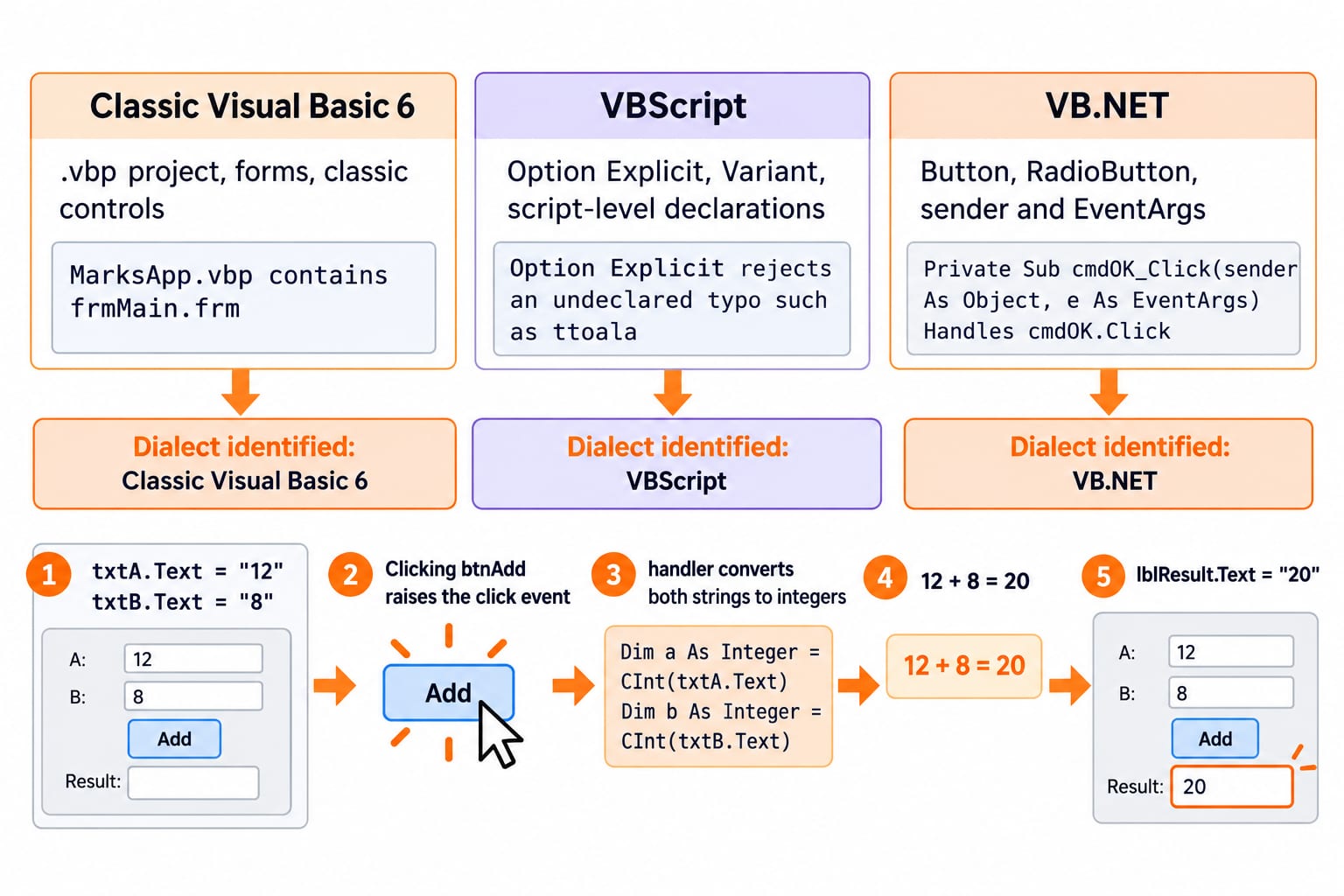
Start by asking which Visual Basic family the wording describes. A project extension, declaration rule or event signature can answer that before you inspect the options.
Family | Typical cue | Exact example | Do not confuse with |
|---|---|---|---|
Classic Visual Basic 6 | .vbp project, forms, classic controls | MarksApp.vbp contains frmMain.frm | .vbproj, which belongs to a VB.NET project |
VBScript | Option Explicit, Variant, script-level declarations | Option Explicit rejects an undeclared typo such as ttoal | a compiled VB6 project file |
VB.NET | Button, RadioButton, sender and EventArgs | Private Sub cmdOK_Click(sender As Object, e As EventArgs) Handles cmdOK.Click | the classic VB6 event signature |
Now trace a small form. txtA.Text = "12" and txtB.Text = "8". Clicking btnAdd raises the click event. Its handler converts both strings to integers, calculates 12 + 8 = 20, then sets lblResult.Text to "20". That separates the input controls, event, handler and output control. Because the dialect changes across problems, read the cue afresh each time. The Programming Languages Survey gives the broader map of language families and execution styles.
2. Visual Basic MCQs 1-3: versions, the IDE and identifiers
Question 1 (DSSSB 2018)
Which of the following was the final version of Visual Basic before the release of Visual Basic.NET?
A. Visual Basic 4.0
B. Visual Basic 5.0
C. Visual Basic 6.0
D. Visual Basic 7.0
Correct answer: C. Visual Basic 6.0.
The phrase before the release of Visual Basic.NET marks the classic-to-.NET boundary. The ladder is 4.0 -> 5.0 -> 6.0 -> Visual Basic.NET, so C is correct. VB6 file and event rules need not apply to VB.NET.
Question 2 (DSSSB 2021)
What is the full form of IDE in Visual Basic?
A. Integration Development Environment
B. Integrated Development Environment
C. Integrated Drive Electronics
D. Integrated Development Electronics
Correct answer: B. Integrated Development Environment.
Expand it letter by letter: I = Integrated, D = Development, E = Environment. In that one environment, open MarksApp, place txtScore on Form1, set its text to "72", run and inspect 72 while debugging. A and D alter one word. C is a hardware term.
Question 3 (NVS 2022)
Which of the following cannot be used to represent a variable name in Visual Basic?
A. 25 Values
B. Number9
C. _Score
D. Five6Five
Correct answer: A. 25 Values.
25 Values starts with digits and contains a space, failing both cues. Compare Number9 = 9, _Score = 72 and Five6Five = 565. Edge rules differ between classic VB and VB.NET, but A is the unambiguously invalid choice here.
3. Visual Basic MCQs 4-6: controls and click events
Question 4 (DSSSB 2022)
Which of the following control of visual basics is used to create a command button?
A. CheckBox
B. Label
C. Button
D. RadioButton
Correct answer: C. Button.
A Button triggers an action. Here txtA = "12" and txtB = "8" hold input, btnAdd triggers addition, and the label becomes "20". A Label displays text, a CheckBox stores a yes/no state, and a RadioButton represents one mutually exclusive choice. Classic VB6 calls this a CommandButton; VB.NET names it Button.
Question 5 (DSSSB 2022)
Which of the following controls is more suitable to accept gender value of a person in visual basic application?
A. TextBox
B. CheckBox
C. Button
D. RadioButton
Correct answer: D. RadioButton.
This tests control selection, not the number of gender identities. RadioButtons suit a defined set permitting one choice. Classic VB trace: rdoA.Value = False, rdoB.Value = True and rdoC.Value = False, so exactly one is selected. A TextBox accepts free text, a CheckBox is independently Boolean, and a Button starts an action.
Question 6 (DSSSB 2022)
Which of the following statements is INCORRECT about sub-routine corresponding to click event of the "cmdOK" button in visual basic?
A. The name of this sub-routine should be cmdOKClick.
B. It has two arguments.
C. The first argument is "sender As Object".
D. The second argument is "e As EventArgs".
Correct answer: A. The name of this sub-routine should be cmdOKClick.
In the conventional VB.NET pattern the designer generates:
Private Sub cmdOK_Click(sender As Object, e As EventArgs) Handles cmdOK.Click
    lblStatus.Text = "Saved 3 records"
End Sub
The name contains the underscore, and the signature has the two arguments in B, C and D. Therefore A is incorrect. A handler can be wired with Handles or AddHandler, so its name is a convention, not the mechanism.
4. Visual Basic MCQs 7-9: declarations, project files and integer division
Question 7 (DSSSB 2018)
In VB script, _____ is used to force all variables to be declared before they are used.
A. Option Explicit
B. Option Implicit
C. Script Tag
D. Variant
Correct answer: A. Option Explicit.
In VBScript, Option Explicit requires declaration before use. Declare Dim total, set total = 12, then add 8 to get 20. The typo ttoal = 20 is rejected instead of becoming another variable. Variant is a VBScript subtype category. The other options do not enable this check.
Question 8 (NVS 2022)
In Visual Basic, __________ is the file extension of a Project file.
A. .frm
B. .vb
C. .vbp
D. .vbproj
Correct answer: C. .vbp.
This is a classic Visual Basic question. MarksApp.vbp is the project and frmMain.frm is a form, so C is correct. In .NET, .vb is a source-code extension and .vbproj a project-file extension. The family label resolves the ambiguous phrase Visual Basic project.
Question 9 (DSSSB 2018)
Which of the following symbols is used to represent Integer Division in Visual Basic?
A. Forward slash (/)
B.
Backward slash (\)C. Percent (%)
D. Ampersand (&)
Correct answer: B. Backward slash (\).
Take 23 and 4: 23 / 4 = 5.75, while 23 \ 4 = 5 for positive integers. The backward slash performs integer division. % is not the requested operator; & performs concatenation in this VB context. Write both results together to fix the slash direction.
5. Visual Basic MCQs 10-12: trace Len, InStr and Mid
Question 10 (DSSSB 2018)
What is the output of the following Visual Basic expression?
Len("Visual Basic Tutorial")
A. 3
B. 21
C. 19
D. 0
Correct answer: B. 21.
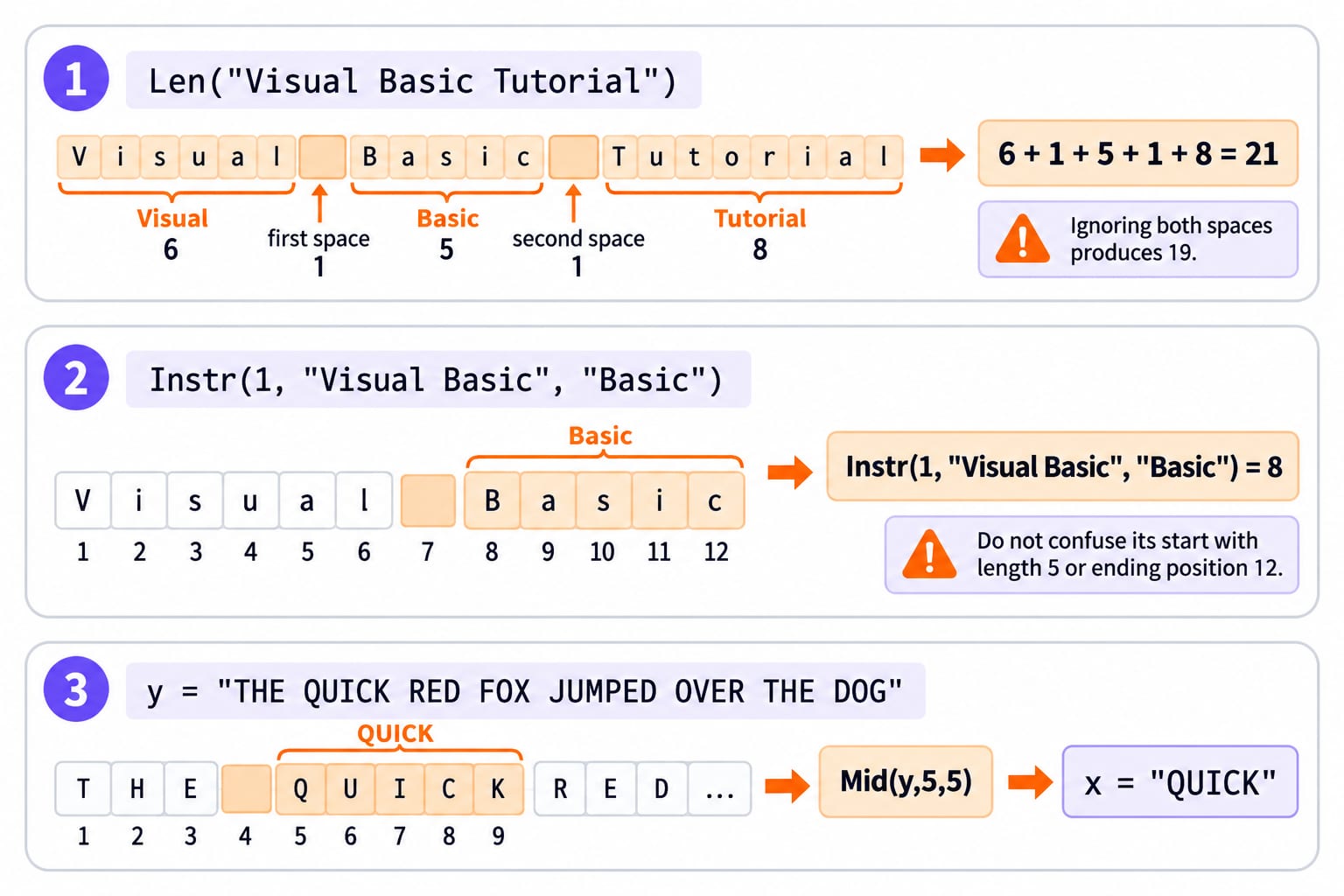
Count spaces: Visual = 6, first space = 1, Basic = 5, second space = 1, Tutorial = 8. Thus 6 + 1 + 5 + 1 + 8 = 21. Ignoring both spaces produces the trap, 19.
Question 11 (DSSSB 2018)
What will be the output of the following Visual Basic string handling function?
Instr(1, "Visual Basic", "Basic")
A. 1
B. 4
C. 8
D. 12
Correct answer: C. 8.
Mark the 1-based positions: V1 i2 s3 u4 a5 l6, space 7, then B8 a9 s10 i11 c12. Searching from 1 finds Basic at 8. Do not confuse its start with length 5 or ending position 12.
Question 12 (KVS 2017)
Which of the following Visual Basic statements will assign the value "QUICK" from the variable y to the string variable x?
y = "THE QUICK RED FOX JUMPED OVER THE DOG"
A. x = Middle(y,5,5)
B. x = Left(y,5)
C. x = Mid(y,5,5)
D. x = Instr(5,y,"QUICK")
Correct answer: C. x = Mid(y,5,5).
Positions are T1 H2 E3, space 4, then Q5 U6 I7 C8 K9. Mid(y,5,5) takes five characters from 5, giving x = "QUICK". Left(y,5) gives "THE Q"; InStr returns a position; Middle is not the tested function name.
6. Six traps that make introductory VB questions harder than they look
Family collapse:
.vbpmeans classic VB6, while.vbprojpoints to VB.NET.Control-role swap: input is
txtA = "12", action comes frombtnAdd, and output islblResult = "20".Handler-name shortcut: use the generated pattern
cmdOK_Click(sender As Object, e As EventArgs), notcmdOKClick.Slash reversal:
23 / 4 = 5.75, but23 \ 4 = 5for these positive integers.Invisible-space error:
Len("Visual Basic Tutorial") = 21, not 19.Zero-based reflex: the tested
InStrandMidexamples use positions 8 and 5 because VB string positions here are 1-based.
After the first attempt, sort every miss under family, control, event, operator or position. If the family label still causes most errors, use Programming Languages to rebuild the wider language map before retrying the set.
7. Turn each wrong VB answer into a reusable rule
Write each miss as family | cue | rule. Question 8 becomes VB6 | .vbp | classic project file; Question 11 becomes VB string | InStr | first match starts at position 8; Question 12 becomes VB string | Mid | start 5 and length 5 produce QUICK. This turns a remembered option letter into a rule you can apply to a new stem.
In short, identify the VB family, find the tested role or operator, then compute positions on paper. DSSSB Computer Science readers can consider DSSSB TGT CS 2026 Section B Course as an optional route. For practice, explore Coding for Placements: C, C++, Java and Python.
Redo only the missed questions tomorrow. For every miss, keep one family label (VB6, VBScript or VB.NET) and one mechanism label (file, control, event, operator or string).
Keep learning
Data Abstraction Explained: Hide Implementation Details with a Worked Java Example
See how a stable Account contract protects its invariant while the Java implementation changes from a running balance to a transaction ledger.
Updated 16 Nov 20265 min readProgramming Languages Survey
Programming Paradigms Explained: Concepts, Classifications and Worked Examples
Learn how imperative, procedural, object-oriented, functional and declarative styles organise the same computation, and how to classify code from visible evidence.
Updated 15 Nov 20265 min readProgramming Languages Survey
Introduction to Visual Basic (VB): Concepts, Worked Code and Exam Patterns
Learn how a VB.NET form turns text-box input and a button click into a traced result. Then practise operators, loops, procedures, scope and debugging.
Updated 14 Nov 20266 min readProgramming Languages Survey
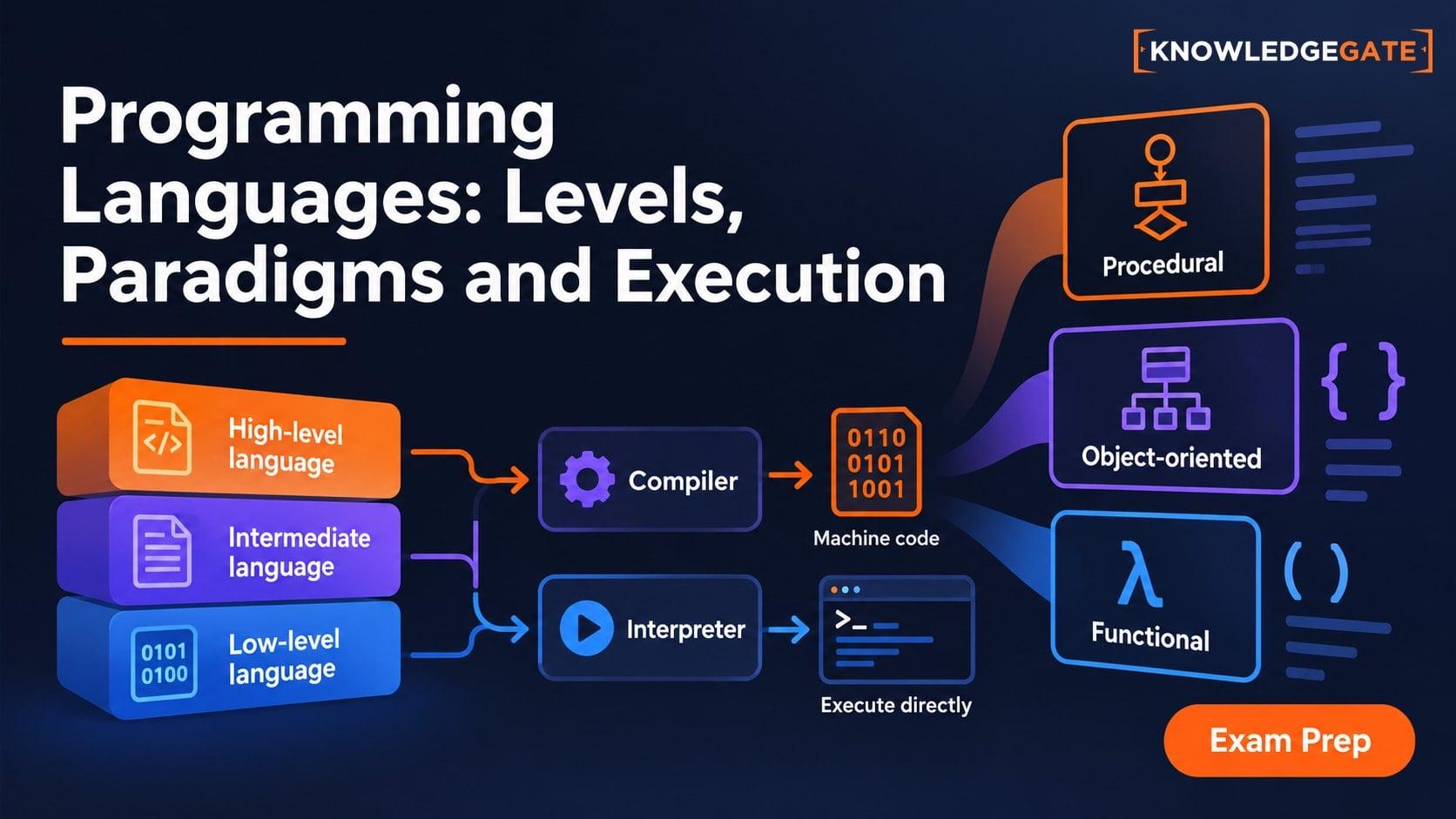
Types of Programming Languages: Levels, Paradigms and Execution Models
Learn why low-level, object-oriented, compiled and dynamically typed describe different axes. Build a clear classification map through one result expressed three ways.
Updated 13 Nov 20266 min readProgramming Languages Survey