

Cyber Threats and Malware Explained: Types, Attack Flow and a Worked Example
Learn how threats, vulnerabilities, exploits, attack vectors and malware differ. Then classify malware by behaviour and solve a simplified InvoiceSync spread scenario.
KnowledgeGate Team
Exam prep & CS education
Updated 10 Nov 20265 min read

Threat, vulnerability, exploit, virus and malware are often treated as synonyms. That confusion makes a simple scenario question look harder than it is. Build clean vocabulary, classify malware by behaviour and solve one numerical incident. The incident is a deliberately simplified exam model, not a prediction of real-world infection speed.
Cyber threat, vulnerability, exploit, attack and malware are not the same
An asset is worth protecting; a threat can cause harm; a vulnerability is a weakness; an attack vector is the route in; an exploit uses the weakness; malware is malicious software; an attack is the attempt; and impact is the harm.
In one school example, a student-record server is the asset, an attacker is the threat actor, an unpatched file-sharing service is the vulnerability, and a phishing attachment is the initial vector. Exploit code abuses the service, then malware alters or encrypts records. For the layer beneath ports and services, revise Computer Networks.
Term | Question it answers | Example from the school-server scenario |
|---|---|---|
Asset | What needs protection? | Student-record server |
Threat | What can cause harm? | Unauthorised alteration or encryption |
Vulnerability | What weakness exists? | Unpatched service |
Attack vector | Which route is used? | Phishing attachment |
Exploit | How is the weakness used? | Code abuses the service |
Malware | What malicious software runs? | Record-altering software |
Attack | What attempt occurs? | Attachment executes |
Impact | What harm results? | Records become unavailable |
Risk depends on a scenario's chance and impact. Malware is one source of cyber risk, not all cyber risk. Phishing is a delivery vector or social-engineering method, not a malware family.
Classify malware by what it does, not by one memorised label
Malware is the umbrella term. A virus attaches to a host and spreads when it runs. A worm self-propagates. A Trojan pretends to be legitimate or uses deception. Ransomware denies access, commonly through encryption. Spyware collects information without informed consent. A rootkit hides activity or maintains privileged access. A bot is one remotely controlled device; a botnet is the collection.
Labels can overlap. Fictional InvoiceSync arrives as invoice.pdf.exe, showing Trojan disguise. It scans other hosts without further user action, showing worm-like propagation, and renames documents with .locked, showing ransomware impact. Not every ransomware sample spreads like a worm.
Ask what the clue describes: delivery, replication, concealment, remote control, data theft or impact. This stops one stage from being mistaken for the whole attack.
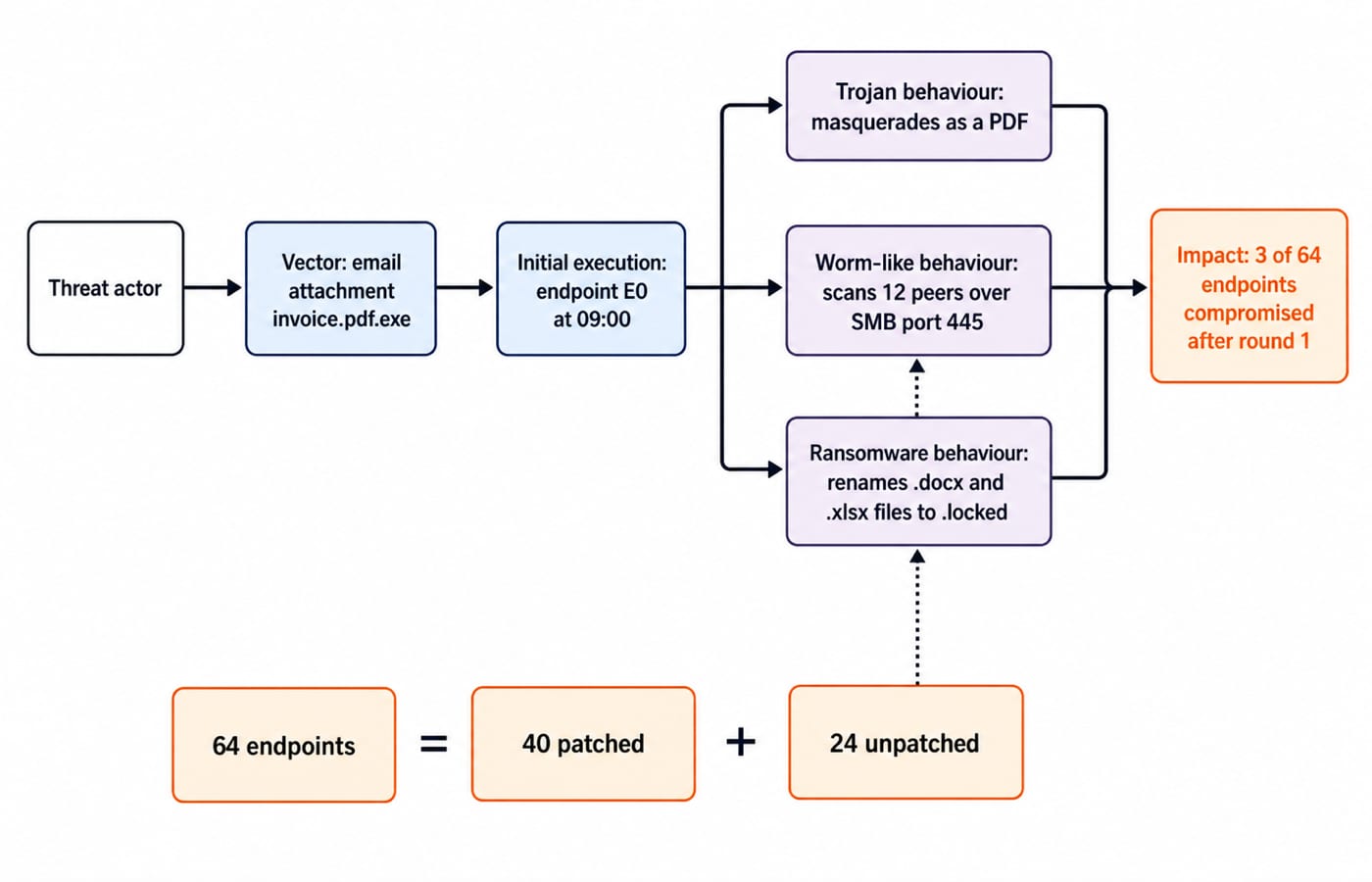
Follow the attack as a sequence, then place controls at each stage
The seven-stage model is delivery, execution, persistence, privilege or access expansion, command-and-control if present, lateral movement, and action on objectives. Incidents may skip, repeat or reorder stages, so this is a reasoning aid, not a universal law.
Delivery: email filtering and user verification.
Execution: application controls.
Persistence: endpoint monitoring.
Access expansion: least privilege.
Command-and-control: egress monitoring.
Lateral movement: segmentation and prompt patching.
Impact and recovery: tested offline or isolated backups and an incident-response plan.
A backup aids recovery but does not stop execution. A firewall does not patch a service. Antivirus does not replace least privilege, patching, segmentation and monitoring.
Worked example: calculate the first-round spread of InvoiceSync
The office has 64 endpoints: 40 patched and 24 unpatched. At 09:00, E0 runs invoice.pdf.exe, making the initial count 1. At 09:02, InvoiceSync scans 12 distinct peers over SMB port 445: seven patched and five unpatched and vulnerable. Endpoint protection blocks three of those five; two are compromised.
Calculate each requested quantity separately:
New infections = 5 vulnerable peers minus 3 blocked peers = 2.
Success rate among vulnerable peers contacted = 2 / 5 x 100 = 40%.
Infection yield across all scanned peers = 2 / 12 x 100 = 16.666...%, which rounds to 16.7%.
Total compromised after the round = 1 initial + 2 new = 3.
Affected share of the office = 3 / 64 x 100 = 4.6875%, which rounds to 4.7%.
These counterfactuals are conditional. If all five vulnerable contacted peers had been patched, the stated exploit path would cause 0 new infections and the total would remain 1, assuming no different exploit or vector. If the original attachment had been quarantined before execution, the model would start at 0.
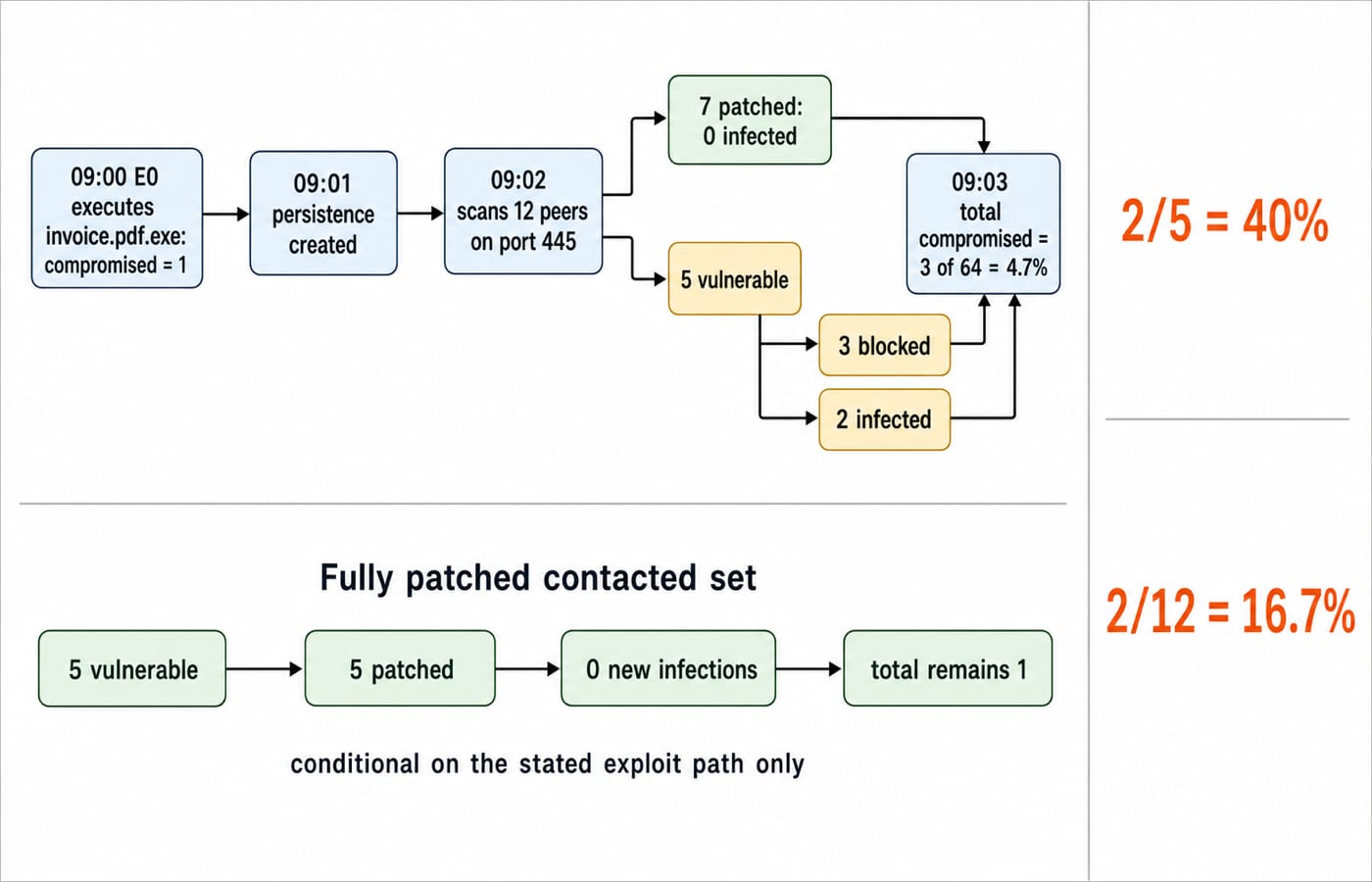
Read the evidence before choosing a malware label or control
Separate facts from inferences. A double extension supports Trojan-style deception, autonomous scanning supports worm-like propagation, and .locked changes support ransomware impact. Traffic to one unfamiliar domain may support a command-and-control hypothesis, but is not proof.
Corroborate it with email-gateway records, process-creation events, the 09:01 persistence change, telemetry for 12 connection attempts, alerts for three blocks, and file changes on two infected peers.
Quarantine E0, isolate the two affected peers, preserve logs, and patch the vulnerable service fleet-wide. Reset exposed credentials if evidence supports theft, restore from tested clean backups, and monitor for recurrence.
Common traps that turn easy cyber-security questions into wrong answers
Calling phishing a virus: it is social engineering or a vector; its attachment may deliver malware.
Giving one sample one label: delivery, propagation and payload can justify different labels.
Saying every worm copy needs user action: autonomous propagation is the clue, though user action may create the foothold.
Confusing terms: a vulnerability is the weakness; an exploit uses it. A bot is one controlled device; a botnet is the collection.
Overclaiming controls: patching closes known weaknesses, segmentation constrains movement, monitoring detects, and backups aid recovery. None guarantees safety.
How exams test cyber threats and malware
Expect definition matching, scenario classification, attack-stage sequencing, statement pairs about controls, and arithmetic with infected, blocked, patched or scanned counts. For yield over all scanned peers here, use 12, not 5 or 64: 16.7%.
KnowledgeGate's question bank has more than 25 questions on introductory cyber threats and malware for targeted practice.
Use a 30-second method: underline the action verb, identify the stage, distinguish delivery from behaviour, mark the denominator, and reject claims such as “always prevents”. Revise Computer Fundamentals for CS Teaching Exams, then practise propagation with Computer Networks MCQs.
Syllabus coverage, question counts, marks, negative marking and dates vary by body and cycle. Check the current official notification of the exam you are targeting. The Government Teaching Jobs category is a KnowledgeGate navigation hub, not an official authority.
Short version and the next practice step
Threat is the potential source of harm, vulnerability the weakness, exploit the means, malware the malicious software, vector the route, and impact the result. Remember Trojan for disguise, worm for autonomous spread, ransomware for encrypted denial, spyware for covert collection, rootkit for concealment or privileged persistence, and bot for remote control.
Redraw 64 -> 12 scanned -> 5 vulnerable -> 3 blocked -> 2 newly infected -> 3 total, change one control, and recompute. For teaching-recruitment Computer Science papers, continue with the DSSSB TGT Computer Science 2026 Section B course, whose curriculum includes Computer Networks, TCP/IP & Network Security and Society, Law & Ethics.
Keep learning

Cyber Threats and Malware Attacks: Types, Attack Vectors, and Worked Security Problems
Learn to distinguish malware classes, map attacks to the CIA triad, and solve password, cipher, and key-count numericals. The guide also covers common attack vectors and a safe way to study Indian cyber law.
Updated 30 Oct 20266 min readGATE Strategy & Roadmap

Cyber Threats and Malware Attacks: Types, Attack Chains and a Worked Incident
Learn to separate vectors, techniques and payloads, classify mixed malware behaviour, calculate exposure, and map controls to each incident stage.
Updated 26 Jul 20266 min readDBMS

Program and System Threats in Operating Systems: Worked Attack Trace and Exam Traps
Learn to separate program and system threats by trigger, propagation, target and effect, then test the method on one fully worked fictional attack trace.
Updated 18 Nov 20266 min readOperating Systems
Security in Mobile and Wireless Computing: Threats, Controls and a Worked Replay-Attack Example
Learn where wireless, device, application and identity controls apply, then trace exactly how a server detects message tampering and rejects a replay.
Updated 10 Oct 20266 min readGATE Strategy & Roadmap