Cyber Threats and Malware Attacks: Types, Attack Chains and a Worked Incident
Learn to separate vectors, techniques and payloads, classify mixed malware behaviour, calculate exposure, and map controls to each incident stage.
KnowledgeGate Team
Exam prep & CS education
Updated 26 Jul 20266 min read
Calling every piece of malicious software a virus, and every suspicious email malware, throws away the evidence you need. A real incident mixes delivery, behaviour and impact in one chain: an email arrives, a disguised file runs, copies spread across the network, files get encrypted. Naming those steps separately is what security questions across the GATE CS preparation category test, and it is what tells you which control would have broken the chain.
Build the vocabulary before naming the attack
In one chain, payroll.csv is the valuable asset. Allowing an executable attachment is a vulnerability, email is the attack vector, and user execution enables the attack. The criminal operator is the threat actor, possible harm is a threat, and the method using the weakness is an exploit or technique. Credential theft followed by encryption makes an incident, an event that compromises or threatens security.
The same asset explains the CIA triad. Reading or stealing it harms confidentiality, changing salaries harms integrity, and encrypting the only accessible copy harms availability. Ransomware directly harms availability and integrity. Confidentiality requires separate exposure or theft evidence.
Risk combines likelihood and impact. A weakness is not an attack, an indicator is not proof, and threats need no malware. Insider copying, DDoS and a malicious attachment are different paths.
Classify malware by behaviour, not by one filename
Class | Depends on host content | Self-propagates | Usual user action | Main behaviour | Typical evidence |
|---|---|---|---|---|---|
Virus | Yes | Not alone | Opens infected content | Infects executable, macro or boot record | Modified host |
Worm | No | Yes | None after entry | Copies across systems | Automatic copies |
Trojan | No | No | Opens apparent legitimate item | Deceives during delivery | Disguised file |
Ransomware | No | No | Varies | Denies access, often by encryption | Encrypted files |
Spyware | No | No | Varies | Monitors or steals data | Collection traces |
Keylogger | No | No | Varies | Captures input | Input hooks or logs |
Rootkit | No | No | Varies | Hides or preserves access | Concealed changes |
Bot | No | No | Varies | Accepts remote commands | Command-and-control traffic |
Logic bomb | May | No | Varies | Waits for a specified condition | Trigger logic |
Labels overlap. A sample may arrive as a Trojan, steal like spyware, preserve access like a rootkit, become a bot and run ransomware. Fileless, polymorphic and metamorphic describe execution or evasion, not a complete chain.
Ask six questions before naming it: How did it enter? What executed? Did it replicate? How did it persist? Did it contact command and control? What happened to data or service?
Separate the entry vector, attack technique and payload
Organise non-malware concepts by route: phishing is social engineering; brute force and credential stuffing are password attacks; spoofing, man-in-the-middle, replay, session hijacking and DoS or DDoS are network attacks; injection is an application attack. None automatically installs malware, and spoofing alone proves no compromise. DoS and DDoS differ by source distribution, not traffic volume.
A fake invoice email is the vector, impersonation is the technique, and invoice.pdf.exe is the disguise. Its loader is Trojan-style delivery, automatic copying is worm-like propagation, outbound contact suggests command and control, and encryption is ransomware impact. DNS, HTTP and email knowledge from Application Layer MCQs helps interpret this evidence.
Worked incident: classify the chain and calculate exposure
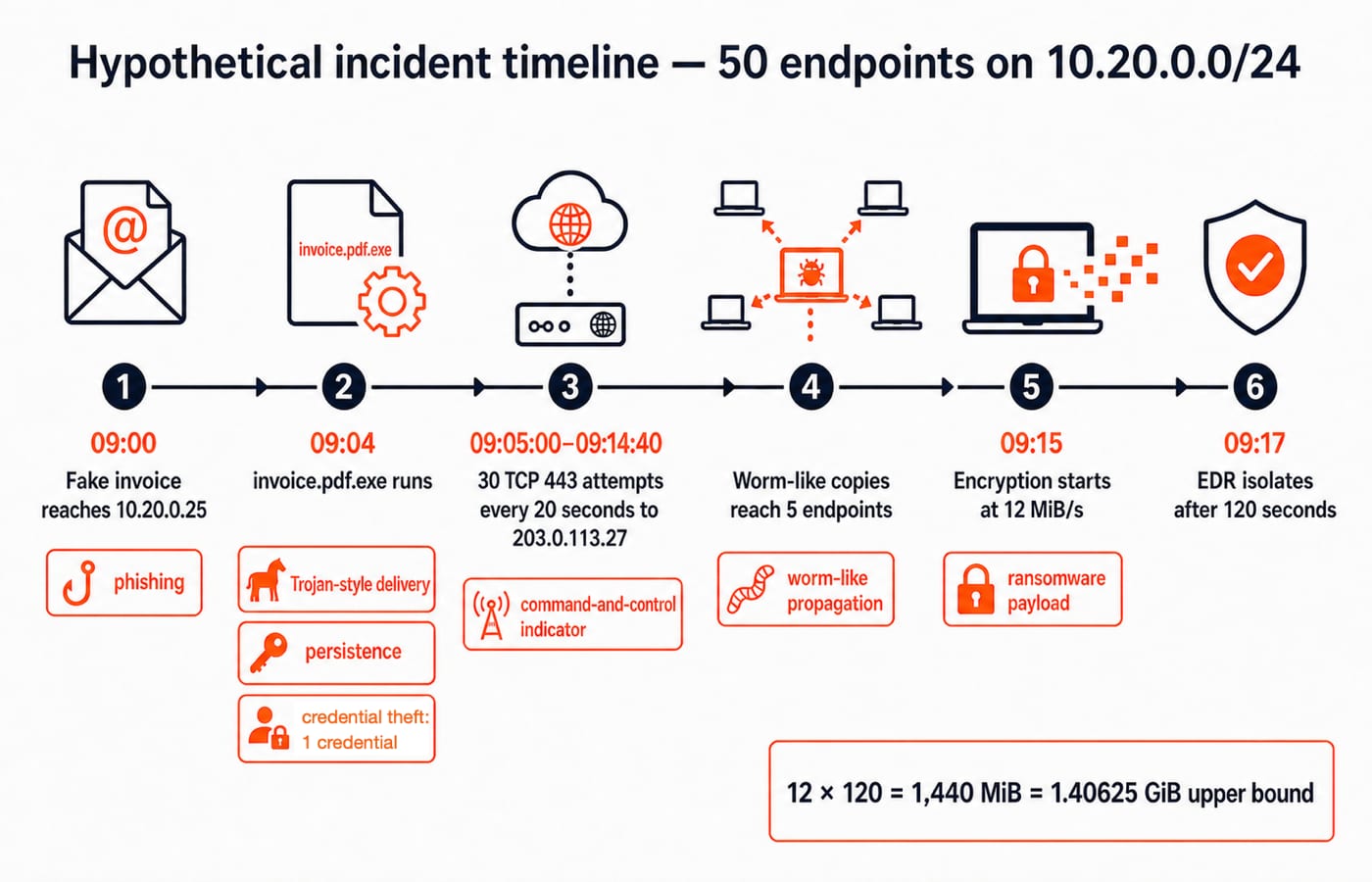
Work through an invented lab incident. 50 Windows endpoints sit on 10.20.0.0/24. At 09:00, 10.20.0.25 receives invoice.pdf.exe from accounts@vendor-payments.example. The user runs it at 09:04. It adds startup persistence, steals one browser credential and attempts outbound TCP 443 connections to an external address, 203.0.113.27, every 20 seconds.
From 09:05:00 through 09:14:40, the span is 9 minutes 40 seconds = 580 seconds. Thus 580 / 20 = 29 gaps, and the inclusive sequence has 29 + 1 = 30 attempts. A second check finds three attempts (:00, :20, :40) across ten minutes: 10 x 3 = 30.
Using a cached administrative credential, it copies itself without user action to 5 reachable endpoints. That is worm-like propagation, not proof that a copy executed. At 09:15, encryption starts on the original host at a simplified 12 MiB/s. EDR isolates it at 09:17, 120 seconds later:
12 MiB/s x 120 s = 1,440 MiB
Using 1 GiB = 1,024 MiB, 1,440 / 1,024 = 45 / 32 = 1.40625 GiB. That bound ignores file-system and encryption overhead, so read it as a ceiling on what the original host could have lost, not a measured figure and not a recovery estimate for the network.
Evidence supports phishing, Trojan-style delivery, startup persistence, confidential credential theft, worm-like copying, 30 command-and-control indicators, and ransomware affecting integrity and availability. It does not show virus-style host infection.
Break the chain with layered controls
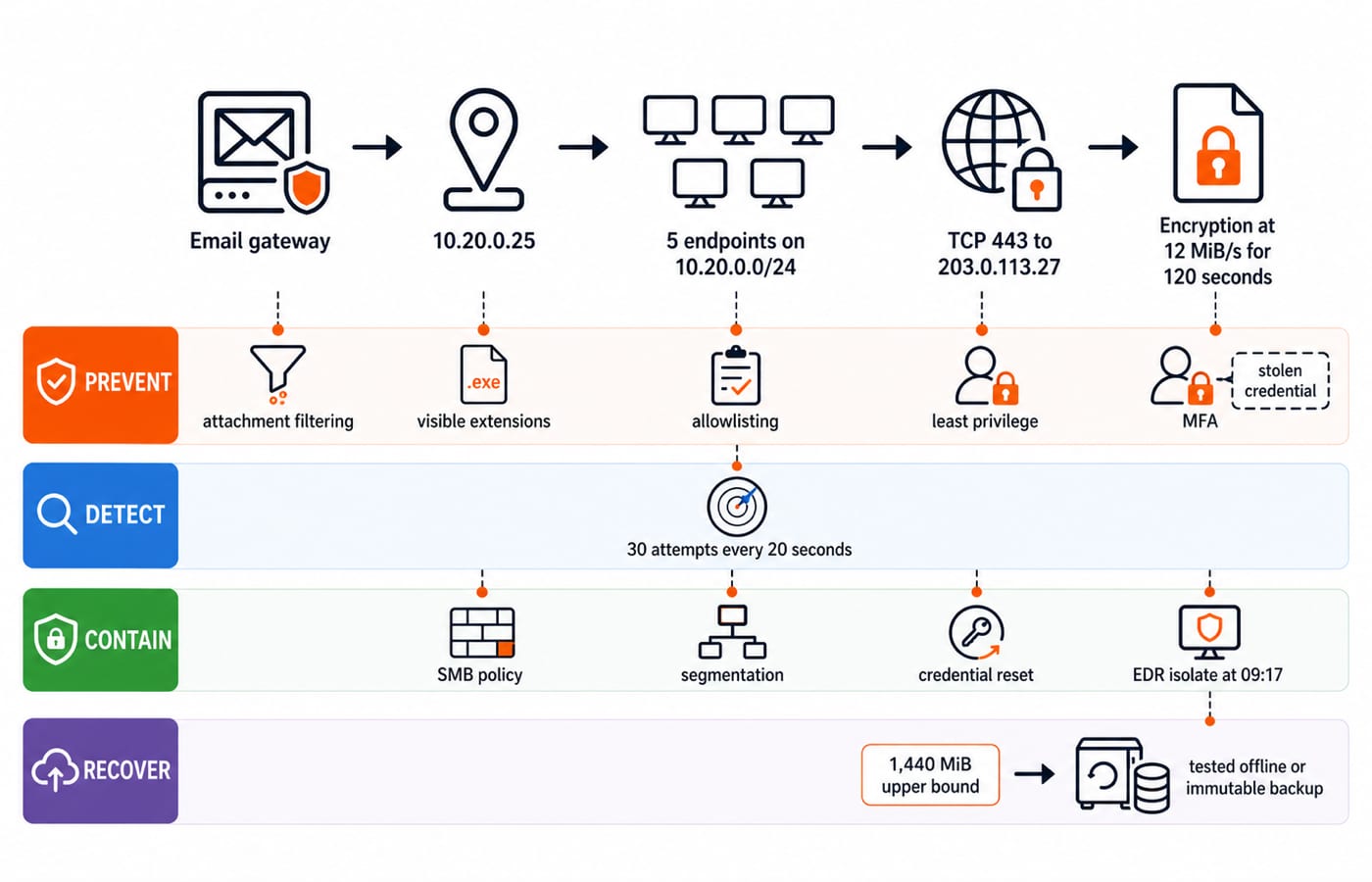
Attachment filtering and visible extensions reduce disguise; allowlisting and least privilege restrict execution. MFA devalues a stolen password but cannot stop encryption on an infected endpoint. SMB policy and segmentation limit movement. Subnetting and IP Addressing MCQs build addressing knowledge, but subnetting alone enforces no policy. Egress analytics and EDR detect the 20-second pattern, isolation contains spread, and tested offline or immutable backups support recovery, not prevention.
Correlate email headers, process trees, startup changes, authentication events, SMB logs, DNS, proxy or flow logs, file changes and EDR alerts. Investigate the regular attempts, but TCP 443 and encryption have legitimate uses.
Respond in order: isolate 10.20.0.25 and the 5 endpoints; preserve evidence; reset the credential; block confirmed indicators; scope, eradicate persistence, restore a known-good backup and monitor. Do not destroy evidence first.
Common classification and control traps
Every malware is a virus: require an infected or modified executable, macro or boot record.
No click means virus: automatic propagation instead supports worm-like behaviour.
A Trojan is the final payload: Trojan describes deceptive delivery.
Ransomware always steals data: encryption shows denial or alteration; theft needs separate evidence.
One sample gets one family: evidence may support several labels.
Thirty attempts mean thirty sessions: attempts are indicators, not confirmed connections.
Five copies mean five executions: copying does not prove execution.
The entire lab lost 1.40625 GiB: that figure is the simplified upper bound for the original host only.
A firewall cannot stop a permitted attachment alone. Signatures may miss altered malware. MFA cannot repair an endpoint. Backups must be isolated, tested and known-good.
How exams and interviews test malware analysis
Questions may ask you to classify a scenario, separate vector from payload, match the CIA impact, order the stages, choose a control, spot an overclaim, or calculate exposure. The usual trap is a scenario whose evidence supports two labels while the options allow only one: answer with the label the evidence proves, not the one the vocabulary suggests.
Here, disguise plus user launch supports Trojan-style delivery, automatic copying supports worm-like behaviour, the inclusive sequence gives 30 attempts, and the upper bound is 1,440 MiB, or 1.40625 GiB. Offline backups aid recovery, not prevention. In interviews, justify each label and name preventive, detective, containment and recovery controls. For timed practice on scenario questions of this shape, work through the GATE Test Series.
Cyber threats and malware attacks in one minute
Identify the asset and CIA impact.
Separate vulnerability, vector, technique and payload.
Classify malware from replication and behaviour.
Allow multiple labels when evidence supports them.
Correlate indicators before declaring compromise.
Layer prevention, detection, containment and recovery.
Redraw the 09:00 to 09:17 chain from memory, recalculate the 1,440 MiB bound, and add one control per stage. Then carry the same evidence-first habit into the rest of the syllabus with GATE Guidance by Sanchit Sir.
Keep learning
Data Mining and Data Warehouse Explained: Concepts, OLAP and Worked Examples
Follow six orders from operational sources into a warehouse, calculate OLAP totals, and test an association rule on five shopping baskets.
Updated 4 Oct 20266 min readDBMS
Set Operations and Cartesian Product in Relational Algebra: Worked Examples and Exam Traps
Learn when relational set operations are legal, calculate exact union and difference results, enumerate a Cartesian product, and trace how a join filters it.
Updated 29 Sep 20266 min readDBMS
DBMS Interview Questions: Keys, Normalisation and Transactions Through One Worked Schema
Build defensible DBMS interview answers by tracing keys, normal forms, ACID and isolation through one university-enrolment database.
Updated 25 Sep 20265 min readDBMS
Super Key, Candidate Key and Primary Key: A Worked DBMS Example
Use one ENROLMENT relation to derive two candidate keys, enumerate every super key, select a primary key and translate the result into SQL.
Updated 24 Sep 20266 min readDBMS