

PowerPoint Slides & Views MCQs: 12 Solved Questions with Explanations
Test yourself on 12 PowerPoint questions covering Master views, Slide Sorter, templates, effects, file formats and slideshow shortcuts.
KnowledgeGate Team
Exam prep & CS education
Updated 9 Nov 20267 min read

PowerPoint MCQs often place similar-looking terms such as Slide Master, Handout Master, Slide Sorter, transitions and animations beside menu paths and slideshow shortcuts. The terms overlap, but their scopes do not: a command may target the deck, printed output, one slide, one object or the running show. These same distinctions recur in the UP Police Computer Operator Exam Prep route.
PowerPoint views, masters and effects: scope refresher
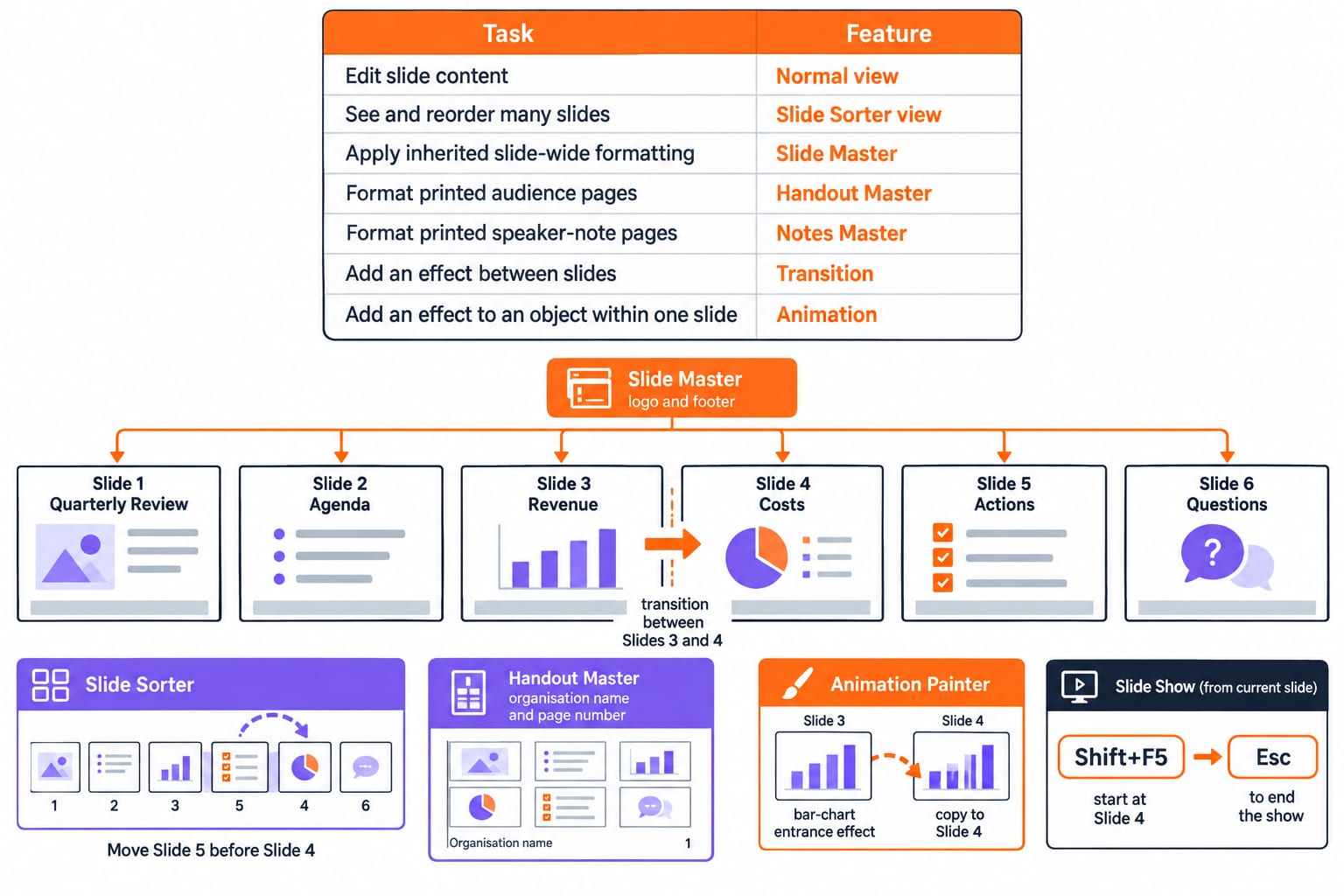
Start by matching the task to its scope.
Task | PowerPoint feature |
|---|---|
Edit slide content | Normal view |
See and reorder many slides | Slide Sorter view |
Apply inherited slide-wide formatting | Slide Master |
Format printed audience pages | Handout Master |
Format printed speaker-note pages | Notes Master |
Add an effect between slides | Transition |
Add an effect to an object within one slide | Animation |
Use a six-slide deck: Slide 1 Quarterly Review, Slide 2 Agenda, Slide 3 Revenue, Slide 4 Costs, Slide 5 Actions, and Slide 6 Questions. Put the logo and footer on all six slides through Slide Master. In Slide Sorter, move Slide 5 before Slide 4. Add the organisation name and page number to printed handouts through Handout Master. Add a transition between Slides 3 and 4, then use Animation Painter to copy the bar-chart entrance effect from Slide 3 to Slide 4. With Slide 4 active, press Shift+F5 to preview from there. Press Esc to end the show.
The rule is simple: first identify the object being changed. A deck, printed handout, slide object and full-screen show have four different scopes.
PowerPoint MCQs 1-3: Master views and presentation-wide changes
Question 1
Which of the following is not a valid Master view option in Microsoft PowerPoint 2016?
A. Notes master
B. Outline master
C. Slide master
D. Handout master
Correct answer: B. Outline master.
PowerPoint 2016 has Slide Master, Handout Master and Notes Master views. Outline helps you inspect and organise the text structure of slides, but it is not a Master view. The word Master signals repeated formatting for a particular output scope.
Question 2
In MS-PowerPoint, Handout Master is used to bring changes in _________.
A. Layout of presentation handouts
B. Slide formatting
C. Slide transaction
D. Layout of slide
Correct answer: A. Layout of presentation handouts.
A handout is the audience-facing printed version of slides. Handout Master controls its layout and repeated elements, not the design of the slides themselves. Option C says transaction, which is irrelevant here even if you mentally correct it to transition.
Question 3
Slide Master is used to make changes on _________.
A. All the slides
B. Only a single slide
C. On odd slides
D. On even slide
Correct answer: A. All the slides.
A master change can flow to every slide based on that master. In the six-slide example, adding the logo to Slide Master takes one action. Adding it manually to Slides 1 through 6 takes six actions and creates six opportunities for inconsistency.
PowerPoint MCQs 4-6: Slide Sorter, bulk transitions and templates
Question 4
Slide sorter can be accessed from which menu?
A. View
B. Edit
C. File
D. Insert
E. None of these
Correct answer: A. View.
Slide Sorter changes how you view a presentation, so View is the matching menu family. File handles document operations, Insert adds content, and Edit changes selected content. Ribbon placement may look different by version, but this question asks for the menu classification.
Question 5
Which of the following views is the best view to use when setting transition effects for all slides in a presentation?
A. Slide
B. Notes page view
C. Outline view
D. Slide sorter view
E. None of these
Correct answer: D. Slide sorter view.
Slide Sorter displays the whole deck as thumbnails and lets you select many slides together. For the six-slide deck, select Slides 1 through 6 and apply the transition once. Opening and changing each slide separately would require six applications.
Question 6
The selected design template can be applied:
A. To current slide only
B. To all the slides
C. To all the new presentations you create
D. All of these
E. None of these
Correct answer: D. All of these.
In the classic-interface version of this question, a design template can apply to the current or selected slide, the whole current deck, or serve as the basis for a new presentation. All of these collects those three scopes. Exact ribbon wording can differ across PowerPoint releases.
PowerPoint MCQs 7-9: transitions, animations and the classic menu
Question 7
In the classic menu interface of Microsoft PowerPoint, which menu provides options like Animation Scheme, Custom Animation, and Slide Transition?
A. Insert Menu
B. Format Menu
C. Tools Menu
D. Slide Show Menu
E. None of these
Correct answer: D. Slide Show Menu.
Classic menu interface is the decisive qualifier. In that interface, playback and effect controls such as Animation Scheme, Custom Animation and Slide Transition sit under Slide Show. If you use a newer ribbon, answer for the historical interface named in the stem.
Question 8
Special effects used to introduce slides in a presentation are called:
A. Effects
B. Custom animations
C. Transitions
D. Present animations
Correct answer: C. Transitions.
A transition works at the boundary between two slides. An animation works on text, a shape, an image or another object within one slide. A Fade between Slides 3 and 4 is a transition. Bars appearing one by one on Slide 4 are animations.
Solve it on KnowledgeGate
Question 9
Which option allows you to copy animations from one object to another ?
A. Morph Painter
B. Animation Painter
C. Design Ideas
D. Slide Master
Correct answer: B. Animation Painter.
Animation Painter copies an animation setup from one object to another, much as Format Painter copies formatting. It can copy the entrance effect from the four-bar chart on Slide 3 to the four-bar chart on Slide 4 without rebuilding four separate effects. Morph is a transition, while Slide Master controls inherited design.
PowerPoint MCQs 10-12: file format and slideshow control
Question 10
Which of the following is the CORRECT extension for PowerPoint?
A.
.potB.
.pptxC.
.pngxD.
.ppsx
Correct answer: B. .pptx.
The stem uses PowerPoint loosely because .pot and .ppsx are also PowerPoint-related formats: .pot is a legacy template and .ppsx is a slide show. For the intended standard editable presentation file in modern PowerPoint, .pptx is correct, so the keyed answer is B.
Question 11
What will happen if you press ESC key during PowerPoint slideshow?
A. End of slide show
B. Minimizes PowerPoint window
C. Displays first slide
D. Displays last slide
Correct answer: A. End of slide show.
Esc exits full-screen Slide Show mode and returns you to the editing interface. It neither jumps to a boundary slide nor minimises PowerPoint. If Slide 4 of the six-slide deck is showing, Esc ends playback instead of moving to Slide 1 or Slide 6.
Question 12
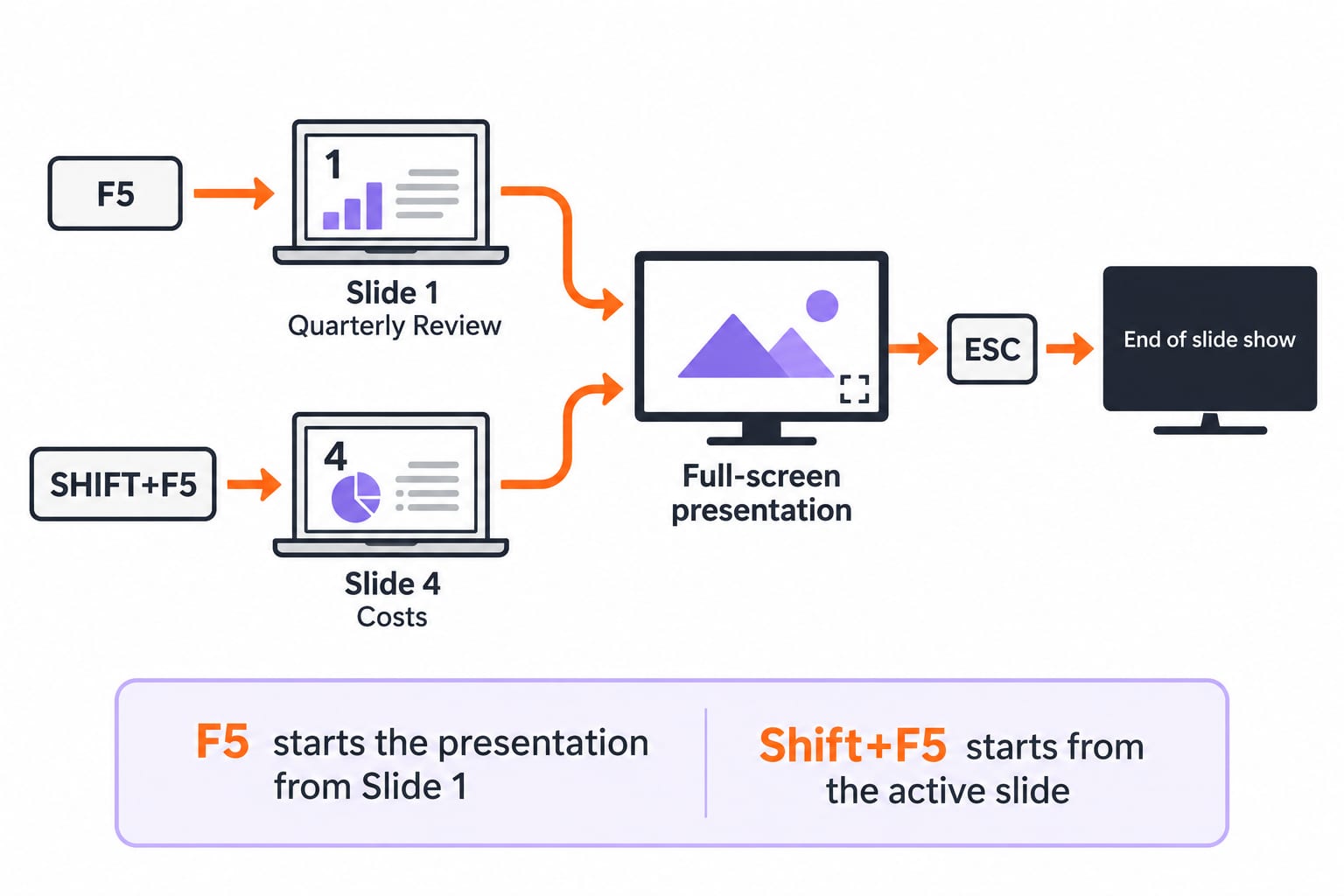
In MS-PowerPoint 2007, _________ is a shortcut to start presentation from current slide.
A. F5
B. ALT+F5
C. CTRL+F5
D. SHIFT+F5
Correct answer: D. SHIFT+F5.
F5 starts the presentation from Slide 1, while Shift+F5 starts from the active slide. If Slide 4 Costs is selected during rehearsal, Shift+F5 begins at Slide 4. Pressing F5 instead returns to Slide 1 Quarterly Review.
The five PowerPoint traps these MCQs expose
Trap | Questions to revisit |
|---|---|
Slide Master versus Handout Master | Q1 to Q3 |
Normal view versus Slide Sorter | Q4 to Q5 |
Template scope | Q6 |
Transition versus animation | Q7 to Q9 |
File type and slideshow state | Q10 to Q12 |
Use a 20-second routine. Underline the scope word, such as slide, all slides, handout, object or current slide. Notice version qualifiers such as PowerPoint 2007, PowerPoint 2016 and classic menu interface. Remove options that belong to another scope, then choose the exact command or view.
For the wider Word, Excel and PowerPoint map, revise MS Office for CS Teaching Exams. The earlier PowerPoint Slides and Views Explained: A Worked Deck and Exam Traps provides the full view-selection model, hidden-slide counts and a reordered deck. Questions 1-12 instead require rejecting distractors through version and scope clues.
PowerPoint Slides & Views: the next practice step
Retake Q1, Q5, Q8, Q10 and Q12 without looking at the answers. These five test Master-view recognition, bulk view selection, transition-versus-animation scope, file extension and slideshow start position. Score 5/5, then explain aloud why every wrong option belongs to a different scope. If you miss one, rebuild the task-to-feature table before attempting more questions.
Use the UP Police Computer Operator Course for sequenced learning and the UP Police Computer Operator Test Series for timed practice. Identify what is being changed, identify how widely the change should apply, and only then choose the PowerPoint view, master, effect or shortcut.
Keep learning

PowerPoint Slides and Views Explained: A Worked Deck and Exam Traps
Learn what each PowerPoint view does, then trace a deck through reordering, duplication and hiding. The worked example separates slide count from show count.
Updated 26 Oct 20265 min readTeaching Recruitment (Computer Science)
Views and PL/SQL Basics MCQs: 12 Solved Questions with Explanations
Test views, materialized views, PL/SQL purity, Pro*C and trigger syntax with 12 solved MCQs. Each explanation separates the right rule from its distractors.
Updated 29 Oct 20267 min readDBMS MCQs

Process State and Lifecycle MCQs: 12 Solved OS Questions with Explanations
Attempt 12 process-state MCQs, then use concise explanations to trace CPU scheduling events, termination cases, Unix lifecycle traps, and CPU limits.
Updated 29 Oct 20268 min read76 viewsOperating System MCQs

Open Addressing Probing MCQs: 12 Solved Questions with Explanations
Solve 12 open-addressing MCQs with worked probe sequences, collision traces, wrap-around cases, clustering rules and insertion-order constraints.
Updated 16 Sep 20268 min readData Structures MCQs