C++ Setup Tutorial: Install a Compiler and Run Your First Program
Set up a C++ compiler, turn main.cpp into an executable, and learn to diagnose the stage that failed. Two small programs make every command and value concrete.
KnowledgeGate Team
Exam prep & CS education
Updated 20 Aug 20266 min read
Installing an editor can feel like installing C++, yet the first build still fails because the editor, compiler, terminal, source file and executable are separate parts. Verify the compiler in a terminal before writing any code, because a missing toolchain and a mistyped semicolon fail in completely different ways and only one of them is your program. One command, g++ -std=c++17 -Wall -Wextra main.cpp -o first_program, turns main.cpp into a runnable executable, and a second short program traces three quizzes worth 18 points each to the printed line Total points: 54. The Coding & DSA Courses for Placements category holds the broader learning path.
Related reading: C++ compilation model and C++ STL containers.
1. C++ setup starts with four separate tools
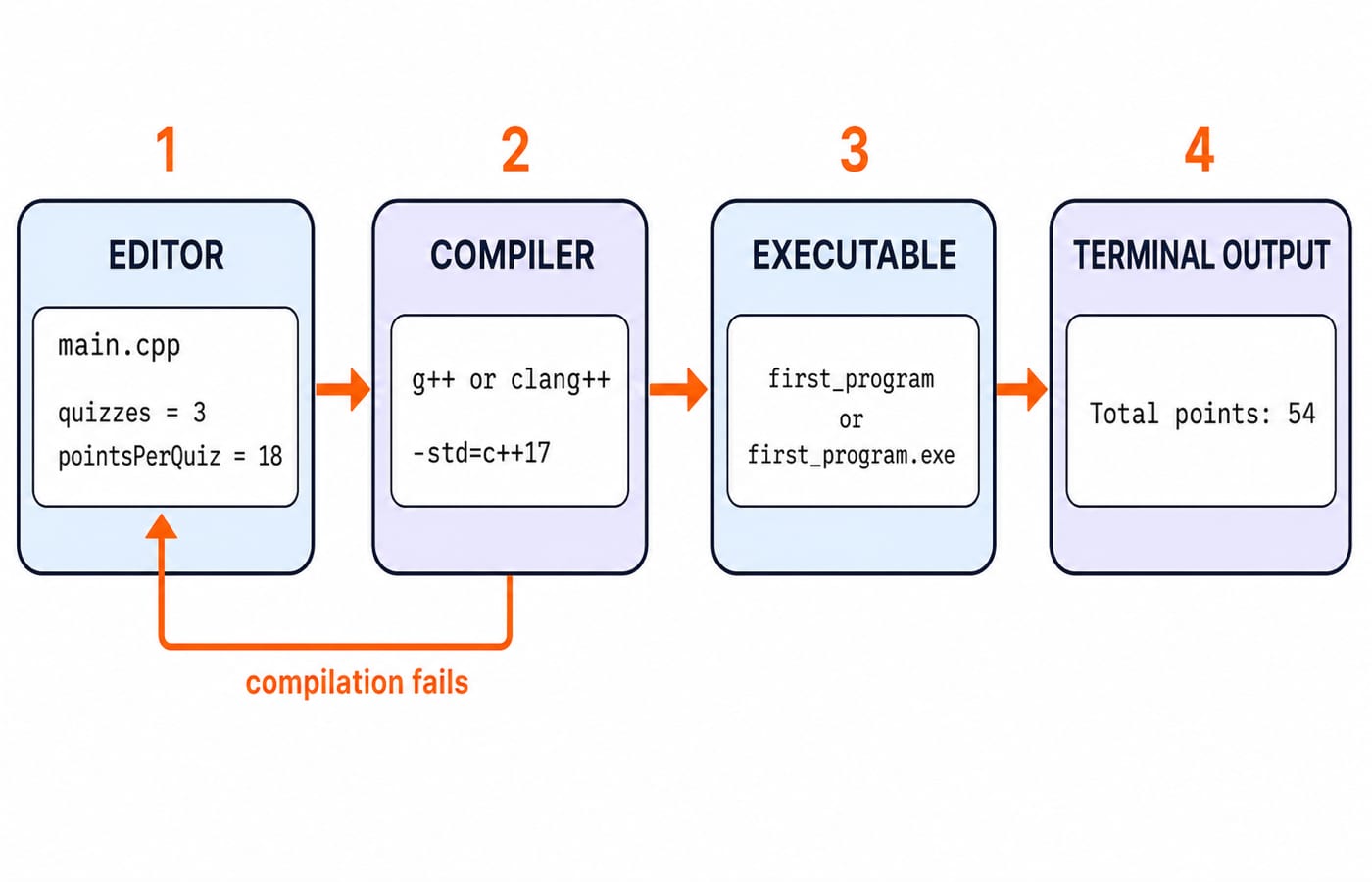
A plain-text editor writes main.cpp. A C++ compiler translates that source text. A terminal runs compiler commands and, later, the finished executable. The executable is the machine-runnable output. Visual Studio Code is an editor unless you install a compiler toolchain separately.
The source file and output file are different. main.cpp remains readable and editable C++ text. A successful build creates first_program on macOS or Linux, or first_program.exe on Windows. Trying to run main.cpp does not compile it.
Use the same path for every program you write: save the source, compile it with warnings enabled, stop and read any diagnostic, then run the executable only after compilation succeeds. IDE configuration and debugger setup can wait. First make this small toolchain visible and test each stage.
2. Install and verify a C++ compiler on Windows, macOS or Linux
Choose one route for your operating system, then verify it immediately.
Windows: Install either a GCC-compatible C++ toolchain or Microsoft C++ Build Tools. For the GCC route, open the terminal configured by that toolchain and run
g++ --version.macOS: Run
xcode-select --installto install the command-line developer tools. Then open a new terminal and runclang++ --version.Debian or Ubuntu: Run
sudo apt update, followed bysudo apt install g++. Verify the installation withg++ --version.
Success means the verification command prints compiler identification and version information instead of a command-not-found message. Do not worry if the exact version differs from another learner's. It depends on the operating system and installation date.
GCC and Clang share the same command shape, so the same flags work on either. If you use Microsoft C++, run cl from a Developer Command Prompt. Its command syntax and diagnostic wording differ, but it compiles the same C++ source program.
3. Your first C++ program: save, compile and run main.cpp
Create a plain-text file named main.cpp, enter this program exactly, and save it:
#include <iostream>

int main() {
    std::cout << "C++ is ready\n";
    return 0;
}
Open the terminal in the folder that contains main.cpp. Run dir on Windows or ls on macOS and Linux. Confirm that the filename appears before compiling. This check prevents a correct command from failing in the wrong working directory.
Compile with GCC:
g++ -std=c++17 -Wall -Wextra main.cpp -o first_programThe -std=c++17 flag selects the language standard. -Wall -Wextra asks the compiler to report useful warnings.
On macOS, you can substitute clang++ for g++. The -o first_program part names the executable that the compiler creates.
On macOS or Linux, run ./first_program. On Windows with the GCC route, run .\first_program.exe. Both commands print exactly:
C++ is readyIf the compiler reports no diagnostic and the folder now contains the executable, the build succeeded. The run command starts that output file, not the source file.
4. C++ first-program syntax: what every line does
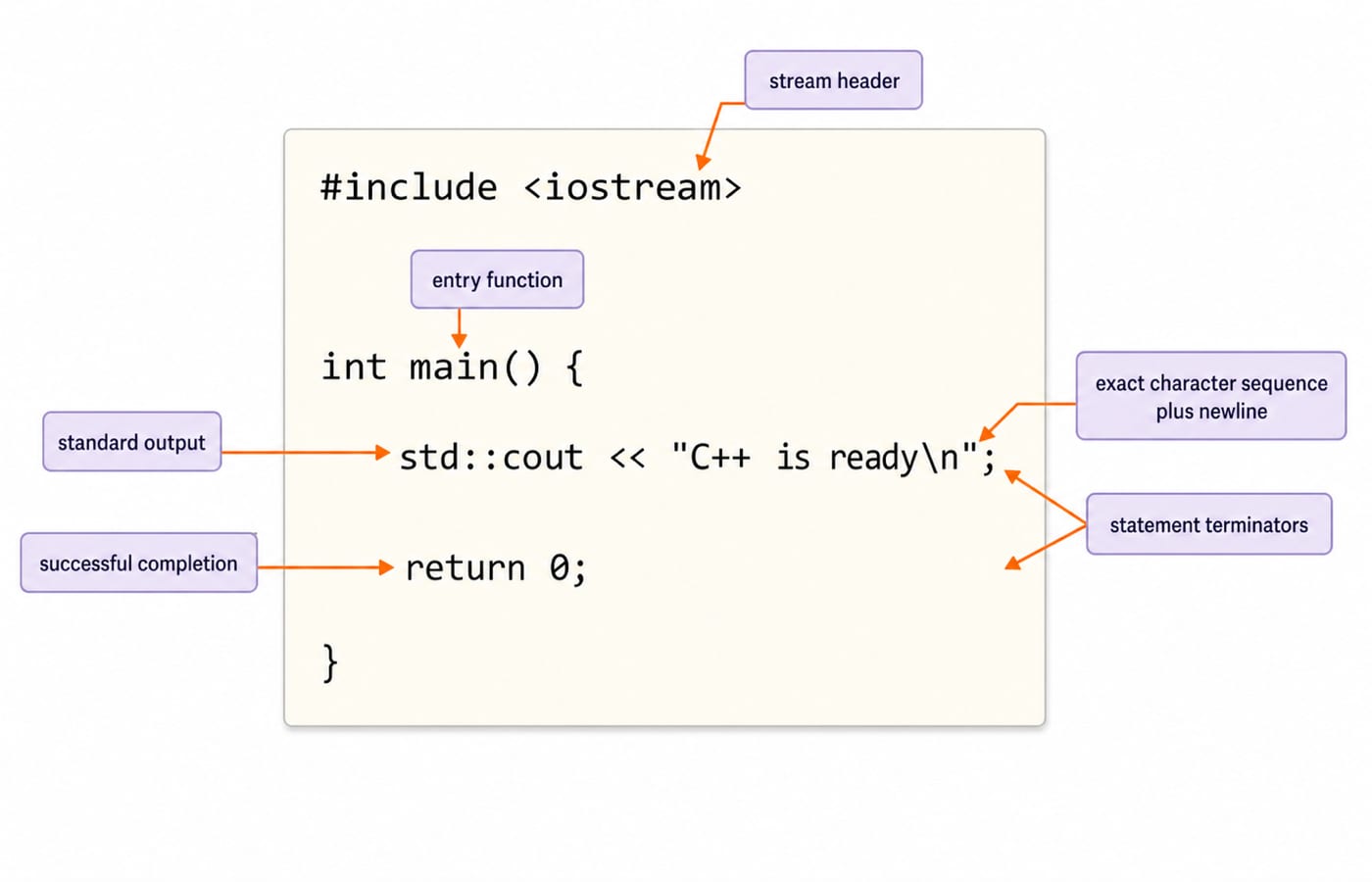
#include <iostream> makes the standard stream declarations available. int main() defines the function where program execution starts, and the braces delimit its body. std::cout writes characters to standard output. The << operator sends the string into that stream, while \n ends the displayed line. Finally, return 0; reports successful completion to the host environment.
C++ is case-sensitive, so main and Main are different names. Statements such as the output and return lines end with semicolons. The straight quotes in "C++ is ready\n" belong to the string syntax. Typographic curly quotes copied from formatted text are not valid substitutes.
The prefix std:: says that cout belongs to the standard namespace. Writing the qualified name keeps this first program explicit and avoids a blanket using namespace std; declaration.
5. Worked C++ example: compute and print 54 total points
Replace the file contents with this complete program:
#include <iostream>

int main() {
    const int quizzes = 3;
    const int pointsPerQuiz = 18;
    const int totalPoints = quizzes * pointsPerQuiz;

    std::cout << "Total points: " << totalPoints << '\n';
    return 0;
}
Compile it to the same executable name with g++ -std=c++17 -Wall -Wextra main.cpp -o first_program, or use the equivalent clang++ command. Then run ./first_program on macOS or Linux, or .\first_program.exe on Windows.
Trace the values before checking the output. quizzes is 3 and pointsPerQuiz is 18. Therefore, 3 * 18 = 54, so totalPoints is initialised to 54.
Expression | Substituted values | Result |
|---|---|---|
|
|
|
String insertion |
|
|
Integer insertion |
|
|
The output statement performs three insertions from left to right: the label, the integer value, then the newline character. The calculation happens earlier, so cout receives the already computed value 54.
The exact output is:
Total points: 54Check the multiplication independently as repeated addition: 18 + 18 + 18 = 54. Both routes agree. The const keyword prevents quizzes, pointsPerQuiz and totalPoints from being reassigned after their initialisation in this program. It makes the intended fixed values clear while you follow the calculation.
6. C++ setup errors: identify the failing stage and fix it
Symptom | Failing stage | Likely cause | Correction |
|---|---|---|---|
| Compiler launch | Compiler is missing or not on the command path | Install the toolchain or open its configured terminal |
| Source lookup | Terminal is in the wrong folder or the filename differs | Change folder and confirm with |
Diagnostic points near | Source compilation | Previous output line may lack a semicolon | Inspect nearby lines and restore |
Executable is missing | Build | Compilation did not succeed | Fix every diagnostic and compile again |
Permission denied on macOS or Linux | Run | Source file was run instead of the executable | Run |
For one exact repair, remove the semicolon from std::cout << "C++ is ready\n", compile, restore ;, and compile again. Diagnostic wording and caret positions vary, so inspect the named file and nearby lines instead of memorising one message.
Also check for main.cpp.txt, an unsaved editor buffer, Main.cpp versus main.cpp on a case-sensitive filesystem, and curly quotes inside a copied string.
7. C++ beginner checks: predict, repair and extend the program
Work through each check with the file open, and write down your answer before reading ours.
Change
quizzesto 5 andpointsPerQuizto 12. Answer:5 * 12 = 60, so the output isTotal points: 60.Delete the
#include <iostream>line and compile again. Answer: the build fails and the diagnostic points at thestd::coutline, because the declaration ofstd::coutcomes from that header. No executable is written, so an oldfirst_programleft in the folder would still run the previous version. Restore the line and compile again.Add
std::cout << "Setup complete\n";after the total. Answer: the program printsTotal points: 54first andSetup completesecond.Rename the source to
scores.cpp. Answer: compile withg++ -std=c++17 -Wall -Wextra scores.cpp -o scores, then run./scoreson macOS or Linux.
Later, Time Complexity & Asymptotic Notation: Big-O explains how work grows, while Stacks and Queues: Operations and Uses shows a data-structure application. Neither is needed before your first program runs.
8. C++ setup: the short version and your next step
Retain this sequence: install one compiler, verify it in the terminal, save main.cpp, compile with warnings, fix every diagnostic, run the executable, and compare actual output with expected output. That loop is the one to reuse for every later program you write. The checked calculation is 3 * 18 = 54, producing Total points: 54.
If you want to continue from first-program syntax into broader programming and placement practice, Coding for Placements: C, C++, Java, Python offers a structured next step.
Keep learning

ctype.h Functions in C: Classify Characters and Convert Case Safely
Learn which character test to choose, trace a complete C classifier, and avoid signed-char and EOF mistakes. Worked examples separate classification from case conversion.
Updated 5 Oct 20266 min readC
Key Features of the C Programming Language: Code Examples
What do C's features actually do in a program? Follow an even-number sum and a pointer update, then test your understanding with small code changes.
Updated 30 Sep 20266 min readC
Preprocessor and Macros in C: Expansion Rules and Worked Examples
Learn what happens before C compilation, expand object-like and function-like macros by hand, and avoid precedence and repeated-evaluation bugs.
Updated 18 Sep 20266 min readC
Variables and Data Types in C: Declarations, Conversions and Runnable Examples
Learn how C types control stored values, expressions and I/O. Compile a complete marks program, trace its conversions and repair common type mistakes.
Updated 17 Sep 20266 min readC