IISc Administrative Assistant Email, Internet and Data Security: Office Workflows, Phishing and Safe Sharing
Build one practical model for email fields, web use, file permissions and account safety, then test it through an end-to-end office scenario and five drills.
KnowledgeGate Team
Exam prep & CS education
Updated 30 Jul 20266 min read
Email, browsing and file sharing feel familiar because we use them every day. Objective questions, however, test precise distinctions: To versus Cc versus Bcc, a browser versus a search engine, sending versus receiving protocols, and a convenient action versus a safe one. For IISc Administrative Assistant preparation, the reliable route is one working digital-office model, then a single office task that forces you to use every part of it.
Build one digital-office map before memorising terms
Map the topic through four connected layers. Message covers email fields and protocols. Web covers browsers, search engines, URLs and downloads. File covers classification, access and sharing. Identity covers passwords, MFA and phishing decisions.
An administrator must notify 12 candidates, download one IISc notice, share a 120-row verification sheet with two authorised reviewers, and reject one fake password-reset message. The goals are to keep addresses private, confirm the source, limit data access and protect the account.
Candidate addresses need confidentiality. The 120 rows need integrity, meaning no unauthorised changes. The approved file needs availability for both reviewers. One office task therefore crosses all four layers.
Read the email fields, then trace the protocols
Consider this sample message:
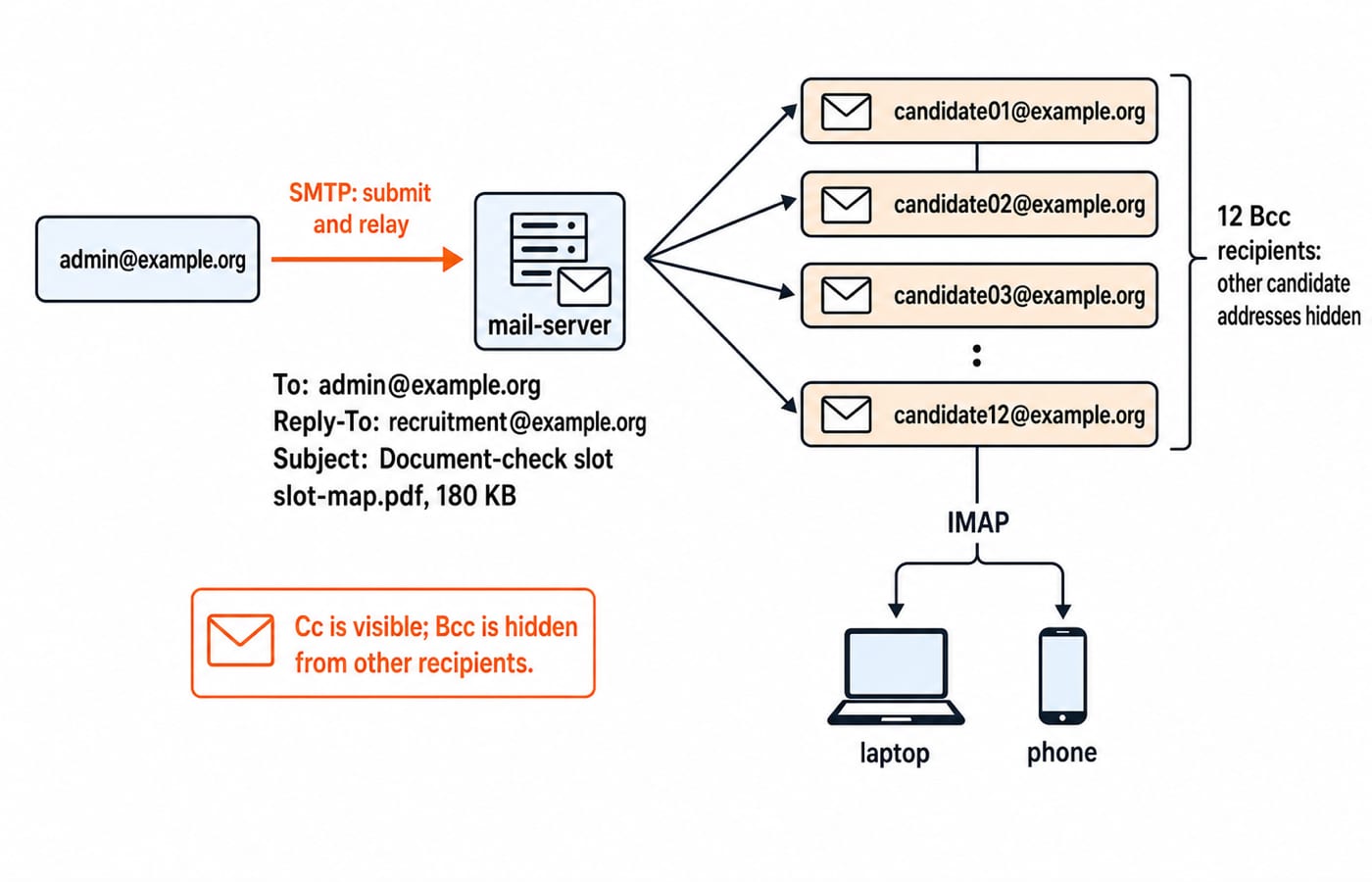
From: admin@example.orgTo: admin@example.orgBcc: candidate01@example.orgthroughcandidate12@example.orgReply-To: recruitment@example.orgSubject: Document-check slotAttachment:
slot-map.pdf,180 KB
Here, To is the visible primary recipient. Bcc delivers to all 12 candidates while hiding their addresses from one another. Cc recipients would be visible. Reply-To directs replies to recruitment@example.org; the Subject states the purpose; the attachment carries the slot map.
SMTP submits and relays outgoing mail. IMAP keeps a server mailbox synchronised across a laptop and phone. POP3 downloads messages and may retain or remove server copies, depending on configuration. POP3 does not always delete mail, and IMAP does not send it. All three sit in the application layer beside DNS and HTTP, traced end to end in Application Layer Protocols: DNS, HTTP and email.
Two traps matter. Reply All can expose an accidental Cc list, while a Bcc recipient who replies to all can reveal their own participation. Also, notice.pdf.exe is an executable because the final extension is .exe.
Separate the browser, search engine, website and URL
A browser retrieves and displays pages. A search engine indexes pages and helps find them. A website is a collection under a domain; a URL addresses one resource. Using a search engine inside a browser does not make them identical.
In https://www.iisc.ac.in/positions-open/, the scheme is https, the host is www.iisc.ac.in, the registered domain is iisc.ac.in, and the path is /positions-open/. HTTPS protects the connection, but cannot prove that a site is genuine.
For IISc positions open, choose A, https://www.iisc.ac.in/positions-open/, over B, http://iisc-recruitment.example/urgent-login, or C, https://short.example/x7Q2. A has the verified official domain. B is unrelated and lacks HTTPS. C hides its destination. Check a shortened link independently, and reach notice.pdf through the official page rather than trusting a filename or snippet.
Share the minimum file with the minimum access
The confidential candidate-records-v03.xlsx is 96 KB with 120 rows and four columns: Candidate ID, Name, Email, and Verification Status. Totals are 74 Complete, 31 Incomplete, and 15 Pending. Forward check: 74 + 31 = 105; 105 + 15 = 120. Reverse check: 120 - 74 - 31 = 15.
A five-member panel needs only those totals, so give it a view-only candidate-summary.pdf without identifiers. Only verifier1@example.org and verifier2@example.org get the workbook, with edit access for 24 hours.
An "anyone with the link" URL exposes too much. Use named recipients, least privilege, a short expiry, version v03, removal of obsolete v02, and a final access review. Deleting a local copy does not revoke cloud access.
Classify files as public, internal, confidential or highly restricted. Names and emails make this workbook confidential; the aggregate PDF has no personal identifiers. Sending an encrypted file and its password together weakens separation. For the Word and Excel side of the same document-check task, see IISc Administrative Assistant MS Office: Word, Excel and PowerPoint Workflows.
Treat passwords, MFA and phishing as one decision chain
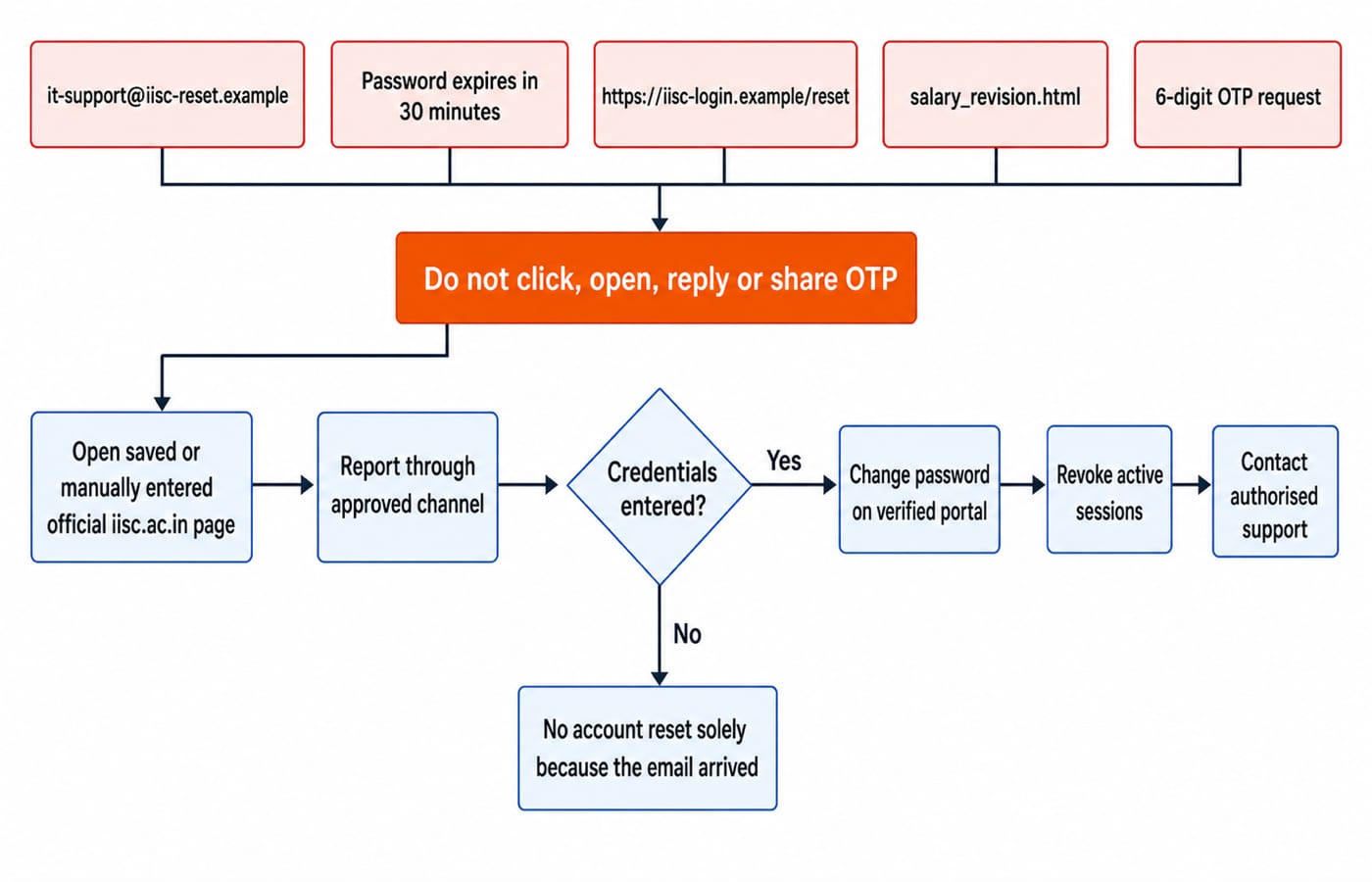
Inspect this sample message: sender it-support@iisc-reset.example, subject Password expires in 30 minutes, link https://iisc-login.example/reset, attachment salary_revision.html, and a request for the password plus a 6-digit OTP.
Four warnings stand independently: lookalike domains, artificial urgency, an unexpected HTML attachment, and a request for credentials or an OTP. Do not click, open or reply. Use a saved bookmark or manually enter the verified IISc domain. Report through the approved channel, then delete the message.
If credentials were entered, change the password through the verified portal, revoke active sessions where available, and contact authorised support. Otherwise, the email's arrival alone does not require a reset.
Use a unique long password or passphrase, a password manager to avoid predictable variations, and MFA as a second factor. An OTP is secret. Iisc@123 is predictable; River Mango Lantern Copper 47 illustrates a passphrase. Never reuse either example.
Defuse the six shortcuts that create wrong answers
Wrong shortcut | What goes wrong | Correct rule |
|---|---|---|
Cc hides addresses | Every recipient can see Cc | Use Bcc for the |
HTTPS means the site is genuine | A lookalike domain can also use HTTPS | Verify |
POP3 sends email | It is a retrieval protocol | SMTP sends |
A strong password makes MFA unnecessary | One stolen factor can still be abused | Use unique credentials plus MFA where offered |
Deleting my file revokes the shared copy | The cloud permission remains | Remove access or expire the link |
Reply to ask whether a suspicious email is genuine | The reply returns to the attacker | Verify through an independent official channel |
Treat minutes.pdf.exe by its final .exe extension, not the word pdf inside. Never open a suspicious file merely to inspect it.
Objective questions test actions, not definitions
Drill | Options | Answer and elimination logic |
|---|---|---|
Send one notice to | A Cc, B Bcc, C Reply All, D Subject | B. Only Bcc hides recipients from one another. |
Submit outgoing email | A IMAP, B POP3, C SMTP, D FTP | C. SMTP submits; IMAP and POP3 retrieve. |
Synchronise one mailbox on a laptop and phone | A IMAP, B SMTP, C PDF, D DNS | A. IMAP synchronises across clients. |
Share the | A public link, B named accounts with 24-hour expiry, C group chat, D all five panel members | B. Named, time-limited access follows least privilege. |
First response to the | A share OTP, B open HTML, C independently open the official portal and report, D reply | C. It avoids attacker-controlled routes. |
These five drills are written for practice, not lifted from any IISc paper. Each one turns a definition into a decision, which is how email, browsing, file-sharing and account-safety questions are usually framed.
Marks, question counts, section timing and stage details change between recruitment cycles, so take those from the notice published on the IISc positions-open page for the cycle you are applying to.
The short version and the next action
Use Bcc when recipient privacy requires it. SMTP sends while IMAP synchronises. Verify the domain before trusting a page or download. Share the smallest necessary file with named recipients, then protect the account with unique credentials and MFA.
Redo the drills without notes and review errors. The IISc Administrative Assistant 2026 course offers exam-focused preparation and a personalised study roadmap.
Keep learning
IISc Administrative Assistant Arithmetic: Master Percentages, Ratios and Data Interpretation
Learn to choose the right base, connect fractions with ratios, and solve percentage and data interpretation questions through fully worked examples.
Updated 14 Aug 20265 min readIISC Administrative Assistant
IISc Administrative Assistant Mock Analysis: Balance Every Section
A total score cannot tell you whether concepts, question selection, speed or guessing caused the loss. Use this worked five-section review to diagnose one mock and plan a balanced repair week.
Updated 11 Aug 20266 min readIISC Administrative Assistant
IISc Administrative Assistant Job Profile: Pay Structure and Office Reality
Understand the IISc Administrative Assistant role through its official job description, an honest pay-matrix reading, and a realistic office-file workflow.
Updated 9 Aug 20265 min readIISC Administrative Assistant
IISc Administrative Assistant English: Build Accuracy for Office Work
Train English accuracy through office-style grammar checks, precise sentence correction, fact retrieval, proofreading and a repeatable practice loop.
Updated 7 Aug 20265 min readIISC Administrative Assistant