File Handling in C: fopen Modes, fscanf vs fgets and the Predict-the-Output Questions
Trace one text file byte by byte to see what fopen returns, where fscanf stops, why fgets may read a blank line and how to write a correct input loop.
KnowledgeGate Team
Exam prep & CS education
Updated 25 Jul 20267 min read58 views
Most students memorise that r means read and w means write, then lose the questions that actually test file handling. The real test is knowing what fopen returns when the file is missing, why fgets reads an apparently blank line after fscanf, and where the stream position sits after each call.
All three become manageable when you stop treating a file as a magic container and trace its bytes in order.
The FILE pointer and what fopen gives you
This statement opens a text stream for reading:
FILE *fp = fopen("nums.txt", "r");fp points to a buffered stream object maintained by the C library. That object tracks the file, the current position, buffering and error or end-of-file indicators. It is not a pointer to the first character in the file.
If the open fails, fopen returns NULL. A missing file makes mode "r" fail, and permission or path problems can make other opens fail too. Check before using the stream:
if (fp == NULL) {
    return 1;
}
Call fclose(fp) when finished. It flushes pending buffered output and releases the stream. If a program exits abnormally before a buffer is flushed, some writes may never reach the file.
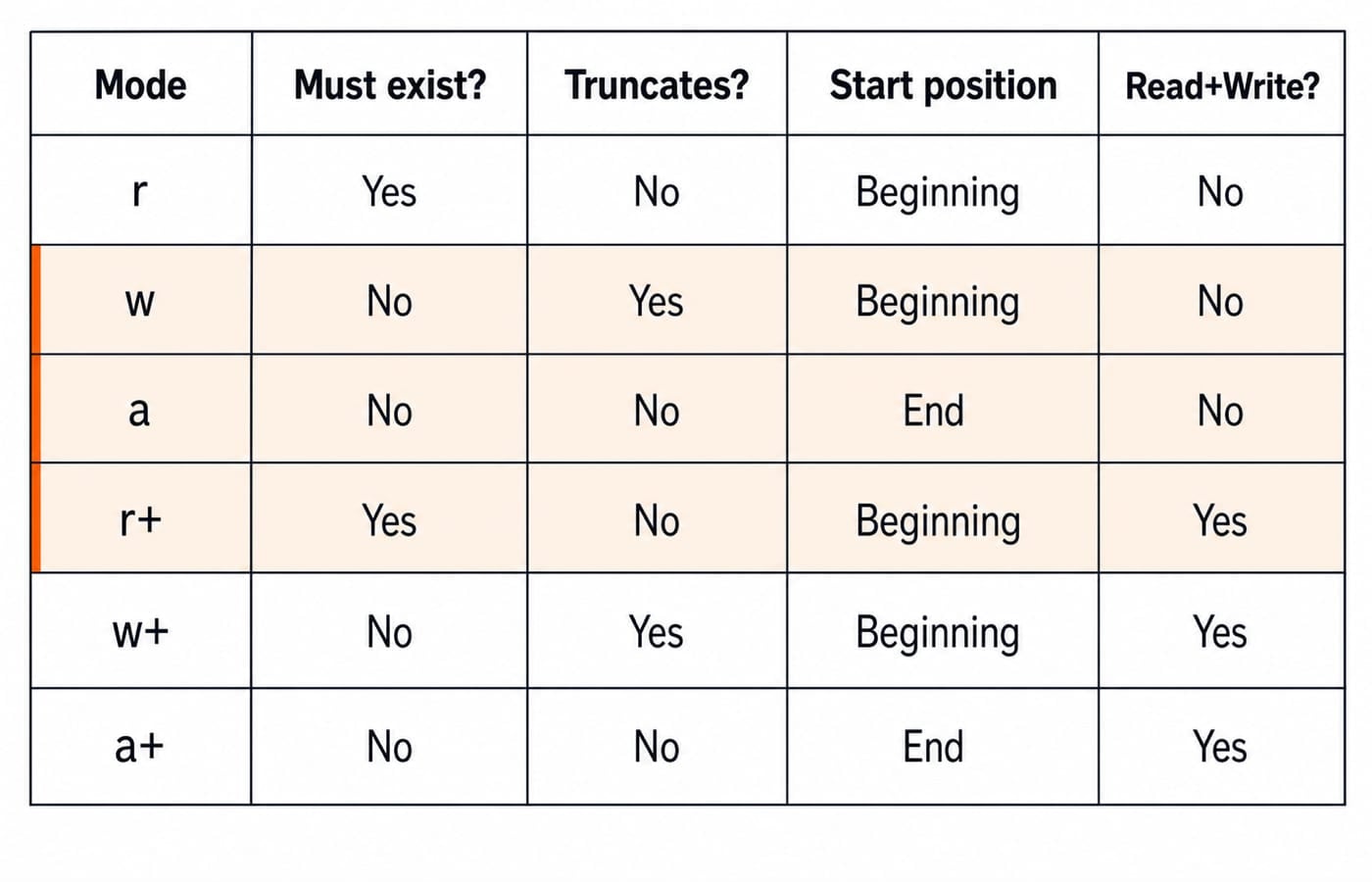
fopen modes, exactly what each one does
Choose a mode by asking four questions: must the file exist, will existing content be erased, where does access begin, and are both reading and writing allowed?
Mode | Must already exist? | Truncates existing content? | Initial position | Allowed operations |
|---|---|---|---|---|
| Yes | No | Beginning | Read only |
| No | Yes | Beginning | Write only |
| No | No | End for writes | Write only |
| Yes | No | Beginning | Read and write |
| No | Yes | Beginning | Read and write |
| No | No | Implementation-defined for reads, end for writes | Read and write |
The three exam traps are direct. Mode w creates a missing file but silently wipes an existing one. Mode a creates a missing file and forces every write to the end, even if you reposition the stream before writing. Mode r+ preserves content but still fails if the file does not exist. Mode a+ is the one the C standard leaves partly open: its writes always go to the end, while its initial read position is implementation-defined and begins at the start of the file on most Linux libraries.
Add b for binary mode, as in rb or wb. This does not change truncation or the starting position. It mainly prevents text newline and end-of-file translations on systems that distinguish text and binary streams.
Reading input: fscanf vs fgets vs fread
fscanf(fp, "%d", &x) reads a formatted token. For %d, it skips leading whitespace, consumes the integer characters and stops before the following delimiter. That delimiter, perhaps a space or newline, remains unread.
fgets(buf, n, fp) is line-oriented. It reads at most n - 1 characters, stops after storing a newline if one is encountered, and adds the terminating \0. It does not first skip whitespace. If the next unread byte is \n, that one-byte line is exactly what it reads.
fread(ptr, size, count, fp) is for blocks of raw bytes. It returns the number of complete items read and is normally paired with fwrite. It does not parse numbers or add a string terminator.
The mixed fscanf and fgets example
Suppose nums.txt contains these exact bytes:
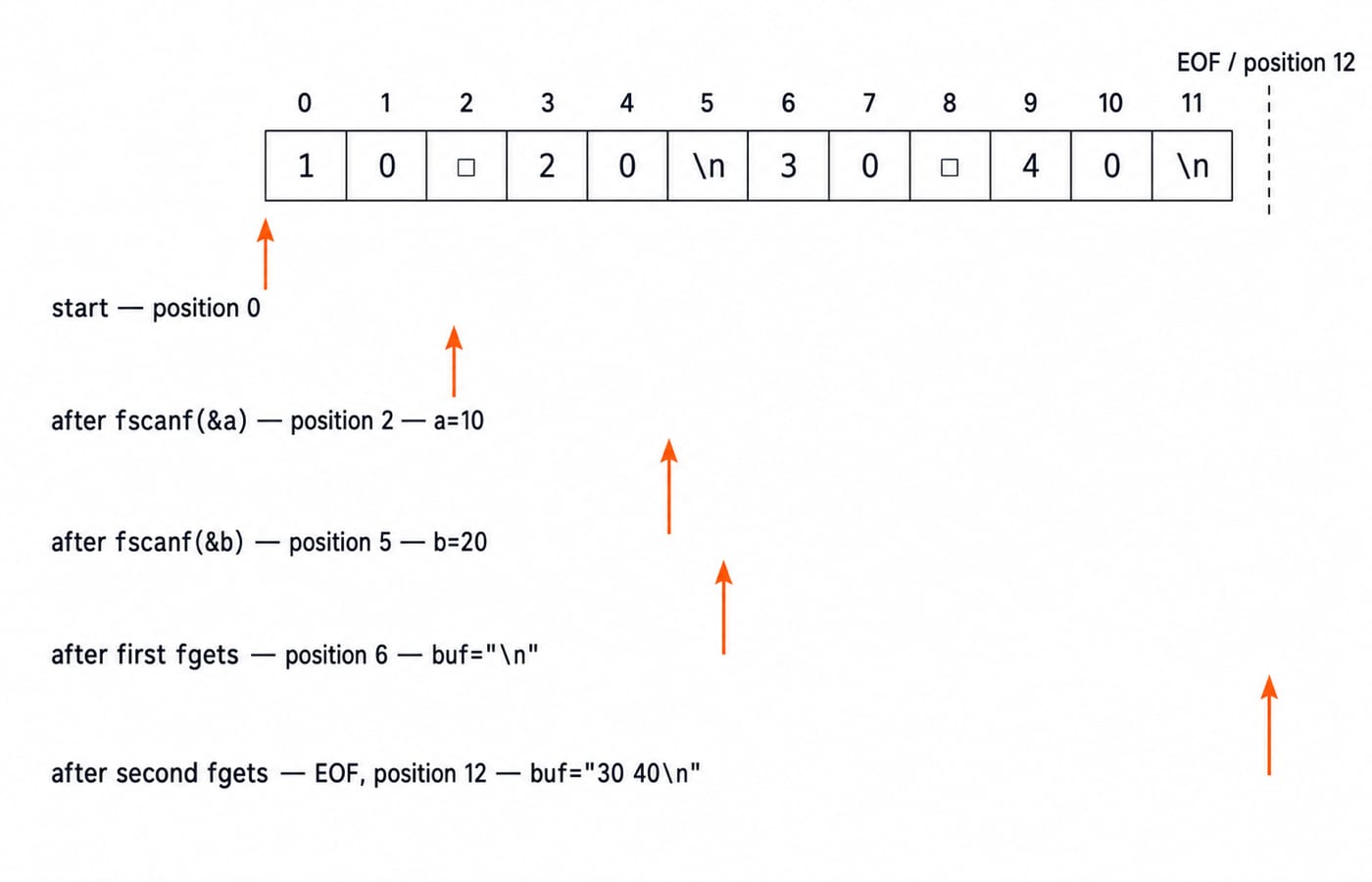
10 20\n30 40\nThere are 12 bytes. Their indices are 0 through 11, and the position after the final byte is 12. Now trace the calls.
At the start, the position is 0.
fscanf(fp, "%d", &a)reads bytes 0 and 1, soa = 10. It stops at the space at index 2. The position is 2.A second
fscanf(fp, "%d", &b)first skips that space, then reads20at indices 3 and 4. It stops before the newline at index 5, sob = 20and the position is 5.fgets(buf, 10, fp)sees the newline immediately. It stores"\n", adds\0, and advances the position to 6. It does not read"30 40".The next
fgets(buf, 10, fp)reads bytes 6 through 11, sobufbecomes"30 40\n". The position is now 12, the end of the file, though the end-of-file indicator is not set until a later read tries to go past it.
The answer after the first fgets is therefore buf == "\n". The safe fix when switching styles is to consume the pending newline deliberately, for example with getc(fp), after confirming that this is the delimiter your input format leaves there.
This kind of trace uses the same pointer discipline explained in Pointers in C for GATE: keep the stream object, its current position and the bytes it refers to as separate ideas.
File position with ftell, fseek and rewind
ftell(fp) reports the current file position. In the trace, it reports 2 immediately after the first integer read. After the final line it reports 12, subject to the usual text-stream portability rules on systems that translate newlines.
fseek(fp, 0, SEEK_SET) moves to the beginning. SEEK_CUR makes an offset relative to the current position, while SEEK_END uses the end as its reference. For a binary file, seeking to the end and calling ftell is a common way to obtain its byte size.
rewind(fp) returns to the beginning and also clears the stream's error and EOF indicators. That second effect is why it is not merely spelling fseek differently.
File-handling traps that cost marks
The classic bad loop is:
while (!feof(fp)) {
    fscanf(fp, "%d", &x);
    printf("%d\n", x);
}
EOF is set only after a read attempts to pass the end and fails. The body can therefore process an old value once more. Test the read itself:
while (fscanf(fp, "%d", &x) == 1) {
    printf("%d\n", x);
}
Update streams add another rule. When switching from writing to reading, use fflush or a positioning call. When switching from reading to writing, use a positioning call unless the read encountered EOF. This is a favourite r+ and w+ trap.
Also check NULL, close every successfully opened stream on every relevant path, and inspect return values. C Programming Interview Questions for Freshers collects these small rules in the form recruiters use.
Predict the output: three questions with worked answers
Assume every open succeeds, and settle on your answer before reading the worked one.
1. What does this print, and what does data.txt hold afterwards? Before the program runs, data.txt holds the five bytes hello.
FILE *fp = fopen("data.txt", "w");
printf("%ld\n", ftell(fp));
fclose(fp);
It prints 0, and data.txt is left empty. Mode w truncates at open, so the position starts at 0 with nothing behind it and those five bytes are gone, even though the program never wrote one.
2. What does log.txt hold afterwards? Before the program runs, log.txt holds the three bytes abc.
FILE *fp = fopen("log.txt", "a");
fseek(fp, 0, SEEK_SET);
fputs("Z", fp);
fclose(fp);
It holds abcZ. Append mode forces every write to the end of the file, so moving back to the beginning first changes nothing about where Z lands. This is the trap where a correct-looking fseek has no effect at all.
3. What do the two calls print? line.txt holds the seven bytes abcdef followed by a newline, and fp is open in mode r.
char buf[4];
fgets(buf, 4, fp);
printf("[%s]", buf);
fgets(buf, 4, fp);
printf("[%s]", buf);
It prints [abc][def]. fgets stores at most n - 1 characters, so each call takes three and stops well before the newline. That newline is still unread at position 6, ready to become the blank line a third fgets would hand back.
How interviews and university exams test this
Those three shapes carry most of the marks: a mode's side effect at open, where the position sits after a call, and how much a single read consumes. The usual variations are a missing-file NULL check and an ftell reading taken between two reads. The method never changes: write the bytes, mark the current position and move it only by what the function actually consumed.
KnowledgeGate's question bank carries well over 900 C programming practice questions across fundamentals, control flow, arrays, pointers and file handling. That wider set is useful because file questions often combine modes with loops, pointers and return values.
The short version and next step
Pick a mode by existence, truncation, starting position and allowed operations. Remember that fscanf leaves its stopping delimiter unread, fgets reads from the exact current position, and a correct loop tests the read result rather than feof.
The Complete C Programming course teaches the file-handling module in full. Use Coding for Placements for recruitment-style output questions, then follow the broader Coding and Skill Development catalog when you want to connect C fundamentals with interview practice.
Keep learning

ctype.h Functions in C: Classify Characters and Convert Case Safely
Learn which character test to choose, trace a complete C classifier, and avoid signed-char and EOF mistakes. Worked examples separate classification from case conversion.
Updated 5 Oct 20266 min readC
Key Features of the C Programming Language: Code Examples
What do C's features actually do in a program? Follow an even-number sum and a pointer update, then test your understanding with small code changes.
Updated 30 Sep 20266 min readC
Preprocessor and Macros in C: Expansion Rules and Worked Examples
Learn what happens before C compilation, expand object-like and function-like macros by hand, and avoid precedence and repeated-evaluation bugs.
Updated 18 Sep 20266 min readC
Variables and Data Types in C: Declarations, Conversions and Runnable Examples
Learn how C types control stored values, expressions and I/O. Compile a complete marks program, trace its conversions and repair common type mistakes.
Updated 17 Sep 20266 min readC